|
By GreedyPeopleSuck - 8 Years Ago
|
Is it only possible to do an RGB mask via Substance Painter?
Or did I miss something that the stock clothes are different?
http://manual.reallusion.com/Character_Creator/ENU/1/15_Substance/Divisions_by_RGB.htm
This doesn't exist in CC 2.0 it seems.
|
|
By eternityblue - 8 Years Ago
|
|
I dunno, it appears to work the same in 1.5 as 2.0 over here. To be clear though, you always have created your RGB mask elsewhere, whether it be Photoshop, Substance Painter, or whatever. Unless I'm missing something :) You just load an RBG mask in the Input Maps RGB slot, and to view it in diagnostic mode, you click Enable in the Diagnostic panel.
|
|
By Delerna - 8 Years Ago
|
|
My understanding of the workflow for this is
Select the cloth you want to work on
In materials tab set the shader to Classic
Goto Appearance tab and enable the appearance editor
Now you have the RGB mask etc etc to texture you cloth
Once you have the cloth textured how you want disable the Appearance editor
Now you can go back to the material tab and select PBR as the shader type.
Now you can setup the PBR textures as desired
Edit
Hope I understood your question correctly
|
|
By Delerna - 8 Years Ago
|
Hmmmmm.....Actually I just tried it out again. No the RGB mask is there with shader type set to PBR so forget what I just said.
I don't remember where I got that idea of doing the texturing first and then doing the PBR from.
I thought I also couldn't find the RGB mask etc and that's why I thought that way.
|
|
By GreedyPeopleSuck - 8 Years Ago
|
eternityblue (1/15/2017)
I dunno, it appears to work the same in 1.5 as 2.0 over here. To be clear though, you always have created your RGB mask elsewhere, whether it be Photoshop, Substance Painter, or whatever. Unless I'm missing something :) You just load an RBG mask in the Input Maps RGB slot, and to view it in diagnostic mode, you click Enable in the Diagnostic panel. [quote]I dunno, it appears to work the same in 1.5 as 2.0 over here. To be clear though, you always have created your RGB mask elsewhere, whether it be Photoshop, Substance Painter, or whatever. Unless I'm missing something  You just load an RBG mask in the Input Maps RGB slot, and to view it in diagnostic mode, you click Enable in the Diagnostic panel. You just load an RBG mask in the Input Maps RGB slot, and to view it in diagnostic mode, you click Enable in the Diagnostic panel.
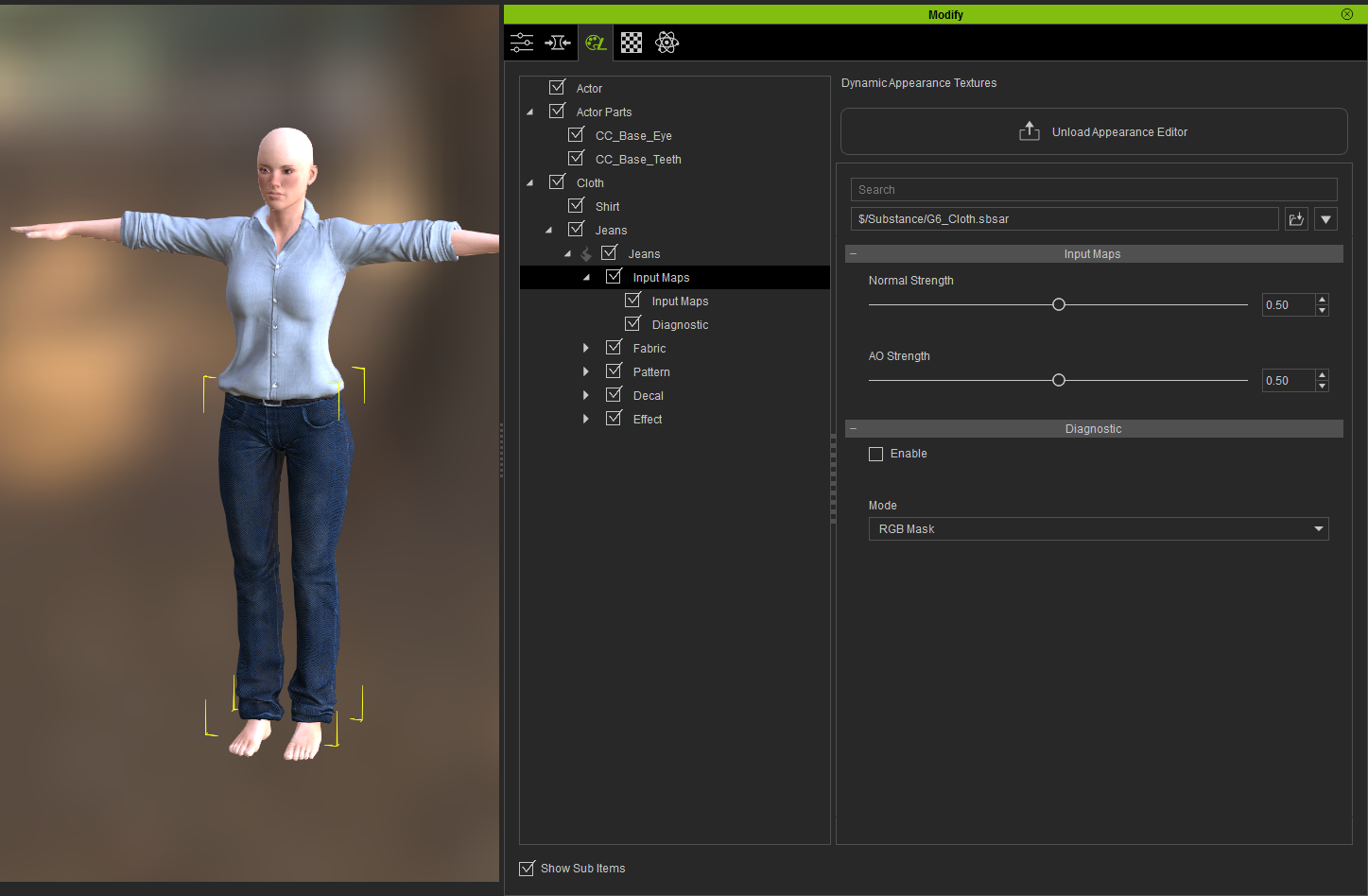
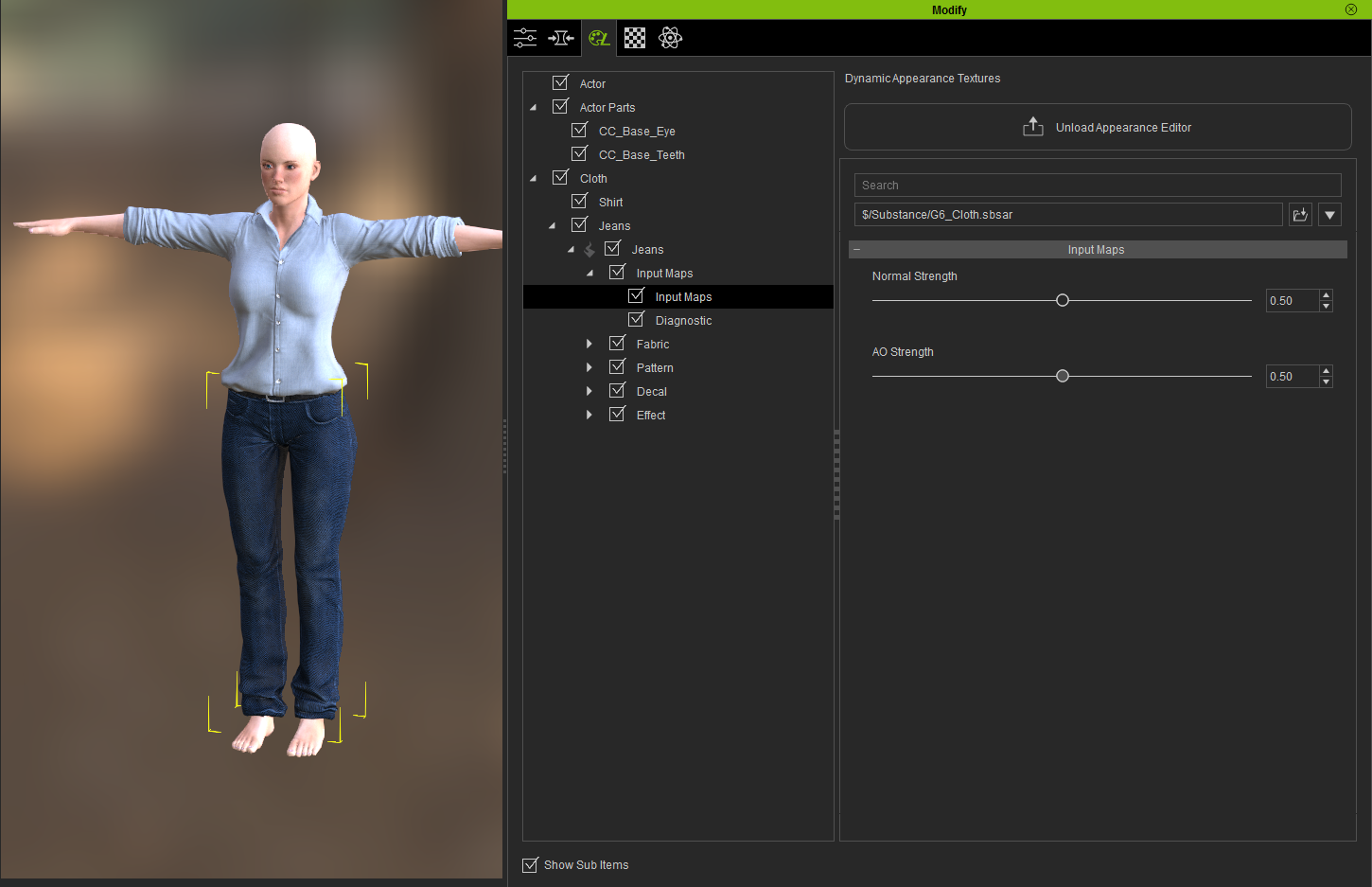
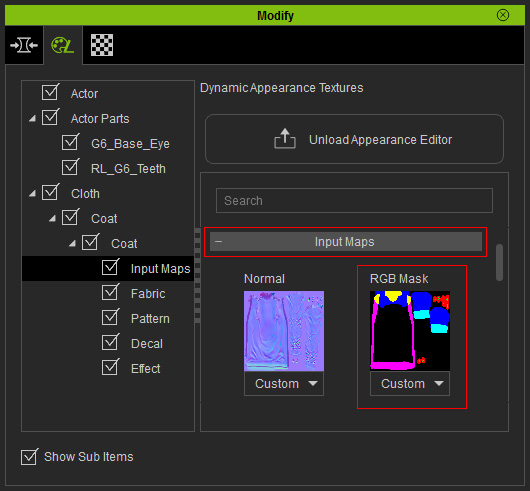
It's not in CC 2.0 for the default assets at least, are you sure? There is no RGB slot as far as I can find. :-/ I followed the CC video turorial to it, and it just doesn't exist as a slot. Please reference my CC screen, and the documentation screenshot with the RGB slot.
|
|
By eternityblue - 8 Years Ago
|
|
Yeah, I see what you are doing, don't dig so deep into that hierarchy, go to the top level of the Jeans, you'll (hopefully) see all the controls, including the input maps and diagnostics. That said, I still see the input maps for all the clothes, including the jeans, at that level, so that may still be an issue, I dunno. Maybe it is your install?
|
|
By GreedyPeopleSuck - 8 Years Ago
|
|
eternityblue (1/15/2017)
Yeah, I see what you are doing, don't dig so deep into that hierarchy, go to the top level of the Jeans, you'll (hopefully) see all the controls, including the input maps and diagnostics. That said, I still see the input maps for all the clothes, including the jeans, at that level, so that may still be an issue, I dunno. Maybe it is your install?
I can't find it for the life of me. I am learning substance now, it's a nice format, but I'm losing my mind trying to figure out if I'm losing my mind. All of the fabrics show up, but not where to import the RGB map itself.
If you can confirm it's in 2.0 for sure, that would be great.
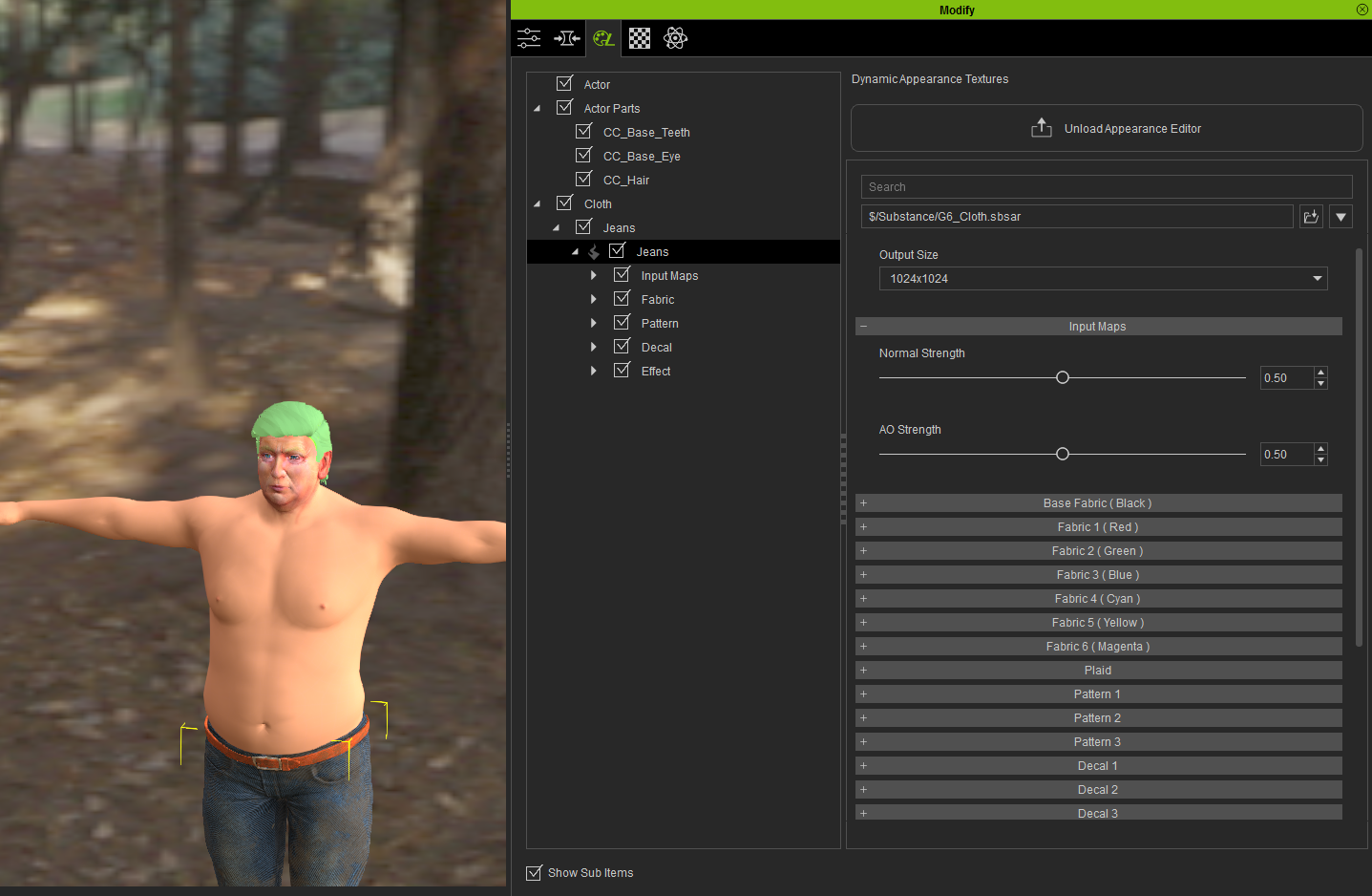
|
|
By eternityblue - 8 Years Ago
|
|
Yep, same beta version.
|
|
By Rampa - 8 Years Ago
|
Nadiak, I think you need to move your installed content over from CC1.5. You only get the input maps when the "Essential" packs are installed.
The paths to copy should be in the original CC2 post from RL.
|
|
By Delerna - 8 Years Ago
|
|
rampa (1/15/2017)
Nadiak, I think you need to move your installed content over from CC1.5. You only get the input maps when the "Essential" packs are installed.
The paths to copy should be in the original CC2 post from RL.
aha, now I see why I get them now. I was checking the RGB mask when I got CC 2 but just before I installed the essential pack into CC2.
Gee wiz. All this time I was thinking along the workflow I mentioned when in actual fact it was installing the essentials pack. I had forgotten that requirement.
|
|
By GreedyPeopleSuck - 8 Years Ago
|
|
rampa (1/15/2017)
Nadiak, I think you need to move your installed content over from CC1.5. You only get the input maps when the "Essential" packs are installed.
The paths to copy should be in the original CC2 post from RL.
Thanks. will try this if if I can find where to download again. It was installed, but maybe uninstalling took it away. There's no download in my account for it, I think I might have to uninstall and reinstall CC to get link.
|
|
By GreedyPeopleSuck - 8 Years Ago
|
Reinstalling didn't bring up link to download, so pretty sure I did install them again. I can't say I comprehend why a resource pack would enable RGB maps. Do you know why?
Emailing support.
|
|
By Rampa - 8 Years Ago
|
Find the template directory for CC1.5 and copy its contents to the template directory for CC2. Re-installing will not do it automatically.
They will both be here: C:\Users\Public\Documents\Reallusion\Template
|
|
By GreedyPeopleSuck - 8 Years Ago
|
|
rampa (1/15/2017)
Find the template directory for CC1.5 and copy its contents to the template directory for CC2. Re-installing will not do it automatically.
They will both be here: C:\Users\Public\Documents\Reallusion\Template
Thank you, I couldn't find the thread you spoke of, was just about to post asking.
Looks like it has it. I'm not sure if the reinstall and reinstall of the iC6 Resource packed did the trick since files are dated from today, but all the files there. Unfortunately there is still no place to upload an RGB map. I will respond here after support answers my ticket. All of the other stuff works. I can diagnose the RGB Map, but there's nothing I can do to change it!


|
|
By Rampa - 8 Years Ago
|
|
It must install some DLL as well, or something to enable that.
|
|
By wires - 8 Years Ago
|
|
nadiak (1/15/2017)
Looks like it has it. I'm not sure if the reinstall and reinstall of the iC6 Resource packed did the trick since files are dated from today, but all the files there. Unfortunately there is still no place to upload an RGB map. I will respond here after support answers my ticket. All of the other stuff works. I can diagnose the RGB Map, but there's nothing I can do to change it!
You can't "change" the RGB Map, you have to create a new one using the UV Map as a base in Photoshop or GIMP, and then load the new one. The procedure is explained in the CC Manual page that you linked to in your first post.
|
|
By Peter (RL) - 8 Years Ago
|
To be able to use RGB Input Maps requires the CC Essentials add-on bundle. I have checked your account and don't see a purchase of CC Essentials. Without this add-on you will not be able to use Input Maps unfortunately. To find out more about the contents of the CC Essentials bundle, please see the product page below.
|
|
By GreedyPeopleSuck - 8 Years Ago
|
Delerna (1/15/2017)
rampa (1/15/2017)
Nadiak, I think you need to move your installed content over from CC1.5. You only get the input maps when the "Essential" packs are installed.
The paths to copy should be in the original CC2 post from RL.aha, now I see why I get them now. I was checking the RGB mask when I got CC 2 but just before I installed the essential pack into CC2. Gee wiz. All this time I was thinking along the workflow I mentioned when in actual fact it was installing the essentials pack. I had forgotten that requirement.
Nope, everybody is wrong, don't feel bad. Peter replied this,
"To be able to use RGB Input Maps requires the CC Essentials add-on bundle. I have checked your account and don't see a purchase of the CC Essentials. Without this add-on you will not be able to use Input Maps unfortunately."
This after we got into over Reallusion marketing practices and their deception. I can't believe this was the answer. Totally disgusting.
For the record, the Reallusion software is great. All of the add ons, including almost everything in the marketplace is stuff you don't sell. Very low quality. I think it's great there are some stock props to play around with, and base shapes. I don't need more crappy morph sliders, I need basic functionality advertised in the product documentation and tutorials.
For all of those wondering who is right, read the documentation: http://manual.reallusion.com/Character_Creator/ENU/1/15_Substance/Divisions_by_RGB.htm
It says nothing about paying for a feature. Nothing.
Edit: I just checked, Reallusion is also in California. This would be a great small claims case.
|
|
By GreedyPeopleSuck - 8 Years Ago
|
Peter (RL) (1/16/2017)
To be able to use RGB Input Maps requires the CC Essentials add-on bundle. I have checked your account and don't see a purchase of CC Essentials. Without this add-on you will not be able to use Input Maps unfortunately. To find out more about the contents of the CC Essentials bundle, please see the product page below.
Oh, I didn't see you posted in this thread, I thought I had blocked you. Great to have such a poor relationship with the person in charge of support. It's extremely disappointing. I don't like you at all, I think your tone and your replies are out of line. Your goal is to sell product, instead you insult customers. You clearly waited to reply to this thread passive aggressively and ignored the other bug submissions.
|
|
By animagic - 8 Years Ago
|
|
Peter is the forum moderator and not a person in charge of support. (There is a support link for that on the RL web site.) You may not like his answer, but it was to the point and accurate. You're obviously upset but don't take it out on Peter.
|
|
By Delerna - 8 Years Ago
|
Oh dont worry, I dont feel bad. Was only trying to help you. Besides, Peter said pretty much the same thing that Rampa said which i then reallised was why i now have the RGB mask.
Reread them and you will see all 3 posts say that you need to install the essentials pack in order to do this.
|
|
By GreedyPeopleSuck - 8 Years Ago
|
|
animagic (1/16/2017)
Peter is the forum moderator and not a person in charge of support. (There is a support link for that on the RL web site.) You may not like his answer, but it was to the point and accurate. You're obviously upset but don't take it out on Peter.
He was the one who replied to my support ticket. Perhaps he is not in charge of the support program, but I doubt the company is organized enough to have this particular distinction.
|
|
By GreedyPeopleSuck - 8 Years Ago
|
|
Delerna (1/16/2017)
Oh dont worry, I dont feel bad. Was only trying to help you. Besides, Peter said pretty much the same thing that Rampa said which i then reallised was why i now have the RGB mask.
Reread them and you will see all 3 posts say that you need to install the essentials pack in order to do this.
Sorry for the confusion. I assumed it was the pack Character Creator prompts you to download after the installation. That's why all of the sneakiness and deception is so bad. The documentation says one thing, and then the programs are all named nearly the same thing.
They spend a great deal of effort designating things like iHair, iProp, iTree, and iAvatar, but there is no distinction to add ons.
I sent a message back to support. Given their documentation and presentation of materials, it's natural to assume it is included, so I am demanding a resolution to this issue. I am patient to await this result. One of the biggest problems I have now is that I am still confused. Nothing in the CC Essentials marketing or documentation mentions RGB maps. Peter's answer to the question is not complete, and I am leaving the possibility that he is mistaken himself on the matter.
If it is not resolved I will probably just pay the $69, and then sue them in small claims court to recover the money. If this were adobe it would be class actionable. I get the need to make a profit, but this (if true) is fraud plain and simple.
|
|
By Miranda (RL) - 8 Years Ago
|
Hi nadiak, this is Miranda from Reallusion. Sorry to hear that you have a bad feeling, and I can sort of understand. I believe that you did spend time in figuring out why, and the result is not what you expected. We are serious about every message we convey, so we did add some remarks under the related feature intro on the Feature page. For example,

And now the online manual is updated. Thanks for your feedback to avoid the confusion in the future.
http://manual.reallusion.com/Character_Creator/ENU/1/15_Substance/Divisions_by_RGB.htm
Here is another information for you and other users,
The input maps of Appearance Editor utilities can be unlocked by purchasing any Reallusion-made CC outfit packs, such as Essential Clothing, Professional Outfits, and the upcoming CC PBR packs.

|
|
By GreedyPeopleSuck - 8 Years Ago
|
Miranda (RL) (1/17/2017)
Hi nadiak, this is Miranda from Reallusion. Sorry to hear that you have a bad feeling, and I can sort of understand. I believe that you did spend time in figuring out why, and the result is not what you expected. We are serious about every message we convey, so we did add some remarks under the related feature intro on the Feature page. For example,
Thank you. I still think there needs to be more clarity...
After all of this circus the answer is this:
1) The CC Essentials situation still makes no sense, but it doesn't apply at all to what I am doing.
2) Everything I need to do can be done with Substance. I don't need the Character Creator RGB Maps. I can bake all of that into a Substance sbsar.
-----------------------------------------------------------------------------
It's amazing that there was early foresight to jump on the Substance train and have deep integration, but not to clearly state how things work. It wasn't until I took the time to look at Substance today that I finally got it.
I am not an idiot. I am the .1% in a lot of different skills closely relating to the Reallusion product line. If I don't understand something, it is because it is not documented. I RTFM and search forums whenever possible. I can't know everything, and often with infrequently used skills of things I'm quite skilled at, like ZBrush, I have to spend a day refreshing my muscle memory on the keyboard. If the documentation is outright wrong, and the user base is small, it is not pretty. This is the case here.
The reason I am participating on the forums is not only for the good of others, but myself so I can find the answer down the road. It's amazing how often years later I will find my own answer somewhere to remind myself how to do something. There is almost not outside discussion of RA product outside of this forum. There is no stack exchange base, no ZBrush base, no blender base, no cg forums base except for general questions about what the products are. It's amazing that my opinion on matters is so universal on the outside comments I do see. I'm not going crazy, but these things do make me put my MAGA hat on when I go outside. (3 more days, praise be upon our lord, Pepe LeKek)
I don't have a lot of 3D animation experience. It's was too time consuming previously to do side projects on my own, and it's a nightmare in blender unless you need to do things never done before, which will always be hard. The software is great. It's very sad though I couldn't make use of CTA3, and that's why I'm grinding iClone. CTA3 is crippled by design with the sour idea that animators don't want to create their own characters and want to buy add on packs. Good luck making a custom 360 G3 character there on your own, and good luck as a newcomer even understanding what G3 means. There are a few comparisons, but you have to go deep digging. You won't find it with a cursory search.
Invest in better documentation and then raise the prices. People here have $120,000 art degrees and rake in $15 an hour at Starbucks. Make them pay by all means, but not like you are currently doing.
|
|
By Miranda (RL) - 8 Years Ago
|
Hi nadiak,
Thanks for your comments, we understood what you tried to convey. It's not only about everything well-documented, but the product positioning strategy and the intuitive design. We won't say that we've done good enough, there is indeed a room to improve. We are looking forward to the good and professional interactions with you and all our users in the future. Thanks again!
|