|
By paul.wright - 9 Years Ago
|
Hi,
I have just started the trial with ICLone 6 on windows 7 PC. The SpeedTrees do not appear and a message says Speedtree requires DirectX11. dxdiag says I am running 11 with no problems
Iclones Graphic mode selection does not open. any Suggestions appreciated.
|
|
By Kevin.S - 9 Years Ago
|
DX 11 is only partially supported on Windows 7 but fully supported in 8.1 +
You may have to go and make sure you have the right SDK package and runtime for windows 7 but full DX 11+ is not fully supported in windows 7
https://support.microsoft.com/en-us/kb/179113
http://techreport.com/news/23907/windows-7-update-brings-some-dx11-1-features
|
|
By animagic - 9 Years Ago
|
@Paul: what is your graphics card? I've run iClone 6 under Windows 7 without problems, including SpeedTrees.
I suggest you run dxdiag.exe to find out what exactly your card supports (having DX11 installed and what the card does are two different things).
Click the Display tab and you will see an entry called Feature Levels for your card. It should give you a list like this:
Feature Levels: 12.1,12.0,11.1,11.0,10.1,10.0,9.3,9.2,9.1
You should at least have 11.0. Also make sure that your on-board graphics (if any) is not interfering.
|
|
By justaviking - 9 Years Ago
|
|
animagic (1/9/2017)
@Paul: what is your graphics card? I've run iClone 6 under Windows 7 without problems, including SpeedTrees.
Same success here on Windows 7.
Also be sure your graphics card driver is up to date.
|
|
By paul.wright - 9 Years Ago
|
Thanks to all for your help. Graphics card is a Quadro FX580 dual monitor 4071MB / 1080 - drivers should be up to date nut I will check.
Not quite getting where the feature levels list is? Dont find it in control panel / display ? It would be handy t check that.
dxDiag says no problem with both displays running DirectX 11 The card is probably a bit past it though.
I do have another machine running win 10 but. Maybe I should move to that. Good tip re the on board
card. thanks - will check. Enjoy
|
|
By animagic - 9 Years Ago
|
The Feature Levels list shows up when you run dxdiag. It's in the Display tab. That it says there's no problem only means that your display card is working.
To illustrate this, I ran dxdiag on my office PC:
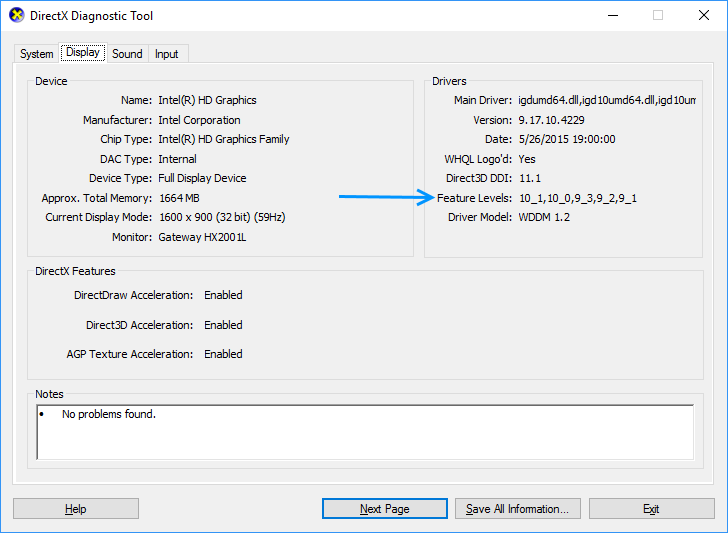
As you can see, my office PC only supports up to DirectX 10.1, even though DirectX 11.1 is installed (the Direct3D DDI entry).
EDIT: I looked up the FX 580 and it says it only supports up to DirectX 10. This is independent of the fact whether DirectX 11 is installed on your computer or not as you can see with my office PC.
See this benchmark: http://www.videocardbenchmark.net/gpu.php?gpu=Quadro+FX+580. You'll also notice that it is not a very powerful card. So the first thing to consider is upgrading your card. The new IC7 features favor NVidia GPUs because of Global Illumination. You want to look for a card with at least 4GB of VRAM.
|
|
By spstudio - 9 Years Ago
|
Hi again. Thanks so much for your help. Checked out the feature levels and of course they are just not there on my FX580. That prompted me to move the whole install to the Windows 10 machine and all works perfectly. This has a Quadro K4000 I think its called and dxdiag is at 12! Looks like I need to consider updating that old card in the other machine. Thanks again for your help with this. Best Paul
|
|
By spstudio - 9 Years Ago
|
Hi again. Thanks so much for your help. Checked out the feature levels and of course they are just not there on my FX580. That prompted me to move the whole install to the Windows 10 machine and all works perfectly. This has a Quadro K4000 I think its called and dxdiag is at 12! Looks like I need to consider updating that old card in the other machine. Thanks again for your help with this. Best Paul
|