|
By Peter (RL) - 10 Years Ago
|
Hi Everyone,
Here are the proposed system requirements for iClone 7. As development is still ongoing these may be subject to change but will help give you an early guide to the hardware requirements.
Recommended System Requirements: - Intel i5 dual core CPU or higher
- 8GB RAM or higher recommended
- 10GB free hard disk space or higher recommended
- Display Resolution: 1920 x 1080 or higher
- Graphics Card: NVidia GeForce GTX 700 Series/ AMD Radeon HD 7000 Series or higher
- Video Memory: 2GB RAM minimum 4GB or higher recommended
- Video card compatible with Pixel Shader 3.0 recommended for optimized visual performance
Additional Requirements:- Sound card / keyboard / Speaker
- 3-button mouse
- DirectX 11
- Internet connection required for online activation
- Stereo devices and player are required for viewing contents with stereo vision
Operating System:- Win 7 SP1 / Win 8 / Win 10
- Support for 64-bit operating system only
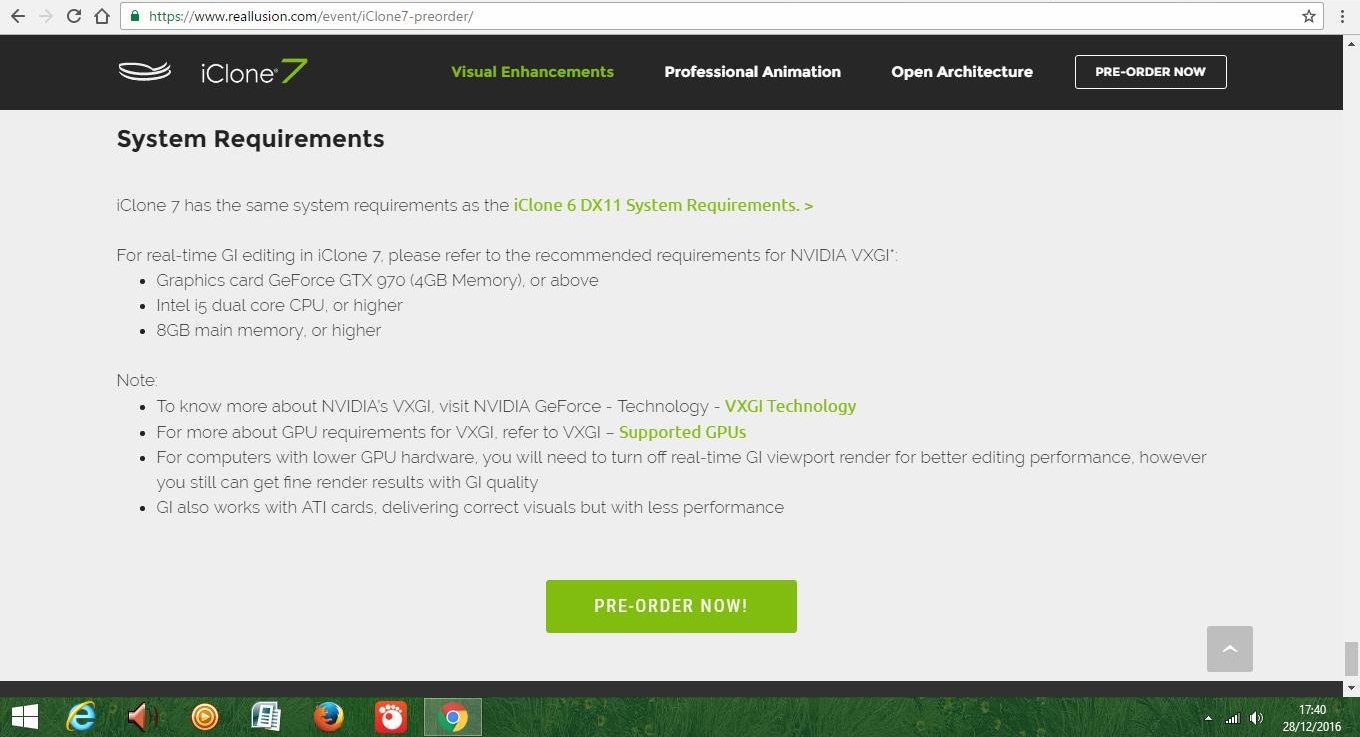
Additional Requirements For Nvidia VXGI, Intel i5/i7 CPU or higher, Graphics card GTX 970 4GB or above, 8GB RAM or higher recommended.
|
|
By fmccann - 10 Years Ago
|
|
Thank you Peter:D
|
|
By bigh43 - 10 Years Ago
|
looks like I will be using 6 then
so it goes !
|
|
By Rampa - 10 Years Ago
|
So......Nvidia 1060 would be a good choice for many of us. It is pretty comparable to a 980, but uses half the power and is a bit cheaper. It has 6 GIG of VRAM, which should be plenty in most cases (unless your running multiple 4K monitors, or something).
And Many thanks Peter for all that you do on these forums. The chatter can get a bit much at times. :)
|
|
By pumeco - 10 Years Ago
|
Thanks for posting the System Requirements, and I'm very pleased to see Window 7 listed, but I have a new question :
When you say they're subject to change, are you including the OS requirements in that statement, or just the hardware?
|
|
By Peter (RL) - 10 Years Ago
|
|
pumeco (11/29/2016)
Thanks for posting the System Requirements, and I'm very pleased to see Window 7 listed, but I have a new question :
When you say they're subject to change, are you including the OS requirements in that statement, or just the hardware?
iClone 7 is still in development. Once testing begins we may find we need to make some amendments to the requirements but it is unlikely to change dramatically.
|
|
By Peter (RL) - 10 Years Ago
|
|
rampa (11/29/2016)
And Many thanks Peter for all that you do on these forums. The chatter can get a bit much at times. :)
Thanks Rampa. I appreciate the kind words. I in turn would like to thank you for all you do on the forum. It certainly makes my life easier to have such great support from long time members of the community like yourself who are always there to help others. :)
|
|
By justaviking - 10 Years Ago
|
Thanks for the info, Peter (RL), even if subject to refinement.
Pretty much in line with what the more experienced veterans predicted. No massive jump in specs over iClone 6, but an acknowledgement that you'll want extra horsepower for the VXGI (global illumination).
Always nice to see both "minimum" and "recommended" specs.
I hope to see Nvidia CUDA support for PhysX acceleration at some point in the 7.x release cycle.
|
|
By JIX - 10 Years Ago
|
|
No massive jump in specs over iClone 6, but an acknowledgement that you'll want extra horsepower for the VXGI (global illumination).
Yes, which is surprising (and pleasant) due to that upgraded engine.
|
|
By yoyomaster - 10 Years Ago
|
Cool, thanks for the info Peter, much appreciated!
So my GTX 960 would work, although it only has 2GB, nice.
EDIT: the iClone 7 pre-order page says GTX 970 or above, which requirement is the right one?
|
|
By Peaches Chrenko - 10 Years Ago
|
:D:D Thanks alot Peter! :)
|
|
By Peaches Chrenko - 10 Years Ago
|
|
rampa (11/29/2016)
So......Nvidia 1060 would be a good choice for many of us. It is pretty comparable to a 980, but uses half the power and is a bit cheaper. It has 6 GIG of VRAM, which should be plenty in most cases (unless your running multiple 4K monitors, or something).
:D:D:D That's great Rampa thanks alot!! :):D:hehe:
|
|
By Kevin.S - 10 Years Ago
|
Video Memory: 2GB RAM minimum 4GB or higher recommended
That 2GB video memory thing still makes my skin crawl :crazy:, but at least it says 4GB or higher recommended :)
|
|
By tycho6 - 10 Years Ago
|
Peter (RL) (11/29/2016)
Hi Everyone, Here are the proposed system requirements for iClone 7. As development is still ongoing these may be subject to change but will help give you an early guide to the hardware requirements. Recommended System Requirements: - Intel i5 dual core CPU or higher
- 8GB RAM or higher recommended
- 10GB free hard disk space or higher recommended
- Display Resolution: 1920 x 1080 or higher
- Graphics Card: NVidia GeForce GTX 700 Series/ AMD Radeon HD 7000 Series or higher
- Video Memory: 2GB RAM minimum 4GB or higher recommended
- Video card compatible with Pixel Shader 3.0 recommended for optimized visual performance
Additional Requirements:- Sound card / keyboard / Speaker
- 3-button mouse
- DirectX 11
- Internet connection required for online activation
- Stereo devices and player are required for viewing contents with stereo vision
Operating System:- Win 7 SP1 / Win 8 / Win 10
- Support for 64-bit operating system only
Additional Requirements For Nvidia VXGI, Intel i5/i7 CPU or higher, Graphics card GTX 970 4GB or above, 8GB RAM or higher recommended.
Hi Peter !
Does GTX 970 4GB and above include Pascal 10X0 cards and DX12 or Maxwell 970+ cards and DX11 only ?!?
http://www.geforce.com/hardware/technology/vxgi/supported-gpus
For nVidia 1080 cards I can't find information on VXCI capability.
Please confirm if the new nVidia Pascal cards with DX12 are supported.
Can I use an nVidia GTX 1080 card for real-time GI in iClone 7 ?
Thanks !
Marcus
|
|
By Rampa - 10 Years Ago
|
info_54_54 (12/18/2016)
Peter (RL) (11/29/2016)
Hi Everyone, Here are the proposed system requirements for iClone 7. As development is still ongoing these may be subject to change but will help give you an early guide to the hardware requirements. Recommended System Requirements: - Intel i5 dual core CPU or higher
- 8GB RAM or higher recommended
- 10GB free hard disk space or higher recommended
- Display Resolution: 1920 x 1080 or higher
- Graphics Card: NVidia GeForce GTX 700 Series/ AMD Radeon HD 7000 Series or higher
- Video Memory: 2GB RAM minimum 4GB or higher recommended
- Video card compatible with Pixel Shader 3.0 recommended for optimized visual performance
Additional Requirements:- Sound card / keyboard / Speaker
- 3-button mouse
- DirectX 11
- Internet connection required for online activation
- Stereo devices and player are required for viewing contents with stereo vision
Operating System:- Win 7 SP1 / Win 8 / Win 10
- Support for 64-bit operating system only
Additional Requirements For Nvidia VXGI, Intel i5/i7 CPU or higher, Graphics card GTX 970 4GB or above, 8GB RAM or higher recommended.
Hi Peter ! Does GTX 970 4GB and above include Pascal 10X0 cards and DX12 or Maxwell 970+ cards and DX11 only ?!? http://www.geforce.com/hardware/technology/vxgi/supported-gpusFor nVidia 1080 cards I can't find information on VXCI capability. Please confirm if the new nVidia Pascal cards with DX12 are supported. Can I use an nVidia GTX 1080 card for real-time GI in iClone 7 ? Thanks ! Marcus
Some of the beta testers are using 1080's, and they work well. Nvidia claims that the Maxwell 2 cards were the first to support it with hardware specifically for it, but I think that may just be marketing hype. It'll run fine on many other cards, some below Maxwell, but it does need more VRAM. If your upgrading your card, my recommendation is a GTX 1060 6 Gig or greater. It does run on AMD cards as well, as long as you have a strong enough card with enough VRAM. When the VRAM is used up, it will use system RAM. That's when it gets really slow.
Final render can be done on a lesser card, as it is not real-time. It's the real-time, during editing, that takes the most horsepower and needs the speed of the VRAM.
As a counterpoint, I am running it on a GTX 770 2 Gig. Runs decently well until the 2 gig is used up (which happens pretty quickly).
So my advice is, if your unsure, stick with the card you have until iC7 is released, and then get a 1060/6G or above. series card. They only get cheaper. :)
|
|
By tycho6 - 10 Years Ago
|
Thanks Rampa for your quick reply !
I already have a GTX 1080 with 8GB RAM and an additional nVidia GTX 1060 with 6GB RAM is ordered for my workstation.
So - let's hope the best for VXCI support on the new nVidia Pascal cards . . .
Regards,
Marcus
|
|
By Rampa - 10 Years Ago
|
|
Your good-to-go with those! :)
|
|
By animagic - 10 Years Ago
|
|
info_54_54 (12/18/2016)
Thanks Rampa for your quick reply !
I already have a GTX 1080 with 8GB RAM and an additional nVidia GTX 1060 with 6GB RAM is ordered for my workstation.
So - let's hope the best for VXCI support on the new nVidia Pascal cards . . .
I have a GTX 1080 and can confirm that VXCI works fine.
|
|
By GrannyJ - 10 Years Ago
|
|
I am running dual (2) GTX 970's with 4GB each using NVidia SLI & it's doing great with iC7.. haven't had an issue yet, even with heavy poly scenes with lots of animation using PBR & GI.... very pleased so far
|
|
By tycho6 - 10 Years Ago
|
Hi Folks !
Thanks for confirming VXCI on 1080 and 970 cards . . .
I just realized that my iClone 6 Pipeline Installation is on my notebook, not my workstation . . .
That is because I use it mostly for Mocap Live Realtime Preview in iClone 6 with Perception Neuron.
It is a Quad i7 notebook with a nVidia 770M graphics card.
So - realtime preview ist still possible with iClone 7 ?
Regards,
Marcus
|
|
By animagic - 10 Years Ago
|
|
info_54_54 (12/18/2016)
It is a Quad i7 notebook with a nVidia 770M graphics card.
So - realtime preview is still possible with iClone 7 ?
You have the option to switch advanced options such as GI on and off, so for your laptop you would use something like "Quick Mode", which is all you would need for Mocap.
You are allowed two iClone installations, so for the more intense visual work, you could then use your desktop.
|
|
By animagic - 10 Years Ago
|
|
info_54_54 (12/18/2016)
It is a Quad i7 notebook with a nVidia 770M graphics card.
So - realtime preview is still possible with iClone 7 ?
You have the option to switch advanced options such as GI on and off, so for your laptop you would use something like "Quick Mode", which is all you would need for Mocap.
You are allowed two iClone installations, so for the more intense visual work, you could then use your desktop.
|
|
By tycho6 - 10 Years Ago
|
animagic (12/18/2016)
info_54_54 (12/18/2016)
It is a Quad i7 notebook with a nVidia 770M graphics card.
So - realtime preview is still possible with iClone 7 ?You have the option to switch advanced options such as GI on and off, so for your laptop you would use something like "Quick Mode", which is all you would need for Mocap. You are allowed two iClone installations, so for the more intense visual work, you could then use your desktop.
Good to know that you can switch between modes to have different options.
Yes - for Mocap Realtime Preview a "Quick Mode" is all that is needed.
I did not realize that two iClone installations are allowed so I should definitely also have a second installation on the workstation for PBR work.
Thanks for the valuable information !
Regards,
Marcus
|
|
By Space 3D - 10 Years Ago
|
Dear RL and iCloner ,
I see on Reallusion site " Specification iClone 7 Pro " . ( Please tell us " This Final Or Evaluated Version Specification Computer )
This link - https://www.reallusion.com/event/iClone7-preorder/
I have question about Card " NVDIA GTX 1050 or GTX 1050 Ti " --------> this compactible VXGI or NOT .
This card is last generation of NVDIA GTX 10 series
Please ...... any suggestion of this card .
------------------------------------------------------------------------------------------------------
Visit Space 3D Gallery - http://city.reallusion.com/store/space3D
|
|
By wires - 10 Years Ago
|
Space 3D (12/28/2016)
Dear RL and iCloner , I see on Reallusion site " Specification iClone 7 Pro " . ( Please tell us " This Final Or Evaluated Version Specification Computer ) This link - https://www.reallusion.com/event/iClone7-preorder/I have question about Card " NVDIA GTX 1050 or GTX 1050 Ti " --------> this compactible VXGI or NOT . This card is last generation of NVDIA GTX 10 series Please ...... any suggestion of this card . ------------------------------------------------------------------------------------------------------
Since the GTX 1050 only has 2 GB RAM it may not be up to the job - it could even be too weak for a heavy Substance model in iClone 6. The 4 GB RAM on the GTX 1050 Ti should be OK. Both cards are newer than the GTX 970 4 GB card mentioned in the specs, it's just the GTX 1050 that doesn't have the needed memory.
|
|
By justaviking - 10 Years Ago
|
A moderate card with enough memory is better than a fast card with insufficient memory.
It will be easy to exceed the 2GB limit with an iClone project.
If your budget can survive the purchase, a GTX 1060 would be worth the extra money over a 1050.
|
|
By theschemer - 10 Years Ago
|
|
justaviking (12/28/2016)
A moderate card with enough memory is better than a fast card with insufficient memory.
It will be easy to exceed the 2GB limit with an iClone project.
If your budget can survive the purchase, a GTX 1060 would be worth the extra money over a 1050.
justaviking,
I wanted to ask, in your signature, you show that you are running Win7. Are you running Win7 currently and not experiencing any issues with G5 characters and clothing?? Or are you running Win10 and forgot to change your sig?
Thanks,
TS
|
|
By JasonWynngard - 9 Years Ago
|
It appears from the ad and video demo I received via email that one requires specialized cameras. Otherwise the facial animations can't be done. Is this true? I have a Panasonic TM300 and a Canon FS10 so it seems neither could be used for facial animation in iClone 7. Again is it true the feature works only with the cameras mentioned in the ad and demo?
|
|
By JasonWynngard - 9 Years Ago
|
I hope Reallusion products, iClone particular remain Win7 compatible. I detest Microsoft forcing customers to make unnecessary accessory purchases. My wife switched to Win 8 and later Win10. In both cases her Canon LIDE scanners no longer worked as the driver or each item bought one year before Windows switching didn't support the driver. AIso believe she also had a portable HDD she couldn't access and had to use my Win7 computer to get her work done. Seen such laments in online forums so it's common.I hope iClone remains Win7 compatible.
|
|
By joel.lovell - 9 Years Ago
|
Will iClone 7 no longer need Indigo for rendering PBR?
|
|
By GOETZIWOOD STUDIOS - 9 Years Ago
|
|
joel.lovell (1/27/2017)
Will iClone 7 no longer need Indigo for rendering PBR?
It depend on your understanding of what is "PBR".
Indigo is a path tracer that use raytracing. iClone itself is a rasterizer renderer, like most game engines, so don't expect having both the same results.
"PBR" means "Physically Based Rendering", meaning the lighting and shading calculations are "based" on physical realities, this does not guaranty you a "Physically Correct Result" nor the same results among all "PBR" renderers.
Some physical phenomenon are harder to reproduce with rasterizer renderers.
So the answer to your question is yes, iClone7 no longer need Indigo for rendering "PBR", just don't expect to get the same results ; )
|
|
By wires - 9 Years Ago
|
|
joel.lovell (1/27/2017)
Will iClone 7 no longer need Indigo for rendering PBR?
There has been no mention anywhere in the iClone 7 information regarding Indigo. My guess is that the subject might just suffer a quiet death, which isn't surprising considering the problems and disappointments in iClone 6.
|
|
By kikisanjayabali - 8 Years Ago
|
|
hi iam curious regarding export time using more cpu core like amd threadripper 1950x. Will it more slightly fast, and the software (iclone 7)utilize the core count like blend*r did? sincerely tyvm
|
|
By siarahmadyaratn - 7 Years Ago
|
Iclone 7 trail not open after installation my computer requirements is also flexible with Iclone 7 requirements just open a window and a message (please check the minimum system requirements)
|