|
By JmsRyan - 10 Years Ago
|
I'm pretty new to iClone and created a simple CC character walking along a path w/MixedMoves.
Works good...but, as I want to modify the movements at the end, there is no Motion track in the timeline.
How do I get that to show? How is it gone?
Thanks!
|
|
By Rampa - 10 Years Ago
|
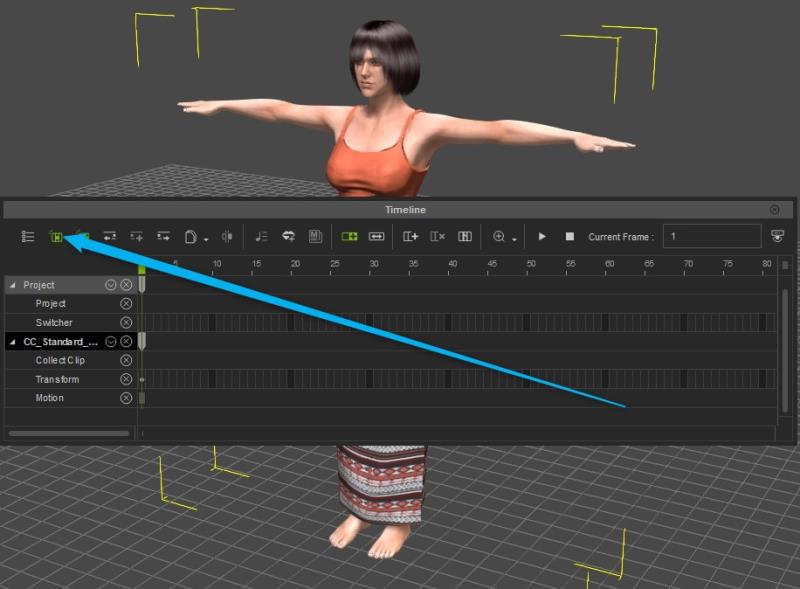
Sometimes character tracks are not initially visible. Make sure that the "objected related track" button is green. If it is already green, and your character does not show up when selected, turn it off and back on.
|
|
By stevew - 10 Years Ago
|
I have just noticed this.
I have upgrade to the latest version earlier. 6.52.3420
Maybe this is the issue????
What version are you on ?
Cheers
Steve Warburton
|
|
By stevew - 10 Years Ago
|
|
stevew (10/31/2016)
I have just noticed this.
I have upgrade to the latest version earlier. 6.52.3420
Maybe this is the issue????
What version are you on ?
Cheers
Steve Warburton
|
|
By JmsRyan - 10 Years Ago
|
|
I'm running the latest and greatest 6.52.3420.1
|
|
By animagic - 10 Years Ago
|
|
There is a problem with the timeline in 6.52, as has been noticed by several long-time users. I had to revert back to 6.51 because the timeline was unusable and I have a project to finish.
|
|
By robertacton3 - 10 Years Ago
|
|
i have the same problem i have been told to go back from 6.52 to 6.51 but how can i find 6.52 thank you
|
|
By JmsRyan - 10 Years Ago
|
|
Good question...
|
|
By Peter (RL) - 10 Years Ago
|
|
Thank you to all those who have supplied information about the timeline issues since the iClone 6.52 update.
We are urgently investigating these timeline issues. As soon as I have any further news about when a fix will be ready, I will update again to let you know.
Please do accept our apologies for the inconvenience caused. For those wishing to revert to v6.51, please be aware that any projects or content saved in v6.52 will no longer work in v6.51. However if you still wish to revert back, please contact us using the Support Form below and we will try to make the 6.51 download available again. http://www.reallusion.com/CustomerSupport/UserEx/QForm.aspx |
|
By animagic - 10 Years Ago
|
|
Peter (RL) (10/31/2016)
For those wishing to revert to v6.51, please be aware that any projects or content saved in v6.52 will no longer work in v6.51.
I expected that to be the case, but fortunately I was able to open my project again in v6.51. So it's worth a try, but it's also wise to heed Peter's warning.
|
|
By JmsRyan - 10 Years Ago
|
Sorta makes me feel better.
At least I can quit looking to see what I did wrong :P
|
|
By JmsRyan - 10 Years Ago
|
|
Any ETA for a fix?
|
|
By animagic - 10 Years Ago
|
|
JmsRyan (11/2/2016)
Any ETA for a fix?
Best to check the Feedback Tracker here: http://www.reallusion.com/FeedBackTracker/Issue/Timeline-acts-irrational and add your vote and comment so RL knows that it is a real problem.
|
|
By stevew - 10 Years Ago
|
Hi,
how can I revert back.
I have uninstalled and re-downloaded but the download is the latest version.
Anyone have a link to the previous version so I can download.
URGENT please!!!!!!!!!!
Cheers
Steve Warby.
PS Reallusion should remove the update file as everyone updating will be having the same issue.
|