|
By Danny_B - 10 Years Ago
|
Hi all,
I'm considering using iClone to produce an animated fantasy series. Specifically, I'm looking at getting the 'CC Essential Complete Bundle', which includes 3Dxchange and the CC Essentials pack. However, I'd like to check that it'll do what I need it to do.
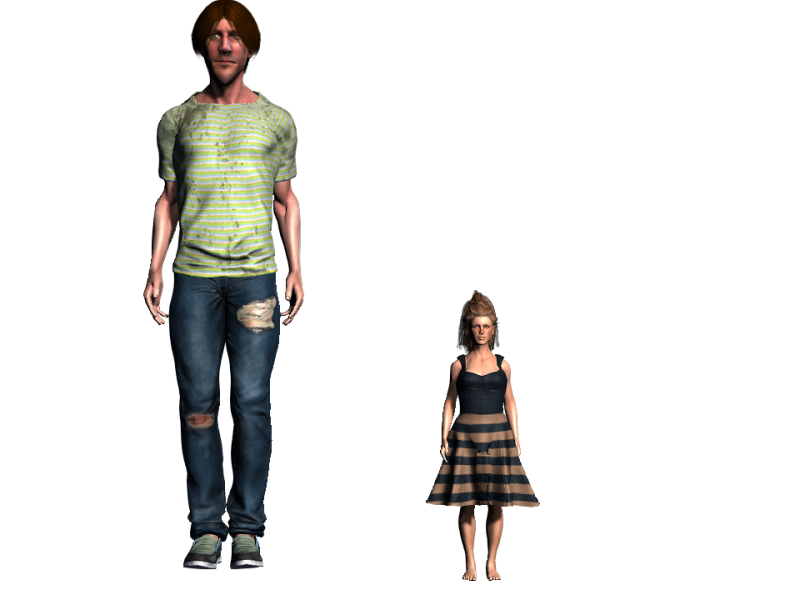
Firstly, I'm planning to have a race of fairies alongside humans. These fairies will be about 1 foot tall. To this end, I'd like to ask:
- Does iClone support scaled characters?
- Am I able to create extra appendages (e.g. fairy wings) and add them to characters?
I'd also like to create custom terrain for the setting. To this end, I was thinking of creating a mesh in Blender, adding textures, then importing it into iClone. Would this be doable?
|
|
By LPmoviestvs - 10 Years Ago
|
|
|
By Rampa - 10 Years Ago
|
All of these things are possible with the package your looking to get.
CC Skin and Morph Essentials has a scale morph that makes it very easy. Just moving the slider will not get it down to one foot, but you can type in a scale number that will get it that small. I have made characters that small for a project that has yet to come to fruition. There are also "Elf ear" morphs if you want to use them.
Wings can be added as accessories, and can have animations. You could import wings through 3DXchange, or use some existing ones. There are some different options in the Marketplace, and some freebie angel wings from RL.
Any mesh that you import can be used as terrain, and multiple meshes can be used for the terrain if needed.
That would be a good package! Welcome to iClone! :)
|
|
By Delerna - 10 Years Ago
|
Also, if you are making videos then the requirements are not the same as with making games.
In videos it is nice to have 3D landscapes, characters, objects etc etc. But in videos it is not essential that everything be 3d.
For example, your fairies could be videos of a full sized chatacter with a green background.
Use the pop video tool to make the background transparent and then add the video to a flat surface, scale it and key frame it for movement.
The fairy could then look as tiny as you need when your scene needs the fairy and the human (or whatever) together.
In scenes where it is just the fairies then they don't really need to be small.
Don't get me wrong, I am not saying that is how it should be done. I am just trying to point out possibilities. iClone is a great tool for producing films or short video's
Also I have done some experimenting using 2D images for backgrounds in scenes
Here is one where I cut a photo up into parts and set them around so they kind of look 3D (3D enough for this test at least)
1 3D car, 2 3D characters and everything else is from a photo
And here is another photo I cut up and used some very basic 3D shapes to add the mountains as textures
Also, I didn't put much effort into these. I was just testing out some ideas to see how they look
Again, I am not saying that's how you should do it. Just point out that iClone has lots of options, lots of ways to make your videos.
|
|
By Danny_B - 10 Years Ago
|
Thanks for all the replies. I am setting these stories in 'the valley kingdom', so I may use photo backdrops for the mountains themselves.
As for iClone, I have a couple more questions:
- What sort of particle effects does it support? I'm thinking of a sort of border effect around objects that are being manipulated by magic.
- Is it possible to create custom gestures? I have a few in mind for greetings, etc.
|
|
By Delerna - 10 Years Ago
|
iClone comes with some particle effects
You can make your own particle effects http://manual.reallusion.com/iClone_6/ENU/Pro_6.0/default.html
and you can buy particle effects http://city.reallusion.com/store/BiggsTrek
|
|
By Delerna - 10 Years Ago
|
|
Oh. And yes you can make your own animations. Instructions also in the online documentation
|
|
By Delerna - 10 Years Ago
|
and some links to video tutorials that you should find helpful
https://www.youtube.com/user/Reallusion/videos
https://www.youtube.com/channel/UCKtjihhZQ_qmxEmbBzxt-nQ
https://www.youtube.com/channel/UCglLKh0PCoG2APu184bnaGQ
and these are mostly iclone4 and iclone 5 but there is still some useful info here
https://www.youtube.com/channel/UC1SGhoB_PxAbh0xqRjq0Nxw
|
|
By Rogue Anime - 10 Years Ago
|
|
I have a question - trying to find where to post s new thread on tutorial comment - It would be helpful if our faithful & fearless Reallusion teacher/narrator would introduce each tutorial by addressing first what is needed from the content store, etc. beyond the basic package of program purchase so that we can follow more easily without having to improvise on the fly? If this comment could make it up the chain, it would be well received. ~V~
|
|
By Rogue Anime - 10 Years Ago
|
|
I have a question - trying to find where to post s new thread on tutorial comment - It would be helpful if our faithful & fearless Reallusion teacher/narrator would introduce each tutorial by addressing first what is needed from the content store, etc. beyond the basic package of program purchase so that we can follow more easily without having to improvise on the fly? If this comment could make it up the chain, it would be well received. ~V~
|
|
By Rogue Anime - 10 Years Ago
|
|
Thanks for this post! I had been looking for this feature for about 2 days when I found this posting. Once I knew where to look, I found it right away. I also noted that if you want to scale the character smaller than the present setting allows, just clicking "BAKE" also allows you to scale infinitely as well. Thanks again. ~V~
|
|
By justaviking - 10 Years Ago
|
|
voiceoverlord (10/24/2016)
I have a question - trying to find where to post s new thread on tutorial comment - It would be helpful if our faithful & fearless Reallusion teacher/narrator would introduce each tutorial by addressing first what is needed from the content store, etc. beyond the basic package of program purchase so that we can follow more easily without having to improvise on the fly? If this comment could make it up the chain, it would be well received. ~V~
Good comment. :)
Reallusion moderators do keep an eye on the forum. I'd say you posted in the correct location. Making a new thread with a title like, "A suggestion to improve the Tutorials" would help it stand out, but since you've already posted here I wouldn't start a new one right now. See if "Peter (RL)" - a favorite moderator - replies to say he'll pass your suggestion along to the appropriate people.
|