|
By Alon Dan - 10 Years Ago
|
Hello All,
I'm trying to finally get my original cloth (made with Blender) back to Character Creator.
But once I try to import the Binded Exported FBX I get this Error: "Failed to load the file." and Character Creator re-load the default woman character.
I'm aware to the very important rule of the KEY file which means I need to save the .KEY file created by Character Creator so I can use it when I import it back and use it, But I must do something wrong and it confused me.
Here are the steps I did: (more than once just to make sure)
1. Character Creator: Export to FBX > Clothed Character
2. Blender: Import FBX, then creating my cloth, Parent to empty groups, Paint Weighted source by name everything goes smooth.
3. Blender: Export to FBX: (disable: Add Leaf Bones)
4. Character Creator: Create > Cloth, Hair, Acc (selecting the FBX from Blender)
5. Character Creator: Browsing to the .FbxKey file, Clicking OK
6. Character Creator start loading... and then I get this error: "Failed to load the file."
I triple check it's the same key file, I even made a new character with a new KEY file just to make sure it's not a mixed-up file mistake or anything like that.
Did somebody ran into this after all the steps (using Blender) and solved it?
Can you please tell me what I'm doing wrong? why Character Creator doesn't accept the .FbxKey
Sorry for my bad English and thanks ahead for helping me.
|
|
By Alon Dan - 10 Years Ago
|
Hey Again,
Unfortunatly, I'm still fighting with this problem and have no idea how to fix it.
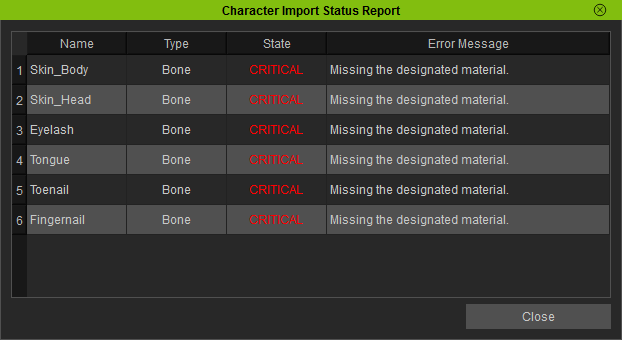
I'm getting these errors when importing the cloth model into Character Creator. I would like to know what I do wrong and how to fix it please help?
I didn't even mess with anything with the model, not the material or anything, I just parent and weight (binding) the Cloth to the model FBX (that came from Character Creator) and tried to import it back as I followed the steps shown in the Pirate Character on Reallusion's YouTube channel.
It seems like it's almost working... but then I get the CRITICAL error when importing and Character Creator gives me the other error: "Failed to load the file." and re-load the default woman model.
I really need a way to import my cloth to my models, I did try many times with different cloth so it's nothing specific but maybe a wrong workflow or something I do wrong.
Any idea why it's happening? or how can I solve this? :(
Thanks ahead!
|
|
By GreedyPeopleSuck - 10 Years Ago
|
Bump. Same error here. https://www.youtube.com/watch?v=E7f__LNUviw Followed this tutorial followed to the T, but doesn't work with latest blender, spits the same error.
There is another tutorial using blender, and the author mentions some weird error that is allegedly resolved with Blender 2.77, but checking the release notes, there doesn't appear to be any difference in the versions he was complaining about as far as fbx export. Could this be an fbx version issue?
The work around is to use a prop for hair in iClone, but then it won't work as hair in Crazy Talk, which defeats the purpose of having crazy talk.
|
|
By wires - 10 Years Ago
|
|
There were fbx export problems with some Blender versions, however version 2.77a and 2.78 caused no problems. This thread contains some good tips for working with Blender and CC.
|
|
By GreedyPeopleSuck - 9 Years Ago
|
wires (12/31/2016)
There were fbx export problems with some Blender versions, however version 2.77a and 2.78 caused no problems. This thread contains some good tips for working with Blender and CC.
Thanks!
I have had nothing but problems trying to convert Collada to FBX and then on in to 3DXchange. It is not a problem with 3dXchange because it persists with ZBrush and Blender.
I'm posting in this thread so someone in the future can find the answer, and I will post once I figure it out. It's easy to import the hair as a prop, but for purposes of Crazy Talk and quick skinning of characters, I think it's best to do it the correct way.
|
|
By Rampa - 9 Years Ago
|
From Alon's picture of the critical errors, it looks like the material names got messed up. There is something I've managed to do in Blender that can rename them with a number after the name. I've run into that a couple times. Check your mesh names too, the same thing can happen.
If you do have a name with a number appended, delete the number so you have the original names for materials and meshes (body meshes. Cloth names can be whatever). CC will only accept body mesh and material names that are exact.
|
|
By GreedyPeopleSuck - 9 Years Ago
|
|
rampa (1/1/2017)
From Alon's picture of the critical errors, it looks like the material names got messed up. There is something I've managed to do in Blender that can rename them with a number after the name. I've run into that a couple times. Check your mesh names too, the same thing can happen.
If you do have a name with a number appended, delete the number so you have the original names for materials and meshes (body meshes. Cloth names can be whatever). CC will only accept body mesh and material names that are exact.
I'm getting things to import and export from Blender 2.78a finally using CC 2.0. CC 1.52 just throws errors using the exact same process. It imports the body textures fine, but the hair doesn't import even though the textures all show up fine via fbx import. Importing hair/clothing results in a familiar missing hip bone error half the time as well.
I'm going to sleep on it and see if I can figure it out tomorrow. It's really a nightmare for something so simple (not that actually sculpting hair is simple or fun).
Edit: I'm an idiot, opacity was defaulted to zero. This is CC bug that also affects maya exports. Everything works! Bone issue, no idea. I might have enabled leaf bones by accident. Will try to see if this replicates.
https://www.youtube.com/watch?v=oVtxT3I1OYg
This works, but I'm just going straight from blender.
|
|
By GreedyPeopleSuck - 9 Years Ago
|
|
rampa (1/1/2017)
There is something I've managed to do in Blender that can rename them with a number after the name. I've run into that a couple times. Check your mesh names too, the same thing can happen.
Embarrassing edit, but it is 100% this. One of my laptops imports with numbers after most, but not all of the materials, another doesn't. I will try to find out why and report back now. This is the most aggravating bug ever. I think RL needs to simply add a Regex routine on imported files to ignore the ".0001" suffix after any imported file name so it imports.
|
|
By justaviking - 9 Years Ago
|
|
nadiak (1/2/2017)
Embarrassing edit, but it is 100% this.
Welcome to the club. :blush:
We've all had our turn. I know I've done far, far worse.
Thanks for letting us know what the problem was.
|
|
By Alon Dan - 9 Years Ago
|
Hey All,
Once again I'm back with a nice CRITICAL ERROR and I hope that you guys can tell me what am I doing wrong...
Before you watch this video, I want to mention a few things:
1. In this video I'm using the most up to date version of Character Creator (1.52) and Blender (2.78a)
2 - I tried importing the FBX with the key into CC (not only the Cloth, Hair, Acc option) = Same critical error.
3 - I tried that same process with different characters and with the default CC character = Same critical error.
4 - I tried with different "cloth" meshes with simple polygons like the example in the video I used a VERY basic mesh.
5 - I tried with "selected only" and without, I still get the same Critical Error.
6 - I tried both parenting ways in Blender: Ctrl+P: Armature Deform and With Empty Groups = Same Critical error.
I thought something is wrong with the Character first, so as I mentioned I did try the default CC character and my other few characters but had no luck, it's probably something in Blender settings but I'm out of ideas.
Can you please tell me why I get this error and how can I fix it?
I'm fighting with CC and Blender to get a decent workflow... I wish it wasn't that complicated but I can't complain it's probably my stupidity, and I bet you guys could point what I'm doing wrong when you'll watch the video example.
Here you go:
Sorry about my bad English and Thanks ahead for any help! :)
|
|
By Rampa - 9 Years Ago
|
When I saw the names of the vertex groups, I saw they had numbers appended to them. Presumably the bones got the numbers appended. This will make it not work. Notice that when it pops up the critical error, it says "CC_Base_Hip" is where the problem is, and that it is missing the specific bone. I suspect your hip is called "CC_Base_Hip00". Skeleton, body mesh, and body materials must follow the proper naming exactly.
I think your base mesh and skeleton were duplicated, and the result was that you ended up using a skeleton with "00" appended onto each bone name.
Start with a fresh export of your character from CC, and make sure the skeleton does not get duplicated. You can duplicate the mesh for your clothing base, but give you should then delete the material(s) from it and assign a new material to it.
It's tricky to spot this issue initially, but once you know it, you can make sure to start with a new skeleton and mesh if it happens.
|
|
By Alon Dan - 9 Years Ago
|
Hey Rampa, Thanks for helping me in this!
I may be wrong but I'm afraid that naming is not the issue, I just tried again with a fresh default CC character and I'm having the exact same critical error.
Maybe I need to reset my computer and it's a Cache issue? I have no clue what this could be...
Before I reset my computer, I just used the same character again (after failed with the default one), so it will be the same I used on the video and I'm attaching a screenshot with the outliner open a bit more wide so maybe you can see the problem?
Thanks ahead for any help in this!

|
|
By Rampa - 9 Years Ago
|
So that does look all correct. Guess it's not that then! :)
I'm not spotting any errors in the scene tree.
Have you tried one of the RL supplied bases?
|
|
By Alon Dan - 9 Years Ago
|
|
rampa (1/3/2017)
So that does look all correct. Guess it's not that then! :)
I'm not spotting any errors in the scene tree.
Have you tried one of the RL supplied bases?
Not yet, The thing is that it won't really help me in my actual project even if it will work with the RL supplied or even if it worked with the default CC male/female because I already worked hard on my other characters, but the real problem (for me) is that I can't really add any cloth.
I'm now trying to do the LOOOONG way with 3DXchange... but even if it will work, it's so much more complicated for every single cloth.
In theory it sounds so user-friendly to work with CC to Blender and back for the clothes.
I wonder how it works so smooth for everybody else as I see on the video tutorials but for me I get this weird Critical Error...
BTW - Restart my computer didn't solve anything, I must find out what is it that cause this Critical Error so I can solve it and actually proceed with my project.
I can't really blame anybody but myself that I can't solve it, this is so discouraging my creation process... :(
|
|
By Rampa - 9 Years Ago
|
It looked like a bone problem from your screen-shot. But do make sure your clothing is rigged/weighted (no missing verts), UV'd, and has a material assigned.
You can bake your morphs and save your character as a new morph slider. If I recall, you can just use the current body shape for a new morph. No exporting required.
You can also zip your character and PM it to me. I'd be happy to take a look and see what I can figure out.
|
|
By Alon Dan - 9 Years Ago
|
Thank you for your solutions Rampa, I appreciate your kind help. I will try it later and hope to get some good news. :)
If I'll get the errors again I'll probably send you a zip file and I bet you'll see the what I'm doing wrong right away.
|
|
By Alon Dan - 9 Years Ago
|
Hey Rampa! and everybody else are welcome to help in this as well. What I did was starting a NEW file on CC and Blender, and recorded everything step-by-step so you can see what I'm doing wrong, I mean... you'll probably see the bad step that I took on a specific part of this new video. Please forgive me for the video is speedup I didn't want to waste your time, but I did my best to keep it very clear to understand what I'm doing by showing with the mouse cursor. I also added a ZIP file for the exact files you see on the video:
1. is the FBX from Character Creator. 2. Blender scene: before the parenting and binding, so you can do your tests on it. 3. Blender scene: after I did the parenting and binding, just in case. 4. Thing.fbx (that necklace or whatever it is, I just made something simple without any planning for the sake of testing). 5. There is a LOG file: Thing.txt probably created by CC, it says: "Bone : CC_Base_Hip is set in profile but not in avatar or already set to other bone type." The log file isn't helping me because I have no idea how to solve it or what does it mean exactly, I'm very confused. Please check out what I did on the video to see where I go wrong, I'm probably doing something very stupid in Blender and I must learn from my mistakes... Thank you for your patience and supportive spirit, I appreciate it a lot! * Sorry about my bad English. |
|
By Rampa - 9 Years Ago
|
I think I found the problem! :)
First I exported the finished FBX, and it imported into CC without any errors. So that told me you had something different in your export settings in the FBX export. I watched that part of the video, and you had checked "Export Selected". You did not have the skeleton selected, so no bones in the FBX! ;(
There is probably no reason to check "Export Selected", as there is nothing besides the character and the necklace. If you do use it, remember to select the meshes and the skeleton.
Let me know if that fixed it.
|
|
By Delerna - 9 Years Ago
|
Yea i press a to select all and then deselect the light and the camera and then go and export the selected option checked..
I might try your suggestion in your blender tutorial rampa to remove the light and the camera so i dont need to worry about them anymore.
Only concern if i do that is i will keep forgetting to uncheck that bone setting thing. Not that i dont keep forgetting to do that anyway......ohhh my
|
|
By Rampa - 9 Years Ago
|
The exporter already has a way to not export lights.
Just de-select the entity types you don't want exported.

|
|
By Alon Dan - 9 Years Ago
|
|
rampa (1/4/2017)
I think I found the problem! :)
First I exported the finished FBX, and it imported into CC without any errors. So that told me you had something different in your export settings in the FBX export. I watched that part of the video, and you had checked "Export Selected". You did not have the skeleton selected, so no bones in the FBX! ;(
There is probably no reason to check "Export Selected", as there is nothing besides the character and the necklace. If you do use it, remember to select the meshes and the skeleton.
Let me know if that fixed it.
Thanks Rampa! I knew you'll SEE my mistake in the video, that's a HUGE progress, I can import the cloth now. :)
so the "selected" is not needed, I also made a preset for easier: "Blender to CC - Cloth" so I won't need to check everything again.
The weird thing I got now is:
When I import: "Thing.fbx" inside CC, I get the Lady with no materials or textures, it's all grey.
It doesn't matter if I import the .fbx from File > Import or from the Create > Cloth... I get a no-materials and textures version.
So.... Any idea how do I bring it back with the original materials and textures that came from CC when exported?
|
|
By stephane.coralie - 9 Years Ago
|
|
You Must export With FBX 2012... CC doesnt not support other FBX 2013.. 2014 etc
|