|
By justaviking - 10 Years Ago
|
The purpose of this forum is for us to compare iClone performance results with each other. As a result, we will also gain a better understanding of what system parameters have the greatest impact on iClone.
THE RENDER TEST (#1):
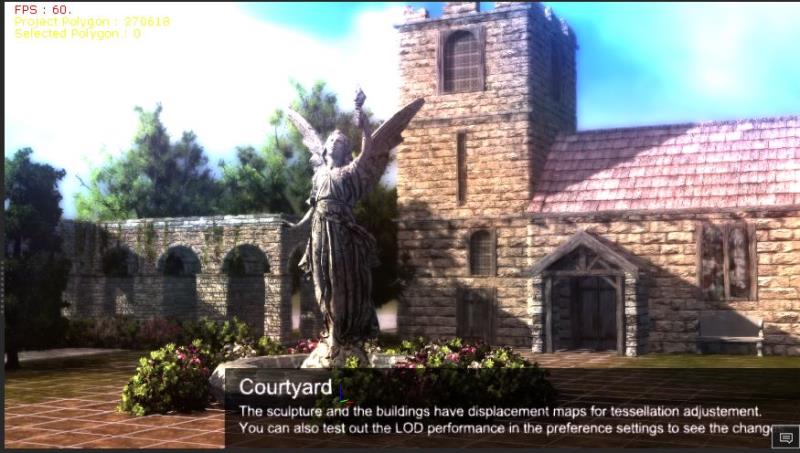
I will start by using the "Courtyard" project that comes with iClone.
RENDER SETTINGS:
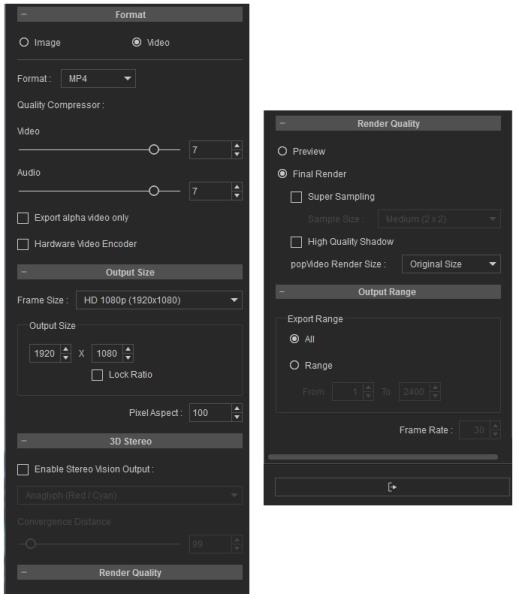
I'm rendering to MP4, 1920x1080, Final Quality... No super-sampling, No high-quality shadows.
MY COMPUTER:
See my system specs in my signature.
INITIAL RESULTS:
My "preview" runs reliably at 60fps.
Render to video = 5:03
For 1,200 frames, that comes out to be about 4 fps rendering speed.
ADDENDUM:
Old text from my first test, which was reported a "6 minutes"...
Rendering took approximately 6 minutes.
Caveat on the time...
I used the "created" and "last modified" timestamps from the video file, so it really could be almost +/- whole minute.
Date created is 7/23/2016 11:03 AM
Date Modified is 7/23/2016 11:09 AM
But that could be 11:03:01 and 11:09:59... resulting in 6:58 (almost 7 minutes)
Or it could also be 11:03:59 and 11:09:01... resulting in 5:02 (just over 5 minutes)
I'll have to do this again and sit and time it, but I wanted to at least start this thread.
ADDED ABOUT TWO YEARS LATER:
First - The original tests were run against iClone 6. Not sure if it was 6.0 or 6.1 or whatever.
I decided it would be best to record my actual specs as a permanent entry in this post, to prevent against future upgrades to my system.
Desktop (homebuilt) - Windows 7, i7-3770k CPU, GTX 1080 GPU (8GB), 16GB RAM, Asus P8Z77-V Pro motherboard, 500 GB SSD, terabytes of disk space, dual monitors.
(I think I had a "slower" 256GB SSD at that time, but the difference would be negligible.)
I just did the test again, Nov 7, 2018.
iClone 7.3
Render time = 5:05, which is almost the exact same result as reported above.
|
|
By justaviking - 10 Years Ago
|
REQUEST:
I would like to standardize on the render settings as much as possible, so we can compare system-to-system performance.
If someone wants to investigate the impact of Super Sampling, High Quality Shadows, different resolutions, or rendering to PNG files, I encourage you to start a separate thread for those sorts of investigations.
Similarly, I would like to keep the number of test cases to a minimum here, too. A good hair-and-cloth test might be nice, but I don't want so many test cases that we can't find the information we're looking for. I was thinking "Skirt and Hair" but it's so short it might be hard to get a good assessment, so maybe the "iClone Dance" project is a better test.

Thanks.
|
|
By justaviking - 10 Years Ago
|
My "iClone Dance" test results:
Using the same render settings as in the first post of this thread...
Preview still a rock solid 60 fps.
Render to video = 0:50
For 725 frames, that comes out to be about 14.5 fps rendering speed.
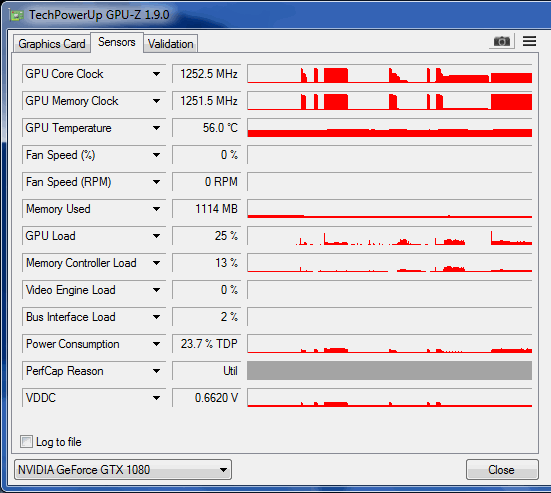
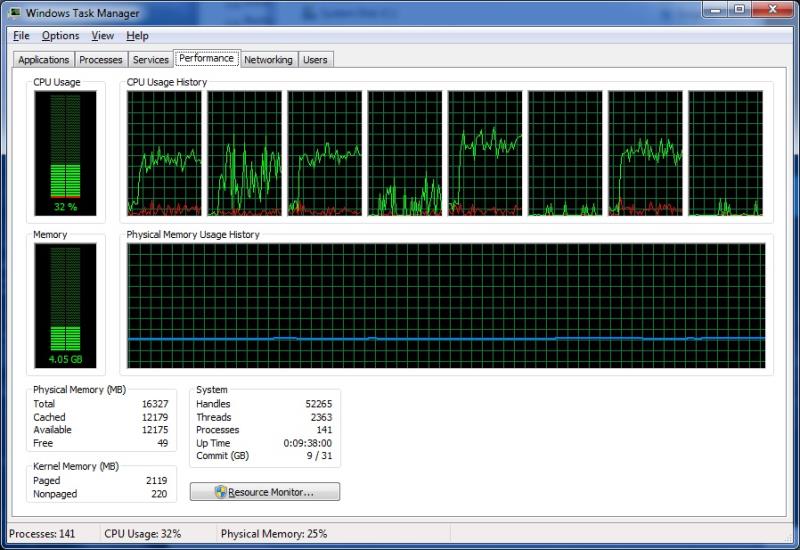
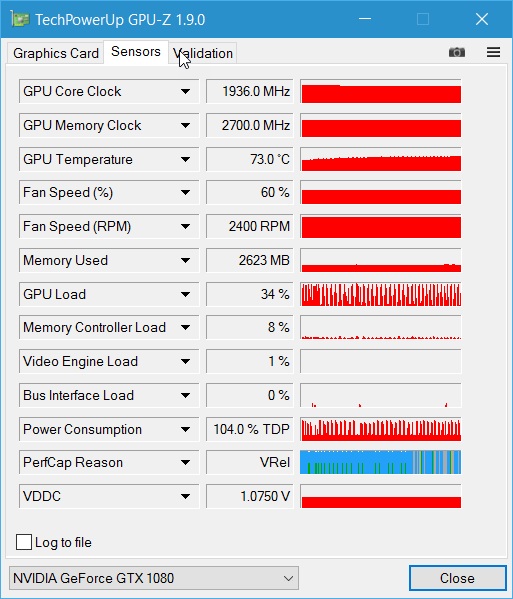
I noticed my GPU was running a bit slower, and my CPU workload picked up some, often reaching 35-40%. I assume that's because the CPU is doing the physics for the hair and cloth, which is a shame, since we are using PhysX and I have a nice Nvidia card, so the PhysX should be running on those beautiful CUDA cores. (I have entered a Feedback Tracker issue on that.)
|
|
By brand468 - 10 Years Ago
|
Fun and interesting thread Viking. :)
I'll do some tests and return with the results.
|
|
By pmaina - 10 Years Ago
|
May I suggest we benchmark indigo RT renders for iClone projects as that is where the real hardware challenge is and that is supposedly the highest quality achievable with iClone.
For me, that is the "final render".
For a standard project, and with standard indigo settings, how long does it take:
1. for iclone prepare the indigo file?
2. to render the a 1080/25p or 1080/24p clip.
Just to confirm the common understanding?
|
|
By pmaina - 10 Years Ago
|
I have created a new thread with updated scope.
If we are in agreement, let's proceed on that thread.
https://forum.reallusion.com/292198/Hardware-Benchmarks-for-best-possible-renders
|
|
By brand468 - 10 Years Ago
|
Hi Viking,
Interestingly, when I started testing, I discovered something I did not know before.
Rendering speed (to disk) is affected by the screen resolution ??
I have a large 40-inch 4K screen (Phillips BDM4065) that the middle monitor driven by a 1080 GTX which I have set to 3840x2160 when I did the first tests of the "Courtyard".
I then got a time of 11 min 20 sec, which I thought was very slow in comparison with the "Viking".
Then i changed the resolution to 1920 x1080, which reduced the time enormously to 4 min 35 sec !!!!
I thought the render speed (to disk) was not affected by the screen resolution, but it seems so?
|
|
By brand468 - 10 Years Ago
|
Hi pmania,
Hello, for my part, Indigo only interesting for the still image rendering.
Indigo is much too slow for my taste that I would create animations.
I use Octane with Daz plugin animation that is super fast even though it is difficult to compare as doing iClone has no plugin yet.
|
|
By brand468 - 10 Years Ago
|
Test "Dance# scene,
Philips monitor + GTX 1080
3840x2160 = 4 min 56 sec.
Asus monitor + GTX 1080 (share same card)
1920x1080 = 1 min 49 sec
2560x1440 = 2 min 4 sec
EDIT:
This is monitor screen resolution not render resolutions. Render resolution is 1920x1080 in all test.
|
|
By pmaina - 10 Years Ago
|
I am not sure if there is a point in benchmarking iClone's native renderer. It works fine even with basic sub $150 GPUs.
The genesis of the benchmarking idea was a proposal by a forum member that it is possible to get decent render performance from iclone+indigo combo if you toss more hardware at them.
I raised the issue that I wasn't comfortable spending $10K+ for to boost performance for a $200 software.
The notion of 10K was disputed by another user who placed his own estimate at $1k-2K.
So the question became... Lets put it to a test. We have users here who own or have access to impressively high spec rigs.
Suppose we want to brute force Iclone+indigo combo to spit out meaningful animated sequences within a meaningful timeframe, what will it take in terms of hardware configuration and, eventually, what is the estimated TCO (total cost of ownership) for the corresponding rig?
That probably would be more valuable for those looking to invest in hardware - as well as having a basis for A/B comparison to gauge future render improvements.
|
|
By justaviking - 10 Years Ago
|
|
pmaina (7/24/2016)
I am not sure if there is a point in benchmarking iClone's native renderer. It works fine even with basic sub $150 GPUs.
Native iClone results do vary. I have some results from my old card, and they were significantly worse than what I'm getting now. I'm going to add them to this thread once I find them again. For my own projects, I am getting a 10x improvement in rendering time on my current project, and on a much more complex scene I measured a 32x improvement (a 1.5 hour render for a 7-minute scene is massively different from a 43 hour render).
I think half of my performance delta is due to the difference in memory, and another half is due to the card being faster.
We often get asked, "What's good enough for iClone?" The minimum specs changed from iClone 5 to iClone 6.
Is it worth upgrading you GPU? Your CPU? Memory? This thread should help answer those questions based on real-world results.
I totally support your desire for Indigo benchmarks, too. Hopefully I'll have a chance to contribute to that topic too.
|
|
By justaviking - 10 Years Ago
|
Wow... this is totally surprising and counter-intuitive...
THE TEST:
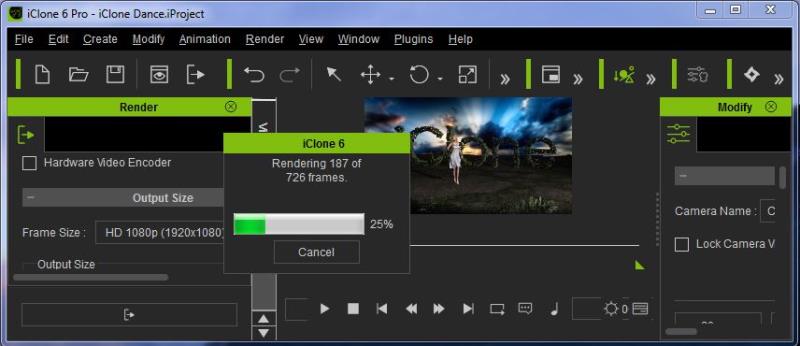
Thanks to Brand's observation on monitor size, I resized my iClone window to make it very small, so I would have very few pixels to display during the rendering process. Actual "window size" is about 856x370, with the viewport being much smaller than that.
Then I re-ran the "iClone Dance" test.
RESULTS:
Normal-sized iClone window = 0:50... 14 fps
Reduces-size iClone window = 3:25... 3.5 fps
My rendering performance DECREASED BY A FACTOR OF 4 simply by making my iClone window SMALLER.
This was repeatable for me.
COMMENTS:
This might reveal some underlying flaw. It reminds me of my rants against iClone using 60% of my GPU power when sitting idle, and I always wondered if that unnecessary GPU activity was also slowing down our render times. Now I'm even more suspicious of some sort of underlying flaw that negatively impacts performance.
See Feedback Tracker issue #262:
http://www.reallusion.com/FeedBackTracker/Issue/If-apply-the-Default-project-including-relective-object-without-any-action-GPU-Load-will-reach-60/1/262
Added details:
a) I don't normally have my iClone window full-screen. More like 95% of full-screen, because I like to see some other windows peeking out around the edges.
b) The first time I did this "small window" test, I may have made it even smaller, and it ran even slow that reported here. I'm pretty sure I was rendering well below 1 fps. I stopped it, and though it was because I had left my iClone session sitting open all night long. But without closing iClone, I stretched it back to a normal size, and got the same results as before (14fps), then still in the same session, I shrunk the window again and got the 3.5fps results.
|
|
By brand468 - 10 Years Ago
|
Strange Viking,
Have you also test to set your monitor in lower resolution and test if you get faster render times like i get.
Now that I know the problem I create scene on my large monitor, and then move iClone to second monitor with 1920x1024 and make the final render there and save lot of render time.
|
|
By michael7 - 10 Years Ago
|
|
brand468 (7/24/2016)
Strange Viking,
Have you also test to set your monitor in lower resolution and test if you get faster render times like i get.
Now that I know the problem I create scene on my large monitor, and then move iClone to second monitor with 1920x1024 and make the final render there and save lot of render time.
I noticed something very similar with Daz a few months ago. I was getting a faster better performance using a lower end computer and a small monitor than what I was getting with a faster computer and my wacom 24 hd touch. There are ways to correct this by turning certain things off in Daz and changing other things. There is a video on that using the Daz Vray render, I'll see if I can find it again to see if it is of any use to you, there might be a similar situation in iclone.
|
|
By michael7 - 10 Years Ago
|
|
pmaina (7/24/2016)
I am not sure if there is a point in benchmarking iClone's native renderer. It works fine even with basic sub $150 GPUs.
The genesis of the benchmarking idea was a proposal by a forum member that it is possible to get decent render performance from iclone+indigo combo if you toss more hardware at them.
I raised the issue that I wasn't comfortable spending $10K+ for to boost performance for a $200 software.
The notion of 10K was disputed by another user who placed his own estimate at $1k-2K.
So the question became... Lets put it to a test. We have users here who own or have access to impressively high spec rigs.
Suppose we want to brute force Iclone+indigo combo to spit out meaningful animated sequences within a meaningful timeframe, what will it take in terms of hardware configuration and, eventually, what is the estimated TCO (total cost of ownership) for the corresponding rig?
That probably would be more valuable for those looking to invest in hardware - as well as having a basis for A/B comparison to gauge future render improvements.
I've spent probably about $2700.00 and I think it's sufficient. If you really want to benchmark your rig set up for 3d applications try downloading Steam's VR performance test. It will show you where your rig sits.
|
|
By Rampa - 10 Years Ago
|
Regarding the 60% load when idle. "Idle" in iClone seems to be "not animating", but still running the rendering engine. So basically, if you have iClone open in the foreground, your GPU is very busy.
If you think about, it makes sense that it would always need to be running. It would not be able to respond to user input (like panning with the mouse) while not playing the animation otherwise.
|
|
By animagic - 10 Years Ago
|
We already know that Indigo is not suitable for animation as has been reported in numerous threads, so I think there is little point in confirming that. Even the Indigo website itself has little to offer in the way of actual animation.
EDIT: This comment was the result of my disappointment with Indigo, so in the spirit of cooperation I decided to be more positive about this benchmark.
|
|
By Rampa - 10 Years Ago
|
Something else that may make a significant difference is the "viewport resolution" rendering option for output size. The basic reason for this render option is to get the exact DirectX 11 rendering features as are displayed in the preview. Those things are applied in screen-space, so it insures WYSIWYG.
Set it in the render panel, and then change the window size by adjusting the side panel widths. Although the dimension numbers are grayed out, you will see them update in real time as you adjust the preview window size.
DOF will hugely be improved. That was a primary reason for implementing it, if I recall correctly.
This is a 6.5 new feature.
|
|
By animagic - 10 Years Ago
|
To continue the actual topic, I did some render tests with the garden scene a while ago at Dennis' request, which eventually convinced him to upgrade his card...:P
The main factor is the card, not the CPU. Simply having additional VRAM is helpful since the items in our scene use textures with higher resolution than in earlier iClone versions.
| Card | VRAM | CPU | RAM | Render Time | FPM | Effective Clock | Card Temp | | GTX 980 | 4GB | i7 2600K | 16GB DDR3 | 7:48 | 154 | 1417.5 | 72 | | GTX 980 Ti | 6GB | i7 5820K | 32GB DDR4 | 7:40 | 157 | 1290.9 | 82 | | GTX 1080 | 8GB | i7 5820K | 32GB DDR4 | 7:07 | 169 | 1797.0 | 84 |
I used the EVGA step-up program to go from a GTX 980Ti to a GTX 1080 (Founders Edition). The older system has a 980 which is factory overclocked, which makes the performance comparable to the 980Ti for this particular scene. The CPU is several generations older and doesn't have much influence. So I think updating your card is the best way to go.
EDIT: These tests were done with iClone 6.42.
|
|
By animagic - 10 Years Ago
|
|
rampa (7/24/2016)
Something else that may make a significant difference is the "viewport resolution" rendering option for output size. The basic reason for this render option is to get the exact DirectX 11 rendering features as are displayed in the preview. Those things are applied in screen-space, so it insures WYSIWYG.
Set it in the render panel, and then change the window size by adjusting the side panel widths. Although the dimension numbers are grayed out, you will see them update in real time as you adjust the preview window size.
DOF will hugely be improved. That was a primary reason for implementing it, if I recall correctly.
This is a 6.5 new feature.
I had to read this a couple of times (it's very hot here so my brain is sleepy), but I think what you mean is that with the new setting there will be better conformity between preview and final render for things like DOF?
|
|
By Rampa - 10 Years Ago
|
Yep! :)
That's the idea anyway. It is probably more important for larger dimensions. I'm rendering a test now, and seeing nicer DOF then I have seen before.
|
|
By Rampa - 10 Years Ago
|
|
rampa (7/24/2016)
Yep! :)
That's the idea anyway. It is probably more important for larger dimensions. I'm rendering a test now, and seeing nicer DOF then I have seen before.
After testing, I think it's still borked! No matter what render output size/options I use, I am not getting the DOF I see on screen. :(
I do wonder if my GPU is to blame somehow. I did try both checking and un-checking hardware rendering. No difference. Also no difference outputting PNG or video.
I should be getting this that is in my preview window during a "final" render.
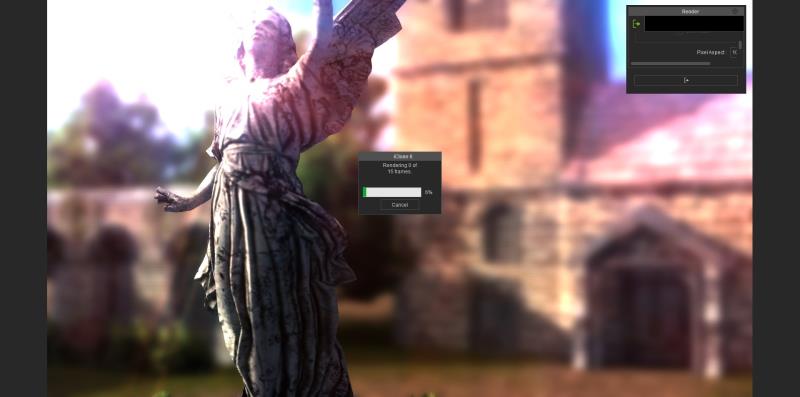
Instead, I'm getting this.

|
|
By TheOldBuffer - 8 Years Ago
|
Just got my RTX 2080 ti installed and just had time to render out the courtyard scene @ 1920x1080.
Time taken was 2:47
I'll be doing more testing tomorrow.
|
|
By Kelleytoons - 8 Years Ago
|
But what format? And settings? (SS on, high quality, etc).
(For example, without turning on the SS or high quality shadows but just rendering the default MP4 it took me 56 seconds. But I'm guessing you had a lot of those turned on so we'd need to know, including what SS degree you had).
|
|
By eternityblue - 8 Years Ago
|
So RTX cards aren't going to be all that snappy for home animation rendering. I hope Reallusion works on updating the real-time engine to get volumetric and sss. And some conforming facial hair system.
The benchmark I guess that interests me most is if I should consider upgrading my CPU, I have an aging i7 but I just don't know what sort of improvement it would give me to upgrade. Especially within Cc3 it would be nice to speed up a lot of operations
|
|
By TheOldBuffer - 8 Years Ago
|
|
Uh oh ! B.S.O.D. has stopped play for the moment..........wont get a chance to do anything about it till weekend. DOH !
|
|
By justaviking - 8 Years Ago
|
|
eternityblue (11/6/2018)
The benchmark I guess that interests me most is if I should consider upgrading my CPU, I have an aging i7 but I just don't know what sort of improvement it would give me to upgrade. Especially within Cc3 it would be nice to speed up a lot of operations
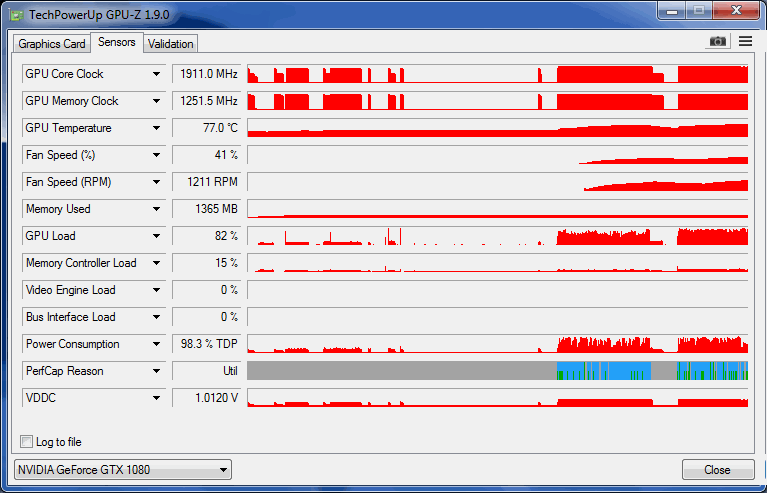
I highly recomment GPU-Z, which is a free graphics card "load" monitoring tool (and it's FREE).
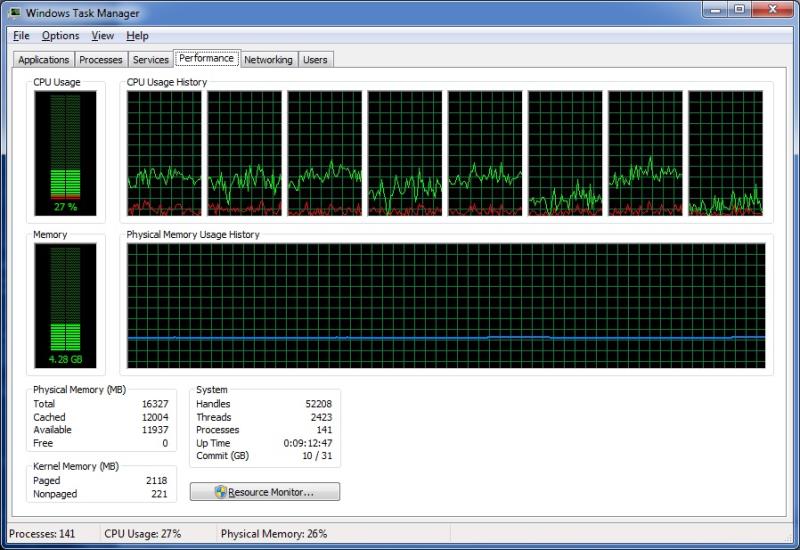
Fire up GPU-Z and your Windows "Task Manager" and keep and eye on your GPU/CPU loads.
iClone should be much, much more dependent on your gaphics card than your CPU, so even your aging i7 is unlikely to be a significant bottlneck in most situations.
I PLAN TO REVISIT THIS TEST, HOPEFULLY THIS EVENING
- The iClone "window size" still intruigues and disturbs me
- Back when I started this thread, my GPU results indicated very little GPU utilization on THIS particular test, which bothered and puzzled me
- I have another idea I want to test, but that will be kept secret until after I have some results
|
|
By RobertoColombo - 7 Years Ago
|
Hi Dennis,
here are the test results with the 2080 TI.
Settings were like the ones you showed. iClone window setup: viewer, timeline, render control window, in default setup.
Courtyeard project:
Render time:
"standard-screen" mode (CTRL+2), but only with the timeline and the render control window enabled: 2 mins 48 secs "standard-screen" mode (CTRL+2), but with timeline off and no control windows within iClone space (render control window placed into another monitor): 2 mins 2 secs
"full-screen" mode (CTRL+7): 2 mins 26 secs
iClone Dance project:
Render time:
"standard-screen" mode (CTRL+2), but only with the timeline and the render control window enabled: 48 secs "standard-screen" mode (CTRL+2), but with timeline off and no control windows within iClone space (render control window placed into another monitor): 41 secs "full-screen" mode (CTRL+7): 44 secs
The effect of the Viewer window size is evident: best configuration seeems to have the "standard screen" settings, but without any window except the timeline and the export window, sized at their default
Roberto
|
|
By wires - 7 Years Ago
|
|
This is a 3 year old thread, the latest benchmarks are being discussed here.
|
|
By RobertoColombo - 7 Years Ago
|
Hi Gerry,
IMO it still makes absolutely sense, especially for those who has some previous generation cards, because it shows the performance improvements.... when existing: did you notice that the project with soft cloth physics did not get so much improvement, which seems to say that the physic calculation time is more on the shoulder of the CPU ?.
Moreover, I was asked by Dennis and Mike to report the results here.
I am running the test on the other thread right now...
|
|
By TheOldBuffer - 7 Years Ago
|
|
Test results on my new system. 1min, 3 secs.
|