|
By bogdanB - 9 Years Ago
|
|
Hello. I have just made a new character in character creator and export it. When I try to load it in iclone 6 an error appears that says "failed to load file". Any solutions, or can anyone tell me what am I doing wrong? TY!
|
|
By Lawsuit Pending Records - 9 Years Ago
|
|
Are you exporting via iAvatar or using Send to iClone? Sounds a little unusual for CC > iClone to go pear shaped.
|
|
By wires - 9 Years Ago
|
Can you provide some more details please, regarding the settings that you used. Are you using the latest versions of both Character Creator and iClone?
|
|
By Peter (RL) - 9 Years Ago
|
|
bogdanB (7/19/2016)
Hello. I have just made a new character in character creator and export it. When I try to load it in iclone 6 an error appears that says "failed to load file". Any solutions, or can anyone tell me what am I doing wrong? TY!
Do make sure you have updated iClone and 3DXchange to version 6.5 and Character Creator to version 1.5. This issue normally occurs when you don't have all programs updated to the same matching version.
|
|
By ninjahiden - 9 Years Ago
|
hi!
i install iClone 3DXchange v6.2 Pipeline
and
iClone v6.11 PRO
now i have some problem to import any file to iClone v6.11 PRO
just show miFailed to load file and click {ok} after click noting! i just waste all my time for a model!
Please help as tnx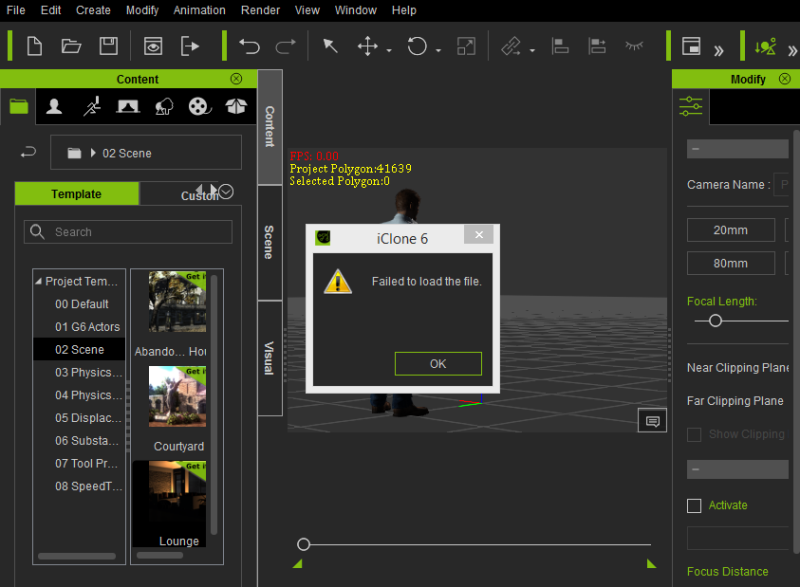
|
|
By wires - 9 Years Ago
|
ninjahiden (8/2/2016)
hi! i install iClone 3DXchange v6.2 Pipeline and iClone v6.11 PRO now i have some problem to import any file to iClone v6.11 PRO just show mi Failed to load file and click {ok} after click noting! i just waste all my time for a model! Please help as tnx
You need to install the latest versions of the software.
At the moment iClone and 3DXchange are version 6.51 and Character Creator is version 1.5.
You can download all the latest versions - including patches - from your Reallusion account. For iClone 6.51 you will also need to download and install the new Resource Pack.
If you are too many versions behind the newest available then it would be better to first uninstall the older software and do a clean reinstall.
|
|
By animagic - 9 Years Ago
|
|
Like wires said. Also, the versions of 3DXchange and iClone need to be the same. So files from 3DXchange 6.2 will not load in iClone 6.11.
|
|
By toystorylab - 9 Years Ago
|
|
wires (8/2/2016)
[quote]ninjahiden (8/2/2016)
For iClone 6.51 you will also need to download and install the new Resource Pack.
I did not do that... Do i simply install this? It probebly will overwrite a lot?
|
|
By ninjahiden - 9 Years Ago
|
thank you for all !!!
i fix it simple with $
|
|
By wires - 9 Years Ago
|
toystorylab (8/3/2016)
wires (8/2/2016)
[quote]ninjahiden (8/2/2016)
For iClone 6.51 you will also need to download and install the new Resource Pack.
I did not do that... Do i simply install this? It probebly will overwrite a lot?
The new Resource Pack will only overwrite default content that has been updated, it does not change, or remove, any purchased and custom content.
|
|
By toystorylab - 9 Years Ago
|
wires (8/3/2016)
toystorylab (8/3/2016)
wires (8/2/2016)
[quote]ninjahiden (8/2/2016)
For iClone 6.51 you will also need to download and install the new Resource Pack.
I did not do that... Do i simply install this? It probebly will overwrite a lot? The new Resource Pack will only overwrite default content that has been updated, it does not change, or remove, any purchased and custom content.
T.H.A.N.X :D
|
|
By cmp - 9 Years Ago
|
|
I have the same error message ,"Failed to load the file " in iclone character and iclone 6. both for the first time , I have the latest update of both software.
|
|
By galgammer - 8 Years Ago
|
I have the same issue. I'm using Character Creator 2.0 and iClone v6.53 PRO.
I tried the same steps and got the same error:"fail to load file" when in iClone importing the i.Avatar. I also tried dragging/dropping and received the same error. I exported the character with settings for: Character Creator 2.0 for iClone & iClone 7.0.
I just downloaded all the latest files last week after purchase. Everything used to work in the demo download.
|