|
By Peter (RL) - 10 Years Ago
|
Hi Everyone 
We have another new Character Creator update and need your continued assistance to help us track down any remaining bugs, glitches or other annoying issues.
Character Creator 1.52 adds several exciting new customization features and also comes a number of important fixes and enhancements.
Important: If you do find any bugs, issues or glitches in the 1.52 update, please can you first report them in the Feedback Tracker. Then feel free to discuss the issues in this thread. However do make use of the Feedback Tracker first to log the issue.
As always, do feel free to post general feedback about Character Creator in your own threads, but it will help us greatly if we can keep all discussion of outstanding issue discussion in the one place.
Please do try to provide your full system specifications and a detailed description of the problem when reporting the issue. If you can provide steps so we can try and reproduce the problem this will be even better.
Many thanks for your continued support. It is very much appreciated.
|
|
By martok2112 - 10 Years Ago
|
Yeah, I have a big WTF issue with CC 1.5. I was on the understanding that Blender was supposed to be one of the apps you could use to create cloth meshes for Character Creator/iClone!
Is this still going to be the case? Or is Maya going to be the exclusive standard for this?.... for which I do not have however freaking many thousands of dollars to shell out for that program!
|
|
By wendyluvscatz - 10 Years Ago
|
Well my first attempt at attaching and weightpainting a simple mesh to an FBX export in Carrara crashed it on re-import so that does not bode well.
Not overly concerned though as the essentials cloths coupled with accessories using softbody meet most my needs and can always just import CC iAvatars into 3DX5 as nonstandard too (6 gives me a few issues mostly with facial presets if I fiddle in Carrara with them but also works sort of)
|
|
By Rampa - 10 Years Ago
|
Wendy,
Carrara FBX is a slightly odd flavor. If you send a Carrara exported FBX to RL, they can probably get it working.
It has to do the base of the skeletal hierarchy being connected to nulls.
|
|
By Rampa - 10 Years Ago
|
|
martok2112 (7/15/2016)
Yeah, I have a big WTF issue with CC 1.5. I was on the understanding that Blender was supposed to be one of the apps you could use to create cloth meshes for Character Creator/iClone!
Is this still going to be the case? Or is Maya going to be the exclusive standard for this?.... for which I do not have however freaking many thousands of dollars to shell out for that program!
Maya is a great option if you have it. But you can use any software that can import and export FBX, and do the rigging/weighting of course. ;)
|
|
By martok2112 - 10 Years Ago
|
Aye...I've done rigging before, in Blender.. I actually managed (sometime back) to make iClone characters out of XNALara characters, with the exception of face rigging.
I'll just try and see if I can retrace me steps that I did for XNALara, and make them apply for Character Creator.
However, if there is someone amongst us who has knowledge of how to make these custom cloth meshes in Blender, a tutorial would be greatly appreciated.
If I happen to stumble upon how to do it meself, I will share the knowledge (bruises and all) :D
|
|
By Postfrosch - 10 Years Ago
|
After updating to 1.5 of the CC missing DRM complains s for Essental pack and for all m one myself made CC avatars. I have the Essential pack already since last year. That should not happen.
What can I do? Can I herunterlaen and install from my Konot the Essential again?
Best regards from Germany
Postfrosch
|
|
By Lily(RL) - 10 Years Ago
|
|
Postfrosch (7/15/2016)
After updating to 1.5 of the CC missing DRM complains s for Essental pack and for all m one myself made CC avatars. I have the Essential pack already since last year. That should not happen.
What can I do? Can I herunterlaen and install from my Konot the Essential again?
Best regards from Germany
Postfrosch
Hi Postfrosch,
Could you provide more details to help reproducing the problem?
What kind of step will popup the missing DRM dialog?
Thank you
Lily
|
|
By Postfrosch - 10 Years Ago
|
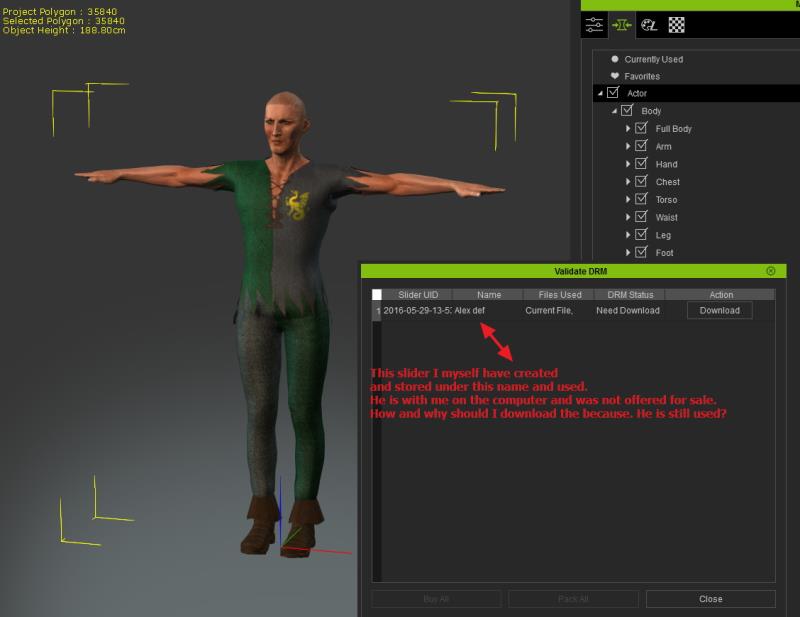
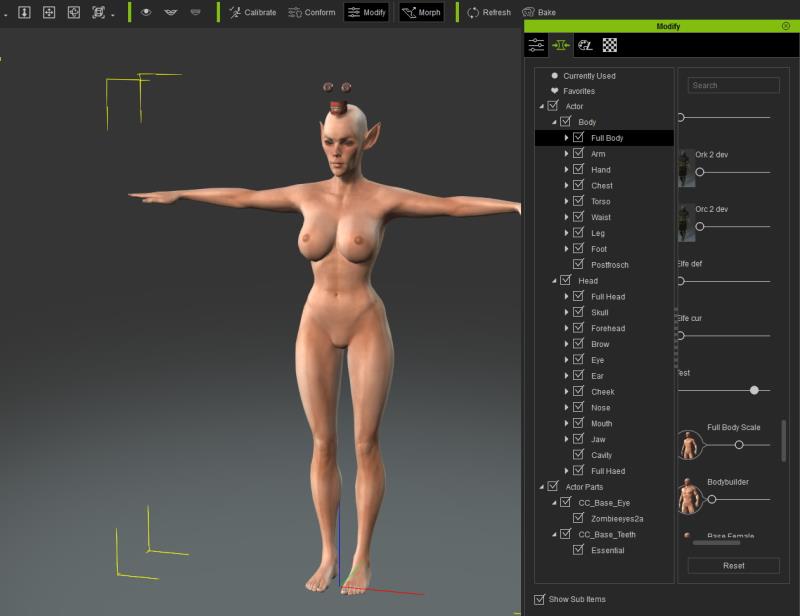
[quote]What kind of step will popup the missing DRM dialog?[/quoteI openable an avatar I created
- Then opens automatically, "Validate DRM" from the Tools Submissions-
(Would that was before the update to 1.5 is not so -I had the part I never used Weikl no Avatars offer for sale)
- In the local columns are then Slider from the Essentials as "missed" and "buy" gekennzeichnet.obwohl I have the Essential Pack.
I have now installed again.
Although you can click away the "Validate DRM" - but the next time the Avatars this file reopens.
It is not bad special just plain annoying
Also Morph slider that I will have created yourself called for
(see image)
Greets from Germany
Postfrosch |
|
By Kalex - 10 Years Ago
|
Hello !
With all those posts about CC 1.5 and FBX import... I wonder if it's possible to export previous G5 characters into FBX format and import them into CC 1.5 with all the clothes. It would certainly be time saving... But I don't know if it's possible and how to proceed, with the FBX key file =S
Any ideas ?
Thanks guys !
|
|
By wires - 10 Years Ago
|
CC 1.5 slows down to a crawl when making changes to the Materials using the Appearance Editor. Tapani has also reported the problem in this thread.
The video below (without audio) demonstrates the problem in real time:
|
|
By DroneMaster - 10 Years Ago
|
|
wires (7/15/2016)
CC 1.5 slows down to a crawl when making changes to the Materials using the Appearance Editor.
I can confim this. And the computer locks out any attempt to get out of the program. Had to use CTL/ALT/Delete to shut down iClone.
|
|
By Postfrosch - 10 Years Ago
|
Yes, CC1.5 is veeeery slooooow.
I can confirm this
Greets from Germany
Postfrosch
|
|
By Tapani - 10 Years Ago
|
Ok, I made an issue to the Appearance Editor, please vote it - hopefully it will help : http://www.reallusion.com/FeedBackTracker/Issue/Appearance-Editor-slider-jam
At this moment, it's quite hard to operate with CC 1.5
Tested a lot : it seems to be when using fe. "Essential clothes / bundle / morphs(?)" even if removed from character. Materials which became with the first installation of CC are adjustable.
|
|
By wendyluvscatz - 10 Years Ago
|
|
wendyluvscatz (7/15/2016)
Well my first attempt at attaching and weightpainting a simple mesh to an FBX export in Carrara crashed it on re-import so that does not bode well.
Not overly concerned though as the essentials cloths coupled with accessories using softbody meet most my needs and can always just import CC iAvatars into 3DX5 as nonstandard too (6 gives me a few issues mostly with facial presets if I fiddle in Carrara with them but also works sort of)
I will need to experiment a bit more with it anyway and probably use C8.1 to weightpaint to before exporting from 8.5 as the latter is a right PITA for rigging but needed for import.
This was just a first go and not a good example for testing, I will try one with easily shareable assets like Makehuman mesh clothing and hair for that.
|
|
By wendyluvscatz - 10 Years Ago
|
Oops I meant to quote Rampa,
iPad Safari browser does not show very ckearly which post is with which quote button.
Or show smileys attachments etc is a pain.
|
|
By Peter (RL) - 10 Years Ago
|
Important Update:
Initially we thought a separate discussion thread on issues would be a good way to gather more feedback on any problems you are having. However we now see this is causing some confusion. Because of this I have updated the original post to make it clearer. Please see the change below.
Important: If you do find any bugs, issues or glitches in the 1.5 update, please can you first report them in the Feedback Tracker. Then feel free to discuss the issues in this thread. However do make use of the Feedback Tracker first to log the issue.
Apologies for the confusion caused.
|
|
By Miranda (RL) - 10 Years Ago
|
Tapani (7/15/2016)
Ok, I made an issue to the Appearance Editor, please vote it - hopefully it will help : http://www.reallusion.com/FeedBackTracker/Issue/Appearance-Editor-slider-jamAt this moment, it's quite hard to operate with CC 1.5 Tested a lot : it seems to be when using fe. "Essential clothes / bundle / morphs(?)" even if removed from character. Materials which became with the first installation of CC are adjustable.
Hi Tapani and others, we are unable to reproduce this issue. Can you help to provide us the settings? See details here: http://www.reallusion.com/FeedBackTracker/Issue/Appearance-Editor-slider-jam
Thanks!
|
|
By Tapani - 10 Years Ago
|
Hi, please check the video by Gerry https://youtu.be/9bMdLKgM4KQ
Here's one path to follow :
1. Open Character Creator
2. Load a project "Essential_01"
3. Choose "Appearance" tab
4. Click Mini Skirt -> Active Appearance Editor
5. Base Fabrics (black)
6. Adjust using slider "Lightness" - or what ever slider you want
Cursor is rolling and moving slowly to the direction you adjusted. It may take 1-2 minutes to move to a place you wanted.
|
|
By wires - 10 Years Ago
|
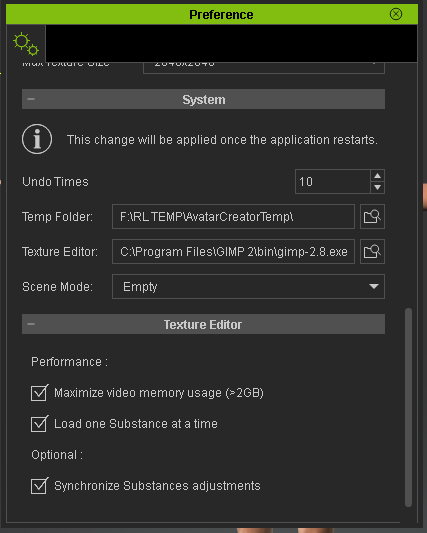
Hi Miranda.
Here's a screen shot of my settings:
|
|
By Tapani - 10 Years Ago
|
My settings are quite similar than Gerrys!
|
|
By Peter (RL) - 10 Years Ago
|
Postfrosch (7/15/2016)
[quote]What kind of step will popup the missing DRM dialog?[/quoteI openable an avatar I created
- Then opens automatically, "Validate DRM" from the Tools Submissions-
(Would that was before the update to 1.5 is not so -I had the part I never used Weikl no Avatars offer for sale)
- In the local columns are then Slider from the Essentials as "missed" and "buy" gekennzeichnet.obwohl I have the Essential Pack.
I have now installed again.
Although you can click away the "Validate DRM" - but the next time the Avatars this file reopens.
It is not bad special just plain annoying
Also Morph slider that I will have created yourself called for
(see image)
Greets from Germany
Postfrosch
Hi Postfrosch,
Can you let us have your CC project file for this character so we can test the problem. You can send it to Support using the link below or PM me with the link. Thanks.
http://www.reallusion.com/CustomerSupport/UserEx/QForm.aspx
|
|
By Postfrosch - 10 Years Ago
|
Hallo Peter,
i have do this
Greats from germany
Postfrosch
|
|
By Agonos - 10 Years Ago
|
Hello. Why can not export this simple basic model in a "FBX" format ?

|
|
By Peter (RL) - 10 Years Ago
|
|
Postfrosch (7/19/2016)
Hallo Peter,
i have do this
Greats from germany
Postfrosch
Hi Postfrosch... We have received your characters and will test to see what is causing this issue. As soon as I know more I will let you know. Thanks.
|
|
By Peter (RL) - 10 Years Ago
|
Agonos (7/19/2016)
Hello. Why can not export this simple basic model in a "FBX" format ?
To be able to export to FBX you do need to have 3DXchange 6 Pipeline. You can't export to FBX with the 3DXchange 6 Pro version.
|
|
By Peter (RL) - 10 Years Ago
|
Tapani (7/15/2016)
Ok, I made an issue to the Appearance Editor, please vote it - hopefully it will help : http://www.reallusion.com/FeedBackTracker/Issue/Appearance-Editor-slider-jamAt this moment, it's quite hard to operate with CC 1.5 Tested a lot : it seems to be when using fe. "Essential clothes / bundle / morphs(?)" even if removed from character. Materials which became with the first installation of CC are adjustable.
Just to let you know we are urgently looking into the performance issues with the Appearance Editor. I will let you all know as soon as more is known about this problem.
|
|
By Peter (RL) - 10 Years Ago
|
|
Just to let you all know, we have found the cause of the performance issues in the Appearance Editor and plan to fix it as soon as possible. This will come in a small interim update to correct the problem. Unfortunately I don't have a precise date for when this will be available, but we are working hard to get this ready as soon as possible.
Please do accept our apologies for the inconvenience this issue causes.
|
|
By Galfridus - 10 Years Ago
|
Thank you for the info Peter.
Geoff.
|
|
By wires - 10 Years Ago
|
Peter (RL) (7/20/2016)
Just to let you all know, we have found the cause of the performance issues in the Appearance Editor and plan to fix it as soon as possible. This will come in a small interim update to correct the problem. Unfortunately I don't have a precise date for when this will be available, but we are working hard to get this ready as soon as possible.
Please do accept our apologies for the inconvenience this issue causes.
We're at the stage where we'll accept any crumbs thrown to us. :) Thank you very much for this glimmer of hope. :cool:
|
|
By justaviking - 10 Years Ago
|
Peter (RL) (7/20/2016)
Just to let you all know, we have found the cause of the performance issues in the Appearance Editor and plan to fix it as soon as possible. This will come in a small interim update to correct the problem. Unfortunately I don't have a precise date for when this will be available, but we are working hard to get this ready as soon as possible.
Please do accept our apologies for the inconvenience this issue causes.
Thank you for the update. Hopefully the "Watermark" issue can also get resolved in a quick patch.
We understand you can't commit to an exact date yet, but news is always appreciated. And when it's good news, "Woo hoo!"
|
|
By Skuzzlebutt - 10 Years Ago
|
i dont know if anybody posted this already,
hair creation causes the screen to blackout and a bad file
when saving.
i tried 2 different methods, they come into CC with no error
and the popup says "hair"
no big deal, just saving them as accesories instead
until it's looked into.
|
|
By Hexer_ - 10 Years Ago
|
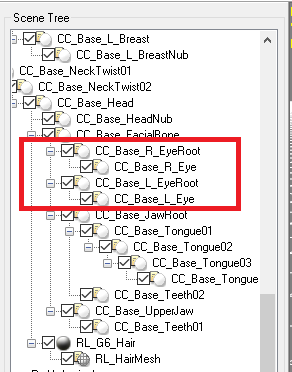
After updating to CC 1.5, the export to iAvatar or FBX no longer creates bones for eyelids and eyebrows.
Maybe more bones are missing, I'm not sure.
Can somebody confirm this issue too? Thanks.
|
|
By Tesira - 10 Years Ago
|
|
Postfrosch (15.07.2016)
After updating to 1.5 of the CC missing DRM complains s for Essental pack and for all m one myself made CC avatars. I have the Essential pack already since last year. That should not happen.
What can I do? Can I herunterlaen and install from my Konot the Essential again?
Best regards from Germany
Postfrosch
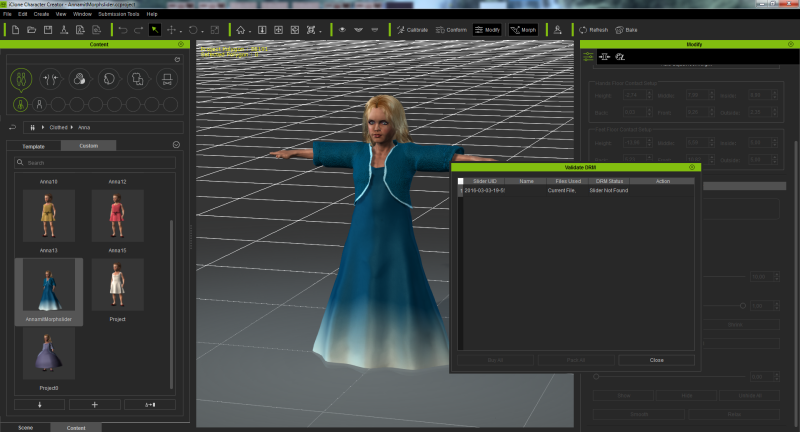
I get the same error message with my own morph sliders, when I load an character, which was made with them. I havent the Essential Pack, so this issue seems to be more common.
This error we have had already during the Beta test. Then it was gone after the update.
Since the official release it is back.
Have a nice day
Tesira
|
|
By Hexer_ - 10 Years Ago
|
Also, it seems CC 1.5 export doesn't generate specular and reflection maps anymore.
|
|
By SeanMac - 10 Years Ago
|
I probably should have noticed this earlier but having upgraded to 1.51 I find that there are three missing icons on the toolbar. Whether they were missing earlier and I didn't notice I cannot tell.
Anyway I have the Show/Hide icons for character and hair missing as well as the show/Hide for Wire Frame.
I uninstalled, redownloaded and reinstalled 1.5 + the multi-patch 150. Still missing.
Any checks? I have logged the issue on Feedback.
|
|
By wires - 10 Years Ago
|
|
SeanMac (7/28/2016)
I probably should have noticed this earlier but having upgraded to 1.51 I find that there are three missing icons on the toolbar. Whether they were missing earlier and I didn't notice I cannot tell.
Anyway I have the Show/Hide icons for character and hair missing as well as the show/Hide for Wire Frame.
I uninstalled, redownloaded and reinstalled 1.5 + the multi-patch 150. Still missing.
Any checks? I have logged the issue on Feedback.
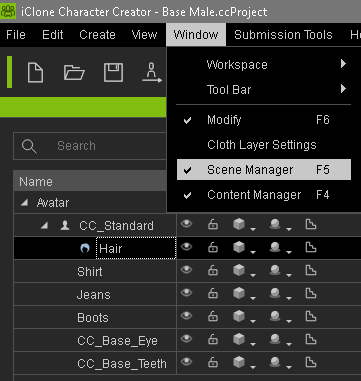
These options are available in the new Scene Manager window:
|
|
By SeanMac - 10 Years Ago
|
Hi Wires,
Thanks for that.
Maybe it's my day for being dim but I do not understand what you are saying to me.
If i trigger the Scene Manager it is a panel on the left, not icons on the tool bar.
|
|
By SeanMac - 10 Years Ago
|
Oops - Okay - it is my day for being dim.
Ok you are referring to the alternate or possibly replacement functions shown when the hair is on the avatar and access is given in drop downs in the scene manager.
OK problem solved - Thanks for that.
I must remember to eat more Smarties.
Regards
SeanMac
Home Built inCoolermaster ATX case with Gigabyte GA-Z170X-GAMING 7 MoBo, i7-6700 @ 3.4 Ghz,Asus GeForce GTX 970 Graphics Card, 32Gb DDR4 RAM, twin HD monitors, Huion H610Pro Graphics Tablet, Kinect v2, Win 10 64 Bit OS
|
|
By TonyTiger - 10 Years Ago
|
|
Hello all,Any word on when appearance editor will be fixed,
|
|
By Agonos - 10 Years Ago
|
Thank you for these versions 6.5. But I would like to know why the same dress (obj) imported in "CC", it works without problems with a friend but not at home (Failed to load the file or crashes the program ) ?
|
|
By Galfridus - 10 Years Ago
|
Just downloaded todays new CC patch...
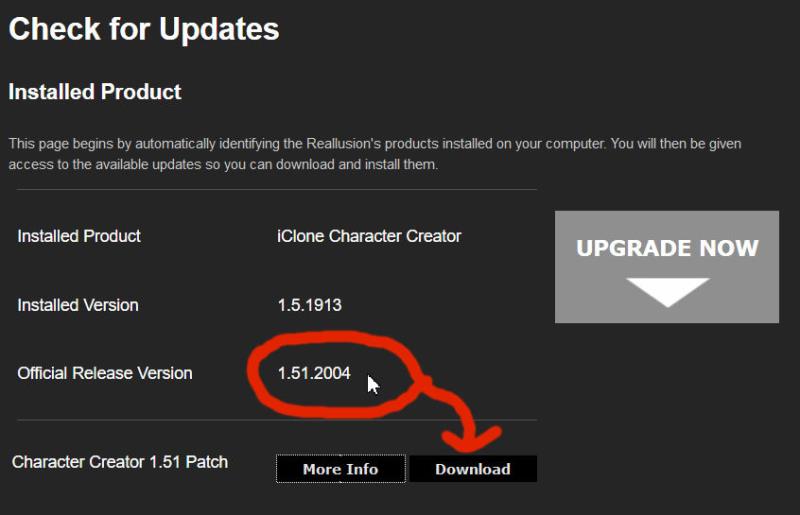
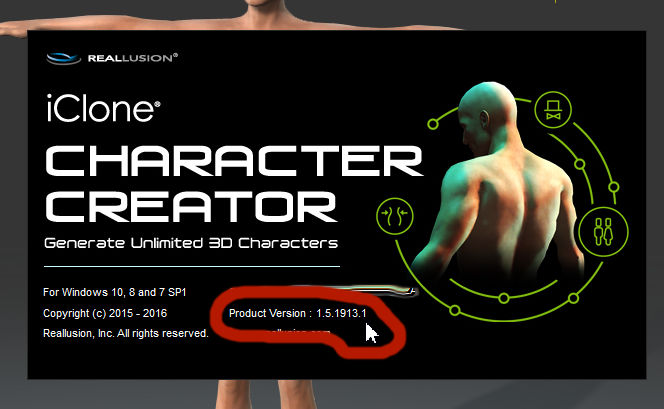
I installed this after download but after launching CC it`s still showing the older version with just a .1 extension.
Geoff.
|
|
By lkelemen - 10 Years Ago
|
+1
same here, also with the full exe downloaded from my account ( http://file.reallusion.com/ic/iClone_Character_Creator.exe ).
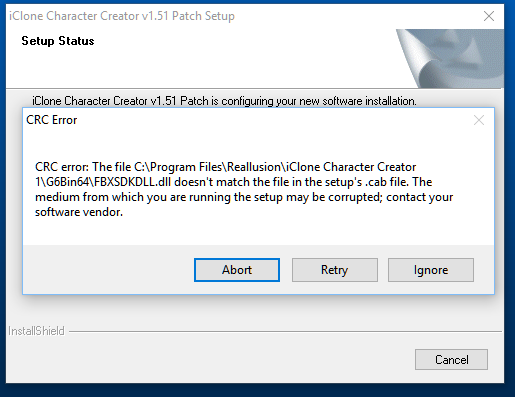
If I update via Reallusion Live Update I get:
|
|
By wires - 10 Years Ago
|
I downloaded directly from my account and have the correct version:
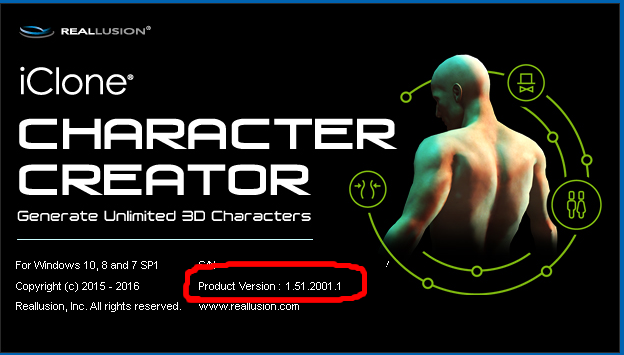
|
|
By lkelemen - 10 Years Ago
|
according to the webpage linked from cc "check for update" the latest version should be 1.51.2004. My version is 1.51.2001 and it doesn't change after the update

|
|
By wires - 10 Years Ago
|
According to the release notes 1.51.2001.1 is the latest version:
Release Notes: v1.51.2001.1 update patch released on 2016-08-04 *Note: Make sure you have updated all the iClone family programs to the latest version (iClone v6.51, 3DXchange v6.51, Character Creator v1.51) before you launch iClone 6. - Fixed: Wrong DRM checking caused Appearance Editor to slow down.
- Fixed: Loading ccProject or iAvatar containing sliders created from iAvatar or rlHead with DRM, would sometimes prompt an incorrect message in the Validate DRM window.
- Fixed: Using a .rlHead without an internet connection would show a watermark.
- Fixed: When a watermark displayed, using the Calibration tool would prompt an unnecessary message.
- Fixed: After double-clicking a slider to set the value to Zero, the highlight area of character would display the wrong result.
|
|
By Galfridus - 10 Years Ago
|
Now downloaded from my account and got the 1.51.2001.1 version installed from that source.
On start up this triggers the update notification info of a newer 1.51.2004
I wont follow that link this time as I seem to be going round in a circle from where I started this morning. ( See my previous post above).
Geoff.
|
|
By wires - 10 Years Ago
|
|
Galfridus (8/4/2016)
Now downloaded from my account and got the 1.51.2001.1 version installed from that source.
On start up this triggers the update notification info of a newer 1.51.2004
I wont follow that link this time as I seem to be going round in a circle from where I started this morning. ( See my previous post above).
Geoff.
This mixup with version numbers is nothing new. :pinch: It would seem that copy and paste does not exist between R&D and Marketing. :Whistling::w00t:
|
|
By Zeronimo - 10 Years Ago
|
|
+1 same punishment here :)
|
|
By Peter (RL) - 10 Years Ago
|
As many of you already know we have now released version 1.51.2001.1 (2016-08-04)
To see the changelog, please click HERE.
Important: If you do find any additional bugs, issues or glitches in the 1.51 update, please can you report them in the Feedback Tracker first. Then feel free to discuss the issues in this thread. However it is very important you use the Feedback Tracker first to log the issue.
|
|
By Peter (RL) - 10 Years Ago
|
Galfridus (8/4/2016)
Just downloaded todays new CC patch... I installed this after download but after launching CC it`s still showing the older version with just a .1 extension. Geoff.
Apologies, we are aware of this issue and it will be corrected soon. If you have installed the update then everything should be fine even though the build number is incorrect. If in doubt you can download and install the update manually from your Member Account under "Patch/Bonus". Thanks.
|
|
By Peter (RL) - 10 Years Ago
|
A CRC error normally indicates the downloaded update was corrupt. This could be because there was a connection issue.
Please try downloading manually from your Member Account by clicking the "Patch/Bonus" link for iClone 6 Pro.
|
|
By lkelemen - 10 Years Ago
|
I have already the version 1.51.2001.1
If that's the latest then I'm OK
|
|
By Postfrosch - 10 Years Ago
|
CC 1.51 crashes when creating a morph Sliders
If I want to create a morph slider with the CC 1.51 the Prgramm crashes. i.e. it is closed with an error message. Creating a morph slider is no longer possible. Templates from which I have so far been created slider, the slider create now faulty. However, the body is no longer changing, eyes and teeth. They remain unchanged. I have set a message in the feedback Tracker http://www.reallusion.com/FeedBackTracker/MyIssue
Greetings from Germany
Postfosch
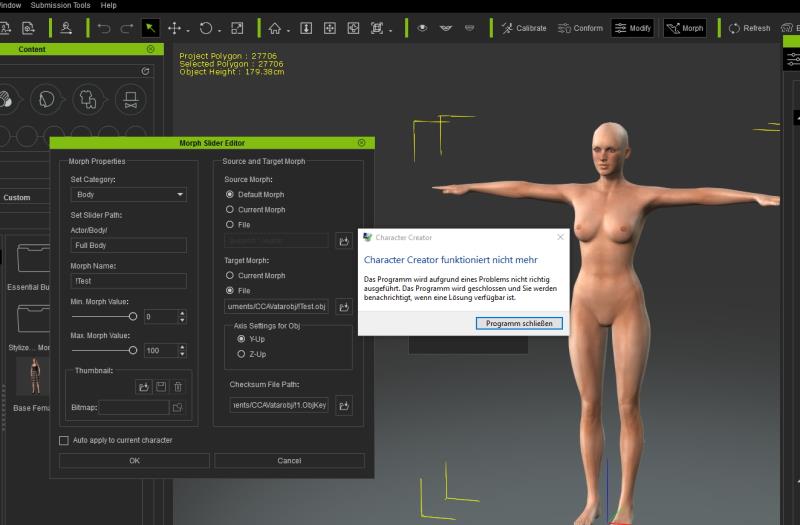
I have now made some test.
1. If I an avatar with the sliders morphe - export this avatar as objDatei - then wants to create a Slider
the objKey adds itself automatically - the program runs
2. If the same avatar e.g. send for Bledner - there morphe b- the morphed avatar as obj from Blender under a different name (e.g. Dame1) export
-versuche create a slider - there enter the objKey file this file originally had (as Lady) crashes the CC from.
It is as devinitv at objKey file or to the zurückimportierten obj files (Sculptirs and Blender)
|
|
By Tesira - 10 Years Ago
|
hi Postfrosch,
I have made a new slider for a child today and all has worked for me how always. So there maybe more testing is necessary. I have made my slider from a iAvatar.

Have a nice sunday
Tesira
|
|
By Tesira - 10 Years Ago
|
hi Postfrosch,
I have made some more tests. In the german Forum you have written, that this happens, if you create the morphslider with the .obj file, if it is exported from blender or sculptris. I also have gotten the same crash, also if I haven't done something with the file.
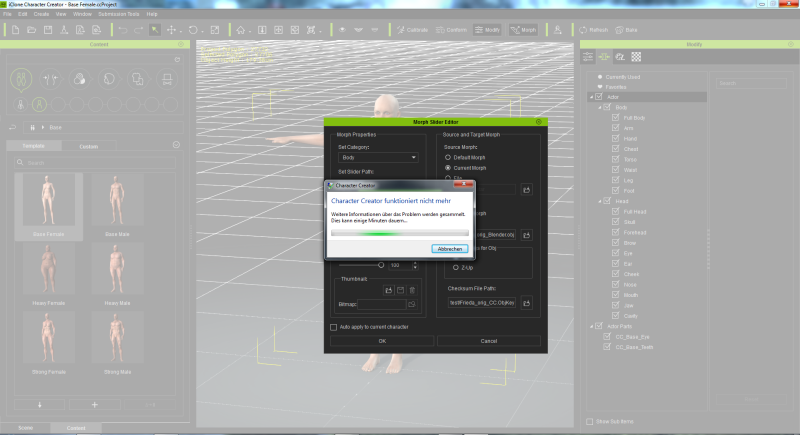
Now I have tried to replace the mesh in 3dXChange. Also here I have gotten a load error.
Ok, so I have done the next test.
This is my Charakter:

1. Export the Character as iAvatar in CC
2. Export the same Character as .obj file in CC
3. Load the iAvatar in 3dXChange.
4. replace the mesh with the .obj how it was saved from CC
And this is the result:
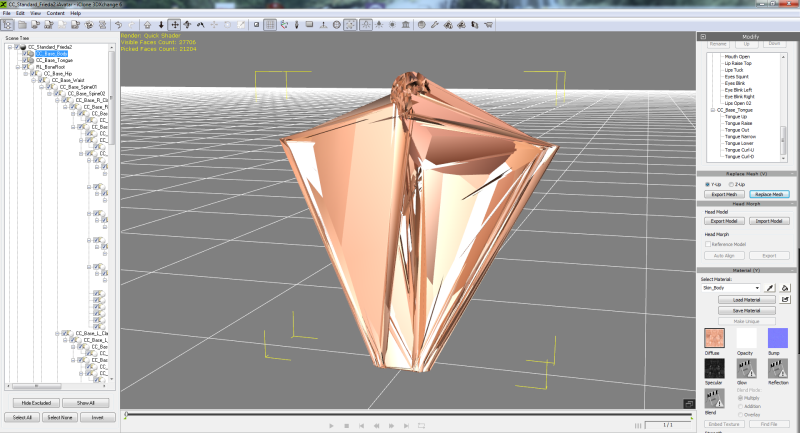
So here seems to be already problems with the exporting of the .obj file.
Greetings
Tesira
|
|
By Rampa - 10 Years Ago
|
If you use Sculptris, do not use the mirror function!
It will change your vertex order, and give you the result you see. This may be true for other software as well.
|
|
By Postfrosch - 10 Years Ago
|
Hello Rampa,
I do not use the mirror function.
It works since 1:51 only no longer. CC crashes when I use a with Skulptis (or blender) morphed obj file as Slider goal.
It's only when I create the avatar in CC - by IC 6 send - from there to 3DX 6 - vond there the mesh as obj save - the morphe in Skulptris - the mesh in 3 dx exchanges - then Avatar back to IC 6 - of there for CC - from there save as obj and then make the slider.
Greeting Postfrosch
|
|
By Tapani - 10 Years Ago
|
Thanks Peter and RL team of fixing this - forum members as well. Looks and works fine now!
|
|
By mark - 10 Years Ago
|
Just wondering if anyone else has had this problem...Every time I try to click and load a new "Skin" for my CC avatar, CC crashes. I noticed this awhile back and thought drivers or the new versions would fix it for me but even with the newest video drivers and the latest CC version it is still happening. Now I can "Locate" the file, like a file from the "Essential Skin Collection", and drag it onto the avatar and it will work fine and not crash but not if I click on the Skin file in CC..not a deal killer ...but a bit of a pain.
Any thoughts?
|
|
By animagic - 10 Years Ago
|
|
mark (9/19/2016)
Just wondering if anyone else has had this problem...Every time I try to click and load a new "Skin" for my CC avatar, CC crashes. I noticed this awhile back and thought drivers or the new versions would fix it for me but even with the newest video drivers and the latest CC version it is still happening. Now I can "Locate" the file, like a file from the "Essential Skin Collection", and drag it onto the avatar and it will work fine and not crash but not if I click on the Skin file in CC..not a deal killer ...but a bit of a pain.
Any thoughts?
I just tried this and for me applying the skin works without crashing. Unfortunately, I'm lacking thoughts...:unsure:
|
|
By mark - 10 Years Ago
|
Thanks Job! I'm sure it's something with my system ;)
|
|
By Cary B - 10 Years Ago
|
|
A quick question. I have started trying to use CC characters in Iclone ...and I find that I cannot link any objects or attach any objects to them. Nor Can I align any objects to them or have a camera or light "Look at" them. Is this normal? Is this something that is upgraded in one of the bundles you can purchase?
|
|
By Emerald Animation (formerly reelcheapfilms) - 10 Years Ago
|
Here's an interesting one. I created a custom double-breasted jacket in Blender, and it imported just fine into CC. However, it appears I can have the character wear the custom jacket, or pants, but not both. If he is wearing pants and I add the jacket, the pants disappear. If I add the pants back, the coat disappears.
I am going to try exporting two characters to iClone, one with pants, one with coat, and see if they can be combined there, but a fix in CC would be welcome.
|
|
By wires - 10 Years Ago
|
|
Emerald Animation (formerly reelcheapfilms) (10/6/2016)
Here's an interesting one. I created a custom double-breasted jacket in Blender, and it imported just fine into CC. However, it appears I can have the character wear the custom jacket, or pants, but not both. If he is wearing pants and I add the jacket, the pants disappear. If I add the pants back, the coat disappears.
I am going to try exporting two characters to iClone, one with pants, one with coat, and see if they can be combined there, but a fix in CC would be welcome.
What you describe happens when clothing items have the same layer number. This can be set during the clothing import:
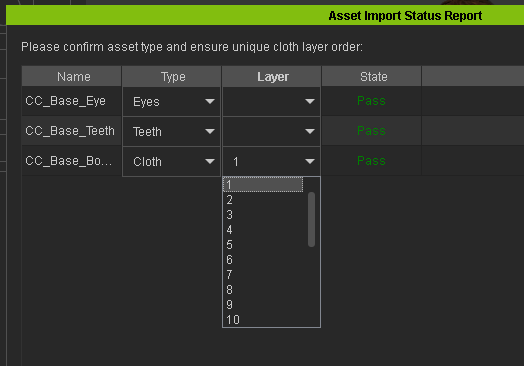
You can read more about setting the clothing layers in this post.
|
|
By Peter (RL) - 10 Years Ago
|
Character Creator 1.52 has now been released.
Important: If you do find any bugs, issues or glitches in the 1.52 update, please can you first report them in the Feedback Tracker. Then feel free to discuss the issues in this thread. However do make use of the Feedback Tracker first to log the issue.
Please do try to provide your full system specifications and a detailed description of the problem when reporting the issue. If you can provide steps so we can try and reproduce the problem this will be even better.
Many thanks for your continued support. It is very much appreciated.
|
|
By mr_vidius - 10 Years Ago
|
Sorry peter.. this is way too frustrating for that tracker. and i don't want to wait a month for an answer. so here it is..
that content downloder update wiped out my microsoft visual cc + + again! so like dude.. what is wrong with you guys? are you guys smoking that wacky weed?
i tried system restore. but this time it won't recover the file. so what do I do now? redownload and re-install iclone 6 and CC ? and then go thru 3 days of verify?
you guys at RL got to get your poop together. this is getting really annoying.
Vidius
|
|
By Peter (RL) - 10 Years Ago
|
mr_vidius (10/7/2016)
Sorry peter.. this is way too frustrating for that tracker. and i don't want to wait a month for an answer. so here it is..
that content downloder update wiped out my microsoft visual cc + + again! so like dude.. what is wrong with you guys? are you guys smoking that wacky weed?
i tried system restore. but this time it won't recover the file. so what do I do now? redownload and re-install iclone 6 and CC ? and then go thru 3 days of verify?
you guys at RL got to get your poop together. this is getting really annoying.
VidiusHi Mr Vidius, We are sorry to hear you have encountered problems with Visual C++. It may be linked to the build of Visual C++ you have installed and the one required by the downloader. However we are checking this to try and find the cause of the problem. For now, please reinstall the package below.
Install both versions below to be sure.
vcredist_x64.exe
vcredist_x86.exe
This should resolve the resolve the problem for you.
|
|
By mr_vidius - 10 Years Ago
|
Peter (RL) (10/7/2016)
mr_vidius (10/7/2016)
Sorry peter.. this is way too frustrating for that tracker. and i don't want to wait a month for an answer. so here it is..
that content downloder update wiped out my microsoft visual cc + + again! so like dude.. what is wrong with you guys? are you guys smoking that wacky weed?
i tried system restore. but this time it won't recover the file. so what do I do now? redownload and re-install iclone 6 and CC ? and then go thru 3 days of verify?
you guys at RL got to get your poop together. this is getting really annoying.
VidiusHi Mr Vidius, We are sorry to hear you have encountered problems with Visual C++. It may be linked to the build of Visual C++ you have installed and the one required by the downloader. However we are checking this to try and find the cause of the problem. For now, please reinstall the package below.
Install both versions below to be sure.
vcredist_x64.exe
vcredist_x86.exe
This should resolve the resolve the problem for you.
thank you Peter for replying. First, this should not have happened in the first place. second. the content downloader disabled both IC6, and CC. the Visual C + + on my computer is up to date. the only thing effected was IC6 and CC. there was a MSVC120.dll message. the problem was resolved by re-installing IC6. after I did that. both IC6 and CC worked again. reinstalling visual C ++ didn't resolve the issue. so what ever the content down loader did . it is now considered by me as public enemy #1. and I will be not downloading any update for that again. burn me once, shame on you.. burn me twice.. shame on me. burn me the third time.. it's all out war. again thank you for responding. and looking into this. now it's time for verify101. 3 days of fun just so I can finish a project.. geeez..:angry:
|
|
By Emerald Animation (formerly reelcheapfilms) - 10 Years Ago
|
What you describe happens when clothing items have the same layer number. This can be set during the clothing import: You can read more about setting the clothing layers in this post.
Thanks Wires, I changed the cloth layer of the coat and it worked a treat.
|
|
By animagic - 10 Years Ago
|
I have just discovered that recently created CC characters have a limited set of collision shapes compared to older ones. For example, there used to be an L_Thigh, L_Thigh(0), and L_Thing(1), but now there is only a L_Thigh collision shape. The same with R_Thigh, Hip, and possibly others. The stock characters, Natalie and Christian, are still OK, but the default avatar in CC lacks collision shapes.
This is not good because the collision shapes are really needed, until something better comes along. I found out because I couldn't get a recent purchase behave properly. I posted it here, but come to think of it, it may be an iClone problem.
EDIT: I forgot to mention, there is a workaround: You can save an older, complete collision shape set as a file and then load for characters that lack collision shapes.
|
|
By Postfrosch - 10 Years Ago
|
@Animagic
I can confirm this behavior. The additional collision degrees are missing with the CC.
But with "Add Shape" I can add as many forms as I need.
So the avatar can work properly again.
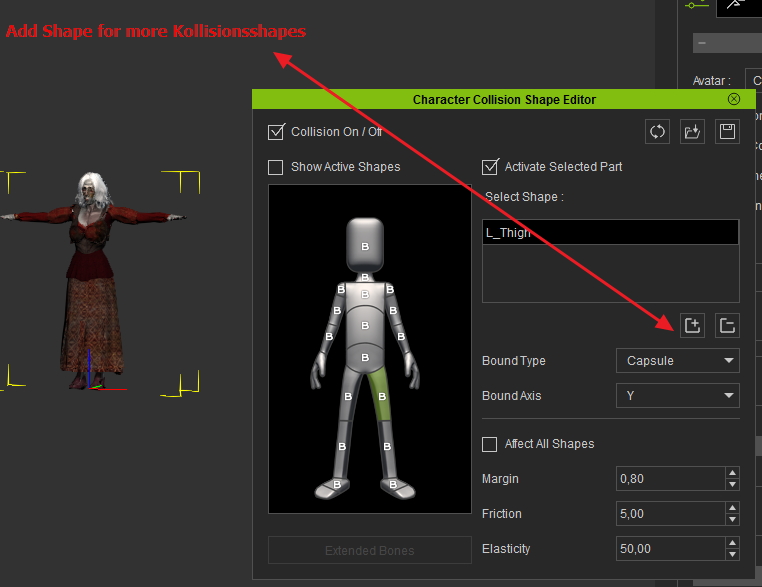
Or mostly you what different?
Greetings from Germany
|
|
By animagic - 10 Years Ago
|
|
@Postfrosch: Thanks for confirming. I know they can be added; the other option I gave is to save the settings for a complete set of collision shapes and then load them for CC characters.
|