|
By RagingKylo - 10 Years Ago
|
|
When I drag the Genesis2_Female_iCloneFaceKey to the face of Genesis 2 Base Female, it shows "Preset Exceed Limits" message. I turn the limits off and export that to 3dXchange, adjust the T-pose, then apply it to iClone 6, the facial expression is really weird. How does this "Preset Exceed Limits" come? Nobody else ever encounter that error. Any suggestion will be appreciated!! By the way, I use Daz Studio 4.9 and followed the video Reallusion posted step by step.
|
|
By ToKoMotion - 10 Years Ago
|
Hi. First of all "Thanks" for your comment and sub on my YouTube channel. Really appreciate it.:).
As I haven't worked with Genesis 2 in iClone for a long time now I have tested the issue you described and also recognized some incorrect Facial expressions. Don't really know why this happens, but I would suggest to adjust some sliders manually in 3DXchange by using the Expression Editor.
For example the "Oh" mouth shape looked a bit weird, but I could fix it by reducing the "Genesis2Female.VSMOW" slider to a value of "30" and setting the "head.PHMMouthOpen" to "0".
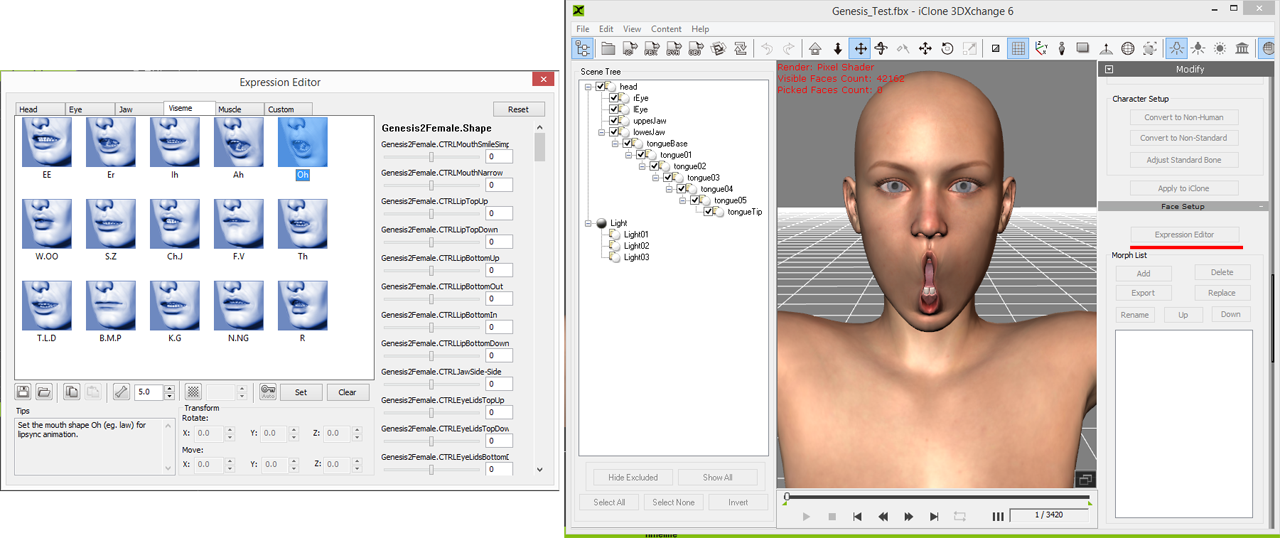
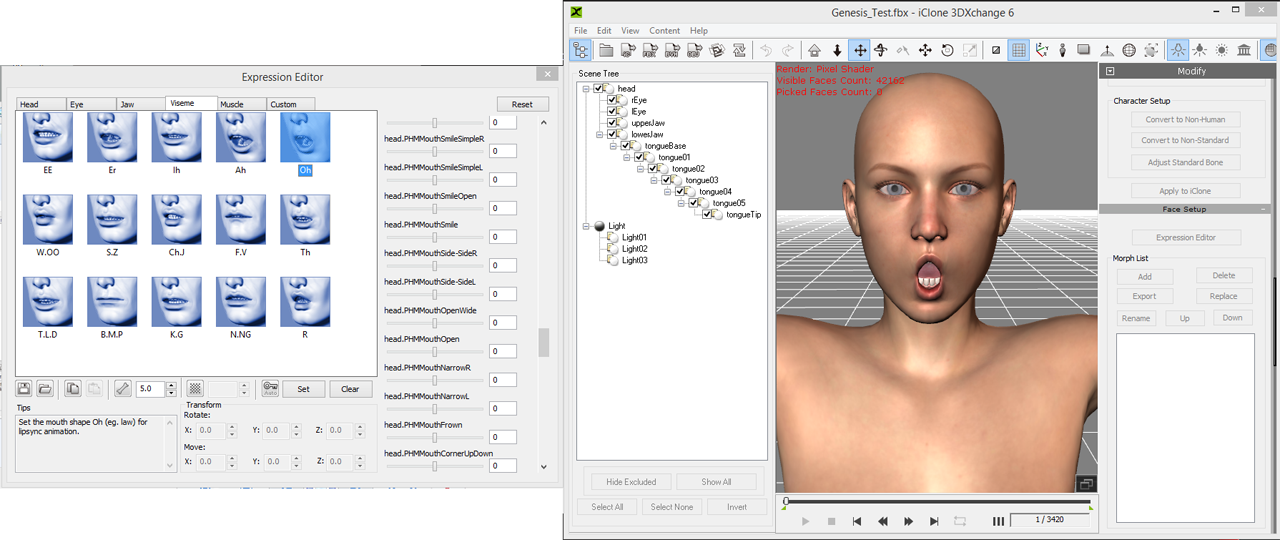
Hope that helps. Let's see if someone else has an idea for an easier solution.
|
|
By RagingKylo - 10 Years Ago
|
|
Thx 4 ur suggestion, I really appreciate it, though I can't say "problem solved". By Adjusting parameters in expression editor I fixed some weird morphs. O shape is OK but some other shapes still need to be modified. I feel frustrated 'cause I have to modify them every time I load a new G2 character. And I just wanna know: when you drag the G2 iCloneFaceKey to G2 characters, did you get the "Preset Exceed Limits" message? Hope you'll post more awesome iClone tutorials, I've learned a lot from them.Thanks a billion!
|
|
By Skuzzlebutt - 10 Years Ago
|
after you "fix" a set of visemes (all of them)
save it in the expression editor with a unique name.
|
|
By RagingKylo - 10 Years Ago
|
|
got it! I see the "save profile" button at bottom left. Thx budbundy, you're a great mentor. Also thx to ToKoMotion for the solution. But I still don't understand why the video posted by Reallusion and others don't have "Preset Exceed Limits" issue.
|
|
By Skuzzlebutt - 10 Years Ago
|
who knows? perhaps when they made the video tutorial they were not aware of it.
when i first downloaded the file it worked fine and
in some rare cases there will be no bug.
.
|
|
By ToKoMotion - 10 Years Ago
|
|
Yes, I also got the "Preset Exceed Limits" message. Never recognized it before, but mainly because I usually worked with Genesis 1 characters and it hasn't such a problem. And "Thanks" budbundy for the additional tip with the profile saving - very important:)!
|
|
By Skuzzlebutt - 10 Years Ago
|
just a heads up, the 3dx profile is also doing this sometimes
some bones come in with the wrong mapping.
again fix it and save a unique copy...
|
|
By Snarp Farkle - 10 Years Ago
|
I stopped using the G2 iClone duf file a while ago but I never saw that error when I did use it. The problems I had were related to adding some emotions to the timeline before or after I used the duf file, along with the messed up bones in 3DX it seemed futile to keep using it if I had to fix each bone and item in the profile anyways. One drawback is the iClone duf also adds little tweaks to the visemes and the muscle settings, here's an example of the viseme EE that uses a few tweaks to get a nicer expression with it too. All you need to do is note down the settings for each one then you can use these settings for the G3's also and save the profile.
|
|
By RagingKylo - 10 Years Ago
|
|
I thought I was the only one has problem with Duf file, now it seems lots of veteran users have it too. Thx 4 ur suggestions!It's very helpful! I used to use Maya for the animation work, now I switch to iClone, I don't know how to set keyframes in iClone, or create loop animation. When I apply the premade animations to a selected character, all the animations start from the initial position and not follow the end position of previous one. How can I fix it?
|
|
By Snarp Farkle - 10 Years Ago
|
|
RagingKylo (5/9/2016)
I thought I was the only one has problem with Duf file, now it seems lots of veteran users have it too. Thx 4 ur suggestions!It's very helpful! I used to use Maya for the animation work, now I switch to iClone, I don't know how to set keyframes in iClone, or create loop animation. When I apply the premade animations to a selected character, all the animations start from the initial position and not follow the end position of previous one. How can I fix it?
The CloneFacekey for Genesis 1 is the only one that worked correctly, I manually set each key frame in the DAZ timeline for my use now.
There are a lot of tutorials on key framing and animation in iClone [HERE] It's easier than you might think and subscribing to the Reallusion Channel would be beneficial. :)
|
|
By RagingKylo - 10 Years Ago
|
|
Thxxxx! I watched some of the tutorials, yes, it's not that hard compared to the steep learning curve of Maya. THANK YOU!
|
|
By RagingKylo - 10 Years Ago
|
|
Thxxxx! I watched some of the tutorials, yes, it's not that hard compared to the steep learning curve of Maya. THANK YOU!
|
|
By RagingKylo - 10 Years Ago
|
|
Thxxxx! I watched some of the tutorials, yes, it's not that hard compared to the steep learning curve of Maya. THANK YOU!
|