|
By pumeco - 10 Years Ago
|
It's no good, I can't stand it any longer ... does anyone know if they added a way to change the Up-Axis in Blender?
They added a way to use left mouse to select, which is great, but I'm still struggling with that idiotic Z-is-up arrangement. Is there any way I can change it so that Y is the up axis and the colours of the axis are as follows :
RED=X
GREEN=Y
BLUE=Z
It might not sound like a biggie, but I just cannot get used to the way they have it as default. It's completely wrong cause in 2D X is always horizontal and Y is always vertical. Add a third axis to that and you get Z, which should be lateral, not vertical. Vertical was taken by Y long before 3D programs even existed. The colouring should follow the default RGB too, meaning RGB = XYZ, not RGB=XZY (it even sounds backward). FFFFFFFFF ... I cannot tell you how irritating it is to have to deal with that all the time, it slows me down like you would not believe, it's so bloody ridiculously I cannot find a word suitable for it. iClone works like that too. I don't know where they get these ideas from, it's totally backward, seriously frustrating and clearly wrong.
It's the biggest pain in the arse I face every time I use iClone and it's an even bigger pain in the arse using Blender due to it being a modeler. I'd enjoy learning it so much better if I wasn't constantly struggling with this idiotic crap every freaking time I move something. If anyone knows how to change it, pleeeeeeeeease tell me before I go completely insane!
|
|
By urbanlamb - 10 Years Ago
|
i have never changed it but if there is a way its under user preferances and just "save user preferances" you can change just about anything in blender never thought about the axis cause its actually fine for 3d .Change to user preferances and click away, but its a 3d program so its got 3 axis not 2 so its actually quite fine the way it is lol. Just export your model to comply and set the axis then and upon import do the same thing.
Also check you can change to 3dsmax or maya interface conventions if you like.
|
|
By urbanlamb - 10 Years Ago
|
just gonna add I think your problem is your not thinking in 3 dimensions so your going to need to get used to that. When your going to do rigging and animating if you get that far you will need the z axis facing updown or your going to have troubles.
Anyhow I present to you 3 screenshots in orthographic view. The Z axis needs to be somewhere though. The x,y.z colours are set already to what you ask by the software. I think your problem is not being used to creating things in a 3D space.
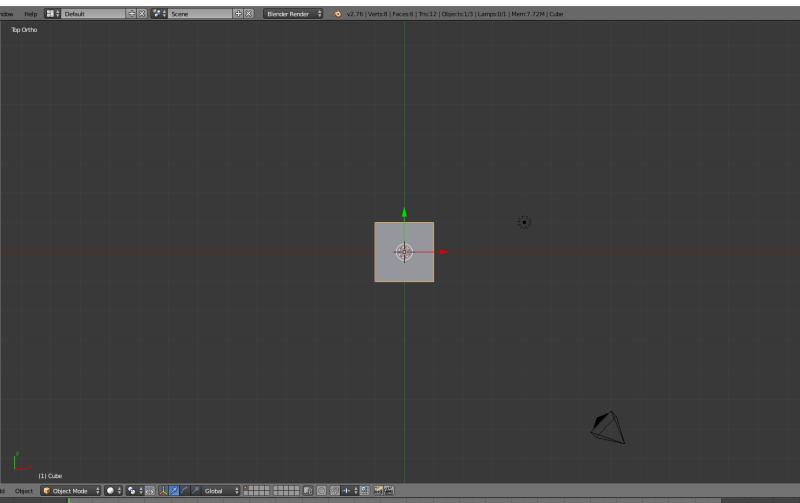
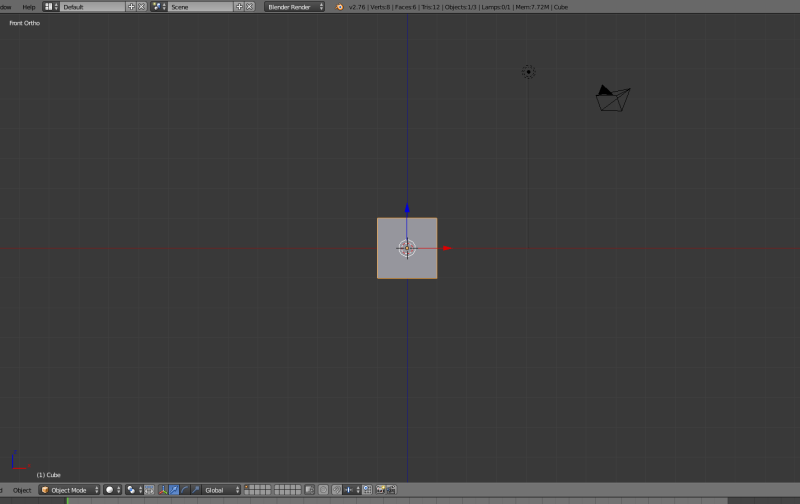
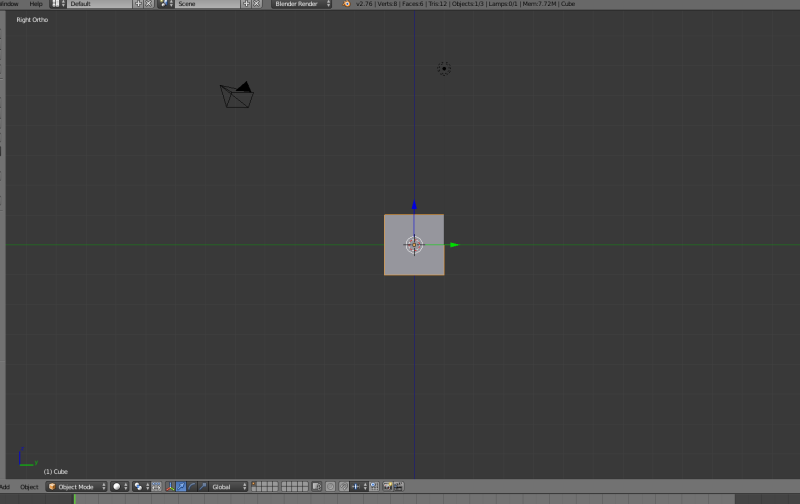
|
|
By pumeco - 10 Years Ago
|
Cheers urbanlamb, and yup, it seems you can customize absolutely everything in Blender apart from the biggie, the bloody axis!
Since I was 14, maybe 15 years old I've been into design, it was a natural progression from the enjoyment if drawing, and it's pretty much set in stone that X is Horizontal and Y is Vertical. That's your basic 2D axis system right there, and the same is used even when drawing 3D objects in 2D space. So when 3D programs came along you needed to represent that third axis, that third axis is obviously going to be Z, not Y.
- The RGB colour system has always been used to represent the three axis, and R is always the first colour, G the second, and B the third (we know it as RGB).
- The axis are derived from the alphabet, and the final letters of the alphabet are in the order XYZ
- X has always been horizontal in 2D
- Y has always been vertical in 2D
- Z is the third axis, not the second.
RGB=XYZ and it always will be unless your program is designed with a backward axis system (like Blender and iClone is). Neither of them are following the basic axis system correctly. Every program I've ever used, whether it be 2D or 3D uses the correct system of RGB=XYZ. The only two programs I have that don't follow this system, are Blender and iClone. I've been using iClone and Blender for what must be seven, maybe eight years now, and nothing has changed. I cannot get used to it because it's wrong. It's like asking me to accept walking upside down on my hands instead of my feet. I can't (and won't) reprogram my brain to work in a backward fashion just because the people responsible for these mistakes haven't sorted them. I did request a preferences option for iClone so that we can choose which axis system we prefer, but whether they will add it, I haven't a clue. Apparently others here have asked for it long ago and quite a few times over the years, but it still hasn't arrived.
As for Blender, the first thing I do every time I download a new version is to check the preferences to see if they added a way to correct the axis, but I've never seen anything, not under any preferences tab.
|
|
By urbanlamb - 10 Years Ago
|
they are using the same colours you posted. Its 3d and the axis are fine :)
Its your spacial awareness that is the issue here I hate to say. The axis indeed are correct and also use the universal colour coding system you speak of.
|
|
By Rampa - 10 Years Ago
|
Take your painting off your easel, and lay flat on your desk.
;)
|
|
By animagic - 10 Years Ago
|
We had a discussion about this some time ago... One clue is the Z buffer, which is related to depth and is always called a Z buffer! :P
The again, if you think of coordinates in space, you have latitude (X), longitude (Y), and height (Z) as described here: http://www.oc.nps.edu/oc2902w/coord/llhxyz.htm. I suppose the reasoning here is that the primary coordinates are represented by X and Y, whatever you choose them to be.
Interesting though that Blender uses the same convention as iClone.
|
|
By pumeco - 10 Years Ago
|
@Urbanlamb
I think you're misinterpreting the problem slightly. Sure, they have the colour assignments correct, but that alone should tell you how important "correct" is.
- They've assigned Red to X ... brilliant!
- They've assigned Green to Y ... brilliant!
- They've assigned Blue to Z ... Brilliant!
It's all good in that respect simply because it's correct and in order, meaning RGB=XYZ ... brilliant!
The problem though, is that X is supposed to be horizontal, Y is supposed to be vertical, and Z is supposed to be lateral - but that's not what Blender does though :
- They have assigned Y (which we know is Green) to Lateral
- They have assigned Z (which is Blue) to Vertical
Now lets compare and it will become obvious which is the correct system :
- The right way is 123 ... XYZ ... RGB
- The wrong way is 132 ... XZY ... RGB
As demonstrated, the only part they have right is the use of RGB, the rest is backward. The web is littered with people complaining about this, believe me I'm not the only one. Just seach for "Blender Y is up" or other similar terms and you'll see why this backward system is such a pain in the arse for people who are used to using the correct system. There is no doubt whatsoever that the system they are using is wrong, it's flipped, left-handed or whatever.
@Rampa
LMAO, yeah, either that or maybe superglue myself to the ceiling and spin my head around 180 degrees, sort of exorcist-like :Wow::D
@Job
I know, typical isn't it, the two 3D programs I use most, both have a backward axis system with no way for people to work the right way (not even as an option) :crazy:
It's really maddening ... oh hang on ... I think I feel a moment of madness coming ... please stand clear ...

@sw00000p
Trust me I do want to change the axis, the way they have it is wrong!!!
And doing the Import/Export thing is a pain in the arse, shouldn't have to do that :Wow:
|
|
By Rampa - 10 Years Ago
|
I meant lay your painting flat on your desk. Now which axis is up?
It is based on real-world stuff. Easel vs drafting table.
The grid in Blender's perspective view is your paper.
|
|
By justaviking - 10 Years Ago
|
This same issue sort of freaked me out when I first got exposed to manufacturing coordinate systems.
As someone used to looking at X-Y plots, Y was "up" on the page.
When operating a milling machine, the drawing is on the machining table, so the X-Y plane is parallel to the floor. Thus "Z" comes "up" out of the drawing. Z points up from the floor to the ceiling.
As Job said, lay your easel on the floor.
Or more simply... get used to it. (Sorry.)
|
|
By pumeco - 10 Years Ago
|
@Rampa
It's all relative though, and that would mean working with a vertical floor in Blender!
@sw00000p
Is Maya wrong? ... yes it is!
It's not about what I think is right, it's about what is right. One of the first things you should have been tought in school Technical Drawing class is about the basic 2D Axis.
- X is Horizontal.
- Y is Vertical.
If you need a third axis for 3D work, then you add the third axis, that third Axis is called Z (used to represent depth).
I don't care whether some industry standard nutjob decided to use a different system to the one taught worldwide ... IT IS WRONG.
- X is the Horizontal 1st Axis
- Y is the Vertical 2nd Axis
- Z is the Lateral 3rd Axis
You have never, ever, been taught about a two-axis system where X is Horizontal and Z is Vertical - it is ALWAYS taught that X is Horizontal and Y is Vertical.
If you have been taught otherwise, then the teacher should be booted-out and sent beck to school themself.
Worldwide accepted conventions do not change just because some idiot making decisions thinks the accepted ways should be changed to suit them.
- X is Horizontal (The First Axis)
- Y is Vertical (The Second Axis)
- Z is Lateral (The Third Axis) ... and take a guess why they call that 3rd Axis the Z (or Depth) Buffer?
Exactly ... it is because the Z-Axis is supposed to be the freaking depth (in other words, the lateral axis).
Like I said, do some Googling and you'll soon discover what a farce this stuff is, believe me, I'm not the only one it drives to insanity :Wow:
@Dennis
Can't get used to it (and don't want to anyway), been at it for years!
|
|
By RobertoColombo - 10 Years Ago
|
Hi Pumeco,
actually, if you think about how 3D geometry is teached, the Z axis is up.
I get very comfortable with it, because that´s how I studied geometry at the university.
Also, it seems wikipedia is also aligned with Blender: https://en.wikipedia.org/wiki/Cartesian_coordinate_system ;)
Btw, if you are more familiar with 2D, just use Blender orthogonal front/side views, then the Y axis will point up.
Moreover, I think that, in Blender, once you export something (e.g. to .obj), you can reassign the axis orientation.
Cheers
Roberto
|
|
By pumeco - 10 Years Ago
|
@sw00000p
And what's the big deal then, why is it so freaking hard to implement a bloody Axis Preferences option so that those of use who were taught right, can work right?
I'm not kidding when I say this, I wouldn't have looked twice at Blender if it were a paid product due to this nonsense, cause it's awesomness cannot outweigh the sheer frustration of using a backward Axis system. The problem is even if I use only blender for a while and get even slightly used to it, everything gets reset again as soon as I use another program that does it the correct way. And let me tell you something about "PRO" tools, sw00000p. One of the most important factors of a PRO tool is to be extremely well designed and highly customisable. PRO tools are generally something you work with a lot, so they need to be comfortable to work with. Blender is failing in that department, cause it seems you can customise everyting but the bloody axis - something that is involved in everything you do in 3D.
@Roberto
Yes, the coordinate system you describe is correct. The problem is how they're aligning that coordinate system to the 3D axis in some of the 3D programs. If you look at that page you pointed out under the "Two Dimensions" section, you will see that indeed X is always horizontal and Y is always vertical. Like I said, Y is always Vertical and there is no need for that to change just because you add the third axis known as Z. As soon as you move into 3D, you add that Z axis. So I fully understand how that coordinate system works, it's the implementation in some software products that is wrong.
- Think of a car as an object, look at it from the front. You're looking into the headlights because the headlights are on the front of the car, not on the top.
- Look at a full-frontal nude, so-called cause you're looking at her from the front, not from the top.
- Look at your TV from the front, the front is the part with the screen on it unless you prefer to look at the top of your TV while being stuck to the ceiling.
So with that understood, take a peice of paper and draw the basic X and Y axis in the bottom left corner of the page, label them X and Y.
- Draw the front of a car.
- Draw the front of a woman.
- Draw the front of your TV.
With that understood, take a look at each drawing and tell me which axis is the vertical one, is it Y or is it Z?
Exactly, you only have two axis, so X was Horizontal and Y was vertical (in other words, Y is always Vertical).
So if X is Horizontal and Y is Vertical, then obviously Z is meant to be lateral. Z is the depth of those objects, meaning the third axis is Z, not Y, cause Y is already assigned to be vertical. Like I said, I'm not debating the Cartesian system, it's as correct as it always has been. The problem is that some software developers are implementing it with the X axis rotated on it's back. This works well for things like CNC, sure, but it's wrong to expect the designer to work backward just to accomodate a machine. The right way to do it is to use the proper way and simply rotate the model on it's X axis when you're done with it. Humans aren't meant to work for the convenience of machines, machines are meant to work for the of convenience humans.
- Blender, iClone, and Maya get a big thumbs down for implementing the system incorrectly.
- Bryce, Lightwave3D, Poser, and WIngs3D get a big thumbs up for implementing the system correctly.
|
|
By mark - 10 Years Ago
|
..add Lightwave 3D as correct as well!;)
|
|
By pumeco - 10 Years Ago
|
Thanks Mark, added Lightwave3D to the correct implementations bit :D
|
|
By urbanlamb - 10 Years Ago
|
z is depth in blender I dont know where your seeing otherwise. If you look from the top down you only see the x and y axis you and the depth is not really visible if you look at it on a side view you see the z depth axis. I dont know where your seeing its wrong showed you a top down orhtographic view and you only see x,y.
As others say take your paper and stick it on the floor and imagine the z axis shooting out the top. That is the exact view in the first photo I showed you of a top down ortho view. The other two were side ortho views and indeed you saw the the z axis pointing up.
|
|
By pumeco - 10 Years Ago
|
@Urbanlamb
I can't explain it any easier than I have already, the explanation I gave to Roberto was as good as I can get it, but to lessen any chance of confusion, look at it in use :
- Load Blender and add a Cube
- Go to the numerical input boxes for the Scale of the Cube
- Remember X and Y are supposed to be Horizontal and Vertical
- Let's make the Cube wider, so enter a larger number into the X Scale to make it wider, and it will work, the Cube will get wider because X is the Horizontal axis.
- Let's make the Cube taller, so enter a larger number into the Y Scale to make it taller, and it will not work, the cube will get longer instead of taller because Blender uses the Height axis (Y) as depth.
@sw00000p
Exactly, GREED, which in my opinion is designed to get people used to it so that the very effect I'm complaining about, keeps users from using other systems. So yes, possibly GREED in the case of Maya, but not Blender, Blender is free and should offer the option to change this for the sanity of users that are used to using the correct system. That's all I was wanting to know, whether there is a way to change it yet. The answer still seems to be no, apparently not. iClone hasn't implemented it out of greed, either. My suspicion is that the coders being either Max or Maya users simply chose that system cause it's what they're use to working with, it stuck, so now iClone has also ended-up with a tits-up axis system thanks to the influence of the backward axis system they were used to working with.
So you see, it's wrong, you know it's wrong. Maya won't change it, no, but I couldn't care less cause I don't and never will use Maya. iClone might give us an option I suppose, and Blender will fix it eventually. Those programs with the wrong system are in the minority, not the majority, and it's just another epic example of how bad "Industry Standard" influence is. All programs with the backward system, could and should offer the user a way of working the correct way (unless they do it out of greed). What you need to remember is that masses of people (especially designers) who are used to working the right way will simply uninstall any software that uses a backward axis system as soon as they try it, they'll simply point-blank refuse to use it (and that's exactly what they should do). I've done that a few times myself over the years, even with Blender way back.
So no, I won't get used to it, I have no intention of doing so. I've been into design my whole adult life and won't be changing my habits because some dumbass greed machine had influnece over developers who likely aren't even aware that the system is wrong. I'm not even going to try getting used to it, I'd rather switch to the majority that do it the right way - and will be doing so with Blender if they don't fix that crap pretty soon. Blender cost me nothing, so I'd lose nothing if I stopped using it (and I much prefer traditional media over 3D anyway). 3D is just a hobby to me.
|
|
By RobertoColombo - 10 Years Ago
|
Pumeco,
think about this: luckily we live in a Universe where we can understand only 3 coordinates (let's keep Einstein's theory out for this time...).
Imagine we were living in one of those 9-dimension Universes, mathematically conceived by Stephen Hawkins in his books: such a mess!! 9 coordinates to align in those alien's 9D software....!!
Think about this and... be happy :D :P
Cheers
Roberto
|
|
By primaveranz - 10 Years Ago
|
|
pumeco (4/14/2016)
- Draw the front of a car.
- Draw the front of a woman.
- Draw the front of your TV.
And then hang the picture on the wall ;)
|
|
By urbanlamb - 10 Years Ago
|
|
pumeco (4/14/2016)
@Urbanlamb
I can't explain it any easier than I have already, the explanation I gave to Roberto was as good as I can get it, but to lessen any chance of confusion, look at it in use :
- Load Blender and add a Cube
- Go to the numerical input boxes for the Scale of the Cube
- Remember X and Y are supposed to be Horizontal and Vertical
- Let's make the Cube wider, so enter a larger number into the X Scale to make it wider, and it will work, the Cube will get wider because X is the Horizontal axis.
- Let's make the Cube taller, so enter a larger number into the Y Scale to make it taller, and it will not work, the cube will get longer instead of taller because Blender uses the Height axis (Y) as depth.
Yes I am sorry this is your 2d perception getting in the way. There is no fix for this inside blender :D
|
|
By pumeco - 10 Years Ago
|
@Roberto
You crazy Italian ... but I forgive you cause you're from the homeland of Lamborghini, Italian Babes, Fine Design, Dario Argento and Giallo Movies in general :D
@Prima
Yes, and that would still be the right way up :laugh:
@Urbanlamb
You're just teasing, say it ain't true :D
|
|
By Rampa - 10 Years Ago
|
|
Nobody tell him about local space! ;)
|
|
By pumeco - 10 Years Ago
|
Makes no difference, all it does is tilt the axis to local space, but the axis still behaves in the same manner.
Did Rampa run out of coffee today? :D
I should contact Ton Roosendaal, I should tell him, I should say Hey Ton, how about you make Ms Blender behave herself?
She's giving me axis-agro, I'll have to ditch her if it doesn't stop - she's driving me insane!!!
If I had the money I'd commission it to be fixed myself :Wow:
|
|
By Rampa - 10 Years Ago
|
|
Mmmmm.... Coffee. The proper number of coffees to have is the same as the proper number of bicycles to have, n+1.
|
|
By urbanlamb - 10 Years Ago
|
your gonna hate me but here "rotational order" this will not change the fact that z is "up" and not y or whatever but maybe it will help your perpective issues or make it worse but anyhow here does that look better?
press "n" or the + key on the right hand side of the view window and choose your order.
on a side note you know it doens't matter which way your orient yourself when modelling something as long as your happy with "which end is up" you can always change it to whatever you like at the end.... I think blender is too logical for many its really "not that hard" :blush:

|
|
By pumeco - 10 Years Ago
|
Urbanlamb, I have not got an issue with 2D perception, nor do I have trouble with logic, I'm a master of logic. This goes hand in hand with being a psycho and makes me super-intelligent. In addition to that, I have been into design for over 20 years, I'm exceptionallly skilled at it and happen to know that X and Y are Horizontal and Vertical - because that's what it always has been.
Saying that Blender is logical is unfortunatley wrong :
- Logical is 123
- Logical is XYZ
- Logical is RGB
Illogical is what Blender is, what Maya is, and what iClone is, they're illogical because :
- Illogical is 132
- Illogical is XZY
I'm sorry you can't grasp that simple logic, and that illogical things are fine with you, I don't know how you do it, it's amazing :D
I'm sorry to have to tell you this but I've been programmed with perfectly correct logic, I can't lie to myself and pretend illogical things are logical, cause I know that they're not. Here's a video which demonstrates why I can't get along with a tits-up axis system. Unlike Kryten, I can lie, but just like Kryten I can't (and won't) reprogram my brain to appease illogical design flaws :
https://www.youtube.com/watch?v=oB-NnVpvQ78
|
|
By urbanlamb - 10 Years Ago
|
did you check the tab that i put in the screenshot? . Anyhow the info is there. to change the rotational axis .... use it or not. ...
or go find another piece of software.
Truly if i was so rigid in my requirments for tools I would have had a heart attack long ago. Things work the way they do and not everything works the same way.
In europe a lot of people drive on the side of the road that is not the same side that they do in north america. IN each case things are quite logical although in reality both systems are backwards to each other and rather.... not identical. You learn to adapt to different systems of thinking. Neither system is "wrong" and both systems are "right". There is no reason for blender to change because there is nothing wrong with how it works!
Anyhow done with this thread....
|
|
By animagic - 10 Years Ago
|
To get it from the horse's mouth: Apparently you can switch in Maya between Y-up and Z-up. Both are considered legit, according to the bolded quote below.
3D coordinates To determine the location of points, we first establish an arbitrary point in space as the origin. We can then say a point’s location is so many units left (or right) of the origin, so many units up (or down) from the origin, and so many units higher (or lower) than the origin. These three numbers give us the 3D coordinates of the point in space. For example, a point 7 units right (x), 4 units down (z), and 3 units above (y) the origin has the XYZ coordinates (7,4,3). To specify points on the opposite side of the origin, we use negative numbers. In the example, a point at (-5, -2, -1) would be 5 units left of the origin, 2 units up, and 1 unit below. In computer graphics, we don’t really say the point is “left/right”, “up/down”, or “higher/lower”. Instead we call the three dimensions the X axis, the Z axis, and the Y axis. Y-up and Z-up In animation and visual effects, the tradition is to use Y as the “up” or elevation axis, with X and Z as the “ground” axes. However, some other industries traditionally use Z as the up axis and X and Y as the ground axes. Maya lets you switch the up axis between Y and Z. Select Window > Settings/Preferences > Preferences, then click Settings in the list on the left. |
|
By pumeco - 10 Years Ago
|
@Urbanlamb
I'm not about to have a heart attack, lol, I'm just pointing it out in a fashion that really gets the point across (and it looks like it worked)!
Thanks for the rotation order suggestion, you must know I appreciate your help with Blender, and of course I tried it, and I can't imagine what makes you think I woudn't try it, but it's for rotation order so it won't actually change the rotation of the axis to the correct direction. You tell me to use it or not or find another peice of software, well yes, that's exactly what will happen if they don't fix it, but I'd rather not. Getting used to the axis being the wrong way is doeable, but the problem is as soon as I use another program that does it right, it all gets reset. Users of these packages shouldn't have to put up wilth nonsense like that, they should all be the same. I'm taught the right way and I'm not changing it because some clown, somewhere along the line, had too much influence and screwed it all up.
So yes, Blender will add the option or I'll stop using Blender, and the same could even be true of iClone depending on how the alternatives develop. The only reason iClone is a bit more bearable is because it's not a modeler, but for me, modeling with a tits-up axis is just beyond the joke. And like I said, I'm not the only one this nonsense pisses-off, you should Google and you'll find more stuff than you'll even have time to read. It's a pain in the arse to those of use who are used to working the right way, and we shouldn't need to ask to be abe to work the right way, it should be a given. As demonstrated in the video, it's a banana, it always was a banana and always will be a banana!
Y is vertical, it always was Vertical and always will be Vertical.
And I have to ask, did you follow the example (at least in your head) that I gave Roberto?
If you did, then you know that Blender is using the wrong system.
@Job
Thanks for that, I'm guessing everyone who was taught right (meaning everyone who had a teacher knowing the difference between Y and Z), got pissed off, and constantly kept hounding them about it, so much so they were forced to allow a way to change it in Maya's preferences. Either way, we need such an option in Blender and iClone, and in any other program that uses that dumb tits-up axis system.
|
|
By pumeco - 10 Years Ago
|
@Urbanlamb
BTW, check out that line at the bottom of Jobs post, even in their own words, that tells you the recognised way to do it is with Y as the Vertical axis :D
So there :P;)
Quote :
"In animation and visual effects, the tradition is to use Y as the “up” or elevation axis, with X and Z as the “ground” axes. However, some other industries traditionally use Z as the up axis and X and Y as the ground axes."
So you see the problem there? ... by their own admission they used a system that is NOT traditionally used in 3D software, but rather "some other industries".
Like I said, don't worship "Industry Standard" as if it's something good or automatically correct, cause more often than not, it's bad news and corporate manipulation.
Yours truly,
- pumeco (part of the super-intelligent line of beings)
|
|
By pumeco - 10 Years Ago
|
- Blender will fix it eventually cause they cannot stop those with the resources to do so from doing it, it's open source in case you forgot.
- By their own admission, the Maya developers implemented the wrong system, read the quote direct from their own mouth and live with it!
You're just pissed-off cause it has now been proven that they ARE using the wrong system, extra embarrasing for them considering they're dumb enough to admit it on their own website :laugh:
READ IT AND WEEP >>> They admit they used a system that is designed for "some other industries" not the one designed for 3D.
Now go cry to mama, beg her for forgiveness, and promise her you'll at least try to improve :D
And look on the bright side, you actually learned something today!
Yours truly,
- pumeco (part of the super-intelligent line of beings) :Whistling:
|
|
By urbanlamb - 10 Years Ago
|
one last time "go look at the photo to switch the rotational axis" , but as I said "I give up" your not really interested in just learning these threads are posted just to rant. Blender has a maya set up as well (as I told you already at the beginning of the thread) but this is not about learning its about ranting so rant on. I told you initially go into user preferances they have a maya set up and a 3dsmax one. I then posted photos to show you the orthographic view and then I posted a photo to show you the button on the side of the screen to change the rotational axis and there is a list of about 10 different variations.
Do it or dont, but I do not think your threads are about learning or adapting to software they are for ranting which I really dont have an interest in.
...Of course all that info I posted I learned myself I didnt ask anyone I went and looked in the manual and learned it. I have yet to rant about any software. I prefer to spend my time constructively learning how to do things.
So "do it or dont" i dont care. If you dont like how blender works go use something else.
|
|
By pumeco - 10 Years Ago
|
Urbanlamb
If you're not prepared to read properly, there's nothing I can do about that, I am writing in English here. I tried what you said and it doesn't work, how many more times, it's not the same thing, and I don't want the damn thing to work like Max or Maya either. If you're going to get emotional about it, fine, but it doesn't help.
And I don't know why you keep repeating "if you don't like it go use another program". Yes I heard you the first time and don't need you to point that out to me, I've already replied to that with the answer, yes, that's exactly what will happen if it doesn't get fixed. No matter how many times you repeat it, you won't effect my decision to do so. I shall decide if and when to ditch Blender, I'll probably speak to Ton Roosendaal first, just to get an idea of the chances of it happening. I don't want to ditch Blender but I will if necessary, I'm not going to be slowed down having to constantly correct wrong moves all the time, just because the axis system is incorrect.
The thread was a request to find out if it can be changed, so calm down. It's not my fault if you have a problem coming to terms with the fact that you're used to an incorrectly designed system and weren't even aweare of it. The fact is you are whether you like it or not, so deal with it. Bear in mind that other people aren't as malleable as you are - the web is full of correctly taught people like myself who won't stand for that crap. The axis is tits-up for a 3D animation and modeling tool, and that is that. It goes completely against worldwide conventions for 3D work, so yeah, you could call it a rant if you want, a perfectly understandable one. Blender is a 3D modeling and Animation tool, not a specialised CNC suite. So does that answer your question?
Looking at the way you respond, I'm beginning to think you might be having one of those female mood swings or whatever women have, so we'll leave it at that.
Please vacate the thread if you find you're getting too emotional, but thanks for the advice given :)
@sw00000p
You seem to be forgetting that it was YOU who started the Maya does it that way out of GREED, not me - you're crumbling man, I can see the dust :Whistling:
Still, I totally understand with you being an "Industry Standard" sort of person, that this must all be a bit too much for you to come to terms with, but here's something to cheer you up - and I just know you'll love it :w00t:
http://www.cafepress.co.uk/mf/99672420/i-love-max_tshirt?productId=1603646056
:Wow::Wow::Wow:
|
|
By pumeco - 10 Years Ago
|
Did you like the T-Shirt? :w00t:
And yes, exactly, it's only a recent addition to Maya, and do you know why it's only a recent addition to Maya?
It's cause of the sheer masses of correctly taught people like me, hammering them with hatemail and telling them to sort their crap out or they'll ditch the program :Wow:
Now go tell your mama you're sorry, and don't ever do it again :D
|
|
By pumeco - 10 Years Ago
|
No.
|
|
By pumeco - 10 Years Ago
|
Oh no you won't, I have no interest in learning a backward system :Wow:
Anyway, time for your bedtime story I think, so here we go kiddies ...
Once upon a time, in a land far, far away, there lived a sw00000p.
People had often heard about him, but only Max users can see him.
Some say that if you close your eyes and think of Max, he leaves coins under your pillow to buy sweeties!
Others say that if you chant Max three times, he'll appear in front of you and talk about Max for exactly one hour.
Experts say he's the product of industry standard influences and that there's no hope of curing him.
Others say he's merely a figment of people's imagination.
Some say he's real and that they've seen him on the Reallusion forum, but one thing is certain ...
A sw00000p is unique, capable of living in it's own world of fantasy, and for that reason alone, has become the stuff of legends!
Now go to sleep ...
|
|
By pumeco - 10 Years Ago
|
You really want to know?
It was a cube.
|
|
By pumeco - 10 Years Ago
|
* pumeco shakes hands with sw00000p *
|
|
By mark - 10 Years Ago
|
...and both retire to their separate corners :P:P:P
|
|
By pumeco - 10 Years Ago
|
I thought I was seeing things, but no, it really happened :w00t:
|
|
By pumeco - 10 Years Ago
|
Well sw00000p, I just can't get used to it in Blender, that's a fact, and like I said, I don't want to get used to doing it the wrong way anyway. That said, there's no way I'm ditching my sexy Blender, so what I've done is changed the colour of her axis. Might sound like a weird thing to do but it does help because I think in terms of "RGB XYZ" (the right way). When I glance at something and want it to move upward, I know that's going to be Green for a Y axis. It's still listed in Blender as a Z axis, but it's Green now. I don't look at the letter, I just look at the colour. It's not ideal, for obvious reasons, and it doesn't stop the numerical input boxes being tits-up either, but it definitely helps a fair bit in some circumstances which is better than nothing.
They'll give us axis preferences in Blender sometime, I have no doubt about that (cause they'll have no choice eventually), but in the meantime that's what I'll have to do. But yeah, the sooner the Blender Foundation get to work on that one the better, cause the longer they leave it, the harder it will be to fix, and this issue is never going to go away. Now that Maya has the ability to work the right way, that puts Blender at a disadvantage for those who will only work the right way. They really need to fix it (and so do Reallusion for iClone).
|
|