|
By bluemidget666 - 9 Years Ago
|
Does anyone here have a good working knowlage of makehuman and blender ?
I have it a issue making targets for makehuman and so far not getting any reply to questions asked it the makehuman forum.
I can make targets but the eyes always mess things up anyone hit this ?
|
|
By duchess110 - 9 Years Ago
|
No knowledge on either blue but the eyes can cause problems in max also. Have a look through the manual there is a section about the eyes and the axis I always
after creating a character that then become a non standard is within iClone load a ball and get the eyes to look at that is a good way of testing if the axis is correct.
|
|
By Rampa - 9 Years Ago
|
Blender and Makehuman use a different bone rotation than Autodesk and RL. It seems to only be an issue for the eyes, when using a "look at" command. It is pretty easy to fix.
In Blender, select your skeleton and go into edit mode. Now grab the eye bones one at a time and rotate them so that the proper axis is facing straight out from the eye. If I recall Y is pointing straight out, and you want Z pointing straight out. When your done, the eye bones should extend out sideways instead of forward. It will now work correctly with "look at".
Blue, you might also want to look at ManueL lab. Very similar idea, but already in Blender.
http://www.manuelbastioni.com/
|
|
By bluemidget666 - 9 Years Ago
|
Thanks for the reply's that's what I love about this forum, I have been waiting 2 days in the makehuman forum and still nowt.
The issue is before I even get it ready to go into 3DX, I have edited a Makehuman mesh and want to turn that into a target but the eyes are not connected right or something.
The body targets right but the eyes do not.
I have read all I can find on the subject and actually fell asleep last night trawling through blender & makehuman tutorials.
I bet the info I need is there somewhere but unless someone from makehuman can point me in the right direction its like looking for a needle in a haystack,
Yeah I have looked at Manuel Bastioni Lab but it looks like its in need of some more development, makehuman though has come a long way over the last few months.
I just wish there forum was a bit livelier.
:)
|
|
By Rampa - 9 Years Ago
|
This person looks to be changing the eyes with their morph target. They have been active on the forum over there.
http://www.aversionofreality.com/blog/2015/11/16/makehuman-11-anime-style-custom-target-test
I have never tried, and probably never will, creating one for Makehuman.
|
|
By bluemidget666 - 9 Years Ago
|
That great thanks looks to cover what I'm trying to do.
the only reason I'm playing with makehuman is I can model in quads and make clothes fairly easy once I have the eye issue sorted.
|
|
By Colonel_Klink - 9 Years Ago
|
|
sw00000p (3/7/2016)
If you are not interested.....
Sorry to bother you!:crying:
"I will stop pestering others to learn more."
Kind Regards,
sw00000p:cool:
Keep pestering, sw00000p. If I could afford to hire you I'd have you as my personal tutor :)
|
|
By bluemidget666 - 9 Years Ago
|
If you are not interested.....
Sorry to bother you!
"I will stop pestering others to learn more."
-------------------------------------------------------------------------------------
Hang on what I miss
I really am interested in making my own characters and rigging them. I got 90% there with MH and was hoping to get a easy pipeline for fully rigged characters that are in quads (before getting into iclone)
This does not look like its going to happen so if I want to do this I am open to abandoning that rout and rig the character your way.
I am interested and your not bothering me.
SO where do I start :)
After saying that I need to get some sleep early start tomorrow.
But you will have my 100% attention tomorrow evening.
using this method will i be able to rig a mesh of my creation ?
So if your up for it, you take me through this in max then Ill worry about translating that to blender.
|
|
By bluemidget666 - 9 Years Ago
|
Ok sleeps out the window :)
I can export the MH mesh as a obj
Gona grab a coffee then start with this
I did some stuff in Max 5 but never skinning and used biped for the bones so totally new really
|
|
By bluemidget666 - 9 Years Ago
|
Right I am at the export stage and I can export it
decimeter
Meter
inch
Centimeter
which one ?
also I will post the exported mesh onto my google drive so we can work with the same mesh should issues arise.
is that ok
|
|
By bluemidget666 - 9 Years Ago
|
https://drive.google.com/drive/folders/0B2x7LTgD-Si8OUtaQzFpQ0ZEc0U
There ya go.
check make sure alls ok n ill load it up into max.
there metric btw in MH iv exported in cementers.
|
|
By bluemidget666 - 9 Years Ago
|
Err I loaded it into max ... when you do what do you see ?
I just get a outline, think its a materiel issue but no idea how to fix it
|
|
By bluemidget666 - 9 Years Ago
|
ok thats fine needed to fix a few things.
Why you need fbx ? max works with obj or do you need the character with rigging ?
https://drive.google.com/drive/folders/0B2x7LTgD-Si8ODFpNjFONUJ1WjA
|
|
By bluemidget666 - 9 Years Ago
|
https://drive.google.com/drive/folders/0B2x7LTgD-Si8ODFpNjFONUJ1WjA
here you go
|
|
By bluemidget666 - 9 Years Ago
|
You should have a fbx file in the folder https://drive.google.com/drive/folders/0B2x7LTgD-Si8ODFpNjFONUJ1WjA
https://drive.google.com/folderview?id=0B2x7LTgD-Si8OUtaQzFpQ0ZEc0U&usp=sharing or try this
|
|
By bluemidget666 - 9 Years Ago
|
Have you got it ?
|
|
By bluemidget666 - 9 Years Ago
|
Dude you still here ?
I have the model opened in 3dmax....
|
|
By bluemidget666 - 9 Years Ago
|
Its about 4am so gona go grab some kip, catch ya tomoz
|
|
By bluemidget666 - 9 Years Ago
|
|
Swoooop is there anybody out there ?
|
|
By Anaximander - 9 Years Ago
|
 Hello: Hello:
If you guys don't mind I would like to participate in this exercise and see what I can learn.
I'll be using Blender.
I'm not off to a very good start. This is what I get when I try to import the fbx into Blender.
Any suggestions?
|
|
By bluemidget666 - 9 Years Ago
|
Hi Swooop
this is my fault posting while tired, the issue with the eyes was way before I could get them in to Iclone
http://www.makehumancommunity.org/forum/viewtopic.php?f=6&t=13192 this will explain a bit better, the issue was morph target not working how I expected in blender.
So thanks for the vid , it will be very useful on the rout.
Did you have any issues with the FBX file and are you still up for showing me how to rig right :)
Anaximander would like to follow along as well if ok but the fbx I posted is giving issues in blender and I am getting this in Max

Also I did not export the model in a good t-pose so going to re do that. Or maybe not, i have a choice of 2 MH one is a nightly build and has a few more functions (like t-pose) but very few rigs. The stable version has many more rigs but no t-pose. I think finding the right rig will be the starting point.
|
|
By bluemidget666 - 9 Years Ago
|
That cool by me , the transfer from max to blender is a issue I have to deal with .
I'm ok with starting a rig from scratch blender is pretty much the same as for max.
I have a few family things to get done before I'm 100% with you but ill be on later eager to go 😎
|
|
By Rampa - 9 Years Ago
|
Blue, it's best to use MH 1.1, because of the t-pose, and the "default - no toes" skeleton. Yours truly got them to implement that skeleton. ;) :blush: Export as FBX, and import in Blender.. The eyes were never a problem when I did that way.
At defaults the shoulders will be a little to low in iClone, so angle the arms up a few degrees during characterizing. Previous to G6 avatars could have bones adjusted in iClone, but that's not the case with G6.
Although the facial bones are a-typical, they do work pretty well. I always just exported FBX directly from MH and imported into Blender. It is only the last face bone in the chain that has any effect on the mesh, but you may need to rotate the others to achieve all the permutations.
|
|
By bluemidget666 - 9 Years Ago
|
So the plan is to use the Rampa rig (cheer for that :)) that looks like this

Ill export this in t-pose fbx and the original MH 1.10 nightly file on the google drive.
once you have the files we can set about following you Swooop, ill be using Max but may be jumping to and fro with blender but the blender side isnt for you to worry about.
Is that a plan ?
Ok files are uploaded
@Anaximander
I have included the mhx2 file and that loads ok into blender but you will need to blender tools installed (I think you prob already do) and its from the nightly build.
and ill be back later .
|
|
By Rampa - 9 Years Ago
|
When you characterize, any bone you skip over is effectivly treated as part of the previous bone. So it looks like a crap-ton of bones, but that's not really an issue. You can adjust all those bones in 3DX for fine tuning if need be.
I think your after a higher poly-count for sculpting? There is a "smooth" in MH that basically doubles the poly-count, or you can apply a sub-division modifier in Blender. That will not mess anything up, in terms of skinning. Sw00000p can give the Max version of that modifier, as I don't have Max.
|
|
By urbanlamb - 9 Years Ago
|
nice except the "boob bones" as I call em those are the wierdest looking boob bones lol. I would extrude another bone set and put those at 90 degrees and the new ones pointing more forward like at a right angle to the reoriented boob bones that are wierd like that and then weight the boobs to the new bones. I am not a makehuman fan lol I just had to comment on those boob bones.
(yes I am highly technical but it all makes perfect sense to me and that is what counts) :)
|
|
By bluemidget666 - 9 Years Ago
|
Yeah I have used this rig before as it gave the best results but unfortunately had little to no weights around the chest area.
|
|
By bluemidget666 - 9 Years Ago
|
|
Yeah I just copied over what was there , so just re download em😉
|
|
By bluemidget666 - 9 Years Ago
|
nice except the "boob bones" as I call em those are the wierdest looking boob bones lol. I would extrude another bone set and put those at 90 degrees and the new ones pointing more forward like at a right angle to the reoriented boob bones that are wierd like that and then weight the boobs to the new bones. I am not a makehuman fan lol I just had to comment on those boob bones.
(yes I am highly technical but it all makes perfect sense to me and that is what counts)  ------------------------- -------------------------
---------------------------------------------------------------------------------------------------------------------------------------------------------------
it might actually be those boob bones that gave me the weight issues I had..
|
|
By urbanlamb - 9 Years Ago
|
|
yeah any mesh linked to it would move wierd cause of the angle I would just reorient those you know to be like right angle to the spine and then extrude one bone per boob forward and move the weighting. Its an easy touch up. It almost looks like an error in translating the info like the script or whatever did not read the info right.
|
|
By Rampa - 9 Years Ago
|
Blender FBX is having a barfy-barf on import when I import an FBX. 3DX does it right. I'm using Blender 2.76 as well. That's odd because it worked fine in an earlier release. :(
Back to something else then! ;)
EDIT: But the DAE is working properly now. It can be musical chairs with Blender sometimes!
|
|
By urbanlamb - 9 Years Ago
|
it looks like they did some work on the fbx wonder if they broke something or new buttons must be pressed. I did have some issues with it but when i farted with it it worked okay .. I see no notes in the 2.77 of any fbx fixes lol (might be an issue of just fishing out the previous fbx version and moving it to the new blender )
http://wiki.blender.org/index.php/Dev:Ref/Release_Notes/2.76/Add-ons
|
|
By bluemidget666 - 9 Years Ago
|
Well the bones look the same if I import it into blender via the mhx2 import.

it looks to me that if there was a quick way to break the breast bone in half making it 2 boned this could be easily fixed.
I know It can be done just not sure which tutorial out of the hundreds I have viewed the info is in.

Right so more like this then ?
|
|
By bluemidget666 - 9 Years Ago
|
yeah I am here ready when you are.
So just the mesh load into max yeah
|
|
By Anaximander - 9 Years Ago
|
Hello:
I got the project into blender with the makehuman inporter addon.
I have no problem if you want to abandon the rig and start from scratch. I'm comfortable with making an armature in Blender.
A couple of questions about terminology.
Is cloning a mesh different than just making a copy of the mesh?
Is skinning what Blender refers to as weight painting?
|
|
By urbanlamb - 9 Years Ago
|
|
bluemidget666 (3/8/2016)
Well the bones look the same if I import it into blender via the mhx2 import.
...
Right so more like this then ?
yeah that is fine just make sure the mesh is weighted to the ones on the end.
There are some interesting things on the face too there... at the top of the head now that i see that closer up again I think this is a misplaced bunch of bones, , but if they dont hold any weighting it wont be an issue. I would assume there are twist bones in that mess .... as long as they are weighted properly and not you know holding all the mesh weight they are probably okay....
As I said makehuman I looked at it once and saw more work then if I just did it all myself lol. When I start seeing way more work then doing it from scratch I just ignore it and make my own crap.
|
|
By bluemidget666 - 9 Years Ago
|
Ok I am all loaded
Looks like this

Also
Can you clone a mesh?
Can you create a simple sketeton?
Can you save MH's skin and adjust the skinning to NEW bones.
NO!! :)
|
|
By urbanlamb - 9 Years Ago
|
|
If you want it here is a G5 skeleton I did this in blender eons ago (thought I had not a copy as this is a new pc) ignore the python error I had a scripted rig attached at one point. Anyhow its a blender file already theoretically you can import your make human and move this skeleton over if you are into weighting stuff. One has the face and then another layer has a simplified rig for avatar toolkit .. start with automatic weights and well adjust from there if you see a need. Autoweighting works fairly well. I found if i was using face bones I had to do some small work up there but the body was mostly okay unless I had made big belly or boobs or something ..
|
|
By bluemidget666 - 9 Years Ago
|
Ill have a look at that if you dont mind urban but it says to ask for access
|
|
By urbanlamb - 9 Years Ago
|
|
errp sorry try now? I am not used to google drive.
|
|
By bluemidget666 - 9 Years Ago
|
Cheers ill have a play with that after this.
also
A couple of questions about terminology.
Is cloning a mesh different than just making a copy of the mesh?
Is skinning what Blender refers to as weight painting?
Dont know about cloning but I am pretty sure skinning is matching bones to mesh and applying weights.
|
|
By urbanlamb - 9 Years Ago
|
|
yeah skinning and weighting is basically the same at least in my pea brain and I am assuming that cloning is copying. There is a term for 'skinning' in blender when you use b bones and then you generate a 'mesh skin' I dont think this is the same, but its great for making stick men lol. (b bones = blender bones)
|
|
By Anaximander - 9 Years Ago
|
An oddity I found with the makehuman project. In pose mode the toes don't move with the body. I assume this is due to weight painting? 
|
|
By bluemidget666 - 9 Years Ago
|
That looks to me like the foot is not weighted right.
|
|
By urbanlamb - 9 Years Ago
|
|
yeah anything like that not moving its not weighted to the skeleton. Looks like makehuman is still have its issues lol. Anyhow good luck. I bet you guys can figure this stuff out now that you have a clean skeleton to use and/or referance :)
|
|
By bluemidget666 - 9 Years Ago
|
I just checked it in blender and it has same issues but I used this in 3dx same bones and didnt play with weights and it worked fine, well the legs did.
Got the Houdini looking arms as per usual :)
|
|
By urbanlamb - 9 Years Ago
|
|
lol then its some script something or other in transfer good luck. Something is getting mangled I guess anyhow I am off to watch bad tv. I still am a do it yourselfer that way if i screw up i know its me :D
|
|
By bluemidget666 - 9 Years Ago
|
You there swooop
|
|
By bluemidget666 - 9 Years Ago
|
Erm .... ill look bk in tomoz :)
|
|
By bluemidget666 - 9 Years Ago
|
Hi
I received a email but could not reply as it was from forum@reallusion.com
Hello:
I was rereading through your posts and was wondering how a quad mesh helped to model clothes. Something I've never tried.
I had a different result when I took the girl into 3dexchange. I found that I had to fix the weight painting on the toes. And I got the Houdini arms as well.
---------------------------------------------------------------------------
Sorry I could not reply direct so hope you read this
I have never modeled clothes yet, I was hoping to get there following Swooopp (where are you Swoooop :))
But the way I work with a mesh quads are soooooo much easier to manipulate, its all about edge loops, Iclone triangulates the mesh as its quicker to calculate (?) but for editing you would like quads.
You can select face loops and edge loops so have a greater control on shaping the mesh, editing triangulated models can be done but its by push and pulling the mesh into place.
Also if you need to cut you model for making UVs quads are nicer to work with.
This is my basic understanding, there are people hear who can do this subject more justice than my explanation.
|
|
By bluemidget666 - 9 Years Ago
|
SwooooooooooooooooooooooooooooooooooooooooooooooooooooooooooooooooooooooooooooooooooooooooooooooooP
Where are you dude :(
|
|
By bluemidget666 - 9 Years Ago
|
|
awesome dude, can't watch it just now but looking forward to it 😊 cheers
|
|
By bluemidget666 - 9 Years Ago
|
Cool , you will have to bear with me just came Down with chills n shivers think iv picked up a bit of a bug.
gona take some Lemsip and see if I can shift it enough to focus on this is a bit.
|
|
By bluemidget666 - 9 Years Ago
|
Your not going to lose me , the mind set of but ist there a easier way ..has gone, I have a character I want to make , she can not be tweaked from RLs triangular mesh and the rigging won't work from a make human model, so I'm learning this with determination.
BUT I have mates with kids who love to pick every cold and bug they can from school and pass it on to me
|
|
By bluemidget666 - 9 Years Ago
|
|
But lemsips n brandy working nice
|
|
By bluemidget666 - 9 Years Ago
|
|
Ok I'm heading up shorty to follow the vid
|
|
By bluemidget666 - 9 Years Ago
|
ok first issue
3DSMax/UI/Macroscripts folder.
I have no such folder
OK .. I have the folders just not under UI
|
|
By bluemidget666 - 9 Years Ago
|
Hay Swooop I have installed the scripts and stuff so sat down to watch the vid and instantly we have a issue
I am looking at this 
Nothing like the model you loaded in, so something had gone way wrong ... the arms are all weird on yours and mine is covered in white bits
|
|
By bluemidget666 - 9 Years Ago
|
So as your starting from scratch, I take it the fbx version is no longer needed.
So I am going to load in the OBJ file as it does not have the white things all over the mesh.
So I am going to settle down and watch this vid a few times and start this in the morning.
Should I create a new layer for the body mesh only leaving the teeth and eye out from that.
Or is it your intention to use the FBX file at some point.
From what I have seen so far I can follow, its just the initial setting up because its different to how my fbx file comes in.
|
|
By bluemidget666 - 9 Years Ago
|
Nope they are still there ,
what version of max are you using or is it a initial setting I need to play with.
So far I have followed 90% no problems every now and again you go a bit fast and I have no way to slow the vid down and the Downloaders I have just will not work on this vid for some reason.
I do not know if your on a limited internet with uploads and down loads but if its no issue could you upload the vid to the google drive so I can download it ? if its a pain dont worry Ill work something out.
|
|
By bluemidget666 - 9 Years Ago
|
I know what they are, the are representing the bones, I can turn off the light bulbs and they go away.
Any way to do this automatic ?
|
|
By bluemidget666 - 9 Years Ago
|
I have turned them all off.
Made a new layer with just mh_fbxMesh in it and saved the project so do not need to go through all that again.
|
|
By bluemidget666 - 9 Years Ago
|
The issue is watching it through a webpage dont worry about it.
I now have all bones deleted and the eyes on the default layer and the body mesh on a second layer.
No teeth , but can not remember if I gave her any.

I had to use layer explorer as my work space to get the same functions as your default work space
|
|
By bluemidget666 - 9 Years Ago
|
no It would just be easier if I could download it and on the tricky bits run it in slo mo in VLC
Thats all
|
|
By bluemidget666 - 9 Years Ago
|
Well I normally use Download helper but that aint working, I have another YouTube Downloader and that will not even play the file never mind download it .
--------------------
I'd throw my pc out the window if I couldn't pause or rewind a video!
--------------------------
not the comp its windows 10 pain in the A$%^£$%
|
|
By bluemidget666 - 9 Years Ago
|
You could upload it to the google drive, I think I have set it so you can edit stuff but dont know if you can upload
Or do you have onedrive ?
|
|
By bluemidget666 - 9 Years Ago
|
No you know the link i gave to download the fbx files, if you zip the vid you can (should be able ) to just open that link and drop the vid there, it should upload if its a zip file.
But its no biggy ill fine a way to down load it.
|
|
By bluemidget666 - 9 Years Ago
|
yeah that COOOOLL cheers
|
|
By bluemidget666 - 9 Years Ago
|
is it still uploading ?
it hasnt showed up on the googledrive yet
|
|
By bluemidget666 - 9 Years Ago
|
Yeah I am new to his Cloud stuff, tried to avoid it but in cases like this it would be very usefull.
|
|
By bluemidget666 - 9 Years Ago
|
well its 3am over here, Iv watched through it, I think I am pretty ok with whats going on so tomorrow hopefully Ill have something to show you.
Time for some kip.
Later Dude :)
|
|
By Anaximander - 9 Years Ago
|
Hello:
The video played fine for me.
I tried to adapt the tutorial for Blender and was able to build a rig and get it into 3dxchange ok, with one minor snag.
The chest seems to thin a bit when she does the basic walk preview.
Is this because I used Blenders automatic weight painting ? Or is it a function of where I placed the shoulder bones ? Or is it just an Iclone quirk I have to live with?
Any suggestions would be most appreciated.
Looking forward to the face rigging video.
  
|
|
By bluemidget666 - 9 Years Ago
|
I am here , going to find way to download the vid then do the bones .
Sorted just play it through VLC works ..
Scratch that .. not working
Scratch that got it !! only ruddy got it ...
|
|
By bluemidget666 - 9 Years Ago
|
OK Swoooop
I am at the stage of deleting the helper point001, but when I do she grows in size.
What I done wrong ?
-------------------------------------------
Deleted it then resized her to 11.5 and she looks like yours , so guessing its good.
What ver Max you using as the odd bits n bats dont match mine
|
|
By urbanlamb - 9 Years Ago
|
|
Anaximander (3/9/2016)
Hello:
The video played fine for me.
I tried to adapt the tutorial for Blender and was able to build a rig and get it into 3dxchange ok, with one minor snag.
The chest seems to thin a bit when she does the basic walk preview.
Is this because I used Blenders automatic weight painting ? Or is it a function of where I placed the shoulder bones ? Or is it just an Iclone quirk I have to live with?
Any suggestions would be most appreciated.
Looking forward to the face rigging video.
iclone 3dexchange wants straight lines so put the clavicle at 90 even if it seems wrong and make sure the weighting at the chest is mostly on the spine 2 and not at the clavicles which yes blender will do some weighting to. This will probably clear up a lot. This is not a blender thing though its just the way it works with iclone. I dont think the spine 2 rule has changed nor their need for straight lines and no angles. You will always need to tweek automatic weights after you see how it works its just a good place to start because it gets things roughtly set up and so all you need to do is touch up stuff.
|
|
By bluemidget666 - 9 Years Ago
|
I have the vid now and she is scaled.
BUT !!! there are differences between your interface and mine even though we are both using 2016.
this for one

Can you see how this differs from yours ?
Anyways this is where I am now, but need to go do some shopping so will be back later.

|
|
By bluemidget666 - 9 Years Ago
|
this is yours.

This is mine

|
|
By bluemidget666 - 9 Years Ago
|
Shes all scaled now anyway with leg bones added, ill start on the spine in a bit.
|
|
By bluemidget666 - 9 Years Ago
|
|
I'm Gina start from scratch as now I'm not 100% sure I cloned her
|
|
By bluemidget666 - 9 Years Ago
|
swoop I did come down with a bug but I still went on to follow the vid till 3 in the morning, I do need to eat and that means I need to shop, I do have family to think about that's why I am on line till the early hours while they sleep.
the model did not scale as it dud in your vid , so I did something wrong, this probably happend while I was fighting with the video, now I have the video I can stop rewind as needed. So solution start from scratch instead of trying to fix a issue
|
|
By bluemidget666 - 9 Years Ago
|
Try to fix an issue I dint know how it happens.
so what would you have me do.
|
|
By bluemidget666 - 9 Years Ago
|
The point being I have got to boning the legs but little point in continuing if the scale issue is going to bite later on.
so I'm gona start from scratch , it should go a lot smoother now I have done it this far
|
|
By bluemidget666 - 9 Years Ago
|
Right I have just gone through it all again.
On deleting the helper she jumps back in size.
Ran through it twice and it does it every time.
?????????????
So i uploaded the file https://drive.google.com/drive/folders/0B2x7LTgD-Si8OUtaQzFpQ0ZEc0U its called WIP.Max.
|
|
By bluemidget666 - 9 Years Ago
|
Anyway I scaled a box to 6' the scaled her to the box.
|
|
By bluemidget666 - 9 Years Ago
|
ok its uploaded
and units = centimeters.
This FBX still has the helper attached
|
|
By bluemidget666 - 9 Years Ago
|
ok this is what I get on loading
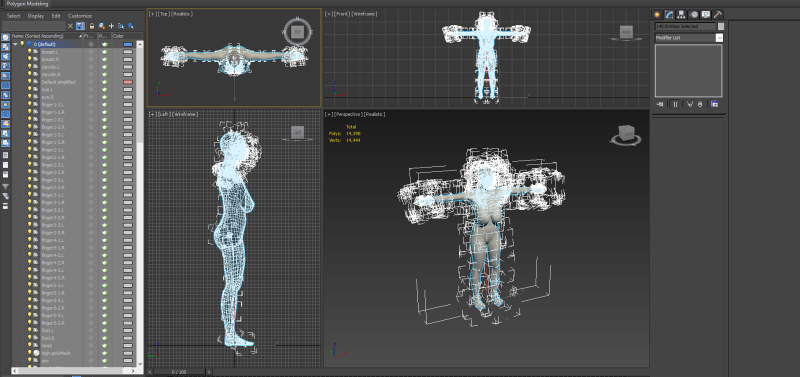
|
|
By bluemidget666 - 9 Years Ago
|
sdf
|
|
By bluemidget666 - 9 Years Ago
|
This version does not have the point helper, that was in the WIP one
But bones are on a different layer now
|
|
By bluemidget666 - 9 Years Ago
|
This is what I get on loading it

|
|
By bluemidget666 - 9 Years Ago
|
ok done that
|
|
By bluemidget666 - 9 Years Ago
|
I was just showing you what the wip.fbx file looked like loaded into my 3dmax.
|
|
By bluemidget666 - 9 Years Ago
|
its loaded and mesh body and eyes on new layer
|
|
By bluemidget666 - 9 Years Ago
|
BUT BUT this version does not have the point helper, you said you could not work with that so load the MH fbx file instead ....
So thats what i did .....:(
|
|
By bluemidget666 - 9 Years Ago
|
I do not know why a MH.fbx would have the helper but anyways this is what I have

|
|
By bluemidget666 - 9 Years Ago
|
This is what I have ...

|
|
By bluemidget666 - 9 Years Ago
|
see above :)
|
|
By bluemidget666 - 9 Years Ago
|
Like this

|
|
By bluemidget666 - 9 Years Ago
|
yep got it
|
|
By bluemidget666 - 9 Years Ago
|
are you wanting it on the google drive ?
anyways its saved.
|
|
By bluemidget666 - 9 Years Ago
|
Right I have cleaned it up with better file system so no more confusion.
What next.
|
|
By bluemidget666 - 9 Years Ago
|
ok thats done
|
|
By bluemidget666 - 9 Years Ago
|
yep done
|
|
By bluemidget666 - 9 Years Ago
|
done
|
|
By bluemidget666 - 9 Years Ago
|
OK Thats all done...
Its getting late here 4am ish so gona need to get some sleep soon.
|
|
By bluemidget666 - 9 Years Ago
|
Well I was following the video ok, just the one issue with the helper.
The bone section was easy with no issues.
But I am tired so need sleep, catch up tomoz.
Cheers Swoooop
|
|
By bluemidget666 - 9 Years Ago
|
|
Yo dude ready to crack on :)
|
|
By bluemidget666 - 9 Years Ago
|
|
Anybody out there 😎
|
|
By bluemidget666 - 9 Years Ago
|
Ha thank god , I thought you'd been abducted.
might get chance late tonight to crack on but if not it means ill be free tomoz.
you do know you only have to direct me to the scaling after that all went well with the bones
cheers dude
|
|
By bluemidget666 - 9 Years Ago
|
|
Out n about should be heading home soonish
|
|
By bluemidget666 - 9 Years Ago
|
|
Sorry busy day but I'm bk at last
|
|
By bluemidget666 - 9 Years Ago
|
Well if I have understood you right I am about to scale a box to 6' then scale my model to it, if I do not need to link it any more.
is this correct
|
|
By bluemidget666 - 9 Years Ago
|
|
1 min computers acting like a £"£$%£$%
|
|
By bluemidget666 - 9 Years Ago
|
Right she is scaled

|
|
By bluemidget666 - 9 Years Ago
|
Everything looks fine but I forgot to scale the bones , is this going to be a issue.
if not ill crack on with the bones.

This is what I am now looking at , so ok to crack on with the bones ?
|
|
By bluemidget666 - 9 Years Ago
|
Hang on I am getting confused
Example:
Import char (make sure the mesh is linked to the root or desired bone (Body to Pelvis - - Eye to eye bone)
Scale the rigs root. (mesh follows)
Clone mesh (Collaspe the Stack)
Layer everything.
Create bones...
----------------------------
Should I start from scratch and scale the root bone ?
|
|
By bluemidget666 - 9 Years Ago
|
I have cheated
I figured out how to export from MH at the right size and checked her against a 6' box.
She fits perfect.
The scaling was getting a bit frustrating but in my spare time ill work on attaching helpers and scaling that way as I do understand the concept.
So I am going to separate bones off onto their own layer , clone eyes and body , add xform and collapse the stack.
is this ok ?

So this is noww what I am looking at , I xformed the cloned eyes and body then converted to editable poly
|
|
By bluemidget666 - 9 Years Ago
|
Who Dat?
Who What?
"Who dat who say who dat??? -- --
------------------------------------------------------
Keep it together SWoooop , this could take a long time :)
|
|
By bluemidget666 - 9 Years Ago
|
So i connect the eyes to the eye bones on the new bones I am about to start making yes ?
|
|
By bluemidget666 - 9 Years Ago
|
Ha right, how do I split the eye mesh ?
When it does split, its going to split into 4 sections so they will need to be joined again to make 2 sections.
|
|
By bluemidget666 - 9 Years Ago
|
I already cloned both the body mesh and the eye mesh.

applied xform to both clone meshes and collapsed the stack
first things first how to set pivot points ?
|
|
By bluemidget666 - 9 Years Ago
|
Ok I have both detached and renamed.
Should i place them in a new layer ?
|
|
By bluemidget666 - 9 Years Ago
|
Right Swooooop
Its 3am and this is where I am at

So I am going to have to call it a day , Ill link the eyes tomoz (sunday so should have plenty of time)
Then the bones ????????
Catchya later Dude :)
|
|
By bluemidget666 - 9 Years Ago
|
Hay Swoop
ill be at it soon, was hoping to get on earlier but sods law.
|
|
By bluemidget666 - 9 Years Ago
|
ok all done and pivot set.
Now how to link those eyes.
|
|
By bluemidget666 - 9 Years Ago
|
Hay dude
I am having a issue with my computer , not sure but think one of the ssd drives might be failing .
Gona run some tests be about 10 mins
|
|
By bluemidget666 - 9 Years Ago
|
OK I am back .. not sure whats going on but looks ok now
This is what I am looking at
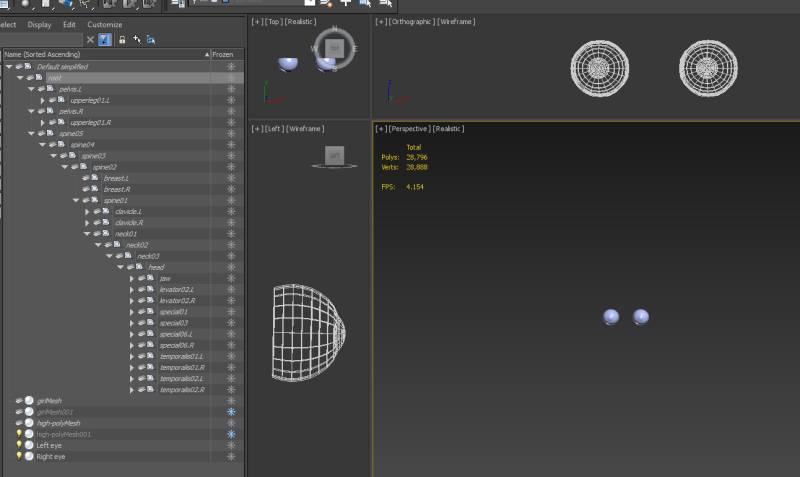
Ok Done that , How to i check that they linked correctly ?
|
|
By bluemidget666 - 9 Years Ago
|
No size options

|
|
By bluemidget666 - 9 Years Ago
|
 
This is what I get
|
|
By bluemidget666 - 9 Years Ago
|
I select the bone

I go to the modify panel

Do you see my problem
|
|
By bluemidget666 - 9 Years Ago
|
SOOOO its start from scratch time again :)
Ho that video, but I haven't been following that video .........
|
|
By bluemidget666 - 9 Years Ago
|
Dude you still there , ya not pulling your hair out are you :)))))
Whoooooops , Ill start over after watching that video aswell
|
|
By bluemidget666 - 9 Years Ago
|
Ha yes that makes a lot more sense now ....
Its tooo late to start over tonight ..........
errrrm :ermm::blink::blush: sorry..
It does make more sense now.
|
|
By bluemidget666 - 9 Years Ago
|
Thats why I had issues with the white bits all over the place.
|
|
By bluemidget666 - 9 Years Ago
|
Should I give you some time to calm down Swoooop
|
|
By bluemidget666 - 9 Years Ago
|
Talk to me Swooop
|
|
By bluemidget666 - 9 Years Ago
|
Errrm its nearly 4am Ill come back tomorrow with it done right ....
It will be fine .... errm I am getting there.
|
|
By bluemidget666 - 9 Years Ago
|
Hay Swoop
Gone through it all again , just about to link the eyes to the eye bones but how do i display the bones ?
Check bk later on.
|
|
By bluemidget666 - 9 Years Ago
|
First of all let me say how grateful I am for the time you have taken on this but I feel I need to explain how it got this confused.
If you go back to this page https://forum.reallusion.com/274461/Does-anyone-here-have-a-good-working-knowlage-of-makehuman-and-blender-?PageIndex=4 you will see why I disregarded the first video (that led to the issues)
After disregarding this video I missed the display as bones not as dummy, this also went on to give me the scaling issue that started you taking me through it step by step.
Once I had the bone issue sorted the mesh scaled fine as per your second video.
Asking you how to display bones was simply to see if you were replying to this thread because I did actually sort it through a youtube vid.
I do not want you to take me through it step by step.
So thank you for your help , the videos are fantastic and ill call back in once I have the character rigged.
Cheers.
|
|
By bluemidget666 - 9 Years Ago
|
I did watch it but at the point of watching it was not relevant to the issue I was having with the eyes between make human and blender because the targets I was trying to create didn't work how I expected.
So the information in the video was not taken in.
"you spit in my face and don't bother to watch it."
I did not do this at all.
I thank you for your help I really do.
But this is toooo stressful I am out.
|
|
By bluemidget666 - 9 Years Ago
|
Hay Swooop
Yeah ill gladly come back to it
It will be next week or Sunday (depending on how the weekend goes)
Right now trying to fix a issue I am having with a ssd drive that keeps disappearing files.
-----------
If that's fine with you ?
|
|
By pumeco - 9 Years Ago
|
Yeah, sw00000p can be pretty scary when he's in tutor mode :D
I don't use Max, but nevertheless this has been a fun thread to watch.
Long may it continue :w00t:
|
|
By APRND - 8 Years Ago
|
|
I apologize. But what happened to the user sw00000p? What happened to his messages? Thank you.
|