|
By Peter (RL) - 10 Years Ago
|
Hi Everyone,
Character Creator 1.4 has been released today and with it comes a number of fixes and exciting new enhancements.
However if you do still find any bugs, issues, glitches or other general annoyances, please can you post them here.
As always, do feel free to post general feedback in your own threads, but it will help us greatly if we can keep all Character Creator 1.4 issues in one place. This will help the development team track and eradicate any remaining problems.
Please do try to provide your full system specifications and a detailed description of the problem when posting.
Many Thanks.
|
|
By sterlingy - 10 Years Ago
|
|
Where do we see a list of big fixes and new features?
|
|
By animagic - 10 Years Ago
|
|
sterlingy (2/2/2016)
Where do we see a list of big fixes and new features?
It's in this thread: https://forum.reallusion.com/270681/Whats-New-in-Character-Creator-v14.
|
|
By Cricky - 10 Years Ago
|
I'll post this again here:
I've spent the last 2 hours uninstalling and re-installing the newest version. I've also installed the Essential Clothing and Skin Morphs again.
Now for the NEWS:
It still tells me I have to buy the same things AGAIN!!! Every time I open a saved project with any Clothing, Morphs or Skin applied to the Avatar, the same prompts come up. Buy me AGAIN!!!
Oh, they load after dismissing the prompts, but something is wrong somewhere. Especially when I am not even applying any essential pack changes at all, yet get that same prompt.
There's a disconnect in the IT department. DRM gone Wild perhaps?
|
|
By madicloner - 10 Years Ago
|
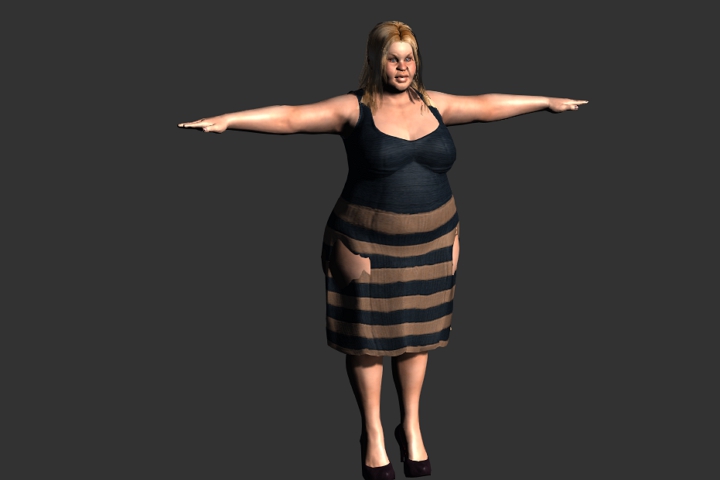
This is your own standard "heavy" morph. I did push the button "calculate collision". Several times with some other different settings, too.
Nothing changed in version 1,2,3 and now 4.
Wow.
Do you plan to patch away this "false front" in 5, 6, 7 or never ? Manual setting is possible, but very time consuming. Daz avatars are still much better (higher poly, more beatiful textures, better and more morphs and so on) and there this time is still better invested.
|
|
By Peter (RL) - 10 Years Ago
|
|
Cricky (2/3/2016)
I'll post this again here:
I've spent the last 2 hours uninstalling and re-installing the newest version. I've also installed the Essential Clothing and Skin Morphs again.
Now for the NEWS:
It still tells me I have to buy the same things AGAIN!!! Every time I open a saved project with any Clothing, Morphs or Skin applied to the Avatar, the same prompts come up. Buy me AGAIN!!!
Oh, they load after dismissing the prompts, but something is wrong somewhere. Especially when I am not even applying any essential pack changes at all, yet get that same prompt.
There's a disconnect in the IT department. DRM gone Wild perhaps?
Did you try the following? This worked in the tests I ran.
If you are seeing the Validate DRM window, please try closing the window down and then attempt to load the CC character again. If you have an active internet connection you should find the character will load without the Validate DRM window appearing again and the character can then be sent to iClone 6.
If you do continue to see the Validate DRM window, then you can reinstall the CC Essentials bundle which should resolve the problem. Note you may still need to repeat the first step one more time before the issue is fully resolved.
Please do let us know if this helps.
|
|
By TopOneTone - 10 Years Ago
|
I have successfully installed IC6.4.2527.1 update and rebooted my pc, but when I try to install CC1.4 I get this error message :
"The signature of CC140_Patch_Enu (4).exe is corrupt or invalid."
I have tried a number of times using both the Download from the Upgrade page and the patch in my account, but the same message comes up every time.
Anyone know what this means and how to rectify it?
|
|
By primaveranz - 10 Years Ago
|
Are you using Internet Explorer (or Edge) to download? If so, it is a known issue, read this :- http://answers.microsoft.com/en-us/ie/forum/ie10-windows_7/the-signature-of-this-program-is-corrupt-or/90ff01cd-41f1-426d-96a5-fb1a6852e8e2?auth=1
Bestter to try downloading using Chrome or Opera and see if you have any joy.
|
|
By Rampa - 10 Years Ago
|
|
TopOneTone (2/3/2016)
I have successfully installed IC6.4.2527.1 update and rebooted my pc, but when I try to install CC1.4 I get this error message :
"The signature of CC140_Patch_Enu (4).exe is corrupt or invalid."
I have tried a number of times using both the Download from the Upgrade page and the patch in my account, but the same message comes up every time.
Anyone know what this means and how to rectify it?
That's just Windows warning you. The certificate info somehow got lost for this update.
You should have an option when thant message pops up that says "more info", or something. Click on that (it's gray text in Win 10), and an install option will become available. Go ahead and select that, and it will install just fine.
|
|
By primaveranz - 10 Years Ago
|
|
Windows 7 and 8 may still prevent you installing software with an invalid certificate if UAC is enabled to a certain level.
|
|
By peppie - 10 Years Ago
|
|
Bring up whatever program you are patching.Then >Help> check for update. Now locate patch link.Click download. then choose "RUN" ..once finished and you get a signature warning, then click "VIEW DOWNLOADS" then you will see at the top of the list and highlited, your download.. Right click on it and choose "Run anyway".........Now just follow instructions as they appear. Repeat for all applications. CC,,,I-6,, 3dz and so forth. I have windows 8.1.
|
|
By TopOneTone - 10 Years Ago
|
Thanks Primaveranz for the tip, it worked when I used Chrome.
Cheers
|
|
By wendyluvscatz - 10 Years Ago
|
It took me quite a few goes with live update to get there but finally all is working
The issue is it does not update iC6 first then 3DX6 pipeline before CC so you get the message your version is not the right one and sent to the the store.
So a bit of a loop of frustratedness and it telling you it is up to date too when its niot, a fair bit of rebooting needed inbetween goes too.
|
|
By GrayHardt - 10 Years Ago
|
Hi everyone,
I had to install iClone6 and CC again, regarding to a new hard drive. Now I don't have the resources of CC Essential with the morphs anymore. There is also no posibillity to find it under my serial number. I bought the program on the 27th november and essential was included. What can I do?
|
|
By Lawsuit Pending Records - 10 Years Ago
|
|
Yeah if you use the RL update installer it gets it in the wrong order. I downloaded it from the members update page and just updated iClone first. CC and 3DX.
|
|
By ToKoMotion - 10 Years Ago
|
Hi RL.
It's not possible to save customized Skin Textures in CC 1.4 anymore. Would be glad if you could take a look on it.
Thanks:).
|
|
By Peter (RL) - 10 Years Ago
|
|
ToKoMotion (2/22/2016)
Hi RL.
It's not possible to save customized Skin Textures in CC 1.4 anymore. Would be glad if you could take a look on it.
Thanks:).
Hi ToKo,
This issue will be fixed in the 1.42 update due soon. Apologies for the inconvenience caused.
|
|
By Peter (RL) - 10 Years Ago
|
|
TopOneTone (2/3/2016)
I have successfully installed IC6.4.2527.1 update and rebooted my pc, but when I try to install CC1.4 I get this error message :
"The signature of CC140_Patch_Enu (4).exe is corrupt or invalid."
I have tried a number of times using both the Download from the Upgrade page and the patch in my account, but the same message comes up every time.
Anyone know what this means and how to rectify it?
Please refer to theFAQ page below for more information on the signature issue: http://kb.reallusion.com/General/50347/How-to-fix-Corrupt-or-Invalid-Signature-installer
|
|
By duchess110 - 10 Years Ago
|
|
Any news yet on a fix for Character Creator Crashing with Stack Hash or Avatar Shaping on Windows 7 systems.
|
|
By Rockoloco666 - 10 Years Ago
|
Hi, since the last update i can no longer use the appearance editor for editing the basic long hair, it loads the textures but no parametrrs can be modified, with other ítems sometimes it happens, but after some basic workarounds i get it to load, but with the long hair i can't get it to work. Please help the graphically challenged :)
This issue i've found it on 3 different systems a lenovo y 50 860mgtx an alienware laptop with a 970m gtx and my own build an asus x79 deluxe with core i7 4930k, gtx 980, all systems using latest nvidia drivers and fully updated Windows 10 64 bit, here is an image of what is happening:

|
|
By pumeco - 10 Years Ago
|
I haven't been able to repeat it, but in CC when using 'Save Project As ...' it locked up when creating a thumbnail.
I was able to load the chartacter back in, but there was a generic thumbnail.
|
|
By Colonel_Klink - 10 Years Ago
|
|
CC crashes (turns to white screen) when going from base female to base male, and vice versa, after morphing a character. It did this several times today. Windows 7 SP1
|
|
By luke (RL) - 10 Years Ago
|
|
Colonel_Klink (3/7/2016)
CC crashes (turns to white screen) when going from base female to base male, and vice versa, after morphing a character. It did this several times today. Windows 7 SP1
Could you help us to explain in more detail or specific operation ? thanks.
|
|
By Colonel_Klink - 10 Years Ago
|
waveact (3/7/2016)
Colonel_Klink (3/7/2016)
CC crashes (turns to white screen) when going from base female to base male, and vice versa, after morphing a character. It did this several times today. Windows 7 SP1Could you help us to explain in more detail or specific operation ? thanks.
1. load cc
2. chose nude base male (or female)
3. apply custom morph to nude base male (or nude base female)
4. reset sliders of custom morph back to nude base male (or nude base female)
5. double click nude base female (depending if you chose nude base male first)
6. Displays "updating user interface" then screen turns white and CC crashes
Does that help? :)
|
|
By luke (RL) - 10 Years Ago
|
Colonel_Klink (3/7/2016)
waveact (3/7/2016)
Colonel_Klink (3/7/2016)
CC crashes (turns to white screen) when going from base female to base male, and vice versa, after morphing a character. It did this several times today. Windows 7 SP1Could you help us to explain in more detail or specific operation ? thanks. 1. load cc 2. chose nude base male (or female) 3. apply custom morph to nude base male (or nude base female)4. reset sliders of custom morph back to nude base male (or nude base female)5. double click nude base female (depending if you chose nude base male first) 6. Displays "updating user interface" then screen turns white and CC crashes Does that help? :)
According to your description if you click mouse on 3d view too frequent, it will cause crash because Microsoft will regard the process which takes too much time as a infinite loop and force program to close.
Could you try when load project, don't click mouse before everything done ? I hope this may help you, thanks.
|
|
By duchess110 - 10 Years Ago
|
|
Any news I ask again as to a fix for Windows 7 SP1 where upon closing Character Creator it crashed with either Stack Hash or AV Shaping as the cause.
|
|
By luke (RL) - 10 Years Ago
|
|
duchess110 (3/7/2016)
Any news I ask again as to a fix for Windows 7 SP1 where upon closing Character Creator it crashed with either Stack Hash or AV Shaping as the cause.
Yes, we gonna fix this issue next patch ( the end of March ) and apologies for any inconvenience caused, thanks
|
|
By Rampa - 10 Years Ago
|
Colonel_Klink (3/7/2016)
waveact (3/7/2016)
Colonel_Klink (3/7/2016)
CC crashes (turns to white screen) when going from base female to base male, and vice versa, after morphing a character. It did this several times today. Windows 7 SP1Could you help us to explain in more detail or specific operation ? thanks. 1. load cc 2. chose nude base male (or female) 3. apply custom morph to nude base male (or nude base female)4. reset sliders of custom morph back to nude base male (or nude base female)5. double click nude base female (depending if you chose nude base male first) 6. Displays "updating user interface" then screen turns white and CC crashes Does that help? :)
I had a go at this, following these steps. I think I've narrowed it down a bit more. I noticed that the crash happened if I de-selected the character by clicking anywhere in the window. Without the the yellow selection box around the character, switching to any other full body or head morph causes a crash.
This only applies to the morph bases in the content manager of CC (left panel).
Complete characters do not cause a crash this way.
|
|
By luke (RL) - 10 Years Ago
|
|
I had a go at this, following these steps. I think I've narrowed it down a bit more. I noticed that the crash happened if I de-selected the character by clicking anywhere in the window. Without the the yellow selection box around the character, switching to any other full body or head morph causes a crash.
This only applies to the morph bases in the content manager of CC (left panel).
Complete characters do not cause a crash this way.
Thanks a lot!! We will fix it asap.
|
|
By animagic - 10 Years Ago
|
As this may perhaps get a reaction from RL when brought up here, I'm referring to this thread: https://forum.reallusion.com/273347/iClone-64-Changes-to-Skeleton-No-more-Root-bone-animation-track.
Apparently, CC characters are now exported without a root bone, which causes problems in various 3D applications (details are in the referenced thread). Even though RL published a video on how to use Maya to add the root, that doesn't seem a reasonable solution as not everyone has Maya (which isn't cheap) and it also sort of defeats the purpose of CC as character creator for external 3D applications.
|
|
By luke (RL) - 10 Years Ago
|
animagic (3/13/2016)
As this may perhaps get a reaction from RL when brought up here, I'm referring to this thread: https://forum.reallusion.com/273347/iClone-64-Changes-to-Skeleton-No-more-Root-bone-animation-track. Apparently, CC characters are now exported without a root bone, which causes problems in various 3D applications (details are in the referenced thread). Even though RL published a video on how to use Maya to add the root, that doesn't seem a reasonable solution as not everyone has Maya (which isn't cheap) and it also sort of defeats the purpose of CC as character creator for external 3D applications.
sorry for the inconvenience, we will discuss this issue and fix it asap.
|
|
By Snarp Farkle - 10 Years Ago
|
Besides CC1.4 taking along time to load up from start as opposed to CC1.3, there's the save skin issue which I see is already being addressed, but I have another issue that I posted but nobody responded to and that post is HERE Basically there's a problem with the "T" pose in this example and any morphs I try to create using this avatar's settings creates the same twisted results. The original avatar I made was before CC1.4 and works fine in all poses and animations, but when I make a custom slider from him the results are always a twisted t-pose. Also maybe I'm missing something here, I tried to save the old lady's head in CC to apply to a different body but it doesn't make any changes at all and when trying to save it in iClone only saves a face that won't apply to any avatar CC or any other version. This isn't a head created in CT8, it was created in CC.
|
|
By luke (RL) - 10 Years Ago
|
Snarp Farkle (3/15/2016)
Besides CC1.4 taking along time to load up from start as opposed to CC1.3, there's the save skin issue which I see is already being addressed, but I have another issue that I posted but nobody responded to and that post is HERE Basically there's a problem with the "T" pose in this example and any morphs I try to create using this avatar's settings creates the same twisted results. The original avatar I made was before CC1.4 and works fine in all poses and animations, but when I make a custom slider from him the results are always a twisted t-pose. Also maybe I'm missing something here, I tried to save the old lady's head in CC to apply to a different body but it doesn't make any changes at all and when trying to save it in iClone only saves a face that won't apply to any avatar CC or any other version. This isn't a head created in CT8, it was created in CC.
About loading speed, we will check where the problem is.
Currently, we couldn't save only head geometry in CC, and could you send me the files you mentioned which have arm twisted problem ? thanks
|
|
By Snarp Farkle - 10 Years Ago
|
|
[b]waveact (3/15/2016)
About loading speed, we will check where the problem is.
Currently, we couldn't save only head geometry in CC, and could you send me the files you mentioned which have arm twisted problem ? thanks
Thanks for looking into this waveact, I've tried to PM you the files in .zip format but it wouldn't let me saying that the file size was too big. :unsure:

|
|
By animagic - 10 Years Ago
|
Besides slow loading, Dynamic Appearance changes made in Character Creator take forever to settle down and perhaps texture other changes as well. Morphs work OK.
Another thing I noticed (which may be an older problem) is that decals show up with low quality even if the original has a good resolution and sharp text. I try to put an emblem on a T-shirt and the result is disappointing. It's especially noticeable because the fabric looks very good.
EDIT: This may be inherent to the way the decal works in that it is scaled down to fit the overall texture of the T-shirt. It would be great if there were some other method so that the original resolution could be maintained.
Also, waveact, thanks for getting back to us!
|
|
By luke (RL) - 10 Years Ago
|
|
animagic (3/18/2016)
Besides slow loading, Dynamic Appearance changes made in Character Creator take forever to settle down and perhaps texture other changes as well. Morphs work OK.
Another thing I noticed (which may be an older problem) is that decals show up with low quality even if the original has a good resolution and sharp text. I try to put an emblem on a T-shirt and the result is disappointing. It's especially noticeable because the fabric looks very good.
EDIT: This may be inherent to the way the decal works in that it is scaled down to fit the overall texture of the T-shirt. It would be great if there were some other method so that the original resolution could be maintained.
Also, waveact, thanks for getting back to us!
First, sorry about loading speed, it's also make me annoyed. Our team want to speed up that, but encounter some difficulties. We will keep trying to do this but can't promise anything.
About the resolution of decal, I'm think how to fit your request, please give me some time, thanks
|
|
By duchess110 - 10 Years Ago
|
Just installed the latest iClone patch 6.42 hoping that because it sends to CC that the crash issues for Windows 7 may have been fixed.
So I opened CC worked on a character then closed still a crash.
Problem signature
Problem Event Name: APPCRASH
Application Name: CharacterCreator.exe
Application Version: 1.4.1402.1
Application Timestamp: 56b06853
Fault Module Name: ACAvatarShapping.dll
Fault Module Version: 0.0.0.0
Fault Module Timestamp: 56b066c5
Exception Code: c0000005
Exception Offset: 00000000002306d9
OS Version: 6.1.7601.2.1.0.256.48
Locale ID: 2057
Additional Information 1: 87d5
Additional Information 2: 87d59f17bad8223bb36b9d4509d61090
Additional Information 3: 5c87
Additional Information 4: 5c872f69140c58c8f57cf26feca1015e
|
|
By duchess110 - 10 Years Ago
|
|
This crash since iClone 6.42 patch update.
All I did was open then close Character Creator
Faulting Application Path: C:\Program Files\Reallusion\iClone Character Creator 1\G6Bin64\CharacterCreator.exe Problem signature
Problem Event Name: BEX64
Application Name: CharacterCreator.exe
Application Version: 1.4.1402.1
Application Timestamp: 56b06853
Fault Module Name: StackHash_1dc2
Fault Module Version: 0.0.0.0
Fault Module Timestamp: 00000000
Exception Offset: 0000000000000000
Exception Code: c0000005
Exception Data: 0000000000000008
OS Version: 6.1.7601.2.1.0.256.48
Locale ID: 2057
Additional Information 1: 1dc2
Additional Information 2: 1dc22fb1de37d348f27e54dbb5278e7d
Additional Information 3: eae3
Additional Information 4: eae36a4b5ffb27c9d33117f4125a75c2
So I still have Stack Hash and ACAvatarShapping problems.
|
|
By Melanie (RL) - 10 Years Ago
|
Hi Everyone:
CC 1.42 patch will be updated next Monday (3/22), please upgrade the new version of CC next week to resolve the issue you've encountered due to iClone's 6.42 patch update.
Thanks.
Melanie
|
|
By duchess110 - 10 Years Ago
|
|
Melanie (RL) (3/25/2016)
Hi Everyone:
CC 1.42 patch will be updated next Monday (3/22), please upgrade the new version of CC next week to resolve the issue you've encountered due to iClone's 6.42 patch update.
Thanks.
Melanie
Hi Melanie thank you for the update. The above problems I have mentioned I had before the 6.42 patch release and was hoping that the 6.42 would address these issues.
So there is going to be a CC patch not quite sure when as we have already passed 3/22 the 22nd March, but soon hopefully.
|
|
By wires - 10 Years Ago
|
|
Melanie (RL) (3/25/2016)
Hi Everyone:
CC 1.42 patch will be updated next Monday (3/22), please upgrade the new version of CC next week to resolve the issue you've encountered due to iClone's 6.42 patch update.
Thanks.
Melanie
Hi Melanie,
Which time zone is being used to define the Monday mentioned? :rolleyes:;):Whistling:
|
|
By Melanie (RL) - 10 Years Ago
|
Hi All
Please stay tuned and we will soon update the CC 1.42 patch.
Melanie
|
|
By Melanie (RL) - 10 Years Ago
|
Hi All,
CC 1.42 is now READY for update :)
http://www.reallusion.com/iClone/character-creator/update.html
Melanie
|
|
By justaviking - 10 Years Ago
|
|
Woo hoo!
Thanks for the good news, Melanie.
Looks like some nice fixes.
That's a very nice "release notes" page. Clean and professional. :)
|
|
By wires - 10 Years Ago
|
|
Excellent Melanie. Thank you very much. :)
|
|
By duchess110 - 10 Years Ago
|
|
Thank You Melanie and waveact will install later.
|
|
By ngkalung - 10 Years Ago
|
I have installed iClone 6 Pro 6.42 with no problom, but after installing Character Creator 1.42. It won't start. I have a GeForece 750 Ti graphic card, what seems to be the problem?

|
|
By luke (RL) - 10 Years Ago
|
|
ngkalung (4/1/2016)
I have installed iClone 6 Pro 6.42 with no problom, but after installing Character Creator 1.42. It won't start. I have a GeForece 750 Ti graphic card, what seems to be the problem?
te]
Hi, Would you tell us which way you upgraded to CC 1.42 ? Use patch or full install ? We need to verified the problem.
If you don't feel trouble, could you use the attached file to enable log feature, here are steps below:
1. Close CC AP
2. Double click "Enable Log.reg"
3. Open CC
4. Check the file in C:\Users\{user_name}\AppData\Local\Reallusion
You could see the "CC.2016xxxx_xxxx".log, and PM this log to me.
thanks,
|
|
By Peter (RL) - 10 Years Ago
|
|
New Feedback Tracker Beta - Now Open
No application is 100% free of issues or bugs, as there is always room to improve. So we have created a place where we can all work together to make your products better by making your suggestions visible to all, having them well-categorized, easy to track and easy to implement.
For this we have decided to allow all users to actively participate in our product improvement and development cycles with help from our brand-new Feedback Tracker platform that will put you in the developer seat, allowing you to suggest, vote, prioritize and track all product issues, findings, and enhancements. Ensuring the most efficient and transparent collaboration with you -- our partners. To find the Feedback Tracker please click HERE. What can the Feedback Tracker do for you?
** Check reported bugs, saving your time on duplicated reporting.
** Report bugs and suggested feature enhancements.
** Voting priority for feature enhancements and bug fixes.
|
|
By Lawsuit Pending Records - 10 Years Ago
|
|
Looks great Peter. Whoever has been doing Reallusions site design currently does a great job, very pleasing on the eye. The feedback tracker is a great idea.
|
|
By ddustin - 10 Years Ago
|
I am having a problem with ICC.
When ever I am adding items to a character, the SW will just lockup and the only way to exit is to kill the program.
I am running Windows 10 on an MSI GT72S 6QF Dominator Pro G with 64 GB of and an 8BG GTX card.
Are there any settings that can be changed to reduce crashing?
I understand this is a bit ambiguous, but basically I can't use the program.
Graphics drivers are up to date..
David
|
|
By Peter (RL) - 10 Years Ago
|
|
Hi David,
You haven't mentioned which graphic card you are using. Ideally it should be a series 700 or higher. If it is a series 500 or lower then that could be the problem.
If your computer has switchable graphics, please do ensure you are running CC with the more powerful Nvidia graphics card. Do not choose the Intel graphics option. For more information on switchable graphics please check out the link below. This contains additional instructions on how to select the right graphics card option.
Please also run Windows Update to ensure your system is fully updated. In Windows 10 go to Start > Settings > Update & Security > Windows Update and then "Check For Update".
Do also check that you are using the default 3D Settings profile (Application Controlled) for iClone and Character Creator in your Nvidia Control Panel. If have currently have a custom global setting, try creating a new profile for iClone and Character Creator and choose the default application controlled setting.
If you continue to have problems, try switching to the DirectX 9 version of Character Creator and see if this allows you to successfully run it without the crashing. You can select either the DirectX 11 version or the DirectX 9 version of iClone 6 and Character Creator.
You can do this by going to Start > All Programs > iClone Character Creator 1 and then select "iClone Character Creator Graphics Mode Selection". Then select the DirectX 9 version.
|