|
By GrannyJ - 10 Years Ago
|
|
Okay - iC6, CC6 & 3DX6 Pipeline all work fine on my machine. CT8 Pipeline won't run at all - every time I attempt to run I receive the APPCRASH error: STEPS I have taken to attempt to resolve issue: I have uninstalled & reinstalled. I have attempted to run as administrator. I have changed compatibility to run in Win7. I have tried running as administrator with compatibility for Win 7. MY RIG: Processor: Intel(R) Core(TM)i7-5930K @3.50GHz RAM: 32 GBS: Win 7 PRO SP1 GPU: Dual NVIDIA GeForce GTX 970's SATA RAID 1TB I have submitted a support ticket to RL, but am also posting this in case anyone has experienced this issue & corrected same or if you have an idea that may assist me in getting CT8 to load & run.
|
|
By Kelleytoons - 10 Years Ago
|
|
Make sure you go to your account and choose "Download Patch/Update" and download the very latest version of CT8. Then uninstall your current version and install THIS version and you should be okay.
|
|
By GrannyJ - 10 Years Ago
|
@Kelleytoons
I have been away since December 10th. Today, January 16th (my first full day home) I downloaded CT8 pipeline & installed, along with patch & resource pack from the RL site. I then uninstalled & reinstalled it again (as per my original post). I do not believe that downloading & reinstalling again today will make much difference from having done so twice this morning. But thanks for trying to help me out!! :)
|
|
By Kelleytoons - 10 Years Ago
|
Okay, but let's make sure you did what I suggested.
You need to make sure that NOTHING from CT8 is installed. Now go to the patch/download and ONLY download that version (IOW, do not download any previous version but only the one that is version 1228.1 -- you cannot install the patch over previous versions and expect it to work properly).
Install that version only and then making sure you have the latest video drivers, reboot and see what happens.
|
|
By Peter (RL) - 10 Years Ago
|
Hi GrannyJ,
Sorry to hear of your problems with CT8. As Kelleytoons suggested, do make sure you have the latest build of CT8 installed. You can get this from your Member Account.
Looking at your system specs, you should be running CT8 without any problems. While you wait for Support to get back to you, please take a look at the link below. This gives some good tips to help resolve ntdll.dll crashing issues. This might help.
http://pcsupport.about.com/od/fixtheproblem/a/ntdlldll.htm
|
|
By GrannyJ - 10 Years Ago
|
Hi Peter-
This was my first download/install of CT8 - never had it before yesterday. I downloaded it from my member account on RL & installed. Wouldn't run. Uninstalled & reinstalled, wouldn't run. Then tried all the usual run as admin, run in compatibility mode, etc - still won't run. Redid it all again today - still won't run.....
Perhaps having dual graphics cards has something to do with it.... but I would think if that were the issue, I would also have troubles with iC6, 3DX6 & CC, but they all run the latest updates just fine.
It is truly mind boggling....
|
|
By Kelleytoons - 10 Years Ago
|
Okay, but you didn't answer my question -- did you (after first making sure all instances of CT8 were uninstalled) download the PATCH which is where the latest version is? That's the one you need to install (you cannot install it over previous versions, and you should not install the version that comes up on your member page, as that ain't the latest).
If you did install this version that's in the patch, the 1228.1 version, then you definitely have an issue.
|
|
By GrannyJ - 10 Years Ago
|
Yes, it's 1228.1 & no, it won't run..... so I uninstalled it & also tried just installing the initial release, that won't run either......
|
|
By GrannyJ - 10 Years Ago
|
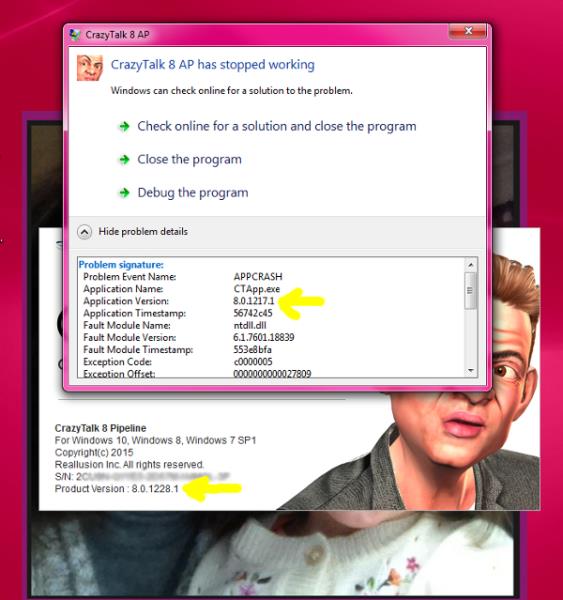
Okay - Tried again to uninstall & reinstall & I noticed something FUNKY..... The app splash screen at start up shows version 8.0.1228.1 but the windows error details shows version 8.0.1217.1 (see image). This is strange as I did a complete uninstall & clean before installing vers. 8.0.1228.1
|
|
By Kelleytoons - 10 Years Ago
|
I'm sure RL support (for your ticket) will have better answers, but the first thing that comes to my mind is that after you did your uninstall and clean did you reboot your machine before you installed that final version? Because not doing so might still have left something in the registry or memory that screwed things up.
My own gut tells me this isn't a hardware issue but some sort of software problem.
|
|
By Peter (RL) - 10 Years Ago
|
|
GrannyJ (1/18/2016)
Perhaps having dual graphics cards has something to do with it.... but I would think if that were the issue, I would also have troubles with iC6, 3DX6 & CC, but they all run the latest updates just fine.
It is truly mind boggling....
When you say dual graphics do you mean an SLI setup with two identical linked graphic cards or do you mean a switchable graphics setup with an Nvidia/AMD card and an integrated Intel graphics card?
If it is the latter, do try right clicking the CrazyTalk 8 icon where you will normally be presented with an option to choose which graphic card to use. It may be that CT8 is automatically selecting the Intel graphic card instead of the Nvidia/AMD card. Do check this to ensure you are using the more powerful graphics.
|
|
By GrannyJ - 10 Years Ago
|
Hi Peter-
It's 2 identical linked GTX 970's
|
|
By GrannyJ - 10 Years Ago
|
@Kelleytoons
Yes I did a reboot every single time..... even made sure all CT8 directories and references had been removed.....
|
|
By Peter (RL) - 10 Years Ago
|
|
Just to let everyone know we have found that there is a compatibility issue with the software "Dell Backup & Recovery" (also known as Alienrespawn) that is causing this type of issue. This backup and recovery software is pre-installed on new Dell and Alienware computers. It appears that these utilities have a major bug that causes issues with any 64bit software that uses QT5 core DLL's.
The easiest solution is to remove these programs from your computer as they will likely affect other software you are using as well as all Reallusion products.
To find out more, please see the Dell forum thread below.
|
|
By GrannyJ - 10 Years Ago
|
Hiya folks - My issue is resolved & I found a way to resolve the problem with Alienware desktops/laptops that come pre-loaded with Alien Respawn. My CT8 now runs properly (& this fix seems to have also stopped the "in application" crashes I would sometimes experience with iC6 & CC).
Before I share though, it is IMPERATIVE that you understand this fix only works for those machines that have the ORIGINAL preloaded version of Alien Respawn (It will NOT work if you have installed or reinstalled the Alien Respawn application yourself). I do not know if this will work on Dell Inspiron machines that come preloaded with Dell's Backup & Recovery as I do not have an Inspiron Machine here to test it on - but it worked on my Alienware Area 51 desktop & my Alienware MX-17 laptop perfectly.
That being said, this is what worked for my Alienware computers:
These steps must be followed EXACTLY to have the best of both worlds (Alien Respawn & CT8 on your machine with both apps working properly). #1 - Download & install the current version iClone Product. #2 - Once installed DO NOT LAUNCH - now create a Windows Restore Point (START > Create a restore point > Create button > enter a new name for the restore point file (I used POST CT8 Install & the date) > click create. #3 - Using Control Panel > Programs > Uninstall Alienware Respawn #4 - reboot machine after uninstall is complete. #5 - restore system using the restore point you created in step #2 #6 - after system restores completely, reboot. #7 - Launch CT8 & the Qt5.dll issue should be solved. This corrected my issue with CT8 not launching/working - but PLEASE remember that this will only work on Alienware Desktops (like Area 51's) & Alienware Laptops (like MX17) where Alienware Respawn came preloaded on the machine. This fix does NOT work on machines where the user self-installed or reinstalled Respawn. Also I do not know if this will work for machines with Dell Back Up & Recovery, as I have no Dell Inspiron or similar to test it on
|
|
By Kelleytoons - 10 Years Ago
|
Just for others info...
Both my laptop and my desktop (bought within the last year or so, and with all recent software updates) have this software and work fine with RLs products, so I'm a *bit* skeptical this sort of "fix" is necessary in most cases. Perhaps it is limited to Alienware machines (my machines are both "Dell" branded).
All I'm saying is folks shouldn't necessarily assume this software is bad and jump to remove it.
|
|
By GrannyJ - 10 Years Ago
|
|
Just an FYI - Although Alienware is distributed by Dell, the brand lines are separated & the SW apps are NOT the same (Alien Respawn is NOT Dell Backup & Recovery - they are 2 separate, distinctive products & are supported by different tech teams in different locations). The Alienware Level 2 team worked with me on the Qt5.dll issue for an entire afternoon (Alienware Level 1 tech was less knowledgeable than I about systems). As previously stated, the fix I listed above is only for ALIENWARE machines pre-loaded with Alien Respawn (versions 1.8.2.1291 & later) & for folks who have this version or newer of Alien Respawn & desire to have both Alien Respawn & CT8 working on their machines. What Alienware Tech support & I discovered is that Alien Respawn will not impact Qt5.dll if it is present when Alien Respawn is activated. By creating the restore point, then uninstalling & then restoring (when the restore has CT8 already installed) the Qt5.dll issue is circumvented. Again, this fix I listed above is only for ALIENWARE machines pre-loaded with Alien Respawn (versions 1.8.2.1291 & later).
|