|
By onlinebarbershop - 11 Years Ago
|
|
CT8...trial user...ready to take the plunge. I don't see an option for saving just the actor that I can use over and over. Is this option disabled in trial? Does saving a project...which I can't do right now...automatically save the actor? I REALLY don't want to have to create this actor again.
|
|
By Peter (RL) - 11 Years Ago
|
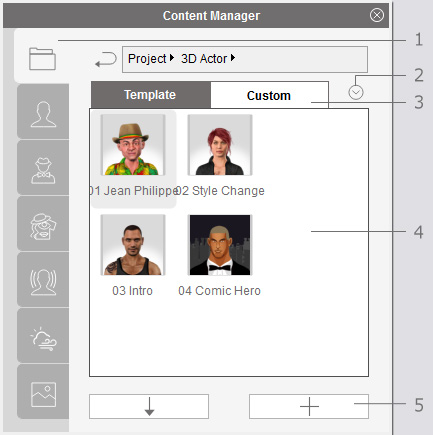
To save an actor just switch to the Actor tab and then click the + ADD / SAVE button at the bottom of Content Manager (number 5 in the image below).
|
|
By onlinebarbershop - 11 Years Ago
|
|
Thanks! yeah this was not available in trial. I bought the program. Its a lot of fun.
|
|
By onlinebarbershop - 11 Years Ago
|
|
Ok, I 'm really not the type to ask a bunch of questions. I have the manual and I spent time on the trial. However after buying the program, I don't have ANY of the Auto Motion or Motion clip files. I see them in the folder on the computer, but I can't see where to connect the .dat file so it automatically opens. I have Pro. I hope that I get all of the facial expressions with Pro.
|