|
By thedirector1974 - 11 Years Ago
|
Hi Folks,
It's iclone 6 again ... I really miss a tool from iClone 5. It's called "Detailed Face Key".
In iClone 5 you had a "Facial Puppet Tool" to create your facial expressions in rough way. That was a good foundation to gor further. And to do this, there were two other tools.
1) Face Key
This you can find in iClone 6, but this tool isn't capable of creating subtle facial movements. Therfor was the second tool.
2) Advanced Face Key
In this tool you could grab certain points of the face and animate it. There was a front, a left and a right faceside to choos from. This was an essential tool to create convincing facial expressions. And this tool is gone.
Why?
You know, I really like to create movies in iClone, but I am still unhappy about iClone 6. It still feels like a cut down version of iClone 5.
Reallusion, you advertised iClone 6 to have advanced facial features, but this is not the case. I only can do very rough facial expression, or very goofy ones.
For me, iClone 6 is a real disappointement, despite of all the good prgressions in other fields. It fails on it's key features. There is still almost no possibility to customize your G6 characters and the animation tools are cut down.
Direx
|
|
By Rampa - 11 Years Ago
|
There was some mention of it returning, a while back.
My impression is that the detail panel points were moving individual bones, and that was no longer feasable for G6 avatars (no facial bones). Hopefully something good will happen in that department soon.
|
|
By Cricky - 11 Years Ago
|
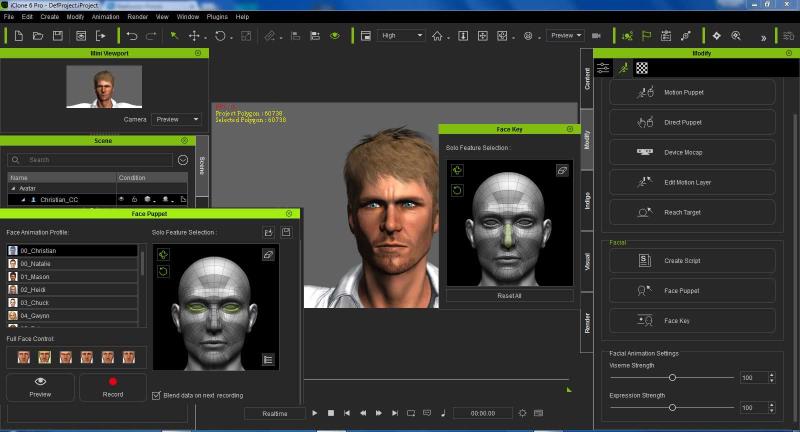
Honestly, I don't see what is missing? The panels create keys, just like iClone5. Bones are not relevant here, as the panels contain morphing abilities based on profiles for the G6, and the older models still have the abilities they had before.
I just did a Facial Key and Face Puppet test combined using Christian; then applied audio facial animation script afterwards, and things blended as expected. There isn't that much difference.
|
|
By animagic - 11 Years Ago
|
The difference is that the animated face key no longer has a detailed panel. I reported this a long time ago as well and never received a satisfactory response from RL. So here, again, is an image showing what's missing:
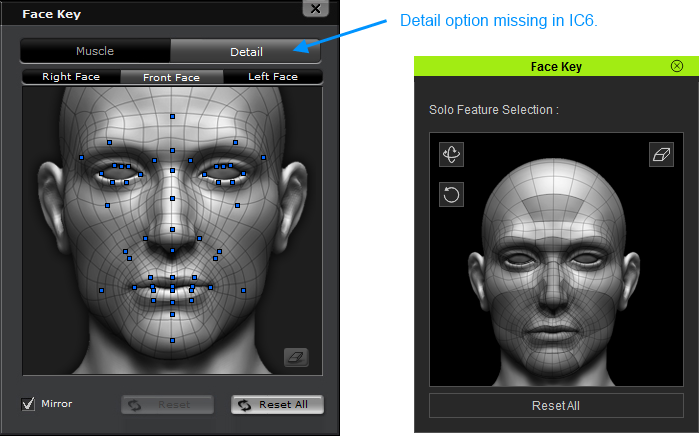
Again, this is for the animated face key settings, not the one the static ones.
It was a great feature, because it allowed you to do subtle facial animation that would be hard with the puppet tool. Now if the puppet tool ever gets improved, I would go for that...:P
|
|
By pumeco - 11 Years Ago
|
@Direx
Wouldn't the included Character Creator be a replacement for that, though? I mean I'm still on iClone5 here, so I can't try it, but surely you can keyframe-animate the new facial stuff with Character Creator?
The Detail panel for Facial Key seems genuinely redundant now (unless I'm missing something), cause from what I've seen, Character Creator is way more capable at doing that sort of thing than the Detail Panel was :w00t:
Like I said though, I don't have iClone6, so you'll have to excuse anything I may have overlooked.
|
|
By planetstardragon - 11 Years Ago
|
i miss it myself, it's near impossible to get good facial expressions without using 3rd party tools. all the character expressions look depressed, and none of the base settings can fix it. The only way to fix it is making custom morphs otherwise forget it. That detailed panel was at least good for getting a smirk.
|
|
By Kelleytoons - 11 Years Ago
|
Well, not to try and fall into the "grass is always greener" trap, isn't the upcoming CT Pipeline thingee supposed to address exactly these concerns?
I'm not going to get my hopes up, but we should know in a few weeks (the whole idea, as I understand it, is for facial animation to be done in CT).
|
|
By planetstardragon - 11 Years Ago
|
at this point i'm not looking to get my hopes up about anything else anymore, I can fix it myself with other software. I'm just saying I noticed that panel missing too.
|
|
By animagic - 11 Years Ago
|
|
pumeco (12/9/2015)
@Direx
Wouldn't the included Character Creator be a replacement for that, though? I mean I'm still on iClone5 here, so I can't try it, but surely you can keyframe-animate the new facial stuff with Character Creator?
The Detail panel for Facial Key seems genuinely redundant now (unless I'm missing something), cause from what I've seen, Character Creator is way more capable at doing that sort of thing than the Detail Panel was :w00t:
Like I said though, I don't have iClone6, so you'll have to excuse anything I may have overlooked.
The facial animation for CC hasn't really changed; it uses the same puppet as iClone 5. It may be that using a CrazyTalk 8 script gives more options, we don't know yet. It's really is about animating facial variations, not just applying them once and that's it. There's ways around it of course, using 3DXchange, but sometimes it's just nice to do something within iClone.
EDIT: Kelleytoons, we crossposted. No the Pipeline will not address this, I think, because this is about animating facial features in a subtle and controlled way, using, ghasp, keyframing...
|
|
By Kelleytoons - 11 Years Ago
|
Well, if you read my entire post you'll see that I refer to doing the facial animation in CT -- that's what I meant about the Pipeline. The ENTIRE pipeline, not just the software called that (which is confusing -- you can't have a "pipeline" without stuff at either end of it, or it's pretty pointless.
So we're saying the same thing and I do have hopes this is what will happen, although I'm trying not to let them get too high.
|
|
By urbanlamb - 11 Years Ago
|
animagic (12/9/2015)
The difference is that the animated face key no longer has a detailed panel. I reported this a long time ago as well and never received a satisfactory response from RL. So here, again, is an image showing what's missing: Again, this is for the animated face key settings, not the one the static ones. It was a great feature, because it allowed you to do subtle facial animation that would be hard with the puppet tool. Now if the puppet tool ever gets improved, I would go for that...:P
the one with the blue dots those are all looking like bones that is where I would place the nub of a bone controller and as people know the newer ones use sets of morphs. (although there might be facial bones its no longer imperative to import a character with a full set of facial bones) Anyhow I guess it might be of use for the older generation characters does anyone actually still use them for close up work?
As an aside you can use the option to "send to 3dexchange" and make more expressions there and slot them in the custom slots?
|
|
By justaviking - 11 Years Ago
|
|
urbanlamb (12/9/2015)
As an aside you can use the option to "send to 3dexchange" and make more expressions there and slot them in the custom slots?
But certainly not nearly as convenient as simply moving a blue dot directly in iClone.
|
|
By urbanlamb - 11 Years Ago
|
yes its not so convenient, but on the other hand I look at it as them moving forward and full backwards compatability may have been too much for them. ON top of it that detail map may not work on the G6 characters and then people would scream its broken LOL so its like 6 of one and half a dozen of the other.
Maybe they will include them later on I am unsure. I remember them saying something along the line of reattaching the controls for some things related in 3dexchange.
|
|
By AverageJoe - 11 Years Ago
|
justaviking (12/9/2015)
urbanlamb (12/9/2015)
As an aside you can use the option to "send to 3dexchange" and make more expressions there and slot them in the custom slots? But certainly not nearly as convenient as simply moving a blue dot directly in iClone.
Better get used to it. RL's new approach for everything it seems is to export and import over and over again into different applications in order to do something that should've just been part of iClone from the beginning.
|
|
By Peter (RL) - 11 Years Ago
|
|
thedirector1974 (12/8/2015)
Hi Folks,
It's iclone 6 again ... I really miss a tool from iClone 5. It's called "Detailed Face Key".
In iClone 5 you had a "Facial Puppet Tool" to create your facial expressions in rough way. That was a good foundation to gor further. And to do this, there were two other tools.
The request to bring back this feature has already been passed to the dev team so you may well see it (or something similar) return in the next version of iClone
However I will send another reminder to the dev team just in case. ;)
|
|
By planetstardragon - 11 Years Ago
|
@peter

|
|
By Colonel_Klink - 11 Years Ago
|
|
I've solved the problem... None of my characters face the camera. The problem is so solved in that you can use the same avatar for every character... just change the clothing and the voice... oh hair too if you want the male/female difference to stand out. LOL
|
|
By thedirector1974 - 11 Years Ago
|
Peter (RL) (12/9/2015)
thedirector1974 (12/8/2015)
Hi Folks,
It's iclone 6 again ... I really miss a tool from iClone 5. It's called "Detailed Face Key".
In iClone 5 you had a "Facial Puppet Tool" to create your facial expressions in rough way. That was a good foundation to gor further. And to do this, there were two other tools. The request to bring back this feature has already been passed to the dev team so you may well see it (or something similar) return in the next version of iClone However I will send another reminder to the dev team just in case. ;)
Hi Peter
it's nice to read that reallusion is still working on a solution for this problem. That's good. But iClone 6 should have been released with that tool already onboard, because it is so important to create fairly convincing facial expressions ...
Hope to see this soon in the next update ...
Direx
|
|
By thedirector1974 - 11 Years Ago
|
Peter (RL) (12/9/2015)
thedirector1974 (12/8/2015)
Hi Folks,
It's iclone 6 again ... I really miss a tool from iClone 5. It's called "Detailed Face Key".
In iClone 5 you had a "Facial Puppet Tool" to create your facial expressions in rough way. That was a good foundation to gor further. And to do this, there were two other tools. The request to bring back this feature has already been passed to the dev team so you may well see it (or something similar) return in the next version of iClone However I will send another reminder to the dev team just in case. ;)
Hi Peter
it's nice to read that reallusion is still working on a solution for this problem. That's good. But iClone 6 should have been released with that tool already onboard, because it is so important to create fairly convincing facial expressions ...
Hope to see this soon in the next update ...
Direx
|
|
By justaviking - 11 Years Ago
|
|
Peter (RL) ---> "Next Version" --> Meaning iClone 7, maybe?
TheDirector1974 --> "Next Update" --> Meaning iClone 6.3 or 6.4, probably?
I *hope* it's in a 6.x update, but typically "version" will imply a major release.
It's not always obvious if particular words are chosen casually or because of a specific meaning.
In either case, it's a vague intent of "something." But at least it's on their radar and it sounds like they're working on it, so that's a good thing.
|
|
By AverageJoe - 11 Years Ago
|
|
Given recent history, it'll be built into another separate app, requiring you to purchase it.
|
|
By Peter (RL) - 11 Years Ago
|
justaviking (12/10/2015)
Peter (RL) ---> "Next Version" --> Meaning iClone 7, maybe?
TheDirector1974 --> "Next Update" --> Meaning iClone 6.3 or 6.4, probably?
I *hope* it's in a 6.x update, but typically "version" will imply a major release.
It's not always obvious if particular words are chosen casually or because of a specific meaning.
In either case, it's a vague intent of "something." But at least it's on their radar and it sounds like they're working on it, so that's a good thing.
To be clear I said the iClone team are aware of the request but that's as far as things stand at the moment. Improving facial animation is a always a priority but how that will manifest in the next version (iClone 7) is still to be finalised. The important point I'm trying to get across is that we are listening to all your requests. ;)
|
|
By Peter (RL) - 11 Years Ago
|
|
wizaerd (12/10/2015)
Given recent history, it'll be built into another separate app, requiring you to purchase it.
Well actually that is already the case to a certain extent. CrazyTalk 8 Pipeline will allow you to export its advanced facial animation scripts to iClone.
|
|
By JC Weatherby - 11 Years Ago
|
|
I'm on the fence about the need for a return to the DETAIL FACE KEY of iC5. On recent episodes of Evocronik, I've found myself wanting it, but at the same time - IT'S VERY EASY TO OVER DO FACIAL EXPRESSION, EVEN WITH THE TOOLS WE HAVE AVAILABLE IN IC6. In the end, it's up to the artist.
|
|
By mtakerkart - 11 Years Ago
|
|
but how that will manifest in the next version (iClone 7) is still to be finalised
I loooooooooooooooove to hear this!!!!!!!
|
|
By planetstardragon - 11 Years Ago
|
i was looking for 1 smiling iclone character....i couldn't find one in the entire site amirite ? ^.^
|
|
By JIX - 11 Years Ago
|
|
The important point I'm trying to get across is that we are listening to all your requests. ;)
Sounds good! So if you guys also implement our requests (well, most of them asap and all of them in the long run) as a next step and offer them to acceptable terms, everything will be fine and dandy. Happy holidays! :)
|
|
By thedirector1974 - 11 Years Ago
|
So, iClone 7 then ...
Thats sad. And I am really disappointed about that, because the advertise was telling somewhat different ...
I think i'll return to verison 5. Sorry ...
Direx
|
|
By Rampa - 11 Years Ago
|
Your work will be great with either one! :)
I assume you've given it a good try-out. Do see if you get better results using the available tools with the CC characters, as they are what will be the standard now.
|
|
By thedirector1974 - 11 Years Ago
|
@ rampa
I already started a project in iclone 6, using the cc avatars. I rendered several scenes and I can't see any improved facial capability compared to the g5 avatars. You know, you have the tool to reate facial expression. Thats a fact. But you can't take it a step further to create good facial expressions, because of the non existing "detailed face key tool".
I will see where iClone 6 will take me.
When I reinstall iClone 5, to have it as a second option alongside iClone 6, can I share the library paths or do i have to install everything for iClone 5 again?
Direx
|
|
By Rampa - 11 Years Ago
|
You can set your own paths at install, so that may be a good possibility, but anything saved from iC6 will not open in iC5. There would also be some iC5 stuff that will not work as expected in iC6. Some of the Lua scripted props only partially work, and anything bullet physics is "playback only" and cannot be used with the PhysX engine. Unless your at a premium for space, you might want to keep them separate.
It doesn't look like the new CT8 has that level of detail either (like the detail panel in iC5). This is one of the growing pains of transitioning to a more DAZ-like avatar type, I guess. DAZ, or any non-standard, avatars couldn't use the detail panel before either, If I recall correctly. A mesh deformation tool like the "magnets" in Poser could be a nice alternative, assuming they could be animated. :) That would work for any character type.
|
|
By animagic - 11 Years Ago
|
What has been added, since IC 5.5 I believe, and what is still a option in IC 6, is the possibility to set custom expressions. I haven't used it much, but it allowed me to get a nice "smirk". So that may alleviate the lack of the detailed settings a bit. Of course, as has been remarked, it easier to move a few blue dots.
As to the characters, the CC characters definitely look better to me. I do miss my mirror, and I have one scene I will have to render under DX 9, as the mirror is essential to the story.
|
|
By planetstardragon - 11 Years Ago
|
well, fortunately we have the morphing - but it's more tedious and much less accurate because everything is mouse driven - what we really need is fader access to the morphs we import on the characters. faders we can animate like daz. To make better art and animations "We Absolutely Need these Tools!"

|
|
By pumeco - 11 Years Ago
|
Seriously, can anyone clarify something here ...
I have iClone5 PRO and I don't see anything at all better about the "Detail Face Key" panel that cannot be done better in Character Creator. I've never been able to try Character Creator, but from the videos I've seen of it, blimey, it looks like a way better system for creating custom faces and expressions, and it even has "faders" in the form of sliders (which I assume can be animated). Obviously there's something better about Face Key otherwise you all wouldn't be complaining about it's absence, but what?
I don't get it, Character Creator looks much better to me and I haven't seen anything in that old Detail Panel that couldn't (as far as I can tell) be done in Character Creator. I'd appreciate knowing what part of it is failing to impress cause to be honest, I was quite impressed with what I've seen and you've got my mind in orverdrive, wondering what the hell could be wrong with it for you to prefer the old Detail Panel over it :crazy:
I was expecting Peter to defend it, but he didn't, so what does the old Detail Panel do that the Character Creator can't do better?
|
|
By toonarama - 11 Years Ago
|
Hi Pumeco
What people liked about it is that you could go to the exact frame where you wanted your character to have a specific expression and make detailed adjustments to fairly accurately create what you required; creating a key frame at the same time.
No having to create custom expressions and no messing about with sliders or a mouse in realtime in an effort to get your character into the right expression at the right time.
|
|
By AverageJoe - 11 Years Ago
|
|
toonarama (12/11/2015)
Hi Pumeco
What people liked about it is that you could go to the exact frame where you wanted your character to have a specific expression and make detailed adjustments to fairly accurately create what you required; creating a key frame at the same time.
No having to create custom expressions and no messing about with sliders or a mouse in realtime in an effort to get your character into the right expression at the right time.
Not to mention that by doing so, it was useful for animating these type of detail changes via those keyframes. CC morphs AFAIK aren't animatible.
Part of my pet peeve with the CC is since it is in a separate app, you cannot animate the morphs. Another thing is tweaking an endless list of sliders can be a real daunting task. I'd like to see better group morphs that make more logical sense for changing things together instead of so many separate sliders.
|
|
By pumeco - 11 Years Ago
|
Understood now, thankyou both. Sadly then it seems just another thing that was integrated that isn't anymore, and that's a problem cause one of the main attractions for me to iClone is that it's a very productive environment, everything in one place, and I much prefer that to messing around jumping between different programs (I f@cking hate that way of working). Hopefully they'll come right regards how they go about things in the upcoming releases. Man, I hope so, cause I'm not supporting a bits'n'pieces' system especially when I left such idiotic workflows behind when I discovered iClone! When I animate two characters having a discussion in iClone, I expect all the tech to be there, in iClone, not having to do guess-work due to using multiple programs.
I thought Character Creator was built-in to iClone!
I know it's classed as a seperate plugin now, but blimey, I still thought it was integrated into iClone. It's like iClone attracted me away from the long-winded crap out there, into a nice productive environment, but now they've gone the way of the others (which is not productive). This is actually quite depressing to hear, in fact I won't be buying again even with PBR unless this new, less-productive system changes back to being integrated just like I expect iClone to be :(
I might as well just live with the seperate programs I already have and deal with the unproductivitiy it brings due to being seperate programs :Wow:
I already have a PBR-capable renderer and a very capable animation system, just not all in one, and it sounds as if iClone is going that same tired, idiotic route.
Someone in marketing needs an arse-kicking :Whistling:
|
|
By animagic - 11 Years Ago
|
I'm going to defend CC a bit... Any morph-based system has many sliders... I've always found DAZ quite daunting and FaceGen has many more, just to define a face. FaceGen has photo-mapping and one that's available with Head Creator, there will be a base to work from.
iClone is not a modeling program, so I have no problem with Character Creator being separate. You can go back and forth, with two caveats that need to be addressed: when loading a newly character directly from CC into IC, the lowest texture settings are used and cannot be adjusted. The other issue is that textures are flattened, so when you go back from IC to CC, you have lost your dynamic adjustments. You can save characters in CC format, which will keep everything adjustable.
It takes some work, but you can load a CC character in 3DXchange and create morphs that can be controlled via the Expression Editor. So that is an option, at least as far as I know. Another means of expression that may open up is via CT8 scripts, but we'll have to see what that does exactly.
|
|
By planetstardragon - 11 Years Ago
|
cc is a modeling software, not an animation software, I'm referring to making better facial animations - expressions. I care about making iclone better. No matter what. was always, is still and will always be my main objective. Now more than ever.
|
|
By pumeco - 11 Years Ago
|
iClone is cool, it's super-cool and awesome and all that other lovely stuff, but my point is that iClone attracts people for being easy to use and get along with; everything in one place.
If that philosophy over it's design goes the way of the less productive stuff, why would we look upon iClone as superior anymore?
For me, iClone was by far the most superior product out there when it comes to productivity in it's field, and that was because of it being Realtime and everything being in one program! Chopping it up and making it less productive doesn't sound like much fun to me cause it would no longer be "iClone" in the productivity sense. Not trying to be a naysayer or anything, but the productivity aspect of iClone is very important, it's one of the main ingredients that make it attractive. I really don't see the attraction in splitting it up, taking away the productivity, and making it more expensive in the process!
:crazy:
Anyway, I've wrote a few downhearted posts on here lately, which is unfortunate, but I needed to speak my mind on this stuff.
Time for me to go back into lurk mode and hope that the Reallusion marketing gurus and devs come to their bloody senses!
|