|
By yo bing - 10 Years Ago
|
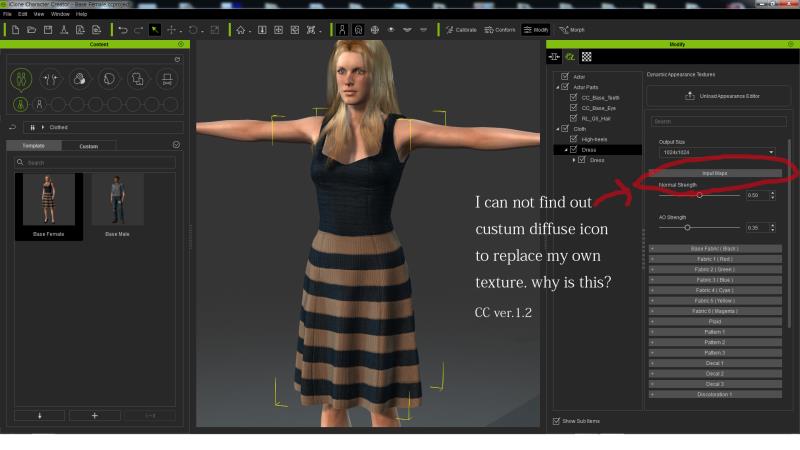
Hi. there.
I have loaded Base female with a dress in CC. to customize dress map.
I could not find out custom map icon in the input map (dress material) even if clicking activate editor as manual
It is only modify slider.
Why is this?
|
|
By Rampa - 10 Years Ago
|
|
That feature is not available in the free version. If you buy the "Essentials" pack, then you get access to loading your own textures, as well as a lot more morphs for customizing your characters.
|
|
By Cricky - 10 Years Ago
|
See if this works for you:
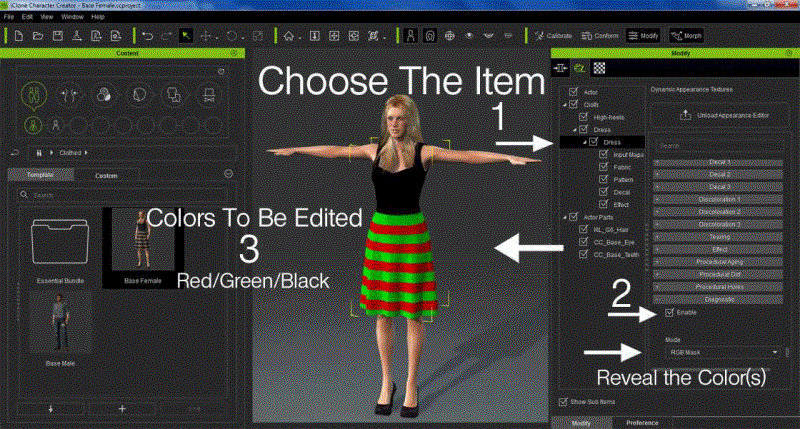
yossigo (11/14/2015)
Hi. there. I have loaded Base female with a dress in CC. to customize dress map. I could not find out custom map icon in the input map (dress material) even if clicking activate editor as manual It is only modify slider. Why is this?
|
|
By yo bing - 10 Years Ago
|
|
Hi,rampa.
Thanks for information.
Oh really? CC essential is so expensive right now...
|
|
By yo bing - 10 Years Ago
|
Cricky (11/15/2015)
See if this works for you:
Hi,Cricky.
I tried this. But I could not replacing texture in CC.
And I figured it out replacing texture in the material of iclone 6 pro!
Thank you.
|
|
By Cricky - 10 Years Ago
|
You should only have to click on the Proper Input Map Color based on the RGB Mask, and then double-click the diffuse to change it. The demo image is not an Add-on part of the Essential package.
Make Sure it says INPUT at the bottom of the specific COLOR, and not something like Cotton, Leather, etc.. It should work regardless of the version you have.
|
|
By yo bing - 10 Years Ago
|
|
Cricky (11/15/2015)
You should only have to click on the Proper Input Map Color based on the RGB Mask, and then double-click the diffuse to change it. The demo image is not an Add-on part of the Essential package.
Make Sure it says INPUT at the bottom of the specific COLOR, and not something like Cotton, Leather, etc.. It should work regardless of the version you have.
Ok. Is this what you point?
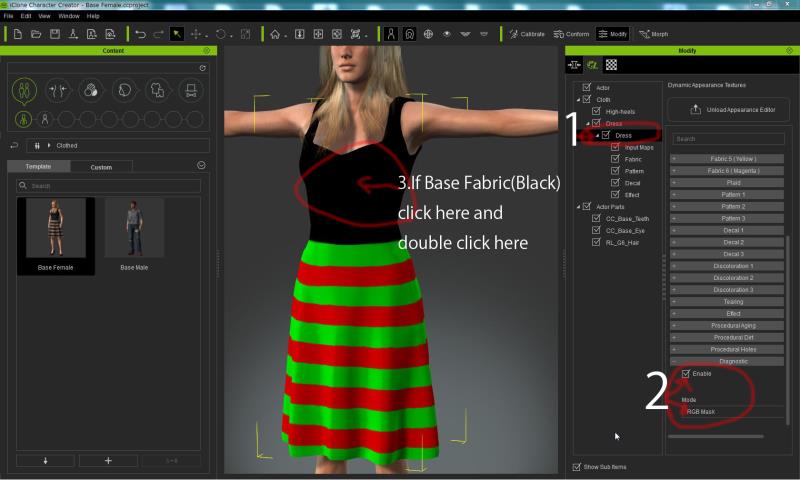
I tried this many time. Double click No.3 of pic then it should appear custom texture icon.
It did not make it so far.
Thanks
|
|
By Cricky - 10 Years Ago
|
No, you are not going far enough. The RGB Mask only shows you the colors for input. Then you have to OPEN the Color Panels related to those colors.
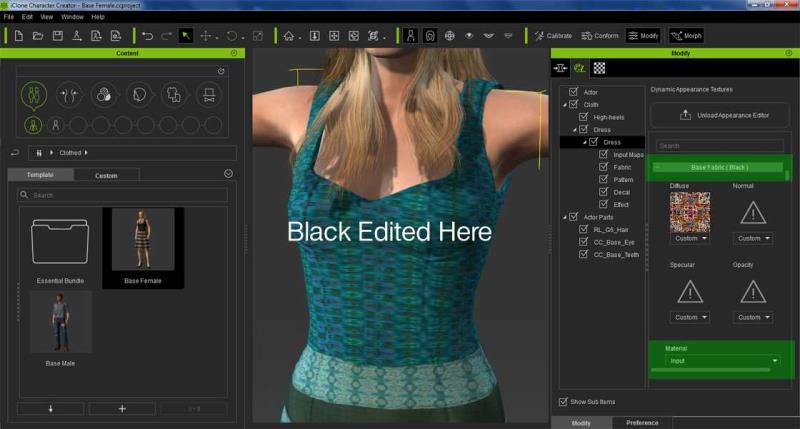
yossigo (11/15/2015)
Cricky (11/15/2015)
You should only have to click on the Proper Input Map Color based on the RGB Mask, and then double-click the diffuse to change it. The demo image is not an Add-on part of the Essential package.
Make Sure it says INPUT at the bottom of the specific COLOR, and not something like Cotton, Leather, etc.. It should work regardless of the version you have.Ok. Is this what you point? I tried this many time. Double click No.3 of pic then it should appear custom texture icon. It did not make it so far. Thanks
|
|
By yo bing - 10 Years Ago
|
No, you are not going far enough. The RGB Mask only shows you the colors for input. Then you have to OPEN the Color Panels related to those colors.
Hi.Cricky.
I also asked Reallusion support and they say Input Maps are not available in the basic version of Character Creator.
Thank you for taking time.
|
|
By Cricky - 10 Years Ago
|
|
I never noticed the restriction, but in fact you do need to have the Essentials Pack just to do Fabric Editing using Input.. I missed that in the description, but it seems something that would be essential even without the Essential Pack in order to Generate "Unlimited" characters; even if it's based on the Free Package. I could see not including Decals, Wear and Tear, etc., but not texture editing. So, my apologies for the misdirection.
|