|
By Realtimer (RL) - 11 Years Ago
|
Start off on the right foot and brush all frustration aside, by first reading up on our tutorials and help files to become a full-fledged Character Creator.
Go to Online User manual: HERE
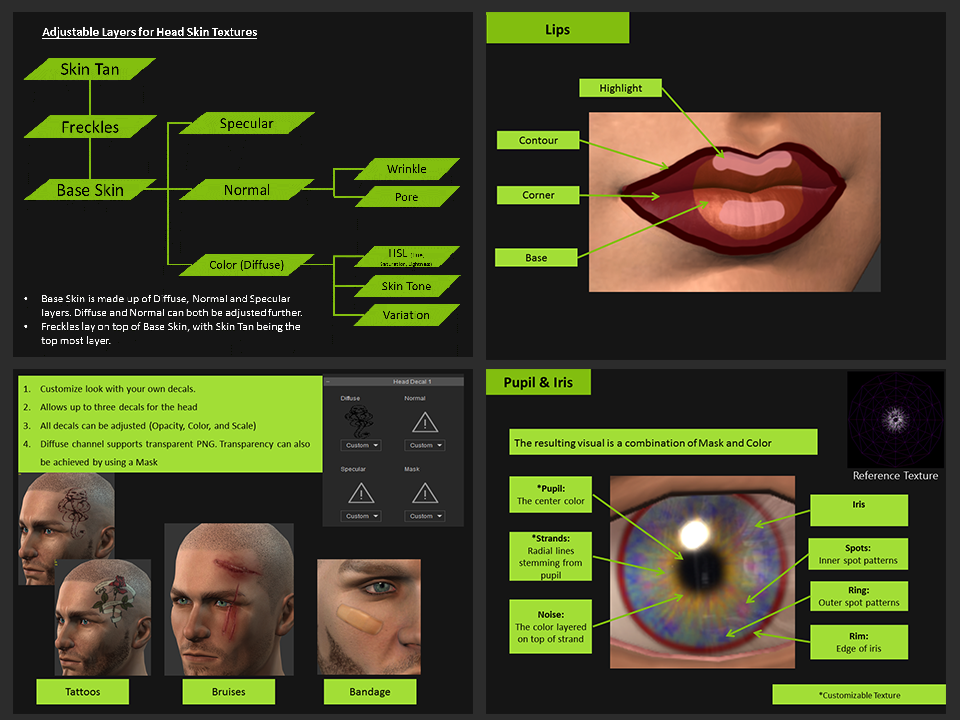
Download the FREE Character Head and Body Skin Texture Design Guide for Character Creator: HERE
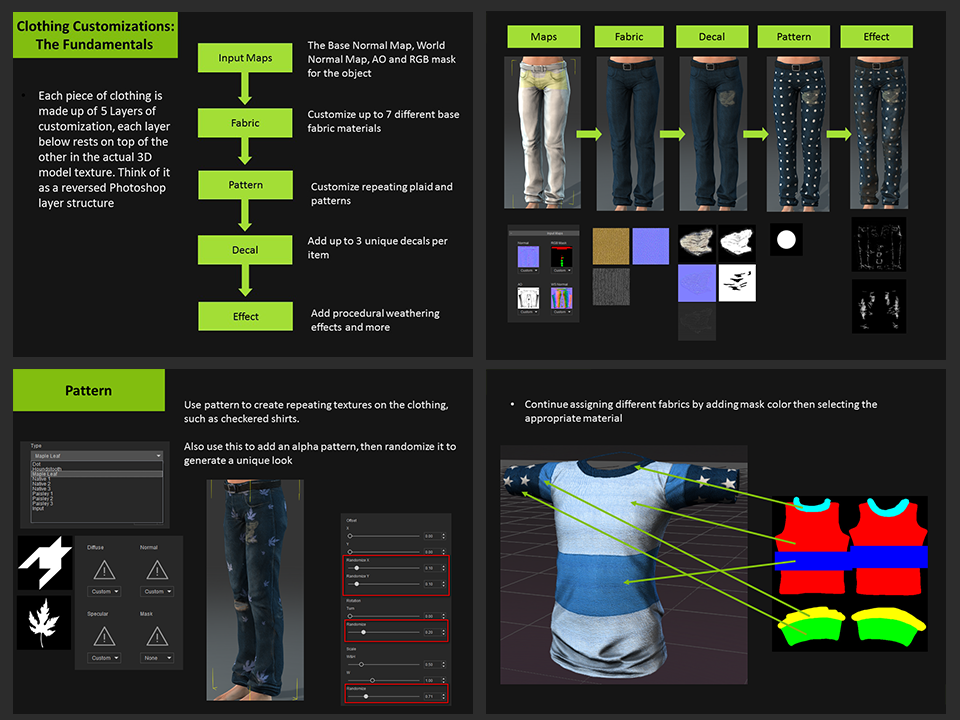
Download the FREE Clothing and Fabrics Design Guide for Character Creator: HERE
See tutorial videos: HERE
Preview:
|
|
By JC Weatherby - 11 Years Ago
|
|
The Learning Reference is a good bonus to the Essentials Pack. It made getting started very easy.
|
|
By rcsinger29 - 11 Years Ago
|
anything on how to import custom accessories and other assets?
such as hair, masks
into CC...?
I have lots of hair meshes, some purchased from RL and some custom..
Can they be imported and saved in CC?
|
|
By Lord Ashes - 10 Years Ago
|
Although some of the content in the tutorials describe base CC functionality, other parts are only applicable if you have the Essentials Pack. However, neither the past title nor the documentation seem to indicate what is basic functionality and what functionality is part of the Essential Pack.
I tried to follow the tutorials and found that some of the tree views and/or menu options seem to be a little different from the current version (guessing the tutorials are a bit out of date) but more importantly I came across features that did not at all appear in my version of CC. After spending some time trying to find them in CC, I checked the forum and discovered that some of the options aren't available unless you have purchased the Essentials Pack.
To avoid confusion, I would either make a Tutorial for the Base Functionality and one for Essential Pack Functionality or, at least, identify clearly functionality in the current tutorial which is only applicable to Essential Pack users.
|
|
By Lord Ashes - 10 Years Ago
|
|
rcsinger29 (9/16/2015)
anything on how to import custom accessories and other assets?
into CC...?
Can someone explain to be why iClone differentiates between accessories and props? As far as I know there are actual accessories which have their own file format and there are props which also have a different format. Aren't accessories just props? This also leads me to wonder why people want to bring accessories into CC. Typically accessories (e.g. hats, glasses, watches, rings, etc) are static items which don't require any of the functionality that CC offers (e.g. morphs, etc). So why drag them into CC? Is it so that they can use the Materials editor? In the end your going to load your character in iClone anyway so why not just keep them in iClone and add them as iProps in iClone?
But I guess that goes back to the more primal question of why is CC a separate application in the first place? I love the convenience of having the character creator and editor in one as is the case, for example, with DAZ Studio. CC somewhat tries to pave over this dis-junction (between itself and iClone) by providing the "Edit In CC" and "Send To iClone" buttons but it still does not feel integrated. On my i7 opening up iClone or CC still takes some time and even when they are both open I still get the "Transferring Data" (or whatever the message is) for at least a few seconds and then I need to Alt-Tab to the other application.
I think this is also why RL has not (yet) officially introduce Dynamic Morphs. You can morph your character in CC and now these morphs can even be custom but once you move the character from the CC realm to iClone all the morphs are baked in (except those that you managed to bind to customs slots of Facial Expressions) and thus the morph cannot be changed in iClone at different key frames. If CC was actually a part of iClone, it would probably be easier to implement Dynamic Morphs. Having said that if RL expanded the existing Facial Expression morph functionality they could implement Dynamic Morphs fairly easily and most of the morphs from CC could actually be accessible in iClone (for those that need to change them at different key frames). This does not mean CC has to be replaced by this method. CC would still be the easier way to create new characters but if all the CC morphs were also available through the Facial Expression morphs then the option would be there for those that want to use it. I demonstrated this concept with G6 & CC characters (the G6 version is still being sold in my market place store under the name G6 Plus) but due to the current limit of (6x4) 24 custom Facial Expression slots the user can only gain access to 24 morphs at a time.
|
|
By justaviking - 10 Years Ago
|
|
Lord Ashes (5/1/2016)
But I guess that goes back to the more primal question of why is CC a separate application in the first place? I love the convenience of having the character creator and editor in one as is the case, for example, with DAZ Studio. CC somewhat tries to pave over this dis-junction (between itself and iClone) by providing the "Edit In CC" and "Send To iClone" buttons but it still does not feel integrated. On my i7 opening up iClone or CC still takes some time and even when they are both open I still get the "Transferring Data" (or whatever the message is) for at least a few seconds and then I need to Alt-Tab to the other application.
As long as it's a easy as "Edit in CC" and "Sent To iClone" I am okay with some things being separate "modules."
I've been dong that exact thing a lot the last couple of days.
It's not so bad. At least I don't have to save files, go find them, import them. Save them. Go find them. Import them. (And delete all the duplicates I made along the way.)
It allows large and complex user interfaces to each stay in their own domain without becoming a massive mess.
It's been working okay, and hopefully becomes even better and more seamless over time.
I am thankful for my Solid State "C:\" drive, which helps applications/modules launch more quickly.
|
|
By wires - 10 Years Ago
|
|
Lord Ashes (5/1/2016)
Can someone explain to be why iClone differentiates between accessories and props? As far as I know there are actual accessories which have their own file format and there are props which also have a different format. Aren't accessories just props? This also leads me to wonder why people want to bring accessories into CC. Typically accessories (e.g. hats, glasses, watches, rings, etc) are static items which don't require any of the functionality that CC offers (e.g. morphs, etc). So why drag them into CC? Is it so that they can use the Materials editor? In the end your going to load your character in iClone anyway so why not just keep them in iClone and add them as iProps in iClone?
Props are just that - props. They can be placed anywhere in a scene that the user desires, can be stationary or movable and can be just about anything. Accessories on the other hand are always attached to a character - hats, glasses, weapons, etc. and will always move with the character,
And this is where it really gets interesting in iClone. Props can be accessories, and accessories can be props - depending on the users needs. For example, a sword can be a prop placed on a table. Using "Reach For" and "Attach" a character can "pick up" the sword with it's hand and the object now becomes an accessory. Or the character can place the sword on a table by having it detached from the hand and it now reverts to a prop.
As to importing accessories into CC, many users are creating characters for use with other software - and won't even use them in iClone. If the character can be directly sent to 3DXchange with all needed accessories then the user has saved quite a bit of time to complete the task.
|
|
By Lord Ashes - 10 Years Ago
|
|
wires (5/1/2016)
Props are just that - props. They can be placed anywhere in a scene that the user desires, can be stationary or movable and can be just about anything. Accessories on the other hand are always attached to a character - hats, glasses, weapons, etc. and will always move with the character. And this is where it really gets interesting in iClone. Props can be accessories, and accessories can be props - depending on the users needs. For example, a sword can be a prop placed on a table. Using "Reach For" and "Attach" a character can "pick up" the sword with it's hand and the object now becomes an accessory. Or the character can place the sword on a table by having it detached from the hand and it now reverts to a prop.
That was my point. Why make a whole other category of Accessories when Accessories are actually just props (i.e. props with an intended use). Especially if you might be removing/dropping the accessory then you want to have it, as I understand it, as a Prop anyway. So why not always make it a prop so that the end user has the option of attaching it or not? So my question was, is there something special that Accessory does that a Prop does not (besides the automatic attach)?
wires (5/1/2016)
As to importing accessories into CC, many users are creating characters for use with other software - and won't even use them in iClone. If the character can be directly sent to 3DXchange with all needed accessories then the user has saved quite a bit of time to complete the task.
First, there is no direct CC to 3DXChange (I suggested this as a wish item). You either need to "Send to iClone" and then "Edit in 3DXChange" or save the creation as an iAvatar and then open it in 3DXChange. Although exporting for non-iClone use could be a reason for wanting Accessories in iClone, I would think that typically the exported file is still going to some editing software (either one to set up the static image or to create animations) and thus the accessory should be added at that time. Otherwise, if you want to change the accessory, you need to do a whole character export again. Just my 2 cents.
|
|
By Lord Ashes - 10 Years Ago
|
|
justaviking (5/1/2016)
As long as it's a easy as "Edit in CC" and "Sent To iClone" I am okay with some things being separate "modules."
...
It allows large and complex user interfaces to each stay in their own domain without becoming a massive mess.
Sure, it works. But a product that users buy should work as well or better, in my opinion, than competitor products being offered for free. Or at least they should strive to do so.
In DAZ Studio (free software) the Character Creator is built into the core software. Similar to CC, all the adjustment are made with morphs (besides changing textures) but because these morphs are part of the core software, they can be adjusted on any key frame. This opens up a huge window to all kinds of effects from transformations (e.g. human to werewolf transformation) and body part transformations (e.g. Pinocchio's nose growing longer, glamour spell wearing and exposing a faeries pointy ears, curse turning a face ugly, rapid aging effect, etc). iClone does not have formal support for Dynamic Morphs like these which can be applied to key frames (probably because CC is not part of the iClone software). There is a work-around in iClone to achieve up to 24 morphs using the custom settings on Facial Expressions but it is not convenient.
Being able to morph inside your animation software also saves time when doing still shots or fine tuning character appearance. For example, you set up your shot but then notice that some facial feature looks a bit odd from this angle, so you want to adjust that facial feature a bit. In DAZ you select the character, go to the Morph section and adjust the desired morph. In iClone, you need to "Send To CC", select the desired facial morph, adjust it (without seeing how it looks in the scene) and then "Send To IClone". If it is not right, you need to repeat until correct. Having the Character Creator inside he core software means you can see the character changes in your seen as you make them.
justaviking (5/1/2016)
I am thankful for my Solid State "C:\" drive, which helps applications/modules launch more quickly.
Yea...I am thinking of getting myself one to see how much of a difference it makes.
|
|
By animagic - 10 Years Ago
|
|
I think the reason why a particular user does this or that is an open-ended debate. CC has the option to add accessories to a character, and I think it's a good thing, especially for certain clothing elements or jewelry.
|
|
By freerange - 10 Years Ago
|
The props and accessories does not really bother me, I am sure it is more of a content store sales issue than anything functional.
Also CC and iClone being separate doesn't bother me either. I actually kind of prefer it to keep each more focused, BUT 3DXchange functionality should be built into the apps and not be a 3rd app.
iClone should have the full features of 3DXchange and then remove the limit on morphs and have dynamic morphs within iClone like you suggested. For CC you have your OBJ and FBX exports with key generators.
Personally I would love to have the ability to control all the blendshapes using MIDI input. So you assign each blend shape slider to a midi input and puppet away with much more control than you can with just a mouse. It would also be good to have the option of instead of MIDI and multi-touch interface to drive the blendshapes.
|
|
By martok2112 - 10 Years Ago
|
I'm still not impressed with the clothing options.
Everything is casual. I'm trying to create some sci-fi stuff, and none of these clothing options are suited for that.
I don't have 3DSMax (which seems to be the only way one can attempt to make their own clothing) and cannot afford it.
Some of the following blank meshes would be nice for CC avatars
-Blouse
-Trenchcoat
-Scalp options (unless I can use ones from previous avatar generations)
-Gown upper and lower slim type and billowy type
-Boots male and female of varying types (jackboot style, slim, combat,etc)
Things like that.
Props, I have no problem making.... and I think I've gotten pretty decent at it.
Unlimited clothing creativity however? So far, I still don't think so...at least not for what I have in mind.
|
|
By animagic - 10 Years Ago
|
The Professional Outfits pack that has just been released is not casual. It's a solution to have more variety until the CC clothing creation options become available. Do you have illustrations of what your are looking for?
As to scalps: anything can be an accessory; and if it's iHair you can apply it by dropping it on the avatar in CC. The same with accessories actually.
|
|
By Postfrosch - 10 Years Ago
|
Hello Martok,
I can understand you well.
Also I go in this package (or at all) some originals off (even if it otherwise is very good), I would like to make more fantasy and medieval clothing I have no templates (blank meshes) for tunics, long dresses, boots (heels without Highheel and without shoelaces) coats, cloaks etc.


I can now do with the CC beautiful avatars, but clothing in medieval or fantasy style not. From armor I will not even talk. I could do with the Essential templates though some, as with the Proffesinal outfit parts but lacking basics as mentioned above.:(That with the CC 1.5 also comes the ability to create own clothes helps me little. I have (except Hexagon) and not the skill itself create neither 3dMax nor other 3D programs clothes. I can edit existing templates or converted, texturing, etc. Also Props can I create in certain extent by you. Otherwise, I'm a little gifted in this area. I wanted an d will actually create only clips. This update is me (and many other users) bring good little (unfortunately) To use it you need one (or more) expensive 3D programs (Blender times excluded) and 3dx6 pipeline.:crying:
I am almost afraid I'm going back to the G5 avatars and CloneCloth - müsssen return originals to continue making clips.
Modern things for which I indeed have enough templates was not lying there.:unsure::(:Whistling:
Greetings from Germany
Postfrosch (Werner)
PS; Sorry for the bad English. I let the text through Google translated:angry:
|
|
By GOETZIWOOD STUDIOS - 10 Years Ago
|
|
freerange (5/6/2016)
The props and accessories does not really bother me, I am sure it is more of a content store sales issue than anything functional.
Also CC and iClone being separate doesn't bother me either. I actually kind of prefer it to keep each more focused, BUT 3DXchange functionality should be built into the apps and not be a 3rd app.
iClone should have the full features of 3DXchange and then remove the limit on morphs and have dynamic morphs within iClone like you suggested. For CC you have your OBJ and FBX exports with key generators.
Personally I would love to have the ability to control all the blendshapes using MIDI input. So you assign each blend shape slider to a midi input and puppet away with much more control than you can with just a mouse. It would also be good to have the option of instead of MIDI and multi-touch interface to drive the blendshapes.
Not everyone need to customize and export/import through 3DXChange so it makes sense it is a separate product.
On another hand, having more animation possibilities integrated into iClone is needed, including having access to external controler yes, I agree, albeit personally I would prefer OSC instead of MIDI but that's a detail (both would be ok ; ) ).
A lot of user's needs could be answered through scripting/sdk, but it is clear that Reallusion does not want us to be able to customize iClone itself and to offer more functionalities ourselves. Because they can sell "add-ons" and "plugins" at some point. But this is an old minded strategy.
For instance, the fact that Maya became the industry standard in the CGI industry over time came from the fact it was entirely opened and customizable. Some other products who maintained a "closed mind" strategy ultimately disappeared. Nobody would like to use a game engine not customizable, look at the success of Unity, Unreal, etc.. and their marketplaces. Very successful yet not only "assets" are sold but also "add-ons" and "plugins" offering new functionalities.
Reallusion can maintain more or less successfully this attitude for now because there is currently no real concurrent product to iClone. But if one appeared at some point with more or less the same functionalities yet offering customizability through scripting/sdk, iClone would die instantly, you can take that to the bank.
So I encourage everyone to push Reallusion to open their products to customization through scripting and SDK.
|
|
By martok2112 - 10 Years Ago
|
Personally, I am trying (in Blender) to try a couple ideas for costumes out, and see if they'll work.
Now, when it comes to armor, Postfrosch, I usually use Blender to make components, and then attach them as accessories to a character. I did stormtrooper armor from Star Wars that way. (And I plan on improving that very soon....looking back at my first efforts, I can see I have a LOT of room for improvement.)
Blender is a free 3D modeling app with animation capabilities, but I prefer to use iClone for animation.
Postfrosch, you might be able to build the medieval armor you need in Blender, convert the pieces in 3DEXchange, and then accessorize them for your characters in iClone. :)
|
|
By martok2112 - 10 Years Ago
|
From what I read in another post, it sounds like CC 1.5 is what folk like Postfrosch and myself are waiting for. :)
|
|
By primaveranz - 10 Years Ago
|
|
animagic (5/23/2016)
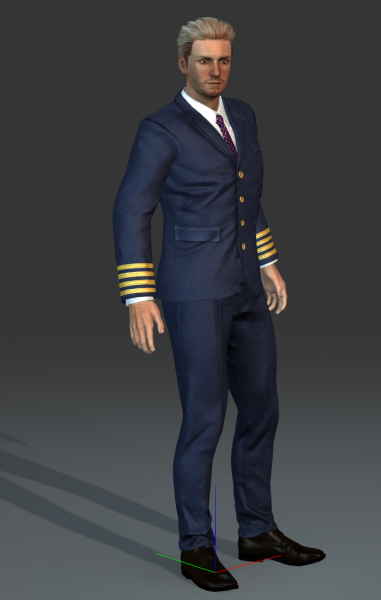
The Professional Outfits pack that has just been released is not casual.
I couldn't find any non-casual trousers to go with e.g. the Captain's jacket. Am I missing something?
|
|
By animagic - 10 Years Ago
|
primaveranz (5/25/2016)
animagic (5/23/2016)
The Professional Outfits pack that has just been released is not casual.
I couldn't find any non-casual trousers to go with e.g. the Captain's jacket. Am I missing something?
Looking at the complete characters (PO_01 and PO_02) in CC, they are provided as Slacks, which is sort of business casual but may not be formal enough for a uniform. However,it looks like what they wear in the examples on the product page.
This is would you would get, for example:
|
|
By primaveranz - 10 Years Ago
|
|
Yeah that's all I could find too.
|
|
By Postfrosch - 10 Years Ago
|
|
From what I read in another post, it sounds like CC 1.5 is what folk like Postfrosch and myself are waiting for.
@martok2112
Then you're better off than me, because I can not Blender. The only program that I have in this direction is Hexagon.
I will probably not benefit me to create your own clothes.
Likewise, I have no 3dx6 pipeline, which is necessary for it. (Lt. request to beta testers).
CC-avatars are likely to remain only a wish for me in medieval clothes or fantasy. Too bad, because I create with CC would actually like.
CC 1.5 will therefore bring no improvement for me. I can possibly wait for Clothing templates appear in the marketplace, the Developer created - with the emphasis here on templates is (without avatars)
Greetings from Germany
Postfrosch
|