|
By Realtimer (RL) - 11 Years Ago
|
Use this thread to write down and share all your wishlist needs, as our innovation team will keep an eye on this thread to hear about your ideas.
NOTE: Please refrain from using this thread to report glitches, bugs or issues. We want to strictly keep this thread for wishful features only. If you need to report an issue then go HERE.

|
|
By fatbirdy - 11 Years Ago
|
|
It would be nice to have a sculpt brush like in ZBrush or Blender.
|
|
By mtakerkart - 11 Years Ago
|
Thank you realtimer.
-Would like more extreme deformation
-importing own props or clothes
-more stylish characters
-quadrupede character
|
|
By Rampa - 11 Years Ago
|
I think a "randomize", or random character generator button would be really useful.
As for additional clothing, I'd like to see:
A trench coat
a gown
a robe
a Puffy jacket (like a down parka)
|
|
By AverageJoe - 11 Years Ago
|
|
More hair. There just never is any good hair in iClone or this CC tool. 3 hairstyles, 2 female and 1 male just isn;t enough. Even the essentials pack doesn't offer any more. What does RL have against hair?
|
|
By Fantasy-Raider - 11 Years Ago
|
What would be even more useful than more hairstyles would be: A template or even a little clue how to use the opacity to cut and style the hair.
With Heidi I have managed to create 5 more lengths/styles but it was all trial and error and each one took over 4 hours!
I suppose i could import the hair into Zbrush and do it that way, creating new uv's/maps .. but I'm a complete newbie with Zbrush and really haven't got a clue what i'm doing yet. (I can't even explain it properly, let alone do it)
so opacity hair templates would be good?
Also, a related question: Would hair created in blender - 3D Max - Zbrush etc etc .. work in CC, If the hair was imported as a prop, like we can do now iClone 5 & 6?
|
|
By Rampa - 11 Years Ago
|
|
Some Children would be good. And maybe some furries. ;)
|
|
By toonarama - 11 Years Ago
|
1. More clothes options (I assume these will come later in more content packs)
2. More hair
3. Ability to morph clothes into different shapes
|
|
By Lord Ashes - 11 Years Ago
|
Looking through the software and reading the online manual I could not find any instructions to do the following, and thus I am assuming there is not support for this at this time, so I am mentioning them here:
1. Custom Content Developer CC Bases.
Yes, there is the CC Essentials Bundle that you get buy to get a whole bunch of Plain White Bases but RL will never cover all possibilities. It would be great if content developers could add their own bases to CC and even sell these bases on RL Marketplace (as CC bases). As far as I can tell, the extension used by CC bases seems to be ccCloth which iClone or 3DXChange cannot produce (or is ccCloth just a renamed iCloth file?). Is there a way to produce custom content developer bases for CC or am I correctly identifying this as a wishful feature. In my opinion, allowing content developers to create custom CC bases just increases the amount of clothing that can be created in CC and, as a result, will increase RL revenue from the marketplace.
2. Custom Body Morphs
Similar to the above, it would be great if content developers could create custom body morphs and sell them on RL marketplace. This could be a serious source of revenue (for both content developers and RL). In my opinion this is one of the big benefits of DAZ Studio. In DAZ Studio users can add custom body morphs with ease. Export the unmorphed figure. Modify mesh points (careful not to add or remove any points). Reimport as a Morph. This generates a new slider for that morph and extrapolates (using linear extrapolation) the mesh point locations for values of the morph between 0% and 100%.
I will agree that RL did a good job or providing a good starting set of face and body morphs for CC but all of the basic morphs are related to human and semi human morphing. Yes, the CC Essentials Bundle adds tonnes more morphs but, once again, RL will never be able to account for all user desired morphs. Allowing content developers to create new custom morphs that would show up in CC will help diversify the different characters that CC can produce and these morphs can become a new content in RL marketplace.
3. Dynamic Morphs
As far as I can tell, all the body morphs that CC provides are static. Meaning that once you apply all the desired morph setting and export as iAvatar, the morphs are "baked in" and cannot be changed. Yes, you can go back to CC and create a new character with different settings but you cannot change the morph settings, on the fly, within iClone. I don't understand why RL didn't take it that one step further and allow the morphs to be assigned to Custom or 3DXchange slots of Expression Editor to allow them to be applied dynamically in iClone. Maybe I am wrong but it seems that RL is already 90% there. In CC they apply the morphs in real time so, I would think, most of the code for applying morphs must already be written. Why not take it that extra step and put the code also in iClone so that you can create effects such as: character aging, character growing fat, character growing muscular, character growing fangs, character growing claws, etc.
With a combination of wishful features 2 and 3, the possibilities are endless.
|
|
By brothertcoleman - 11 Years Ago
|
The ability to create custom faces.
We can only create custom faces with G5 characters, which has seen very little enhancements over the years.
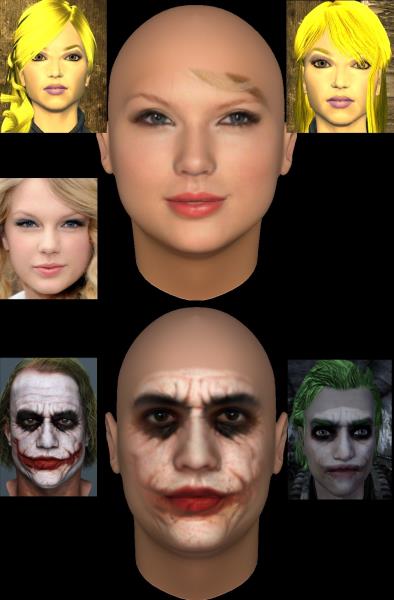
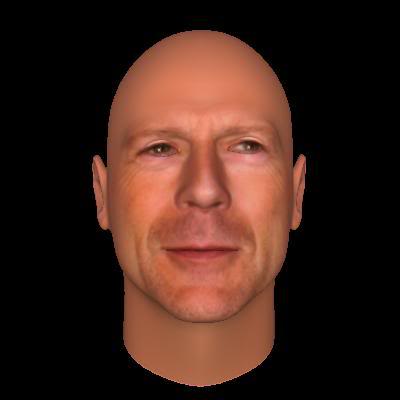
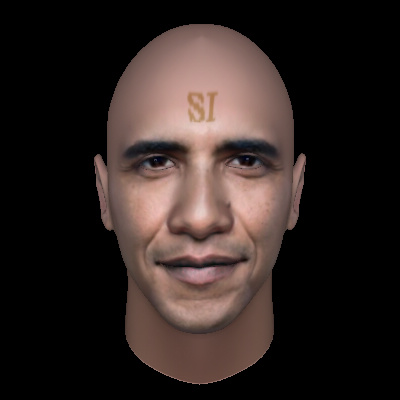
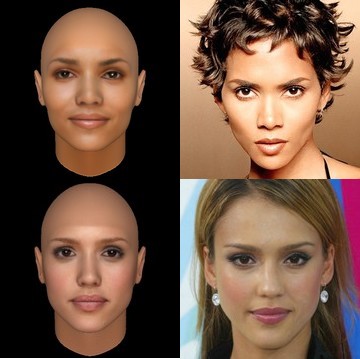
I would be willing to even pay for an add-on tool kit or plugin for another program ,something along the lines of Face Shop (Now called Head Shop 9) or FacegenAlso with the new Kinect for Xbox One, some games are able to build 3d models of the head using the camera,that would be even better.
FaceShop and FaceGen custom faces
|
|
By JIX - 11 Years Ago
|
|
After a first run I´m feeling the need of the following ... Most of the points have been mentioned already and some of them are quite likely already considered by RL. I want to second all of them.
Randomize Button with variable grade option
Kid characters Dynamic morphs (keyframe animation for morphs) Custom faces based on photos (this is already under development, I guess) More content (Yes, also more hair!) More options for customization
More to come (maybe) :)
|
|
By AverageJoe - 11 Years Ago
|
brothertcoleman (9/4/2015)
The ability to create custom faces. We can only create custom faces with G5 characters, which has seen very little enhancements over the years. I would be willing to even pay for an add-on tool kit or plugin for another program ,something along the lines of Face Shop (Now called Head Shop 9) or Facegen Also with the new Kinect for Xbox One, some games are able to build 3d models of the head using the camera,that would be even better.FaceShop and FaceGen custom faces
I for one would most certainly not pay for this, since it was a major staple to the iClone application since it's inception. It could use with some enhancements to be sure, but the core funcrtionality used to be there all along, and paying extra for such a core function shouldn't even enter into the equation.
|
|
By 4413Media - 11 Years Ago
|
More clothing options. While I really like the character creator, I feel like there should have been more options in that department.
A suit option with a tie will be really great.
Rampa mentioned gowns, parkas, and jackets.
Body Suits, superhero kinda outfits mostly.
I'll probably post another list.
|
|
By Sen - 11 Years Ago
|
Hello,
- ref plan for blue-print
- Motion in calibrate tool
- measure tool for body parts
|
|
By Mark McKinney - 11 Years Ago
|
|
A Facial animation plugin like Brekel or something like it - I think the quality of the new CC Characters is excellent - Now I just need a way to get meaningful expressions out of them without spending hours "pose by pose" - it looks like the old facial G5/G6 expressions don't work with the new characters or am I wrong? But mostly, keep up the great work on IClone - am really looking forward to the Perception Neuron plugin when it comes. Add that and we won't need actors anymore.
|
|
By Mark McKinney - 11 Years Ago
|
|
I second the Suit option - need one already for a project - good idea
|
|
By toppro77 - 11 Years Ago
|
I agree that more clothing types are needed. I wonder why they didn't include formal shoes and formal pants in the Essential pack. It seems ok to dress like a bum, but no one can get all dressed up with the suit coat that is included. I have not had the time to fool around with the program enough yet. I will be doing that this weekend. What I have seen so far I like, but still a child model would have been nice and should have been added for variety. It seems you can create the whole family, mom, dad, grandma and grandpa, except for the kids.
Preferences should be updated to allow for the initial load to occur without a model being displayed in the scene. I believe it has been stated in the forum that several people along with myself that the nude woman should not be displayed in the splash screen as well on startup. I think it would be appropriate to able to choose the model we wish to start with from an empty scene like in Iclone 6. This would eliminate embarrassing moments when showing the program to family and friends. No one wants to show mom and dad a naked women in a program your using. I'm sure they would get the wrong idea. Those of you with children, probably don't want them to see this also.
I'm sure as I work with it more I will have other suggestions.
|
|
By toppro77 - 11 Years Ago
|
|
I forgot to mention the face creator too. That should have been a must in Iclone 6. I had tons of fun with that in Iclone 5 and still have to keep Iclone 5 around to make new faces when the urge hits me. I like the new morphed faces in Character Creator, but to be able to add a photo to the face is so much cooler because you can make your own favorite characters from real life, including yourself and other family members. It should be included in Character Creator in some way or add a patch to Iclone 6 so we can use it again with these characters.
|
|
By TonyTiger - 11 Years Ago
|
|
A while back I stated in 'Wishfull Features'that I would like to see a combination of Iclone and Daz Studio with the ability for detail that Daz provides coupled with the ease of use and animation that Iclone provides and I think RL has accomplished this with CC:)BRAVO RL!!!!!!.It's like a toned down version of Daz with the intuitive RL flare.As far as future developments are concerned,I would like to see more extended morph and skin packs(Essentials pack is pretty good) to keep stepping up the level of detail we are able to achieve in our creations:)A good photo fit program would be cool as long as it was high enough quality to not degrade the overall character texture.Of all the companys I've ever gave feedback to RL is the best at actually listening to their customers feedback and producing common sense results-Thank you RL for this incredible software:)
|
|
By JIX - 11 Years Ago
|
|
toppro77 (9/4/2015)
I forgot to mention the face creator too. That should have been a must in Iclone 6. I had tons of fun with that in Iclone 5 and still have to keep Iclone 5 around to make new faces when the urge hits me. I like the new morphed faces in Character Creator, but to be able to add a photo to the face is so much cooler because you can make your own favorite characters from real life, including yourself and other family members. It should be included in Character Creator in some way or add a patch to Iclone 6 so we can use it again with these characters.
So true ...
Please RL, to avoid confusion don´t put the core functions in second place in general! If something is missing somebody is used to, it might feel like a big step backwards.
|
|
By CaseClosed - 11 Years Ago
|
|
HAIR CREATOR. There are an infinite number of hairstyles in the world. I can’t sit and wait for a content developer to create the right style. CONTENT DEVELOPERS - when you make a package of hairstyles, allow us to choose length (of different areas - more on top, less on side - in detail), buns, curls, afro, mohawk, change color, CONFORM TO HAT, etc. Make it powerful and irresistible. $$$ CLOTHES CREATOR.There are an infinite number of clothing styles in the world. I can’t sit and wait for the right style. CONTENT DEVELOPERS - when you make a package of clothing, please provide morphs for multiple stages of taking the clothes off, reshaping collar, sleeves (rolling up or down) etc etc. If you make a suit, allow us to alter it style-wise, buttons, lapel, pocket location, size, tieshape, etc .Do your research and look at what people are wearing and put it into powerful and irresistible packages. $$$ FACE CREATOR. Match real faces - make it as powerful and amazing as the software FACEGEN. More children character bases.
|
|
By AverageJoe - 11 Years Ago
|
I'
d l;ike to see a way to animate the morphs while in iClone, allowing an animation of as skinny dude or dudette morph into a bulky blob of a human...
|
|
By JimmyB7 - 11 Years Ago
|
|
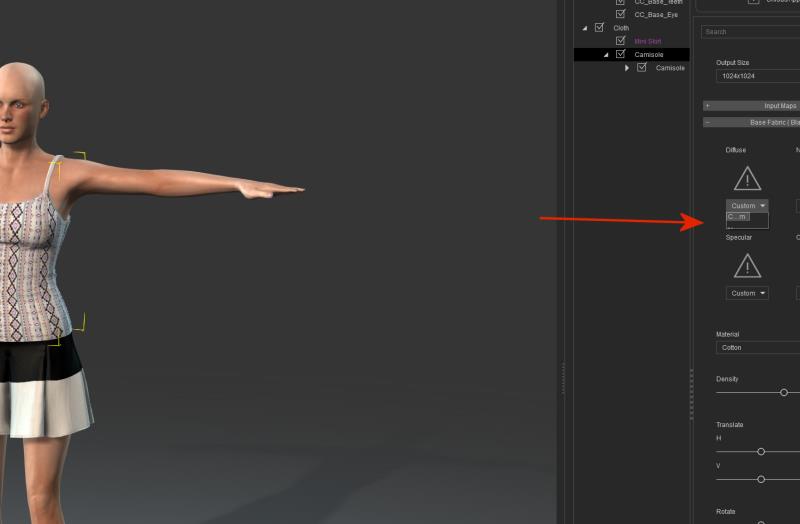
I have a 4K monitor (3840x2160), and have seen some issues with font size, etc, with iClone 6+, and now CC. I would like to have the capability to make the general screen font size larger. We can go up one size in iClone now, but I can’t find that option in CC. Attached is a similar issue with what I believe to be a large screen problem. Maybe we can do a Crowdfunding effort to buy at least one 4K monitor for a lucky developer at Reallusion. ;-)
Also I second the face creator, hair and cloths ideas.
|
|
By primaveranz - 11 Years Ago
|
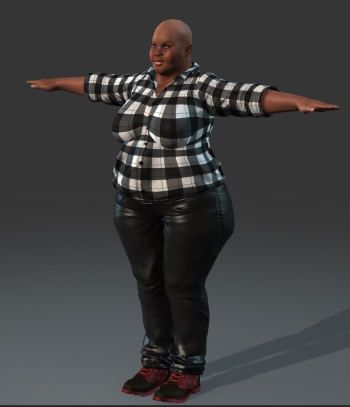
Better UV remapping of morphs (e.g. see the stripe across the breasts here), Or am I missing something that is already there?
|
|
By majorlance - 11 Years Ago
|
|
I think an option for hosiery/tights would be a welcome addition to CC. While not fashionable in the US, it is in Europe. That would be more realistic for scenes set in colder European settings.
|
|
By justaviking - 11 Years Ago
|
If you can do this, please let me know, but my request is...
The ability to move the head forward, so you get a "stooped" poster, particularly like for an older person.
Stooped posture pictures on Google
|
|
By Rampa - 11 Years Ago
|
justaviking (9/5/2015)
If you can do this, please let me know, but my request is... The ability to move the head forward, so you get a "stooped" poster, particularly like for an older person. Stooped posture pictures on Google
Pretty sure you can only do that with some bone rotation adjustment. CC can adjust the length of bones, but not their rotation. So that one you do in iClone.
|
|
By Rampa - 11 Years Ago
|
It'd be helpful to have some kind of morphability for the clothing. Maybe it could be a subset of the "conform" tool, to conform areas.
Then we could make puffy sleeves, horse-riding pants, etc. by adjusting the existing clothing.
|
|
By pfontaine2 - 11 Years Ago
|
First off, Character Creator is fantastic. I'm really impressed by what is available in the initial version that I don't even feel the immediate need to get the expansion packs.
I've noticed that facial puppetry doesn't seem to work all that well with the CC characters. Sometimes I barely get any kind of animation with the exception of the head moving side to side. Other times, the facial animation based generated when using the facial puppet is overly exaggerated. Not certain what I'm doing wrong but it just doesn't seem as intuitive and easy as it was in iClone 5.
I agree with others that the ability to map faces to CC characters would be a very nice feature to add back into iClone 6 and CC. More clothing options, such as formal ware (suits and gowns) and even a body suit for Superheros would be fantastic. Speaking of superheros, I'd love to get a dynamic cloth cape that just works easily.
Despite these requests, I'm just thrilled with what you've produced so far. Thanks!
|
|
By JIX - 11 Years Ago
|
CaseClosed (9/4/2015)
HAIR CREATOR. There are an infinite number of hairstyles in the world. I can’t sit and wait for a content developer to create the right style. CONTENT DEVELOPERS - when you make a package of hairstyles, allow us to choose length (of different areas - more on top, less on side - in detail), buns, curls, afro, mohawk, change color, CONFORM TO HAT, etc. Make it powerful and irresistible. $$$
Talking about a Hair Creator... maybe it should be based on the Nvidia Hairworks technology.
|
|
By justaviking - 11 Years Ago
|
rampa (9/5/2015)
justaviking (9/5/2015)
If you can do this, please let me know, but my request is... The ability to move the head forward, so you get a "stooped" poster, particularly like for an older person. Stooped posture pictures on Google Pretty sure you can only do that with some bone rotation adjustment. CC can adjust the length of bones, but not their rotation. So that one you do in iClone.
You see how much I've neglected my characters?
Thanks for the tip.
So this isn't a total cluttering of this thread, I will make the ability to do that in CC my "Wishful Feature."
|
|
By CaseClosed - 11 Years Ago
|
[b]JJJAM Talking about a Hair Creator... maybe it should be based on the Nvidia Hairworks technology.
I have to take a closer look at HAIR WORKS. Is ti applicable to iClone in a roundabout way? Can we get that hair into iClone? Maybe not for real time of course, but for coolness effect.
|
|
By CaseClosed - 11 Years Ago
|
primaveranz (9/4/2015)
Better UV remapping of morphs (e.g. see the stripe across the breasts here), Or am I missing something that is already there?
Checkt to see if you can modify the iterations of the shirt pattern for the breast area. Here is a tutorial: Watch around the 7:00 minute mark.
|
|
By CaseClosed - 11 Years Ago
|
|
A feature I'd like to see, and maybe its already in CC, but I'd like to be able to loosen the clothes so they are not so tightly conformed to the body shape. EXAMPLE: turn jeans into bell-bottom jeans, and decide if you want the jeans riding up the crack of the butt or not. Have a jacket that hangs loosely around the torso, or a dress shirt that does not conform to the waist, but falls more straight downward. A sweater that does not conform to the breasts but falls more straight so the area under the breasts is not tightly conformed to the body, but more like a tent effect.
|
|
By CaseClosed - 11 Years Ago
|
|
|
|
By vidi - 11 Years Ago
|
|
I like the CC. nice and clean GUI and a great start in a new iClone Character era. I have fun to play it, even if I have only the basic version . Haha I like male Charater now . Chuck and Marson was not really my Typ . With the slider I create me a Dream boy, not bad ;D
But now my wishes on this tool , because I'm not a Content User my heart beats for creating . I wish to make and sell my own morphs and my own Dress mesh . like a DAZ Developer I want not use premade plain mesh or only move slider because it is no my work. I want create my own changeable Dress mesh designs I hope that is on the TODO list ?:)
of course The Coronation would be to create own Character Base and connect additional own dress meshs and Morphs with this CC system.
Maybe ... I hope !
|
|
By RobertoColombo - 11 Years Ago
|
Hi RL,
my wish: to be able load an .iMtl file for each possible materials assigned to the various parts of the body.
In reality, the iMtl file can be still loaded once the character is moved in iClone, but it would be come in handy if the material could be loaded directly within the CC program.
Cheers
Roberto
|
|
By duchess110 - 11 Years Ago
|
vidi (9/5/2015)
But now my wishes on this tool , because I'm not a Content User my heart beats for creating . I wish to make and sell my own morphs and my own Dress mesh . like a DAZ Developer I want not use premade plain mesh or only move slider because it is no my work. I want create my own changeable Dress mesh designs I hope that is on the TODO list ?:)
of course The Coronation would be to create own Character Base and connect additional own dress meshs and Morphs with this CC system.
Maybe ... I hope !
YES YES and YES again vidi I totally agree 100% with your wish for the way Character Creator could and hopefully should or will be a good tool for Developers.
|
|
By ledlight - 11 Years Ago
|
In the readme file that opens on installing CC, it says "the characters created are proportional and anatomically correct".
You can't describe a human model as anatomically correct when it's missing the sexual organs. If you want to live up to your own description of the software, you need to add the option of showing genitals.
I support all the previous suggestions in this thread too, but would add one more wish... that your models can be *actually* anatomically correct rather than just described as such in your read-me file.
|
|
By ladynowak - 11 Years Ago
|
1) ability to design / create cloth
^^ I can create a character dressed in long coat on iClone5. Until I can do the same on iClone6, it makes no sense for me to upgrade, despite many iClone6 features look truly awesome. A variety of cloth is a basic thing, what's the use of iClone if we can only dress it in limited amount of similar cloth (few blouses, jeans)?
2) ability to design / create hair
If you give me the above, I'm getting iClone6 with all the substance-packs, 'cos it's really cool. Seriously.
|
|
By AverageJoe - 11 Years Ago
|
|
Besides my previous wish for more hair, because we really, really, really need more and better hair, I was also thinking it's a shame that the CC is only for such realistic characters. There's so much more to 3D animation that just photo realistic characters. I'd like to see more stylized characters, more cartoonish like Pixar or Dreamworks characters. Like the characters you get with the Toon Toolkits and Monster Workshop, just integrated into the CC, and able to build hybrid characters, using toon features and realistic features.
|
|
By jamie3d - 11 Years Ago
|
I am only repeating what others have said but maybe the Dev team will take more notice if we all agree on whats needed.
more clothes!
The ability to import custom made clothes. (this is a big for me)
more hair!
a beard or two ?
As someone else mentioned can't believe there isn't a shirt and tie. I paid for the export essential pack but can't believe a plain pair of straight pants and a done up shirt and tie are not in the base pack?
That said, I think CC is really good, so well done guys.
|
|
By TonyTiger - 11 Years Ago
|
|
Dam.................Hairworks looks like the ...............DODO:)
|
|
By JIX - 11 Years Ago
|
CaseClosed (9/5/2015)
[b]JJJAM Talking about a Hair Creator... maybe it should be based on the Nvidia Hairworks technology. I have to take a closer look at HAIR WORKS. Is ti applicable to iClone in a roundabout way? Can we get that hair into iClone? Maybe not for real time of course, but for coolness effect.
RL implemented PhysX already, so why shouldn´t they be able to implement Hairworks as well. Not only for coolness, cuze Hairworks is developed for games, hence it is real time for sure.
|
|
By urbanlamb - 11 Years Ago
|
|
I didnt see anyone post this yet so long finger nails and toe nails even more of a claw for both the hands and feet. .. to go with my evil dudes.
|
|
By Agonos - 11 Years Ago
|
More "clonecloth"
. Homespun dress
. Gloves
- Blouse nurse
- Hoods
- Trench-coat
etc...
And helmets
|
|
By "Armstrong" - 11 Years Ago
|
|
mtakerkart (9/3/2015)
Thank you realtimer.
-Would like more extreme deformation
-quadrupede character
+1
|
|
By animagic - 11 Years Ago
|
|
redrum (9/5/2015)
In the readme file that opens on installing CC, it says "the characters created are proportional and anatomically correct".
You can't describe a human model as anatomically correct when it's missing the sexual organs. If you want to live up to your own description of the software, you need to add the option of showing genitals.
I support all the previous suggestions in this thread too, but would add one more wish... that your models can be *actually* anatomically correct rather than just described as such in your read-me file.
We've had a heated discussion about that in the past as some users found this offensive. So RL has to be careful, unfortunately.
|
|
By Rampa - 11 Years Ago
|
Big beards and mustaches.
Basic big beards can be done with morphs and textures, but really big ones need to be CC hair/clothing.
|
|
By wendyluvscatz - 11 Years Ago
|
|
wizaerd (9/4/2015)
I'
d l;ike to see a way to animate the morphs while in iClone, allowing an animation of as skinny dude or dudette morph into a bulky blob of a human...
Well if you do an obj export you can import and add it in expression editor under custom
|
|
By wendyluvscatz - 11 Years Ago
|
|
I joined the nvidia development site so I could download the hair works SDK demo, it is pretty cool and you can import FBX but I cannot figure out how to apply hair in the viewer, I suspect it is all script based which leaves me out in the cold.
|
|
By SeanMac - 11 Years Ago
|
|
CharacterCreator, DAZ and the Martini generation CharacterCreator is hilariously Planet California - no cold weather clothes, no wetweather clothes, no Asian Characters, Black American females stereotyped asTwo-Ton Tessie rather than Michelle Obama, no side-whiskers, nobody under theage of 25, nobody pregnant, nobody as God made them but rather shop windowmannequins getting described as 'naked'. [Mindyou, I agree with animagic that this has been discussed and for business & marketingreasons iClone users have to humour the hicks and just use strap-ons forrealism.] To continue along the Planet California lines we have to livewith the idea that nothing was real before about twenty years ago. And if youare 96 you look as if you are in your late forties ie really old. AGE SPREAD of a population Justto put in a bid for reality - as to characters in a population: before what isreferred to as the Modern Demographic Transition (MDT), all previous societiesthat were not Hunter-Gatherer types had about 50% of the population underfifteen years of age. The MDT is when family size limitation becomes possible(about early 1900s in Britain and spreading to almost the whole world by today)[These type-populations can still be seenin any photograph of a street scene on the Palestinian West Bank.] Mostof these people were under five years of age [about half diedbefore passing five; half again of the remainder before ten.]. The reverse of this happened inthe older half of the population where maybe 2-3% passed their 80th birthdaysand an old man was in his late forties. The average age at death would havebeen sometime in the late thirties early forties. That would be in any of thehistoric societies widely known - the Ancient Empires of the Middle East, MedievalEurope, China, and the Arab Empire. So ina scene shot with a hundred random people you would have about 25 babies,thirteen 5-10 year olds a dozen 10-15year olds, twenty-five 15-30 year olds, thirteen 30-45 year olds and a dozen 45- year olds. CLOTHING 2500 BC to 2015 AD Clothesacross most of the world's societies for the last 5000 years have been limitedfor 95% of the population by scarcity of materials and cost of materials. Fromabout the 1950s onward man-made fibre has made clothes cheaper and moreavailable. Whilecost was still important before the 1950s, enormous efforts across most of theworld were made to preserve the basic rectangular shape of the cloth as it cameoff the loom. Across most of the world, with the exception of Europe, peoplewore the same kind of clothes for a thousand years. There was no fashion. It isa mystery to historians why fashion became normal in Europe sometime in theMiddle Ages. And oddly enough, in the light of the present, fashion mostlyapplied to men rather than to women. In particular, fashion descended from theupper classes: both literally, in that most clothes were second-to-twentiethhand goods (ie last century's upper-class mode); and metaphorically, in thatyoung men wore clothes meant to make you think that they were ready to put on asuit of armour or ride off on a horse. Nakednessfor males while working was commonplace in warmer climates - the Mediterraneanand the Ancient World for instance. Around the Pacific, for instance, what theJapanese call the fundoshi was the sole garment of the ordinary adult male.Boys under puberty similarly, unless they were sons of aristocrats, wore nothingsummer and winter. In 1860 when Garibaldi invaded Sicily, he found shepherdboys wearing clothes they had made themselves out of rabbit skins. It is thepresent cheapness of clothing that makes us have so much of it. It is theeconomic success of the West, and especially of California, that makes us acceptthe tiny choice that Reallusion's Character Creator puts up as representing allthe types of clothing anybody might ever need. Sobecause cost was the main consideration in buying clothing, until about the 1960syou could instantly gauge everyone's status, income, and education. And youcould do this across most of the world. [InBritain, but not elsewhere, this instant analysis could also be done bylistening intently to people's use of the language - the accent in which theyspoke, the words they used, how well they could hold a conversation, andwhether they used classical allusions and references. This was only becausefrom about the late 19th century onwards the ruling class in Britain went to asmall number of private boarding schools and received the same classicaleducation and the same accent.] Body build, proportions,strength Agriculturalcivilizations - all of them until about the 1900s and the invention ofartificial fertilizer - had famines every decade or so. This meant that for thenext five generations the mass of the population which had survived the famine weresmaller than they used to be. Five generations is 125 years for reproductionand about 250 years for lifetimes. So the Irish today are still generally lessin height than they were before 1845 and the Chinese today smaller than theywere before Mao Tse Tung's Great Leap Forward and also smaller than they werebefore the 1850s Taiping Rebellion. So aristocrats and those families that hadbeen rich for five generations could stand up to a foot (30cms) higher than theaverage height in any scene. Themen and women of the working class in even the recent generation dead - saythose who were working in the 1920s - were very much tougher and stronger thantoday. Hard lives bred a hard people. But they did not necessarily look it.Even now if you look at photographs of a heavyweight boxer like Muhammad Aliyou can see he does not have the gymnastic muscles that California's MuscleBeach brings. And if you go back to Ancient Greece the only men who lookedproportionate were aristocrats or took great care of their armoured infantryexercise routine. Ordinary men were deformed by their labours. Someone whorowed a warship for pay had a vast barrel chest huge arms and little bowedlegs. Someone who worked as a potter was not dissimilar but less heavilymuscled. A miner would have button-scars all along his backbone from runningstooped underground and brushing the roof with his back. A working man's handsbore calluses, a middle-class person might have a stoop from leaning over adesk, or walked with sore feet from having had to stand all day. These people livedand worked on a diet which was basically two types of porridge. Fat people untilrecently meant wealth, not poverty. OK. Sotaking all in all as to Reallusion's Character creator we have a way to go but let's not be too funny:it is a good start IMHO. Real modellers and Zbrush and Autodesk experts willprobably regard all these sliders as painting by numbers but that is about mylevel. Join-the-dots, too. Thereused to be adverts for a rather sickly fortified wine called Martini. To big upthe wonderful results of drinking this liquor, the adverts were entirelypopulated by handsome and beautiful, tanned and swimsuited twenty-somethings. Iam glad indeed to see that Reallusion has finally left this fairyland of theMartini Advert-people to DAZ 3D Studio. Beautiful people are only beautiful in comparison to the rest of usschmucks. SystemSpecs HomebuildASRock Z68 Extreme4 MoBo, i7-2600K@3.4Ghz CPU , 16 GB DDR3 RAM, 5.5Tb SATA III HDD, Palit GeForce GTX 750 Tirunning DX 12.0; Win 10 Pro (64-bit) + Samsung S24D300H 1920X1080 monitor +spare 1680X1050 monitor. Kinect for Windows v2. Huion 610 Pro Graphics tablet.
|
|
By Tomasz F - 11 Years Ago
|
Hi there,
1) Custom face/heads from photo
2) Facial animation mocap like BREKEL
Many thanks and looking forward for any info about those two, especially face from photo
Tomasz
|
|
By CaseClosed - 11 Years Ago
|
|
wendyluvscatz (9/8/2015)
I joined the nvidia development site so I could download the hair works SDK demo, it is pretty cool and you can import FBX but I cannot figure out how to apply hair in the viewer, I suspect it is all script based which leaves me out in the cold.
I believe HAIR WORKS needs '3D maps' to determine density, length, color, etc in order to create the hair. These maps can be created in Maya or 3DS MAX (and iClone?).
Tutorials
HAIR WORKS plug in MAYA
NVIDIA HAIR WORKS TUTORIAL VIEWER
|
|
By JIX - 11 Years Ago
|
CaseClosed (9/8/2015)
wendyluvscatz (9/8/2015)
I joined the nvidia development site so I could download the hair works SDK demo, it is pretty cool and you can import FBX but I cannot figure out how to apply hair in the viewer, I suspect it is all script based which leaves me out in the cold.I believe HAIR WORKS needs '3D maps' to determine density, length, color, etc in order to create the hair. These maps can be created in Maya or 3DS MAX (and iClone?). Tutorials HAIR WORKS plug in MAYA
NVIDIA HAIR WORKS TUTORIAL VIEWER
The only thing I know about HairWorks so far is, that it looks pretty good and it´s based on DirectX 11 and Tessellation. Hence it seems to work with some kind of map ...
|
|
By wendyluvscatz - 11 Years Ago
|
Yes it's a shame it relays on a plugin to create a specific file as both Carrara hair and DAZ LAMH create density maps if one could just plug that in a parameter somewhere and I am sure Zbrush would too for fibre mesh, yes I have Zbrush and have created some truly horrendous hairdos in that so far, not sharing LOL,
If one could bring in any FBX mesh as I can indeed iClone avatars and add hair there using UV based mapping it is easy to capture the result with another little gem I got from nvidia, Shadowplay.
|
|
By CaseClosed - 11 Years Ago
|
|
if we can actually create a textured mesh with HAIRWORKS, that fits our iAvatar head, then could we not import that through 3DX and apply as a SOFT MESH, and bring it into iClone?
|
|
By wendyluvscatz - 11 Years Ago
|
Well no it's not really a mesh as such and I can and have done the latter.
Using Zbrush, LAMH geometry and Carrara anything grows to create mesh
Is pretty demanding on poor iClone physX I must say!,
The main thing is the UV mapping of each strand must be the same for the weight map shared across them all.
I looked as an apx file in notepad and it's a lot of nvidia copyright info followed by vertex information like an obj file or delta, data, etc file basically co-ordinates for the mesh and info on how to use them but beyond my knowledge.
|
|
By wendyluvscatz - 11 Years Ago
|
Well no it's not really a mesh as such and I can and have done the latter.
Using Zbrush, LAMH geometry and Carrara anything grows to create mesh
Is pretty demanding on poor iClone physX I must say!,
The main thing is the UV mapping of each strand must be the same for the weight map shared across them all.
I looked as an apx file in notepad and it's a lot of nvidia copyright info followed by vertex information like an obj file or delta, data, etc file basically co-ordinates for the mesh and info on how to use them but beyond my knowledge.
|
|
By Lord Ashes - 11 Years Ago
|
|
majorlance (9/5/2015)
I think an option for hosiery/tights would be a welcome addition to CC. While not fashionable in the US, it is in Europe. That would be more realistic for scenes set in colder European settings.
Can this not already be achieved by using one of the layers on the skin? (I'm not in front of my iClone/CC computer so I can't check). Check the skin to see if it has the 7 different fabrics that clothing has. If there is at least one unused fabric then use the RGB map to define where you want the hosiery/tights. You can even define a opacity map on the fabric to create effects like fishnet stockings. This should be sufficient to create hosiery/tights because, typically, hosiery/tights are skin tight. There is no need for an actual hosiery/tights Cloth mesh unless you are looking for the hosiery/tights to wrinkle as the legs bend.
|
|
By Kelleytoons - 11 Years Ago
|
I sure wish I understood your post (sorry for my ignorance about this, but I'm learning). Using the skin_body that has decals available, I don't see "seven layers" but just one for the skin of the body. Now you *could* use decals, I suspect, but since you only have three it's a terrible waste because they are oh so useful for other things.
But if you mean something else completely different I'd love to know, because I think hose/stockings are a great idea, even in warm weather (we old people wear VERY high socks here in Florida :>).
|
|
By JC Weatherby - 11 Years Ago
|
As I've said throughout the forums - even before CC was released:
1. We need more clothing base meshes besides jeans, t-shirts, blazers... We don't want to be limited to creating character (even human ones!) dressed in contemporary casuals. We want business styled characters, sci-fi characters, fantasy characters, firemen, doctors, police, military... you name it.
2. MORE IMPORTANTLY - we need the ability to import and conform clothing we design ourselves in other programs, like so:
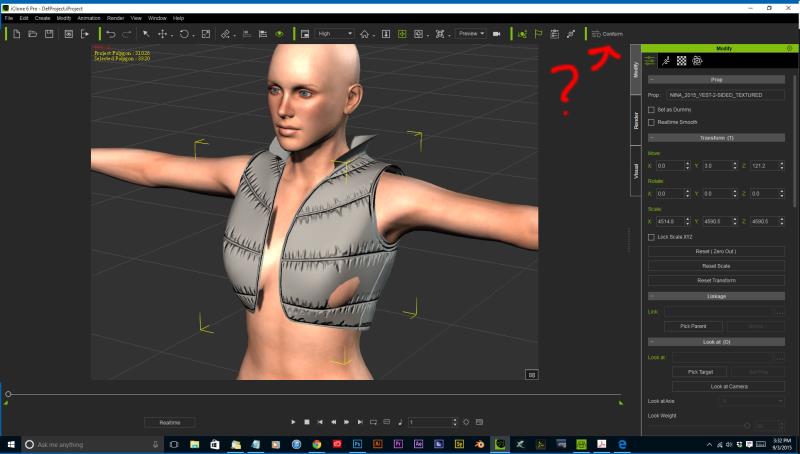
The vest pictured here was imported as a prop in iClone 6.2. I need to be able to conform it to the character mesh. What am I talking about? Here's DAZ's solution for conforming clothes - something it calls the "Transfer Utility"
Obviously, the ability to import and apply/conform our own content would not be limited to just clothing; it would also be good for hair or other accessory items. Although it should be noted that we can already import accessories we make, and apply physics to all or parts of them - by weight mapping parts of the mesh in iClone 6.2. This works for certain items; hair, hats, eyeglasses, and also skirts, capes and cloaks. But it DOES NOT WORK for; shirts, tops, jackets, shoes/boots, pants or full body dresses - hence the need for the conform tool.
Any tool calling itself "Character Creator" MUST have these abilities!
|
|
By AverageJoe - 11 Years Ago
|
|
JC Weatherby (9/9/2015)
Any tool calling itself "Character Creator" MUST have these abilities!
While I agree with your overall premise, playing Devil's Advocate, I do not agree with this statement. A "Character Creator", by title alone doesn't mean or refer to anything clothing or accessory related. "Character Creator" to me is the ability to Create a Character, not necessarily Clothe a Character.
|
|
By JC Weatherby - 11 Years Ago
|
|
wizaerd (9/9/2015)
While I agree with your overall premise, playing Devil's Advocate, I do not agree with this statement. A "Character Creator", by title alone doesn't mean or refer to anything clothing or accessory related. "Character Creator" to me is the ability to Create a Character, not necessarily Clothe a Character.
I'm always surprised when people will actually argue AGAINST their own best interests. It's bizarre.
Anyway, I guess this line of reasoning holds up if we just use iClone to make porn, that might be why RL put a naked chick on the splash screen. You watch... somebody will probably end up making a lot of money making porn with iClone.
99.999% of the time animated characters wear clothes. Where would Peter Griffen be without his green pants and white shirt? He'd be just another fat, middle-aged white dude getting drunk at the local bar and insulting his daughter. Where would Superman be without blue tights and a red diamond crest? He'd be just another buff naked guy in West Hollywood or The Castro. Where would Fred Flintstone be without his cave man tunic? ... He'd probably be hanging out with Peter Griffen... Clothing is absolutely inseparable from Character Creation.
Don't even go there ;)
|
|
By mtakerkart - 11 Years Ago
|
|
"Character Creator" to me is the ability to Create a Character, not necessarily Clothe a Character.
Funny! :P So I made my Advocate of Devil's Advocate , why CC is sell with Clothes that you can create others?Means that CC is a limited clothes creation too. In the CG field I never saw , read , listening talking about character without clothes , "character" in anime field is a generic word for nude body+clothes.... :)
|
|
By Kelleytoons - 11 Years Ago
|
Can you folks make sure I understand this -- if I create a character in CC and export it to iClone, I then cannot use clothing for it even if that clothing was designed specifically for use in iClone 6 (like soft cloth clothing)? And that's because the CC character remains a "CC character" and not a true G6 character, right?
If so, couldn't I use 3DXChange to change it to a "regular" G6 character and then reimport? Or do I understand correctly that I'd need the pipeline and not the pro version to do that (if even possible)?
This is SO confusing.
|
|
By Emerald Animation (formerly reelcheapfilms) - 11 Years Ago
|
No one else seems to have touched on this one, but I would like one-click export to our editing program, of the various JPGs, PNGs, etc. that make up the materials, especially the RGB maps. Barring that, some way to save the maps so they can be loaded in our editing program. The current process according to the manual exports only the UV map, and I have to create the RGB areas myself. This can be a pain if the current RGB map is fine and I just need to tweak a few details.
And perhaps a way to save and load different fabric settings. If I create a nice Scottish tartan, and want folks to use it on kilts, skirts, jumpers, and dresses, it makes sense I would want to save that as a separate file rather than recreate it each time.
|
|
By wendyluvscatz - 11 Years Ago
|
|
There is the attached physX cloth option
|
|
By Rampa - 11 Years Ago
|
A "magnet" feature would be nice for reshaping the mesh with a falloff brush. When using several avatars with the same shirt, it would help for changing-up the bigger folds and wrinkles.
So, a localized manipulator for the verts.
|
|
By Kelleytoons - 11 Years Ago
|
|
wendyluvscatz (9/9/2015)
There is the attached physX cloth option
Are you saying that in CC we can do such things as attach a (created) cape to a character?
|
|
By Kelleytoons - 11 Years Ago
|
Again, I realize we can modify what clothing options are there, but I see nothing for generating clothing (like a cape) that isn't already shaped much the same as we have (including what we can buy).
If that's the case, then they need to release more "clothing" that we could alter accordingly.
|
|
By wendyluvscatz - 11 Years Ago
|
mike_20091214085613313 (9/10/2015)
wendyluvscatz (9/9/2015)
There is the attached physX cloth optionAre you saying that in CC we can do such things as attach a (created) cape to a character?
no in iClone after and not just a cape whole outfits if properly weighted
for example a shirt attached to shoulders, you just need decent collision proxies and may need to make underlying mesh invisible, a thing CC does with its clothes anyway
|
|
By Kelleytoons - 11 Years Ago
|
|
Hmmm -- I saw a tutorial that one of the other Content creators posted using proxies but for the life of me I couldn't follow it (it wasn't so much a step by step as just a general discussion). Is there anywhere I could find such a step-by-step process of how to do this?
|
|
By CaseClosed - 11 Years Ago
|
|
no in iClone after and not just a cape whole outfits if properly weighted
for example a shirt attached to shoulders, you just need decent collision proxies and may need to make underlying mesh invisible, a thing CC does with its clothes anyway
Very clever Wendy :D
Thanks for the good tip.
|
|
By wendyluvscatz - 11 Years Ago
|
@Mike, all characters have a collision setting using proxy objects on bones you can make it visible under collision to see the shapes,
your morphed characters they may need adjusting size and position and maybe extra kinetic props added and attached to collide with the cloth
|
|
By Kelleytoons - 11 Years Ago
|
|
wendyluvscatz (9/10/2015)
@Mike, all characters have a collision setting using proxy objects on bones you can make it visible under collision to see the shapes,
your morphed characters they may need adjusting size and position and maybe extra kinetic props added and attached to collide with the cloth
The tutorial was showing that (the kinetic props attached) but I couldn't *find* those props anywhere and my attempt to use what I thought was a 3D physics prop was a disaster (couldn't figure out how to attach them to the avatar -- they kept sailing away. Needless to say I'm about as new as they come, although not to 3D programs in general, having used Max back when it was a DOS program). Even the help files don't have anything about "attaching" kinetic props, so if there's a video or readme somewhere you could point me to I'd be forever grateful.
|
|
By Delerna - 11 Years Ago
|
mike_20091214085613313 (9/10/2015)
wendyluvscatz (9/10/2015)
@Mike, all characters have a collision setting using proxy objects on bones you can make it visible under collision to see the shapes,
your morphed characters they may need adjusting size and position and maybe extra kinetic props added and attached to collide with the clothThe tutorial was showing that (the kinetic props attached) but I couldn't *find* those props anywhere and my attempt to use what I thought was a 3D physics prop was a disaster (couldn't figure out how to attach them to the avatar -- they kept sailing away. Needless to say I'm about as new as they come, although not to 3D programs in general, having used Max back when it was a DOS program). Even the help files don't have anything about "attaching" kinetic props, so if there's a video or readme somewhere you could point me to I'd be forever grateful.
See if this helps
http://manual.reallusion.com/iClone_6/ENU/Pro_6.0/20_Physics/Settings_for_Collision_Shapes_of_Characters.htm
Edit
Oops. Shouldnt be posting this stuff here. Its not a wishful feature because its a feature we already have.
|
|
By Stefos - 11 Years Ago
|
- Option to switch full male and female genitalia on and off....without this option the models are incomplete
- better choice of clothing, example long coats, boots (for past period productions)
- better choice of hairstyles as standard
- creature morphs and multiple leg and arms
- photo fit heads
The creation of Character Creator is an important step forward in Character creation, however to change that step to a leap then adding those listed above and others by other users will make it a leading package.
|
|
By CaseClosed - 11 Years Ago
|
Wouldn't it be cool if Character Creator gave us really tight collision shapes for our characters? Like the image on the page you referenced? "Let the computer do the work... " Messing around with collision shapes is so time consuming, and it's really tough to get an ideal result.
Wishful thinking :D
|
|
By Rampa - 11 Years Ago
|
|
It'd be really helpful if there was a way to copy the settings of one fabric to another. For instance, if I want the same settings for fabric 2, 3, and 5, there should be a way to set fabric 2 to what I want and then apply those same settings to fabric 3 and 5 without having to set all the sliders over again for each fabric.
|
|
By wendyluvscatz - 11 Years Ago
|
I have to be careful how I word stuff
I meant when I said a whole outfit, one made up of various bits not conformed as one piece.
a whole ensemble may have been a more accurate term.
IE a skirt, a top sleeves etc, all bits attached and weighted pants may be harder not tried those even
sorry to those PM-ing me hoping I had some insight, just using what others have done in videos and tried myself
|
|
By TonyTiger - 11 Years Ago
|
|
I stand corrected,in my previous comment I stated that CC was like a toned down version of Daz.After studing the included Learning resources included with the Essentials bundle I now realize how wrong I was,CC is far and away above Daz.The amount of versatility in modifying actors is insane and would take forever and a lot of $ in Daz!I now realize how much learning I have in front of me-Thank you RL for such a awesome piece of software!!!!!!!!!
|
|
By Kelleytoons - 11 Years Ago
|
Anyone know where the Learning Resources thingee gets put when you install the software?
I know I have it somewhere on my disk but just don't know where to look.
|
|
By animagic - 11 Years Ago
|
|
I read in another post that face-mapping will be introduced in a future (4th Q) upgrade, so that is good news.
I'm sure we can expect other improvements as well, that's we have this thread for.
Besides additional clothing, I would like to see more customizable hair options. It would be nice to have a polygon-friendly version of something like DAZ Hampton Hair.
|
|
By AverageJoe - 11 Years Ago
|
|
mike_20091214085613313 (9/11/2015)
Anyone know where the Learning Resources thingee gets put when you install the software?
I know I have it somewhere on my disk but just don't know where to look.
If I remember correctly, the Leqarning Resource thingie (I assume you mean the one that came with the Essential Bundle) is a ZIP file, so it gets put whereever you downloaded it too. It doesn't "install" per se.
|
|
By Kelleytoons - 11 Years Ago
|
No, it didn't download there -- I got the NLD (loader or whatever) and when I clicked on it it installed stuff, but where it installed that ZIP file I have no idea.
Do you know the name? (I can at least search for it if I had a clue as to what they named it).
|
|
By TonyTiger - 11 Years Ago
|
|
Its a PDF and should be in your documents
|
|
By Kelleytoons - 11 Years Ago
|
But a name?
(I have about 3K worth of PDF files in my documents folder -- and trying to even bring up a search of them I can't sort by date because my "documents" folders are actually a library stored across three drives - since I have a solid state hard drive I try and offload all the stuff normally stored on C: but it doesn't always work).
My guess is it didn't install or installed itself inside some zip somewhere (and I have even MORE zip files. Sigh).
|
|
By Kelleytoons - 11 Years Ago
|
Ah -- I think I didn't install it (all of these RLDs -- easy to miss one, or in this case, two of them). I'm installing now, sorry to get OT.
To get BACK OT: really need some overall creature morphs (one stop, dial an elf/giant/troll sort of thing). You can get close by playing with a LOT of dials, but it would be nice to have some easy presets (plus there are some things we need added to make some great monsters, like horns and tails).
|
|
By wendyluvscatz - 11 Years Ago
|
|
I wish the morphs were animatable in iClone
|
|
By Kelleytoons - 11 Years Ago
|
That would be very cool.
And I would hope folks here wouldn't think wrongly of me to wish we could set certain body parts to soft cloth type physics. I love the women in iClone... but they all look like they've had implants (real women -- and men, for that matter -- have some "bounce" to certain areas of their body). I can't believe this would be all that hard to program.
|
|
By wendyluvscatz - 11 Years Ago
|
|
Can do spring on the bones in 3dx
|
|
By Kelleytoons - 11 Years Ago
|
Okay, that was *way* over my head. Are you saying there are bones that control "parts" other than limbs (and torso) in iClone? Or are you saying I should somehow construct a model (say in Max) and create extra bones and import the whole FBX via 3dXChange? Because that's kind of OT here (where we are asking for features in CC).
I can get LOTS of secondary motion on my Max biped creatures, but I don't want to try and create my characters there. I want to be able to do them in CC, and it seems like adding secondary motion to selected parts should be something fairly simple to implement just by telling iClone (when I export them) that those parts are soft cloth (and adjusting the parameters according).
But if you meant something else I'd love to know.
|
|
By wendyluvscatz - 11 Years Ago
|
Both
Yes are breast bones, go to edit standard character and add them to extend bone, convert then under spring select and enable, can test preview in there before saving
|
|
By Rampa - 11 Years Ago
|
A way to "morph" between two characters.
Say I have a werewolf and a standard female and I want a half-half blend. I would want the morphs of one adjusting more towards the morphs of the other, not being cumulative, if that makes sense.
|
|
By Kelleytoons - 11 Years Ago
|
|
wendyluvscatz (9/12/2015)
Both
Yes are breast bones, go to edit standard character and add them to extend bone, convert then under spring select and enable, can test preview in there before saving
Okay, if we are still OT here then this doesn't work.
I go into 3DXChange and import a character from CC and do indeed see the spring settings for the breast bones, but nothing I change there (and I mean nothing) does anything to affect them (now, to be sure, I haven't tried the same with a standard character, but I'm stipulating that it DOES work there since you say it does). So either this is something we need added to CC, or something we need XChange to be able to do (i.e. handle CC characters).
|
|
By wendyluvscatz - 11 Years Ago
|
It is something that has been in 3Dxchane for years and yes all characters with breast bones and G3 onwards have them, so do the CC ones.
Is kinda OT as an existing features not a new one, you need to search the forum for spring or do Google site search, is lots on how to do it
The bones must be added to extend bone, I will admit CC ones you cannot do this without exporting through pipeline, an issue I have raised for other functions I hope is fixed but other characters like Gwynn you can.
|
|
By Kelleytoons - 11 Years Ago
|
Okay, I'll do a search but just to clarify things -- you are saying this CAN be done with CC characters, as long as I edit them in XChange? Or do we need to do something else? I don't mind editing them in XChange but you seem to be suggesting they need to be "exported" instead of just pressing that Edit button in iClone, which is a bit different (I'm guessing).
I don't really care about any other characters than the ones in CC, so that's my focus here. (I'm also confused because it seems like there are already breast bones that don't work but you seem to be saying I need to research how to do that so I will do so -- right now I'm just clearing up the "CC character workflow versus standard character workflow" thing).
|
|
By Delerna - 11 Years Ago
|
Don't need to do it in 3DXchange for CC character breasts
1) Send female character from CC to iClone
2) In iClone select the character
3) On modify/Edit panel unfold Spring settings
4) Select RL_G6_L_RibsTwist and set activate to ON
5) Select RL_G6_R_RibsTwist and set activate to ON
6) Add animation and enjoy.
There are not a bunch of prudes here so please, stop insinuating there is.
|
|
By Kelleytoons - 11 Years Ago
|
I appreciate the detailed instructions (which work). But now I have the opposite problem -- doesn't appear to be any way to reduce the motion so it's truly believable (well, certainly for *some* folks, but not for everyone). Even with everything turned down (except for strength, which I've turned all the way up to "stiffen" it) I get more movement than would be screen accurate.
(And I'm not insinuating anyone is a prude, but I also think it's equally valid to point out that "bouncing" can apply to men as well -- when I was overweight I had much the same issues with my own anatomy).
So either it's still a wishlist for me (and OT) whether in CC or in iClone, or there's something I still don't know, but there needs to be a way to introduce more subtle secondary motions (I still have a somewhat larger belly than I'd like, and it DOES move, but it certainly doesn't bounce up and down at the exaggerated rate even these turned down settings would allow).
|
|
By kankh - 11 Years Ago
|
I would like to be able to design and create my own clothes for characters as well as hair within the CC program and custom faces using pic references when warranted. Those things should be as unlimited as the characters we can create in CC and will really expand the program beyond limits. We are all making different and unique stories and our own unique take on character creation, clothing, hair, faces, should reflect that in keeping things original and fresh. Also, 3D characters with genitals would be a very nice touch since realism is a word thrown around a lot by Reallusion in creating human characters. Why is this, in 2015, still such a big deal? Particularly in a sex obsessed media world we live in, whereby the media has no shame in constantly flipping and redefining what is sexually normal to everyone else, and companies have no problem using sex to sell everything to the consumer. But some folks still get hung up seeing genitals on 3D characters, but the porn industry is a billions dollar a year business off these same people behind closed doors. Tits in CC is okay and considered less offensive,and there is even a spring effect for them to bounce more realistically in IClone; however the rest of the female and male anatomy is off limits and still a big deal to ponder over. Grow up already. As it stands, any real representation of a classical, fine art nude figure is out of the question, unless you can make genitals in a third party applications or buy it from a developer if and when they decide to make any for these characters. Which is absolutely ridiculous when these things, a natural part of the human body, should already be a part the CC characters, or made available for those who do not find the human form offensive in that essential pack we had to buy for extended morphs and other goodies. The world is going to hell in a hand basket on more important things people need to be really concerned about, but people still get butt hurt over the sight of a 3D penis or vagina. Talk about ass backwards thinking. Therefore, those who find it offensive, that's their hang up, and they should seek therapy or don't buy the add on. But for those of us who have an appreciation for the nude form in it's totality.. considered it beautiful......we should have the option to have that in creating realistic characters for our stories and art work. Other than that CC is a fantastic program and off to a great start. And as it grows it would be a wise move to mature as well in regards to realistic nudity for those who prefer it. Or stop referring to these characters as realistic...they are not. And why show tits?
|
|
By animagic - 11 Years Ago
|
|
I would like the option to introduce asymmetry in the face. Most faces are not completely symmetric and being able to make those kinds of adjustments would be very useful. There is some of it: you can have different heights for the eyes, but there should be more. To illustrate would I mean, check out the adjustments available in FaceGen. One example, mouths are seldom completely horizontal and there are many other areas where left and right side of the face differ. One way would be to turn symmetry off when doing adjustments directly on the model, so you would be able to only adjust one side.
|
|
By Rampa - 11 Years Ago
|
|
Getting back to my earlier post about copying fabric region seetings to other fabric regions, I realized it should work as a "Paint Bucket" tool.
|
|
By CaseClosed - 11 Years Ago
|
|
animagic (9/13/2015)
I would like the option to introduce asymmetry in the face.
Yes. :)
|
|
By justaviking - 11 Years Ago
|
EDITED:
Thanks to a tip I got in another eyebrow thread, the eyebrows are more "fixable" than I realize.
However... I still request that :- The default position of the male eyebrow be raised
- The dark shadows just below the brow, near the nose, be lightened up some. Personal opinion, I know, but it looks overly dark to me.
ORIGINAL POST....
Eyebrows... put them where they belong on the base male characters.
More details are available in this post.
Here's a quick picture for reference...

P.S.
This is my artistic opinion. Maybe others disagree. But that's why I did a Google search before posting.
|
|
By sidyik - 11 Years Ago
|
|
Totally agree for the need of a face generator. Plus need more hair styles.
|
|
By Alien Maniac - 11 Years Ago
|
Yes MORE HAIR styles please. >Old man, military style, receding, sides w top missing and mohawk. Cool styles.
How about a male/female w/o any hair traces (head or mustache or beard).....it takes too long to correct that in CC.
(Why do we need any hair at all on the characters if we are going to add it anyway or use none? :) ie; aliens, babys etc.
How about a body tight suit (like a joggers)...........LS and short ie; for alien spacesuits.
OH yea, NO eyelashes or eyebrows too. or be able to turn those all off ???????
Thanks for such a great addition to iclone......
|
|
By primaveranz - 11 Years Ago
|
|
A hair creation tool and a generic military uniform.
|
|
By theschemer - 11 Years Ago
|
|
primaveranz (9/15/2015)
A hair creation tool and a generic military uniform.
+1
YES, more hair tools and more hair bases. :D
|
|
By theschemer - 11 Years Ago
|
|
sidyik (9/14/2015)
Totally agree for the need of a face generator. Plus need more hair styles.
+1 Face generator is a MUST HAVE. And more hair please. Even just more hair in the market place.
|
|
By wendymorrison - 11 Years Ago
|
|
i would like to see something where you can design your own clothing right inside character creator similar to marvelous designer or if that can't be done maybe have an option to import it straight from marvelous designer and make it fit to the selected character. For people that don't know, you design your own character clothes in marvelous designer and it is awesome and easy to use. I haven't tried it in iclone but have tried it in daz studio and it works really good.
|
|
By Bellatrix - 11 Years Ago
|
I wonder if some of the wanted "improvements" are already in the CC Pipeline version.
But anyway...
CC LOADING SPEED: currently at TUR........TLE..........
From iClone loading time 20-30 seconds.....................
Deleting shoes clothing etc, each one takes at least 10 seconds...............
Helllllloooo....................
Workflow enhancers
- Reset to default values per slider. As an extra icon per slider, or double-click on slider handle.
- Option to multi-select clothing/ acc for deletion
- Reset button for morphs should be on pane TOP, not bottom. (Global issue)
- Morph slider has option to go pass 100 or set to minus-whatever-number.
- Symmetry lock icon option for morphs with L/R (duh)
- 'Show Used Only' for Appearance Editor/ Substance per Content item.
- Lighting- IBL.
- Calibrate: Motion (at least some Idle motions)
- Calibrate: Facial expressions (faces look VASTLY different when animated/speaking)
- Floor - single-sided when viewed from below (duh)
Possible CC Pipeline features...?
- RIGID CONFORM TO NORMALS for Buttons& Buckles
- Hair,Cloth, Acc, Shoes morph
Also...
Not sure how DYNAMIC MORPHS will be implemented in IClone
But it's time iClone gets serious with animating morphs! It's 2015, hello?
Here's an idea how it can work with CC
Ability to choose selective Face/Body Morphs and ADD TO PERFORM for a CC character
|
|
By AverageJoe - 11 Years Ago
|
|
wendymorrison (9/15/2015)
i would like to see something where you can design your own clothing right inside character creator similar to marvelous designer or if that can't be done maybe have an option to import it straight from marvelous designer and make it fit to the selected character. For people that don't know, you design your own character clothes in marvelous designer and it is awesome and easy to use. I haven't tried it in iclone but have tried it in daz studio and it works really good.
I had never heard of this application, and was pretty excited about it, until I saw it's $60 a month subscription. Instead of working on a solution to import assets from a subscription application, I'd much rather RL work on it's own clothing creator thingie... It might not be as elaborate, but it's gotta be better than paying $60 a month for something that'll only get used occasionally, which is just my perspective considering I do this as a hobby, not a profession...
|
|
By CaseClosed - 11 Years Ago
|
Bellatrix (9/16/2015)
Possible CC Pipeline features...? - RIGID CONFORM TO NORMALS for Buttons& Buckles
- Hair,Cloth, Acc, Shoes morph
What does 3d RIGID CONFORM TO NORMALS mean? Thanks!
|
|
By kuchiniy - 11 Years Ago
|
I'd like to see in the СС brushes for sculpting. Then you will be able to create more detailed character's morphs and shapes. Also to detail clothes according to your taste.
All basic templates for clothes (like G5-G6 templates) for creation our own models (not for money :) )
Thanks!
|
|
By Rampa - 11 Years Ago
|
Here's an ear morph I'd like to see. Found I could not make an ear with the lobe really offset from the head. Some folks have weird ears! ;)
Like this:

Very offset from the head at the bottom.
|
|
By Bellatrix - 11 Years Ago
|
CaseClosed (9/16/2015)
Bellatrix (9/16/2015)
Possible CC Pipeline features...? - RIGID CONFORM TO NORMALS for Buttons& Buckles
What does 3d RIGID CONFORM TO NORMALS mean? Thanks!
It means when conforming say a buttoned shirt to the body, when expanding/shrinking chest/tummy, buttons don't get Salvador Dali effect (deform or 'melt').
Buttons on conformed shirt stay rigid yet remain PINNED to Referenced Surface Normals of the shirt mesh.
Other common clothing parts that needs this attribute = belt buckles.
Unintended 'melted' buttons/ buckles is a common issue in Daz Studio.
Their 'after thought' solution is tedious, because DS has no physics.
IClone has proper physics, both soft and rigid, so it's much easier to implement this from the get go.
Let's not wait til period costumes with chunky buttons and collars arrive in the scene...
The solution could be built into 3DXchange's new 'Soft Mesh Assignment'.
Subjected to the ever-mysterious design details of CC Pipeline, of course...
DALI buttons and belt buckle on default CC Essential clothing. Hope that's clear :)

|
|
By CaseClosed - 11 Years Ago
|
|
RIGID CONFORM TO NORMALS for Buttons & Buckles
It means when conforming say a buttoned shirt to the body, when expanding/shrinking chest/tummy, buttons don't get Salvador Dali effect (deform or 'melt').
Buttons on conformed shirt stay rigid yet remain PINNED to Referenced Surface Normals of the shirt mesh.
Other common clothing parts that needs this attribute = belt buckles.
Ahhh, yes. Thank you for the clear explanation. I agree with you on the request, too. :)
|
|
By Sen - 11 Years Ago
|
Hi ,
|
|
By JIX - 11 Years Ago
|
|
Sen (9/17/2015)
Hi ,
Pretty awesome! I like the hair system in this and the fact that the character is not static.
In another video I saw that it allows to bring in custom pics (displayed in the main window), which can be very helpful for guidance while creating a character. It seems they also could be used in sort of overlay mode with adjustable transparency.
RL please update CC with such a hair system (hair is sooo important for a character!) and such a picture in picture feature.
|
|
By AverageJoe - 11 Years Ago
|
|
Sen (9/17/2015)
Hi ,
Color me impressed... I am most certainly not easy to impress, but this certainly impressed me...
|
|
By CaseClosed - 11 Years Ago
|
|
RL please update CC with such a hair system (hair is sooo important for a character!).
Yes! :D
|
|
By JIX - 11 Years Ago
|
CaseClosed (17.09.2015)
RL please update CC with such a hair system (hair is sooo important for a character!).
Yes! :D
I´ll stick to the creation of baldies until this case is closed! :P
|
|
By Bellatrix - 11 Years Ago
|
Indeed, truly cutting edge character creator...
What I really really LIKE - their WORKFLOW SPEED
Click on Thumbnail = INSTANT VIEWPORT FEEDBACK!!!

|
|
By mr_vidius - 11 Years Ago
|
brothertcoleman (9/4/2015)
The ability to create custom faces. We can only create custom faces with G5 characters, which has seen very little enhancements over the years. I would be willing to even pay for an add-on tool kit or plugin for another program ,something along the lines of Face Shop (Now called Head Shop 9) or Facegen Also with the new Kinect for Xbox One, some games are able to build 3d models of the head using the camera,that would be even better.FaceShop and FaceGen custom faces
Yup.. I second this motion. ability to create custom faces.. like being able to put our face on characters.
vidius
|
|
By Sifr - 11 Years Ago
|
It would be nice to send a render section of the material surface to Indigo RT directly from within CC, to preview the final result. Kind of like Daz allows. ;):D:P:w00t::w00t::w00t:
|
|
By JimmyB7 - 11 Years Ago
|
|
I would like to have a choice to leave all “Activate Appearance Editor” in the Modify Appearance panel, turned on, and left on. No more constantly messing with this option. Is this current process because of some computer resources being less than optimal?
|
|
By Bellatrix - 11 Years Ago
|
|
Sifr (9/19/2015)
It would be nice to send a render section of the material surface to Indigo RT directly from within CC, to preview the final result. Kind of like Daz allows.
Agreed. Indigo interactive preview will then show CC skin textures and clothing...
Consistent lighting and visual feedback on characters and clothing
The simplest solution to "light inconsistency between CC/iClone"
and tedious time-wasting jumping between plugins
is
All CC / 3DX / Indigo are un-dock-able panes inside iClone !
Like Daz Studio, like Carrara, like Blender...
Many problems solved
in one simple stroke
Indigo as Interactive Preview inside the under-used mini viewport!
|
|
By Rampa - 11 Years Ago
|
JimmyB7 (9/20/2015)
I would like to have a choice to leave all “Activate Appearance Editor” in the Modify Appearance panel, turned on, and left on. No more constantly messing with this option. Is this current process because of some computer resources being less than optimal?
You can do that. ;)

Check the first one. You have a 4 gig card, so your OK. This makes it run faster.
Un-check the second one. This is what actually keeps them open. You have more than 8 gig of system RAM, so it'll run great.
|
|
By AverageJoe - 11 Years Ago
|
|
Besides the continued request for more clothing, and hair (especially hair... we really need some decent hair), I would like to request multiple viewports. I'm using this on a notebook, and using the trackpad (ugh, I despise trackpads) to rotate after every morph adjustment is a huge PITA. I want to be able to open multiple viewports each with a different angle so I can modify the morph sliders, and not have to re-position my camera view to check it out from all angles.
|
|
By Sen - 11 Years Ago
|
Hello ,

|
|
By Rampa - 11 Years Ago
|
|
It'd be really cool if every coat, and maybe button shirt as well, could morph between buttoned/zipped and unbuttoned/unzipped.
|
|
By lpatter - 11 Years Ago
|
In a revival of new hopeless wishes I thought I could make a chimpanzee. CC did better than IC5 in reshaping the body. I could not protrude the lower face or widen the lips realistically or the skull brow bridge.
I thought the "Skull Type 01" would allow me to change head shape drastically. But it did noting at all. So I am hoping Skull Type 01 will work and that there will be other types that allow this sort of creature morphing. I could not add my IC5 ape faces to IC6 - Alas! Sigh! So Here is the list
1. Human Ape Skull faces.
2. Clothing - Era (Normal (coats, formal, long, Biblical, Roman, Medieval, Native American) IC5 type clothes package.
Military (Roman, German, War bonnets)
3. Feet that make hands. Swapping feet for hands might work for chimp feet that look like hands.
4. Body Accessories.
- Like tails (curly, fluffy, squiggly (pig))
- Alternate hands and feet (hooves, paws, feet for hands or hands for feet)
- Ears (floppy, flexible, huge, cauliflower, raggedy. feathery, edge shaping)
- Excess stuff (eyes, legs, arms) work with avatar creator-type to add multiple body parts
- WIngs (bat wings, fairy, angel)
- Mechanical parts, skin
- Body internals (brain, organs, bones), biomedical or Mechanical parts, Homers single nut brain
- "Motion Puppet" with Preset and masks is great if you can save the changes and add more. Masks need more flexibility with changes so that they don't pop back into the original position, With this you can bend the default idle shape into the position of the animal.
5. Hair all over body.This could probably be done pain-stakingly but since you have realistic body fuzz creation it should be EASY.
|
|
By Bellatrix - 11 Years Ago
|
|
rampa (9/22/2015)
It'd be really cool if every coat, and maybe button shirt as well, could morph between buttoned/zipped and unbuttoned/unzipped.
Yes...
I owned a few Daz Studio products of the "Morphing" genre
Morphing suit/ dress/ bodysuit/ hair/ etc etc
Very popular products, those...
But what I want (and what most are seeking)
is not just different static morph states.
The morph/pose states need to be dynamic and KEYFRAME-able.
Natalie comes home, untie her hair, shake them loose, disrope, into the shower... etc ;)
Which means
These morphing items' morphs have to be made available in iClone not just confined to CC
Perhaps CC conforming clothing should get a Modify > Motion > Poses
or Modify > CC Parts Poses
It will open up a whole new very sexy product line! :)
|
|
By Rampa - 11 Years Ago
|
Maybe a parametric "animal creator" would be an interesting addition. Pretty much all four-legged animals have very similar skeletons, with just proportional changes. Most of the RL animal skeletons, especially the newer "Fierce Animal" ones, are almost identical. Body/face/limb shape changes, but that can be done with morphs for fattening/tapering/ etc. Things like horns could be treated as "hair".
|
|
By AverageJoe - 11 Years Ago
|
|
I know it's possible to import, then reimport, then reimport to get some real extreme morphs for more cartoonish/stylized characters, but it's a PITA to do over, and over, and over... Beyond additional hair & clothing (hmmm, I wonder if those have been requested enough yet... lol) I would really, really like to see more extreme, stylized morphs available as part of the base Character Creator.
|
|
By MistaG - 11 Years Ago
|
I think it was already mentioned once somewhere in the middle of the thread. Just want to accent it.
It would be a good idea to have a visual on all morph slider controls. Icons of body/head parts could be turned on/off per user preferences.
Icons could have arrows indicating the direction of anatomy change.
Perception of visual is whole lot better than of plain text title.
Other than that... everything that was mentioned here before me... :D
Thanks
|
|
By mtakerkart - 11 Years Ago
|
@wizaerd
It was the 2nd post of this thread ;-)
https://forum.reallusion.com/FindPost251362.aspx
|
|
By AverageJoe - 11 Years Ago
|
Not really the same... that posting request a sculpting brush, which would be useful for people who'd like to sculpt... My request was more along the lines of more extreme morphs in CC, for more stylized characters without having to import, and re-import, and re-import...
|
|
By mtakerkart - 11 Years Ago
|
|
My request was more along the lines of more extreme morphs in CC
That exactly what i wrote : "-Would like more extreme deformation"
Deformations means for my bad english "morphs" sorry ;-)
|
|
By AverageJoe - 11 Years Ago
|
mtakerkart (9/27/2015)
My request was more along the lines of more extreme morphs in CC
That exactly what i wrote : "-Would like more extreme deformation"
Deformations means for my bad english "morphs" sorry ;-)
Ahh, I understand what happened. The link provided in the post was to the message actually above yours, and was the second message. Yours was the third message in that thread... Sorry 'bout that.
|
|
By wendyluvscatz - 11 Years Ago
|
wizaerd (9/27/2015)
Not really the same... that posting request a sculpting brush, which would be useful for people who'd like to sculpt... My request was more along the lines of more extreme morphs in CC, for more stylized characters without having to import, and re-import, and re-import...
Just a soft select for the vertices would help, iClone 5 had something like it under head for standard characters called detail where you could pull parts of the head around using dots with or without symmetry I believe it was tied in with the face creator, just re-adding those functions would go a long way.
Maybe the equivalent of the Poser morph brush.
|
|
By Bellatrix - 11 Years Ago
|
|
wendyluvscatz (9/28/2015)
Just a soft select for the vertices would help, iClone 5 had something like it under head for standard characters called detail where you could pull parts of the head around using dots with or without symmetry I believe it was tied in with the face creator, just re-adding those functions would go a long way.
Maybe the equivalent of the Poser morph brush.
Second that.
Perhaps sitting in the Conform pop up panel
So it's available inside CC and also in iC
Good to have a Move brush nearby to manage inevitable pokethroughs
Come to think of it...
the in-game hair morphing GIF that Sen posted above
reminds me of one of Poser's many very useful brushes...
|
|
By Kelleytoons - 11 Years Ago
|
|
rampa (9/8/2015)
Big beards and mustaches.
Basic big beards can be done with morphs and textures.
Really? I can see how you can use textures to put "fuzz" on a character, but I don't see how I can get even a basic beard (like I have :>) or a mustache on any character short of exporting and adding some kind of prop in iClone. I don't see any kind of morph that would do anything other than alter the chin in a way that isn't beard-like in any manner (not to mention the same thing for a mustache, which isn't just a "fat lip" covered in fuzz).
If you have a workflow that would allow this please let me know -- I'm stumped.
|
|
By Rampa - 11 Years Ago
|
mike_20091214085613313 (9/28/2015)
rampa (9/8/2015)
Big beards and mustaches.
Basic big beards can be done with morphs and textures.Really? I can see how you can use textures to put "fuzz" on a character, but I don't see how I can get even a basic beard (like I have :>) or a mustache on any character short of exporting and adding some kind of prop in iClone. I don't see any kind of morph that would do anything other than alter the chin in a way that isn't beard-like in any manner (not to mention the same thing for a mustache, which isn't just a "fat lip" covered in fuzz). If you have a workflow that would allow this please let me know -- I'm stumped.
Here is my relatively un-textured example. It is pretty much what your thinking, chin made big and re-colored. The model could be sent to Sculptris or some other software for better control of the re-shaping. This was done in CC with one trip to iClone and back to reset the morph sliders. I just used used solid color to give a very basic impression. This won't work very well at all for a mustache.
You get the advantage of the beard moving with the face by doing this. Trying to do a beard prop will only work if it's really only on the chin, and not the sides of the face.

|
|
By Kelleytoons - 11 Years Ago
|
Yeah, it really points out how much we need the ability in CC to do facial hair. I understand they want to sell us stuff, and they could still sell hairstyles, and I wouldn't even mind paying for a "beard pack" as long as we could edit the hair itself (because there are a lot of different beards). But we need something.
I've noticed folks over at the Content store selling what is essentially just maps for the hair so I might go ahead and try that approach. It also seems like you should be able to do something with displacement maps but my efforts ended up looking very weird (of course it could just be that I'm not that good yet with them).
|
|
By wendyluvscatz - 11 Years Ago
|
|
you could make that chin beard fuzzy with displacement.
|
|
By Rampa - 11 Years Ago
|
The displacement map is tricky to do without causing tearing, but it does have a nice effect.
Hopefully soon we'll be able to make facial hair that conforms with the morphs like the existing hair (CC version) and clothing do.
|
|
By wendyluvscatz - 11 Years Ago
|
|
rampa (9/29/2015)
The displacement map is tricky to do without causing tearing, but it does have a nice effect.
Hopefully soon we'll be able to make facial hair that conforms with the morphs like the existing hair (CC version) and clothing do.
tessellation your friend here
|
|
By wendyluvscatz - 11 Years Ago
|
|
rampa (9/29/2015)
The displacement map is tricky to do without causing tearing, but it does have a nice effect.
Hopefully soon we'll be able to make facial hair that conforms with the morphs like the existing hair (CC version) and clothing do.
tessellation your friend here
|
|
By Rampa - 11 Years Ago
|
Thanks Wendy. ;) It's actually the UV that's getting me. The lips are UV'd in a different place on the map, and so it tore around them because I didn't make my beard carefully enough.
On the face UV map, the lips are really big up top for better texture/normal detail.
EDIT:
Here's a quick example of displacement without any morphs. Got it right with no tears. I'm going to extract a much better UV map to work from with Blender. This beard was created with a 512^image, so is rediculously low resolution. I think 2048 might give a good starting point to have enough resolution in just the beard area. I'll probably try 4096 though.

|
|
By Bellatrix - 11 Years Ago
|
2k map is good enough for mid res use I think
Marked around in ZBrush and played with tessellation...
A bit too pokey for romantic dates! :Wow:

Really liking Tessellation shadow...
Surprise there's no displacement channel in CC...
Would be nice to load decals with displacement and make them presets
|
|
By wendyluvscatz - 11 Years Ago
|
The facets need to face in the direction of the desired growth I use a noise map for fur for example and if the animal has more polys in some places it is also denser etc and also dependent on how UV mapping is stretched.
I think is doable but the underlying topography is going to play a big part in how it looks.
Fine dots may be better than noise and a very large map as not tileable on the face.
|
|
By CaseClosed - 11 Years Ago
|
Bellatrix (9/29/2015)
2k map is good enough for mid res use I think Marked around in ZBrush and played with tessellation... A bit too pokey for romantic dates! :Wow:Really liking Tessellation shadow... Surprise there's no displacement channel in CC... Would be nice to load decals with displacement and make them presets
Isn't it possible to use a multi-channel tessellation file to create curves in all directions? I believe it's possible to create an entire figure with a tessellation file? BUT, my experience with tessellation in iClone has been mixed. I find that the 'extrusion' is offset in one direction or another, so I was not able to extrude straight out :(
|
|
By CaseClosed - 11 Years Ago
|
|
|
|
By CaseClosed - 11 Years Ago
|
SpeedHair
It just seems that what ever technique is used for SpeedTrees can be used for SpeedBeards :D!
Imagine single polygons that have a curled hair strand texture with diffuse/opacity (and even a displacement?), and the polygon is attached to the vector of the Character chin. The polygons are different lengths, widths, and sit at different angles, to give an organic feel to the beard. Now imagine being able to interactively change the length, density, etc, etc.
I'd buy that!!
I'd rather have creative control over hair, clothes, beards, etc, than have to wait and settle for whatever happens to appear in the market place. I want to pay for software, and not for whatever items are available. DAZ has a huge marketplace, but it's still terribly disappointing because I can never find exactly what I'm looking for.
|
|
By animagic - 11 Years Ago
|
I know scaling was mentioned in other threads, but I'm not sure if it was brought up here.
Recently, someone had the wish to create a giant. You can't really scale enough in CC to do that realistically and scaling in iClone is disabled for CC characters. Something like down to 50% and up to 200% would already help, if you can repeat it. I needed a 2000% version of a character once and with G5 that is easy. I believe G6 characters don't scale that well either, unless that's been fixed.
|
|
By JIX - 11 Years Ago
|
Face-mapping with this technology (beside the photo option) would make things even simpler. Furthermore it could be usefull for facial mocap ...
|
|
By leshenderson - 11 Years Ago
|
A more detailed link to the new tech mentioned above.
http://lgg.epfl.ch/publications/2015/AvatarsSG/index.php
|
|
By leshenderson - 11 Years Ago
|
I know nothing, but I did watch the Small Wonder Studio flick on Character Creator and Mark Pleasant explained how to keep enlarging the heads beyond the set parameters of the program.
https://www.youtube.com/watch?v=6zdMQeC8YSQ
Perhaps you could make a giant in several stages using the same technique?
(Sorry, meant to quote query above for context.)
|
|
By Bellatrix - 11 Years Ago
|
@ RL dev
Please see crucial fix for CC created avatar and lipsync viseme issue
Hi CaseClosed, somehow missed this post of yours lol
CaseClosed (9/29/2015)
SpeedHair
It just seems that what ever technique is used for SpeedTrees can be used for SpeedBeards :D!
Imagine single polygons that have a curled hair strand texture with diffuse/opacity (and even a displacement?), and the polygon is attached to the vector of the Character chin. The polygons are different lengths, widths, and sit at different angles, to give an organic feel to the beard. Now imagine being able to interactively change the length, density, etc, etc.
I'd buy that!!
I'd rather have creative control over hair, clothes, beards, etc, than have to wait and settle for whatever happens to appear in the market place. I want to pay for software, and not for whatever items are available. DAZ has a huge marketplace, but it's still terribly disappointing because I can never find exactly what I'm looking for.
I 1000% support a Speedtree plugin for iClone
It was the first of my plugin wanted wish list (posted 6 months ago)
What's a realtime game style workflow without entry-level true Replicator
What's the point of scattering prefab gazebos if we can't custom speedtree instances?
IClone needs HAIR GRASS
Work out a deal with Speedtree
Something like a Speedtree for Unity
iSpeedtree? :)
Yes please
|
|
By CaseClosed - 11 Years Ago
|
iClone has Speedtree. Maybe I'm confused by your post, and you were referring to SpeedTree HAIR LOL.
Yes... SpeedHAIR and GrassHAIR!!!
|
|
By Cricky - 11 Years Ago
|
My suggestion to Improve Character Creator is simple. After further testing this is the main request I have.
Give us the ability to import a motion to test the character with so we don't have to bounce back and forth between iClone and CC when the cloth does not react properly, or has a poor fit for collision "conform". I don't need to store the motion in any directory separate from iClone, so it would just be a matter of choosing the motion from an already existing motion inside the iClone directory.
I would also like to retain the Pose used for conforming collision offset, applied using the Calibration Pose, without having to close and open the the two separate options when conform is used and fails to be enough to avoid cloth or skin break through..
|
|
By Bellatrix - 11 Years Ago
|
|
CaseClosed (10/15/2015)
iClone has Speedtree. Maybe I'm confused by your post, and you were referring to SpeedTree HAIR LOL.
IClone has Speedtree content - just not Speedtree plugin. :)
A speedtree plugin will allow us to make our own "sprays"
Spray some buildings over there on that hill
Spray some boats here on that river canal...
Like in Simcity...
And definitely plant anything anywhere
grass on rooftops or balding mafia lords...
with built-in auto-collision...
All on super low render overhead!
RL should really work out a deal with Speedtree...
I will totally pay for Hyper-Instancing in iClone!
|
|
By Bellatrix - 11 Years Ago
|
|
Cricky (10/15/2015)
My suggestion to Improve Character Creator is simple. After further testing this is the main request I have.
Give us the ability to import a motion to test the character with so we don't have to bounce back and forth between iClone and CC when the cloth does not react properly, or has a poor fit for collision "conform". I don't need to store the motion in any directory separate from iClone, so it would just be a matter of choosing the motion from an already existing motion inside the iClone directory.
I would also like to retain the Pose used for conforming collision offset, applied using the Calibration Pose, without having to close and open the the two separate options when conform is used and fails to be enough to avoid cloth or skin break through..
Good points...
Don't let iClone product line turn mindlessly modular
I understand the business angle to keep CC separate
But modular doesn't mean a divorced multi-tool hopping workflow
iClone cannot devolve into a house with bathroom and kitchen on the other side of the road
Silent I/O is nice, but better still INTERNAL APPLINK
Not a shocking concept
If I need to adjust my CC's cupid bow lips a little to fit viseme
I want to see her change in CC updated on the other side in REAL TIME
Same with 3DX, or Indigo, as well as IN-HOUSE plugins
Futureproof it...
Good point also on the collision issue.
It's time to enlighten users on CC's collision TYPES
how CC implement conforming collision VS physX collider collision
So that they can create the right content more efficiently
which will increase sales and reduce content shopper remorse! :)
|
|
By CaseClosed - 11 Years Ago
|
|
Bellatrix (10/16/2015)
IClone has Speedtree content - just not Speedtree plugin. :)
A speedtree plugin will allow us to make our own "sprays"
Spray some buildings over there on that hill
Spray some boats here on that river canal...
Like in Simcity...
And definitely plant anything anywhere
grass on rooftops or balding mafia lords...
with built-in auto-collision...
All on super low render overhead!
RL should really work out a deal with Speedtree...
I will totally pay for Hyper-Instancing in iClone!
Yesssssss! Sounds powerful!
|
|
By JIX - 11 Years Ago
|
|
Sounds like we are going to be graffiti sprayers, huh?! :P
|
|
By Wacky-Wabbit - 11 Years Ago
|
|
I know that this request may seem a bit trivial but, how about a Jimmy Toon type editable character for the CC? Yeah, Nay?
|
|
By _The_Animator_ - 11 Years Ago
|
       
Best viewed 1920x1080
When we have edited the characters feature (whatever it may be) to its maximum, but still wish it to be even more extreme, rather than have to go through saving the Avatar and then re-import the avatar procedure and start again we need a button or selector message that asks if we wish to distort/morph the characters feature even more than the current maximum we have reached.
This being requested, the settings then effectively "Zero" themselves instantly so that we can add a further range of morphing distortion to the feature being worked on, or, an extension to the parameters is added so that the range can be even more extreme.
Professionally speaking, this is better than 12 incessantly tedious edit/re-import/edit/re-import/edit/re-import/edit/re-import/edit/re-import/edit/re-import/edit/re-import/edit/re-import/edit/re-import/edit/re-import/edit/re-import/edit/re-import/ sessions to achieve what should be a normality considering the nature of the software.
Armstrong.
|
|
By ladaalbrecht - 11 Years Ago
|
You guys always surprising me developing something what was in my wishes.
But at the end, you never let people freely customize anything. This is just dirty bussiness from you guys !!! Why every character I make look the same and everybody recognize it is coming from REALLUSION?
You are just selling useless packs for big money. I don´t want to use packs, I want FREEDOM.
What if I want beard or if I want different hair ??? Why I can´t make my own stuff? Why i cant make animals? I have to buy pack, WOW 4 new hair styles - 2 new shoes WOW WOW super COOL ...
This is freedom ? No, it is illusion of freedom - reallusion.
Just like I said - dirty business, making dirty marketing videos to fool the people.
Every Reallusion software I tried is full of limits .... always
And new Iclone ??? Why the hell you completely changed the interface ??? This interface is one of the worst I ever seen, really terrible. If you learn people how to use it 5 versions before, you can´t totally change it in version 6.
I can make a huge list, full of bad things, especially in your terrible controlling interface. You can employ me : )
Once someone will come with software much better then reallusion. Once, YOu will be out of game, cuz you don´t respect people who pay at the end.
FINAL THOUGHTS :
1) I love your first ideas 2) I HATE your unfriendly way you doing it 3) I hate your dirty marketing lies 4) I´ll never buy full version of your SW, till you make it usefull, otherwise it is waste of money
5) I´ll rather learn to make my own stuff in blender
PEACE ! ... and sorry for my english, hope you get what i mean and hope you will change for the better. Everyone has the right to a second chance
L.
|
|
By JIX - 11 Years Ago
|
|
ladaalbrecht (10/23/2015)
You guys always surprising me developing something what was in my wishes.
But at the end, you never let people freely customize anything. This is just dirty bussiness from you guys !!! Why every character I make look the same and everybody recognize it is coming from REALLUSION?
You are just selling useless packs for big money. I don´t want to use packs, I want FREEDOM.
What if I want beard or if I want different hair ??? Why I can´t make my own stuff? Why i cant make animals? I have to buy pack, WOW 4 new hair styles - 2 new shoes WOW WOW super COOL ...
This is freedom ? No, it is illusion of freedom - reallusion.
Just like I said - dirty business, making dirty marketing videos to fool the people.
Every Reallusion software I tried is full of limits .... always
And new Iclone ??? Why the hell you completely changed the interface ??? This interface is one of the worst I ever seen, really terrible. If you learn people how to use it 5 versions before, you can´t totally change it in version 6.
I can make a huge list, full of bad things, especially in your terrible controlling interface. You can employ me : )
Once someone will come with software much better then reallusion. Once, YOu will be out of game, cuz you don´t respect people who pay at the end.
FINAL THOUGHTS :
1) I love your first ideas 2) I HATE your unfriendly way you doing it 3) I hate your dirty marketing lies 4) I´ll never buy full version of your SW, till you make it usefull, otherwise it is waste of money
5) I´ll rather learn to make my own stuff in blender
PEACE ! ... and sorry for my english, hope you get what i mean and hope you will change for the better. Everyone has the right to a second chance
L.
Your post sounds like an appeal for peace and a declaration of war all in one breath.
I also have my complaints from time to time, but I think your post is kinda too harsh. In my opion the interface is better than before and the people at RL are not unfriendly at all.
|
|
By Alien Maniac - 11 Years Ago
|
Wow that was really harsh......
We love our RL products because they do give us freedom to do things we can not easily do with other programs. Yes RL is advancing to make that even easier and will encounter a few glitches along the way. So does every company. They do listen to us and make changes as they see it for the betterment of users. They never said that you can do what you can in a 3d modeling program. BUT you can do both together with 3dXchange so whats your beef? With respect to you all I can say is use it or do not.....move on to your other option.....oh wait there isn't one like iClone is there.
The price for iclone is also a plus as is the ability to have so many talented developers selling their products for less than they deserve. The sales discounts are great too. Geez Mon get a grip and look around, iclone is the best 3d animation software out there for the price and it is getting better.
Well anyway, why don't you buy some of those $1K +++ programs and build your own materials if you are so good and stop insulting RL. As they say; Love it or Leave it. Your Bad attitude will never make your work any better using any program.
Ok, if you really want to learn something....ask here on the forums and you can learn exactly what you need to do to have the things you want. It is possible if you just learn iclone. You can make your 3d materials in blender (or other 3d modeling) and put them into 3dxchange then to iclone.....for example.
Also, the user developers will make anything you want for iclone....just ask. So there ya go. You can also make new friends here, if you lose the attitude and open your mind to the possibilities. We would all welcome you. Peace. Who knows we might learn something from you too.
|
|
By Bellatrix - 11 Years Ago
|
|
JJJAM (10/16/2015)
Sounds like we are going to be graffiti sprayers, huh?! :P
Now that is a GREAT idea!
One day we could vertex color paint graffiti realtime in iClone, anywhere!
Bye bye 3D painting tools! :)
For now I'll settle for spraying decals onto whatever that's been baked as "Terrain".
You know, like, dirt road... fake water foam where actress meets water surface in swimming pool...
Another way to distribute 2D particles, basically
And please add a displacement channel to 2D particles... will help mitigate lack of 3D particles...
So I could sprinkle bread crumbs on my character's beards
|
|
By CaseClosed - 11 Years Ago
|
|
Bellatrix (10/24/2015)For now I'll settle for spraying decals onto whatever that's been baked as "Terrain".
You know, like, dirt road... fake water foam where actress meets water surface in swimming pool...
Another way to distribute 2D particles, basically
And please add a displacement channel to 2D particles... will help mitigate lack of 3D particles...
So I could sprinkle bread crumbs on my character's beards
YES!! This would be amazing for iClone and CC. Fast, low-poly, powerful effect that adds so much to the experience.
|
|
By animagic - 11 Years Ago
|
Something I ran into the other day and solved with decals: the ability to provide CC avatars with socks (and also things like stockings or gloves).
This basically constitutes texturing the skin with those items. Like I said, I used decals, but it would be nice to have this separate as there is only a limited number of decals available
As face-mapping is currently a hot topic, it would be nice to have that integrated into CC for a more complete character creation solution.
Some other desirables I ran into and that may have already been mentioned:
It would be great to be able to launch the texture editor from CC, for items that do not use Substance for textures. This is often the case with accessories and most iClone hair that can be applied to a character.
I would also like a direct link to 3DXchange from CC to do a replace mesh, although I realize that may not be possible due to the native format of CC characters.
|
|
By CaseClosed - 11 Years Ago
|
|
animagic (11/9/2015)
Something I ran into the other day and solved with decals: the ability to provide CC avatars with socks (and also things like stockings or gloves).
This basically constitutes texturing the skin with those items. Like I said, I used decals, but it would be nice to have this separate as there is only a limited number of decals available
As face-mapping is currently a hot topic, it would be nice to have that integrated into CC for a more complete character creation solution.
Some other desirables I ran into and that may have already been mentioned:
It would be great to be able to launch the texture editor from CC, for items that do not use Substance for textures. This is often the case with accessories and most iClone hair that can be applied to a character.
I would also like a direct link to 3DXchange from CC to do a replace mesh, although I realize that may not be possible due to the native format of CC characters.
All great ideas. I second all of them.
I love the idea of being able to choose a sock or shirt or underwear that is actually added to the skin texture with a bump map to make it appear slightly raised off the skin. Talk about a problem solver! That way, the artist can add a jacket as a first piece of clothing over the shirt (part of the skin texture), rather than the jacket being a second piece of clothing.
I don't mind the face mapping to be separate. I don't think it has to be part of CT8. I would rather it be its own software completely that can send the created head to CT8 or CC or to Maya if that's what you want it for.. Truly make the software modules actually modular and not stuck within a bigger software. So if you want a face creator (and Reallusion, make it better than anything else out there (easiest to use, produces the best quality)) then you pay $50 or $100 or $200 (I don't care as long as its super sweet) and you get something you love to use.
|
|
By CaseClosed - 11 Years Ago
|
I think as it stands right now, if we can create a matched-face head in CT8, then bring that head and put it on an avatar in CC, THEN have access to all the sliders including AGE, then that F-ing rocks. That makes total sense to me, and I can't wait.
Is that how it works, Peter, or Eric? That would be fantastic.
Please do the hair creator next... please! Then clothes!
|
|
By bobu2357 - 11 Years Ago
|
I would be nice to have a way to give the character a height. I know one can adjust a height, but what I would like is way to make a character a certain height. For example, if I wanted to make a character 5'10" there would be an input, or scale to make the height 5'10". In character creator even relative height is iffy because one can have only one character up at a time.
|
|
By TonyTiger - 11 Years Ago
|
|
Hello all:)I would like to see more morph packages in the future similar to what Daz does,more sliders equals more ability to fine tune our creations
|
|
By Lord Ashes - 11 Years Ago
|
Ethnic controls (such as African American, Asian, Caucasian, etc) which would set some of the basic CC face controls (and possibly body controls) to some corresponding starting settings.
Although actual controls in CC would be the best solution, providing a set of iAvatar characters (free with CC) for each major ethnic group would allow the user to load the iAvatar "template" and made new characters, from the ethnic group, without the need to change the existing code.
I am guessing that ethnic characters already exist in Marketplace but it would be nice if CC came with some free ethnic templates from with new characters could be made.
|
|
By wires - 11 Years Ago
|
|
Lord Ashes (11/15/2015)
Ethnic controls (such as African American, Asian, Caucasian, etc) which would set some of the basic CC face controls (and possibly body controls) to some corresponding starting settings.
Although actual controls in CC would be the best solution, providing a set of iAvatar characters (free with CC) for each major ethnic group would allow the user to load the iAvatar "template" and made new characters, from the ethnic group, without the need to change the existing code.
I am guessing that ethnic characters already exist in Marketplace but it would be nice if CC came with some free ethnic templates from with new characters could be made.
The essentials pack already contains several Ethnic Avatars, complete with all the Bells and Whistles to suit most users. :):cool:
|
|
By Lord Ashes - 11 Years Ago
|
|
wires (11/15/2015)
The essentials pack already contains several Ethnic Avatars, complete with all the Bells and Whistles to suit most users. :):cool:
Agreed. However, I would suggest some basic ethnic (and possibly other) template controls in CC for free and then provide more polished character in the Essentials pack. I am basing this request on my own experience. I don't have the money to shell out for the CC Essentials Pack so I either need to create ethnic characters from scratch (using the base CC morphs) or use something else than CC. Since DAZ Studio has a very large free content community, it is fairly easy for me to find free ethnic characters for DAZ which just pushed me away from RL products. Yes, I will likely import the DAZ figures into iClone and use them that way but the point is that the lack of these free controls is giving me reason not to use CC.
Being able to add our own morphs (as you can in DAZ Studio) would also be very valuable. Am I correct in understanding that at this point we cannot do that? This requires the upcoming CC PIPELINE, correct?
|
|
By Lord Ashes - 11 Years Ago
|
sw00000p (11/16/2015)
Lord Ashes (11/16/2015)
[...I don't have the money to shell out for the CC Essentials Pack...Reallusion intentions are to generate revenue...Reallusion wishes to hear customers thoughts on making the product better, NOT severely reduce their sales.
I understand that...and I believe my follow up post explained my logic: If CC has enough free components/functions then it will encourage users to use it and thus provide the potential revenue of CC content (e.g. CC Essentials Pack, CC bases, etc) via the Marketplace and/or Store. However, if CC does not provide enough free components/functions then user will go to other sources (such as DAZ Studio which is available for free) where they can get these components/functions for free and still import them into iClone. I know, for example, that DAZ Studio also sells its Ethnic pack (similar to RL) but DAZ Studio has such a large community of (legally) free content that you can easily find ethnic characters without needing to buy the DAZ Studio Ethnic pack.
In my opinion, RL should realize that they are in competition with other software (such as DAZ Studio) which offer more functions at no cost. DAZ Studio has a large community of free content. DAZ Studio allows you to make conforming content from scratch (for RL we need CC PIPELINE). DAZ Studio allows you to add custom morphs (for RL we need CC PIPELINE). DAZ Studio allows these morphs to be applied in real time (iClone has a workaround for applying body morphs using Face Expressions but support is minimal and requires exporting CC morphs in order to accomplish).
Please don't get me wrong, CC is a good start but, being on a budget, I frequently find myself going back to DAZ Studio to do stuff that CC/iClone does not do well. Yes, I can already hear someone saying "if you like DAZ Studio so much then just use it instead"...That is not the point. I am not pointing out DAZ Studio features because I want to use DAZ...iClone has features that DAZ does not have (or at least did not have when I switched) such as Softcloth and Physics. I am pointing out DAZ Studio features so that RL can consider implementing similar features in CC/iClone. As for the revenue, RL will still get it. Having controls that help design a ethnic type are useful but they are far from a complete character. RL can make its revenue selling finished characters and/or through developers selling finished characters. Remember that the easier it is for a content designer to create something, the easier it is for him/her to sell it on the Reallusion Marketplace from which RL gets revenue.
In my opinion the following items are the weaknesses in CC which should be addressed in order to make CC even more popular:
1. Custom bases. As soon as CC came out, everyone started asking "how do I create my own custom bases". At first the answer was "you can't - you need to wait for CC PIPELINE". With patch 6.21 the answer has changed a bit because the Replace Mesh function has been fixed so you can use this method to make custom bases, However, the Replace Mesh is very restrictive, due to the requirement for same number of vertices, and thus is better than nothing but not a full functional way to create custom bases. Again, using DAZ Studio as an example, any imported mesh can be used as conforming clothing in DAZ Studio which means there is very little in the way of limits when creating custom bases. Prior to CC, custom bases could always be made using iClone and 3DXchange, so why not do the same for CC?
2. Custom morphs. CC comes with a good set of starting morphs but there is not support for adding your own morphs. As far as I know, we need to wait for CC PIPELINE in order to create custom morphs such as those added by the CC Essentials Pack. Once again, other software such as DAZ Studio provide this possibility out of the box. Using the Face Expressions work-around, this functionality is even available in iClone/3DXChange so why not allow it in CC?
3. Integration with iClone. Because CC was developed as a stand alone application with only lose ties to iClone (i.e. common file format and a "send to" link), you need to create a character in CC and then use it in iClone. Yes, you can jump between the two applications to modify the character but once modified the appearance of the character is static in iClone. If the CC morphs were properly integrated into iClone (such as applying them through similar functions as Face Expressions) then changes in the character could be applied in real time. Consider a video of accelerated aging (where a character ages many years over a matter of seconds) or consider a character getting fat. Currently the CC/iClone combination does not allow you to create one character that transitions into a different character (without exporting the second character and applying it, via 3DXchange, as a Face Expression morph). I even demonstrated how, with no modifications to the software, RL can provide the CC morphs inside iClone to allow morph transitions to be recorded.
Right now CC is good...but it could be better...and the better it is, the more users will use it which translates to more revenue.
|
|
By animagic - 11 Years Ago
|
I have been an on and off DAZ Studio user for quite some time. Version 1.0 (now ten years ago) was announced with big fanfare as a Poser replacement; apparently there was a fall-out at some point about content. Several years ago DAZ made the decision with release 4.0 to have a Pro version for $495. So free was gone. That didn't last too long so they reverted to the free model. This for those that believe that all is paradise in the DAZ world and that things have been consistent and trouble-free for each users over the years. And, I see DAZ primarily as company that creates and sells content. Not everything is free; that would be an unsustainable business model.
Now with respect to CC I would say the product is just out for maybe a month. As with iClone there will be evolution and new features will be added. What I never understand is why some people want everything now. RL has communicated a development path with a Pipeline version later. They could have decided to postpone the release of CC until all imaginable features could be included, but that would have disappointed many more people and left iClone 6 with an incomplete character set. Heidi and Mason never did it for me.
I'm always a bit amused by the wagging finger accompanying "RL should realize that..." I'm sure they do, but they have to make decisions. I don't agree with everything RL does and have been upset at times and voiced such as well, but for me that is no reason to move to DAZ or another software. I just wished they start working on improving the animation part because that is MY main pet peeve.
|
|
By Lord Ashes - 11 Years Ago
|
|
sw00000p (11/16/2015)
Tell me.... with all of Daz's free stuff..... "Why did you come to iClone???"
Sw000p you are so predictable (see above where I predicted that you would say exactly that and also where I answered that question). I wonder if you actually read people's posts or if you just look for tid-bits that you can "jump on".
As I said, I switched to iClone because of their SoftCloth and Physics. When I switched, DAZ was adding Softcloth (called Dynamic Cloth in DAZ) but, at the time, it did not have options for user created meshes with Dynamic Cloth. Also, note that I was not suggesting people would not use iClone. I was suggesting that people would, like I do, use DAZ Studio instead of CC. They will use DAZ to create DAZ characters using all the free bells and whistles and them import them into iClone. This will get them the benefits of iClone but, since they won't be using CC, it will reduce the chance that they will buy RL's CC content.
sw00000p (11/16/2015)
BigDaddy RL knows his business.... inside and out! Madd Genius at Wiork! :cool:
I am not completely convinced about that. I think they are doing some things right and some things could be greatly improved:
Their software seems to be missing functions that are more common or more intuitive in other software packages (e.g. full body morphs, custom morphs, etc) but they also provide functions that other packages don't have or do not implement as well (such as Softcloth and Physics).
I am also not convinced that the Get-Money-Upfront is the best business model. I still think lowering upfront costs will increase the number of users and thereby increase RL's revenue through the percentage that they take from each content sale. As far as I can tell, DAZ is not hurting and their revenue, as far as I can tell, comes only from content sold (since their base software is free). In addition, RL's Marketplace is a lot easier for users to sell content in than the DAZ Store (i.e. it should generate more revenue since any user with iClone can sell content in the Marketplace and RL gets a small cut of each sale).
The RL Marketplace, in my opinion, is a big plus. The fact that anyone (with iClone) can sell content there means you might find some questionable quality items but it also means that you will find more user content than, for example, you might find in the official DAZ Store.
On the other hand DAZ has a large content community including a lot of free content which, due to the upfront costs for iClone, iClone will never have (in my opinion). Sure there is a lot of non-software specific content out there (i.e. in OBJ files) but for DAZ you can get stuff already pre-fitted for DAZ characters, or DAZ Morphs to add more character customization options, and even scripts to perform various other DAZ functions. It is much less likely that you will find iClone G5 Upper and Lower meshes, or G5 clothing meshes that you can just Replace Mesh onto G5 characters, or CC clothing meshes that you can just Replace Mesh onto CC characters.
Just my 2 cents.
EDIT: We should probably end this discussion in this thread or move it to a different thread since this thread is intended to be a list of wishful features and not a discussion on RL's good and bad points.
|
|
By AverageJoe - 11 Years Ago
|
|
Remember, sometimes less is more. I don't think it's more sliders we need, it's more useful slider grouping. And in the case of some sliders, more extreme ranges for the slider. There are already oodles of sliders that rarely get touched because their effect is just so insignificant. To create a character, one really shouldn't have to pick from hundreds of sliders, if they were grouped better, and their area of effect was a bit more broader, covering more than just one single small area.
|
|
By pmaina - 11 Years Ago
|
|
(Moved to wishlist) Given that CC is premised on slider adjustments, its a natural expectation that users will need the ability to save slider adjustments used in one character and apply the same to a different character to get smilar RELATIVE results. Example, when you want to rapidly create a "family" of different unique characters with certain common features.
Taking the idea further, it should now be possible for RL to introduce a proprietary CC scripting language e.g. allowing us to program iterations of recorded (or scripted actions) and possibly with ability to modify futher a variable within a loop construct on basis of logical constraints. This would simplify "extreme character deformations/morphs" as well.
Finally such automated character transformations can be made playble in iClone so that a saved character transformation "script"can be played in iClone and rendered as "real time" video sequence. Example is aging someone (or turning them into a werewolf) in real time as they talk or walk or lie still.
Exciting tmes ahead with CC & iClone...
|
|
By JIX - 11 Years Ago
|
|
pmaina (10.12.2015)
(Moved to wishlist) Given that CC is premised on slider adjustments, its a natural expectation that users will need the ability to save slider adjustments used in one character and apply the same to a different character to get smilar RELATIVE results. Example, when you want to rapidly create a "family" of different unique characters with certain common features.
But aren´t we able to save slider adjustments by simply saving the whole character and use that one as a base for creating another one?!
A randomizer (including a slider for the degree of randomization) would be perfect to create new family members ...
|
|
By pmaina - 11 Years Ago
|
JJJAM (12/10/2015)
pmaina (10.12.2015)
(Moved to wishlist) Given that CC is premised on slider adjustments, its a natural expectation that users will need the ability to save slider adjustments used in one character and apply the same to a different character to get smilar RELATIVE results. Example, when you want to rapidly create a "family" of different unique characters with certain common features.But aren´t we able to save slider adjustments by simply saving the whole character and use that one as a base for creating another one?!
A randomizer (including a slider for the degree of randomization) would be perfect to create new family members ...
Saving a base character is a static and inefficient way of saving slider adjustment and its not very flexble. Assuming I already have a group of characters e.g. from a content pack and I want to convert them all into elves without affecting their individualizing characteristics.. eg. a fat man becomes a fat elf, tall man becomes relatively tall elf and skinny man becomes skinny elf. they all.look different but retain common characteristic of elves.
Randomize button for sliders would be great and if taken a bit futher within a scripting environment would be much more powerful and efficient.
|
|
By pmaina - 11 Years Ago
|
Another wishlist would be a DIFFERENCE function that would compare a "before" character (prior to modifiations) and an "after" character (a character saved after CC modifictins) and then calculate the slider values required to reproduce the same RELATIVE reults on any character.
The calculated values can be in a "script file" format recognizable by iclone as special keyframes to enable real time animated morph/transorm effect on a character.
So I take Gwenn and catGwenn, extract the DIFFERENCE and load to iclone to a scene where Gwenn convincingly transforms into catGwenn.
|
|
By bluemidget666 - 11 Years Ago
|
Hoves and different kinds of hands , these are all but impossible to make .
Like 3 fingered toon hands or tentacles for hands
|
|
By lpatter - 11 Years Ago
|
I already listed some features months back. The most important was a head/body shape ability to change or morph a human into a chimp or any Neanderthal shape/face. So here is more.
1. HAIR. Beard and body hair growth or hair application textures over all skin to look like a big foot or a chimp.
2. PARTICLE FX PHYSICS. If we could take any particle and link it to any boundary that has its own movement then the particle would be placed inside the boundary of an avatar or ball or table but we can also apply the standard files (jpeg/gif/ping) that can be animated on the timeline but we can confine the particle movement to the boundary and encapsulate it inside any "box". So I could may my dissolving person as I described below
Even if we started with a static boundary and move to a physics enabled (eg. movement) boundary then it is a beginning.
If it is not retroactive with preexisting IC5 avatars then make an special avatar that could be superimposed on dressed avatar and inherit the movement of the real or obeys any standard motion than we could dissolve from a transporter type dressed avatar standing still to the new boundary avatar that can move. I could love with the pause between dressed fading to the particle man that takes over and moves and can dissolve.
. DISSOLVE FX. Dissolve and float way a human or prop in whole or in sequence from one point to another (head to toe, toe to head, finger to body left to right or right to left), diagonally.
This could be particles but I would like some textures to change the human body into dissolving atoms, dust, light, shards of clay, shattering like glass and then have them leak away from one part of the body outwards.
I would even take a blank human shape in 2D with motion that could have the textures of the "breakable" props you already have.
I could probably do it now with those with no motion.
I can almost get a hokey all over texture change but the melting away I am trying to do with changing the opacity from one side to another and the fragments leaking out with particle effects. It is not smooth but IF there is a special character/prop designed with this and we can dress it up to look like the regular character we want to dissolve or just superimpose one on the other while one fades out or in.
|
|
By KayParks - 11 Years Ago
|
|
Adding to this list of wishfuls I’m hopeful to eventuallysee, The ability to adjust a character’s stance or gait: Bow-legged Knock-knee Pigeon-toed Duck-footed Tip-toes And others …. Even though these adjustments could probably be made manuallyin Iclone by using the animation layers and tweaking the bones, it would benice to have these as part of a characteristic of a custom character. Maybethey could be morph templates or sliders that could have minimum to maximumsettings. I vote for the ability to make custom clothing as othershave requested. Also, the ability to measure characters and input measurementsfor select body parts. It was also mentioned in an earlier post about havingthe ability to input a character’s height.
KayParks
|
|
By CaseClosed - 10 Years Ago
|
I'm finally getting back into project development after dealing with an issue in the real world. I went up against one of the heads of the beast and I won. :D That's all I will be saying on that subject. LOL.
So I'm exploring Character Creator now and decided to share requests as I come across them.
MORE CONTROL
eyebrows EDIT-- I found a post by RAMPA and he points out that eyebrow rotate, Y translation, and proportional scale are at the bottom of the section for eyebrows... thanks RAMPA.
1. shape
2. size (x or y would be nice)
3. translation (x or y would be nice)
4. angle
5. density
beard
1. shape
2. density
|
|
By CaseClosed - 10 Years Ago
|
HAIR CREATOR
I know I've mentioned this already, and others have, too. I want to create hair for my character! This is the biggest request I can make right now for CC.
1. Direction (brush it!)
2. Density
3. Shape
4. Curls (this will be tough I know)
5. Styles elements
6. Age
7. Thinness - thickness
8. etc
|
|
By CaseClosed - 10 Years Ago
|
EARS
1. Shape... more parameters for altering the ear shape, specifically the outer rim from around the top, along the back of the ear and down to the lobe. The basic ear is fine, but my first character has a specific ear look, and I can not achieve it.
Thanks for a really cool, detailed and fun software product!!
|
|
By joycelyn.biz - 10 Years Ago
|
|
Curly or textured hair would be great
|
|
By justaviking - 10 Years Ago
|
Check out the hair creation on the "Black Desert" Character Creator.
Our CC can do most of the facial stuff, from what I've seen, but the ability to control the hair like Black Desert does would be a stunning addition to CC.
On the web site, select "FEATURES" at the top of the screen, and then click on "HAIR SHAPE."
https://www.blackdesertonline.com/events/ccm/
My son was showing it to me, and you an change the basic style, how curly it is, and lots of things. The preview (in the link above) gives you a small sample of what it can do. I love how they can pull an move the "control points" on the hair.
Here's a little 1-minute video (but it doesn't showcase the hair very much):
|
|
By Rampa - 10 Years Ago
|
The Black Desert character creator is a free download now. But, of course, there will be no way to export a character beyond their game.
It is over 6 Gig! You have been warned. ;)
https://www.blackdesertonline.com/events/ccm/
|
|
By ToKoMotion - 10 Years Ago
|
Hi RL.
I haven't read all pages of this thread and don't know if the following wishful features have been mentioned before. If so - sorry for doubling:).
1. Morph Sliders for Clothes
Would be great to have the opportunity to create our own morph sliders for clothes to be able to fit them perfectly to different body types. I know that we can conform clothes, but on certain areas and on some extreme body morphs it lacks a bit of detailed control. For example the collar of the Default Shirt doesn't conform correctly on extreme neck shapes, like my Stylized Kids and Teens. So I need to adjust the collar manually for each character at the moment. Would be great to have a slider that applies a custom morph with different values.
2. Bone control for Default Skeleton
It would be perfect to have the opportunity to deselect some bones from the default skeleton. This would be handy if you create a character with less than 5 fingers and toes, so that the bones that you don't need doesn't move anymore when animating.
Thanks in advance and best regards,
Tobias
|
|
By doubledutch - 10 Years Ago
|
I don`t know or somebody asked before, i miss the possibility to put created customsliders in a folder. Just for organise things. Now it creates all the sliders in the avatarcontroller rootfolder.
|
|
By javiersevillasanchez - 10 Years Ago
|
Fix Root bone export in 3dXchange 6.4 so it is compatible with Unreal. 3dXchange 6.3 used to be compatible and used to include a Root node. Not any more and the walk around proposed in the tutorial video "Character Creator Tutorial - Adding a Root to Bone Hierarchy in Maya" destroys the Morph targets.
We want to keep using iClone, but this little bug makes all our previous work completely useless.
Thanks.
|
|
By Lord Ashes - 10 Years Ago
|
|
CC already has a button for opening in iClone but a button for opening in 3DXChange would be nice.
|
|
By Emerald Animation (formerly reelcheapfilms) - 10 Years Ago
|
I would like some kind of height guide, so when I change the height of a character I can get a sense of just how tall he or she is. Maybe just a cutout like 3DXChange uses, a standard 170 centimeters.
|
|
By justaviking - 10 Years Ago
|
|
Emerald Animation (formerly reelcheapfilms) (5/24/2016)
I would like some kind of height guide, so when I change the height of a character I can get a sense of just how tall he or she is. Maybe just a cutout like 3DXChange uses, a standard 170 centimeters.
Edit --> Preference --> [X] Info (Ctrl-F)
That will display the height of the selected item, such as a shirt, pants, or your avatar (or the avatar's head, so pay attention to what you select).
|
|
By mwgis48 - 10 Years Ago
|
|
I would not pay extra for this ether. I was able to in port faces on I clone 5, but now I can't. This is lame. Also in I clone 5 more I props, now a fan and record player? really??!! Also if you want things you have extra for everything, wow, what happen?
|
|
By martok2112 - 10 Years Ago
|
You can still bring faces into iClone 6... the interface is just all rearranged now, so it might take you a few seconds to find the actual function. Granted, my first attempt to create a face for a character turned out a bit....umm....less than satisfactory. (I also had not used that feature since iClone 5, so I might be out of practice. :D)
Also, you can transfer your old props from iClone 5 to iClone 6. Just look for the folders in iClone 6 where your custom props can be stored.
(Easiest way to do this is to go into your Custom Props folder on iC6, and click the "Find File" icon to bring it up in Windows. Then find your Custom Props folder in iClone 5. Copy and paste from iC5 folder to iC6 folder. Simple that.) :)
|
|
By SeanMac - 10 Years Ago
|
How about being able to import the Nvidia Hairworks files into Character Creator ? These are *.APX format.
SeanMac
Home Built inCoolermaster ATX case with Gigabyte GA-Z170X-GAMING 7 MoBo, i7-6700 @ 3.4 Ghz,Asus GeForce GTX 970 Graphics Card, 16 Gb DDR4 RAM, twin HD monitors, Huion H610Pro Graphics Tablet, Kinect v2
|
|
By Darren01 - 10 Years Ago
|
small request
I'd like to see a slider to adjust left & right eyebrow height (independently)
|
|
By Darren01 - 10 Years Ago
|
disregard :)
|
|
By bblackbourn - 10 Years Ago
|
Character Creator needs a a way to bring in image planes (see image below) or template geometry, so if you are for instance making a character that has to be a digital double for an existing person, you can use either existing geometry (perhaps from a body scan) or front and side pictures to help you shape your character with accurate proportions.

In the absence of either the image plane or the geometry template import features, at the very least, Character Creator badly needs a way to measure part of the character (for instance, shoulder to wrist length). At the moment creating a character that conforms to specific measurements and proportions is very difficult to do accurately.
|
|
By duchess110 - 10 Years Ago
|
IO_Entertainment (6/30/2016)
Character Creator needs a a way to bring in image planes (see image below) or template geometry, so if you are for instance making a character that has to be a digital double for an existing person, you can use either existing geometry (perhaps from a body scan) or front and side pictures to help you shape your character with accurate proportions. In the absence of either the image plane or the geometry template import features, at the very least, Character Creator badly needs a way to measure part of the character (for instance, shoulder to wrist length). At the moment creating a character that conforms to specific measurements and proportions is very difficult to do accurately.
Here is a good app that will put an image overlay on top of CC so that you can work on character proportions.
It is free. The guy does ramble on a bit but it is a very useful piece of software. You can open more than one so you could set up front and side profiles.
https://vimeo.com/19583976
|
|
By bblackbourn - 10 Years Ago
|
quote]duchess110 (6/30/2016)
Here is a good app that will put an image overlay on top of CC so that you can work on character proportions. It is free. The guy does ramble on a bit but it is a very useful piece of software. You can open more than one so you could set up front and side profiles. https://vimeo.com/19583976
Thanks for the input and the link. That little program looks useful. I'm doing something similar at present, though I still think this feature should exist inside of CC so that you can make sure you lock your images to the correct size inside CC. Otherwise every time you zoom in or out of your character you have readjust your overlay as well.
In any case at least it's a workaround for the time being. If anyone is interested, this is the utility I'm using:
https://www.youtube.com/watch?v=D1GkWUMmg7o
It's easy to use, supports transparency and can show multiple images at the same time, so it's a great tool for those situations where you need to keep looking at several reference images. And it's free as well, so there are really no downsides :)
|
|
By Mythcons - 10 Years Ago
|
I'm sure it's been mentioned, but a rig adjustment option for morphs (a la Daz 3D) is desperately needed. I always push the boundaries with my morphs, and having to pre-adjust a character before exporting it to work around this problem is very cumbersome.
|
|
By ArchAngjel - 10 Years Ago
|
Weight mapping transfer inside of either character creator or iclone xchange would be awesome.... can create clothing fine... but getting it into character creator is making my head explode
|
|
By Cary B - 10 Years Ago
|
|
I think it would be really helpful if you could attach props to the CC characters in Iclone, just as you can with previous generations of characters. The link function is just not as versatile. Having an option to scale them would be very useful too.
|
|
By Emerald Animation (formerly reelcheapfilms) - 10 Years Ago
|
I don't know if these have been posted before, but even if they have, they bear repeating.
I would like to have the following if possible:
1. When adjusting the fabric colors in the Appearance Editor, I would prefer a color wheel (or RGB sliders) rather than the HSV sliders. Perhaps the same color wheel that is already in use in the Materials section to choose Diffuse, Ambient, and Specular can be repurposed in the Appearance Editor too?
2. Once I create a fabric I like, I would like the ability to save it so I can load it into a different clothing item. So, for example, I can easily make a matching coat and pants without having to adjust every detail twice.
Thanks!
|
|
By Rampa - 10 Years Ago
|
|
Emerald Animation (formerly reelcheapfilms) (10/6/2016)
I don't know if these have been posted before, but even if they have, they bear repeating.
I would like to have the following if possible:
1. When adjusting the fabric colors in the Appearance Editor, I would prefer a color wheel (or RGB sliders) rather than the HSV sliders. Perhaps the same color wheel that is already in use in the Materials section to choose Diffuse, Ambient, and Specular can be repurposed in the Appearance Editor too?
2. Once I create a fabric I like, I would like the ability to save it so I can load it into a different clothing item. So, for example, I can easily make a matching coat and pants without having to adjust every detail twice.
Thanks!
Perhaps an paint bucket and eye-dropper as well for grabbing copying the textures.
|
|
By Waterlane Studios - 10 Years Ago
|
'just a quick note - I'd like to see PBR materials as standard throughout CC and more 'realistic' eyes. :-)
|
|
By ArchAngjel - 10 Years Ago
|
JC Weatherby (9/9/2015)
As I've said throughout the forums - even before CC was released: 1. We need more clothing base meshes besides jeans, t-shirts, blazers... We don't want to be limited to creating character (even human ones!) dressed in contemporary casuals. We want business styled characters, sci-fi characters, fantasy characters, firemen, doctors, police, military... you name it. 2. MORE IMPORTANTLY - we need the ability to import and conform clothing we design ourselves in other programs, like so: The vest pictured here was imported as a prop in iClone 6.2. I need to be able to conform it to the character mesh. What am I talking about? Here's DAZ's solution for conforming clothes - something it calls the "Transfer Utility"
Obviously, the ability to import and apply/conform our own content would not be limited to just clothing; it would also be good for hair or other accessory items. Although it should be noted that we can already import accessories we make, and apply physics to all or parts of them - by weight mapping parts of the mesh in iClone 6.2. This works for certain items; hair, hats, eyeglasses, and also skirts, capes and cloaks. But it DOES NOT WORK for; shirts, tops, jackets, shoes/boots, pants or full body dresses - hence the need for the conform tool.
Any tool calling itself "Character Creator" MUST have these abilities!
I agree. I am currently using Marvelous Designer 6 and 3D Coat to create clothing then I have to import everything into Blender just to transfer weight map. I would really appreciate a better/easier workflow by doing the transfer inside Character Creator. The Daz 3D solution is fast and easy I am hoping that will be a future feature of Character Creator. If so I will work on developing my skills and try to release tons of clothing options thank you :)
|
|
By Mythcons - 10 Years Ago
|
|
I'd very much like some basic bone alignment tools, so that we can adjust the rigging to match imported morphs.
|
|
By Rampa - 10 Years Ago
|
|
Abumiguchi (11/27/2016)
I'd very much like some basic bone alignment tools, so that we can adjust the rigging to match imported morphs.
There is an alternative to changing the bones in CC, and that is changing them in Blender or some other 3D software. Have a look at this tutorial where I show doing that in blender, and bringing in the modified character into CC and creating a morph. This allows more complex body morphs, as well as asymmetric morphs.
|
|
By Mythcons - 10 Years Ago
|
I will definitely try that! Thank you, rampa.
rampa (11/27/2016)
Abumiguchi (11/27/2016)
I'd very much like some basic bone alignment tools, so that we can adjust the rigging to match imported morphs.There is an alternative to changing the bones in CC, and that is changing them in Blender or some other 3D software. Have a look at this tutorial where I show doing that in blender, and bringing in the modified character into CC and creating a morph. This allows more complex body morphs, as well as asymmetric morphs.
|
|
By jollyro - 10 Years Ago
|
IT WOULD BE GREAT, TO HAVE THE OPPORTUNITY, TO import DAZ clothes and other sources easily without using Blender or other 3D software. Same for Hair.
:)
|
|
By eternityblue - 10 Years Ago
|
|
I want a morph brush so we can do sculpting directly inside CC, as well as the ability to select vertices and edges, it is kinda weird they only let us select faces, even that one choice limits the usefulness of edit mode considerably. But I love the smooth function, sometimes it seems to work magic. Basically, I don't want to ever have to go outside of CC to model anything on a character.
|
|
By Kevin.S - 10 Years Ago
|
The ability to create more then just a human form, say I want to create a Dragon or bird or dog etc there should be a base models for building all sorts of characters that are not just human . :)
|
|
By Mythcons - 10 Years Ago
|
rampa (11/27/2016)
Abumiguchi (11/27/2016)
I'd very much like some basic bone alignment tools, so that we can adjust the rigging to match imported morphs.There is an alternative to changing the bones in CC, and that is changing them in Blender or some other 3D software. Have a look at this tutorial where I show doing that in blender, and bringing in the modified character into CC and creating a morph. This allows more complex body morphs, as well as asymmetric morphs.
Hey rampa,
Do you know of a way in Blender to allow symmetry when moving the bones on a CC character?
|
|
By Nikar - 10 Years Ago
|
Add more toon and stylization features into the next version of CC, especially for the faces!
Regardless how I adjust the sliders, they still have a sort of mature look to it (even after using Tokomotion pack). Would be good if we can further toonify the characters to Pixar's level (e.g : just a small bob for the nose and no nose bridge, huge and perfectly circular eyes etc.)
|
|
By balintgrp - 9 Years Ago
|
|
How about the ability to create hair for the characters within Character Creator?
|
|
By mark - 9 Years Ago
|
|
balintgrp (2/5/2017)
How about the ability to create hair for the characters within Character Creator?
Oh yeah! That would be super!!:)
|