|
By Rampa - 10 Years Ago
|
I downloaded a few that this guy made, and the diffuse channel Substance graph will not load. Could it be because it's a PBR Substance?
http://kay-vriend.blogspot.com/?view=flipcard
|
|
By wires - 10 Years Ago
|
|
Maybe a tiny hint to one of the substances that you downloaded would help in testing. :);)
|
|
By Rampa - 10 Years Ago
|
There are only 7 SBSAR downloads. He includes the SBS files with most of them. There are also a few more that are SBS only.
The ones I grabbed to get the SBSARs are:
Fan Pavement
Dark Stone Tiles
Cliff
Cobblestone
Granite Tiles
Mediterranean Bricks
Pavement
Slate Tiles lll
Ship Hull - This one did work properly for me.
He's got them mostly in Bundles with a bunch of 4K textures, so it's a long download to get just the SBSARs. But if you have Sbstance Designer, he includes the SBS so you can have a look at how it was made.
|
|
By justaviking - 10 Years Ago
|
Yes, I think I ran into an incompatible substance one of the first times I tried to use them.
But I can't remember exactly what I did and what happened.
I think I actually had a valid substance, but suffered from user error. (Me! Shocking!)
If I get a chance to mess around with it, I'll see if I can duplicate what I think I did wrong before. I might have simply loaded/applied the substance incorrectly, which is probably a mistake way below your level of skill and knowledge.
I assume you have gotten other substances to work correctly. True?
|
|
By Rampa - 10 Years Ago
|
|
justaviking (9/2/2015)
Yes, I think I ran into an incompatible substance one of the first times I tried to use them.
But I can't remember exactly what I did and what happened.
I think I actually had a valid substance, but suffered from user error. (Me! Shocking!)
If I get a chance to mess around with it, I'll see if I can duplicate what I think I did wrong before. I might have simply loaded/applied the substance incorrectly, which is probably a mistake way below your level of skill and knowledge.
I assume you have gotten other substances to work correctly. True?
I'm glad you responded, because I know you're playing with Substance Designer. :)
I would encourage you to have a look at the SBS files he provides. He's a long-time procedural texture dude (he also has a lot of Genetica stuff available). Maybe the SBSARs just need to be recompiled?
His work is quite amazing and rediculously detailed in functionality!
The one called "Ship Hull" works just fine, i.e., with the diffuse portion as well.
|
|
By wires - 10 Years Ago
|
Sorry for taking so long to get back on this, but my Substance skills are just somewhere above zero at the moment.
I think that I have discovered the "problem" with the Substance files.
I downloaded the Granite Tiles files, and first applied the sbar file to a wall prop in iClone 6. As you stated, the Diffuse texture was not applied. Next I opened both the sbs and sbar files in B2M ver.2 and ver.3 - and got the same results, as shown below:
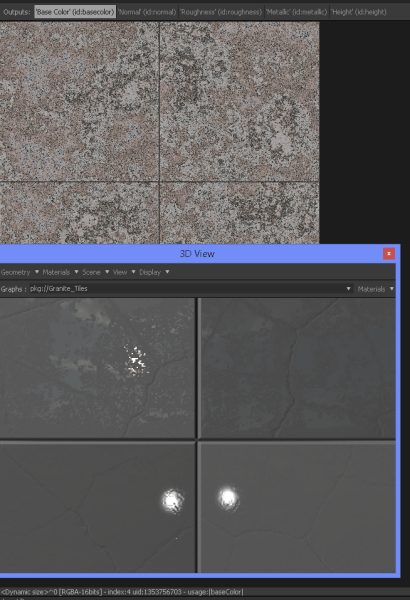
The upper part of the screen shot shows what should be the Diffuse, but the lower window does not display it.
Next I opened the sbs file in Substance Designer 4 and 5. The image file being used for the Diffuse is not defined as such in the Output options - it is only defined as a "Base Color". I redefined it as a Diffuse and saved the file under a new name as both sbs and sbar files. Below is the result of the new file when opened in B2M:
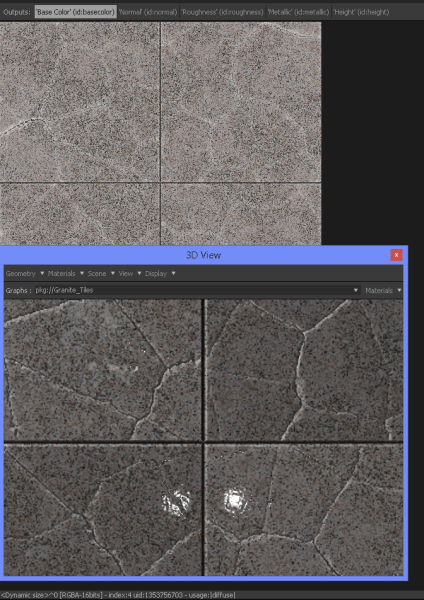
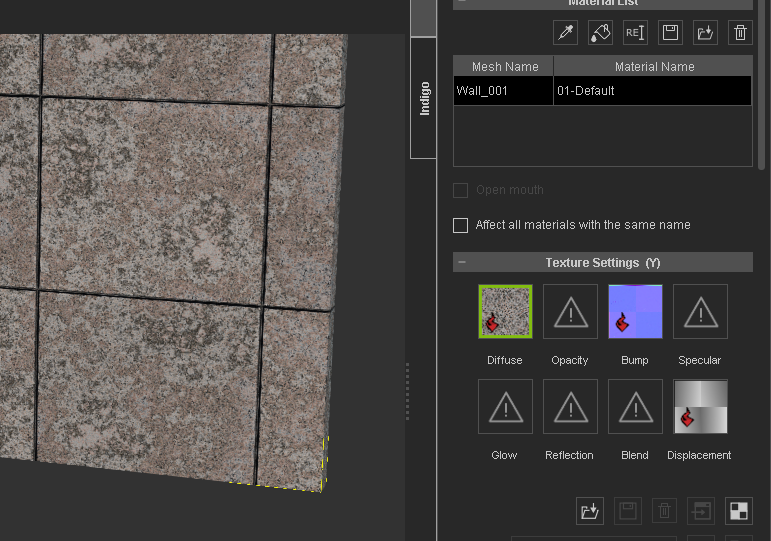
When the new sbar substance file is applied to an asset in iClone the Diffuse displays as expected:
Just for info, I used both B2M 2 and 3 just to test if the file contained PBR settings - B2M 2 doesn't support PBR and the fact that the files opened in both shows that there is no PBR included - they just have incorrect output settings for the channels.
Hope this helps some.:cool::)
|
|
By Rampa - 10 Years Ago
|
Excellent sleuthing there Gerry! :)
Would you be willing to do this with the other SBS files? It'd be nice if this guy's Substances were available for all us iCloners. I could send you a zip of just the SBS files, those 4K textures are a slow download.
|
|
By wires - 10 Years Ago
|
|
Rampa,
If you send me the zip files I'll do my best, but it may take a few hours. :) You can send the file as an email attachment using the email link in my profile. I'll also send you my email address in a PM.
|
|
By animatom - 10 Years Ago
|
|
Thank you, wires, for this. Very nice of you...
|
|
By Rampa - 10 Years Ago
|
wires (9/3/2015)
Rampa,
If you send me the zip files I'll do my best, but it may take a few hours. :) You can send the file as an email attachment using the email link in my profile. I'll also send you my email address in a PM.
They're on the way. Thanks. :)
|
|
By Käy.Vriend - 10 Years Ago
|
Hey Guys,
I'm the author of the substances described, and wanted to ask if there was an issue with them (so I can fix it, so other users wont have that same error).
If not, glad to hear, if so, what can I do to fix it? Some render engines use different standards for PBR (The substances are made for roughness-metallic).
I'm glad you guys like my work! I am currently available for work, so if anyone knows someone looking for neat materials, i would love to hear about it.
Cheers!
Käy Vriend.
|
|
By justaviking - 10 Years Ago
|
|
@Rampa - I got distracted and forgot about it for a bit. Sorry. :blush: @Gerry - Thanks for stepping in and helping. You saved the day for me (and others). @ Käy - Greetings, and WELCOME to the iClone forum. :)
|
|
By Rampa - 10 Years Ago
|
Welcome to our forums Käy.
Thanks for tracking us down and offering assistance. I was hoping to get someone here to have a look, and Wires has done that. So apparently iClone needs a little change in the Substance that some other software must not. Wires posted earlier.
To spare him the long download time, I sent him just the SBS files to look at. I wanted to ask you about re-distributing those if he is able to get them working for iClone. Hopefully it's a more general fix that will not negatively effect there use in other software. Then it would be easy for you to implement going forward.
Your work on these is exquisite. Thanks for making them available.
|
|
By Käy.Vriend - 10 Years Ago
|
Thanks for the kind words guys,
I haven't yet used iClone (Since most of what i do is directly in Substance), so I'm not really sure what has to happen to make the substances work better for iClone users. Any pointers would be very welcome. I could perhaps update the substances with additional outputs for both PBR work flows.
By the way, most of my substances are on Substance Share as well, so if you find something that doesn't work well with one of them, you can comment directly to that substance. Easier for me to see :).
Cheers!
|
|
By Rampa - 10 Years Ago
|
Thanks Käy. I was glad to see the new Substance Share site, but found that most of the Substances posted there do not work correctly in iClone.
It looks like the main thing that Wires discovered was this, "The image file being used for the Diffuse is not defined as such in the Output options - it is only defined as a "Base Color". I redefined it as a Diffuse and saved the file under a new name as both sbs and sbar files".
Quoted from a post of his earlier in the thread. I'm not a Substance Designer user myself.
|
|
By Rampa - 10 Years Ago
|
|
Posted this in the "Substance Share" forum over at Allegorithmic Forum.
|
|
By justaviking - 10 Years Ago
|
On a related note, I think...
On substances I create, if I change the "OUTPUT SIZE" from the default of 512x512 to 1024x1024, iClone locks up. I get the "spinning wheel of progress" but without the progress.
However, if I do the same thing to one of the substances that Reallusion provides, it works fine.
Has anyone else encountered this? Any ideas?
I was going to attach my substance (in a zip file) but it's complaining I'm out of space.
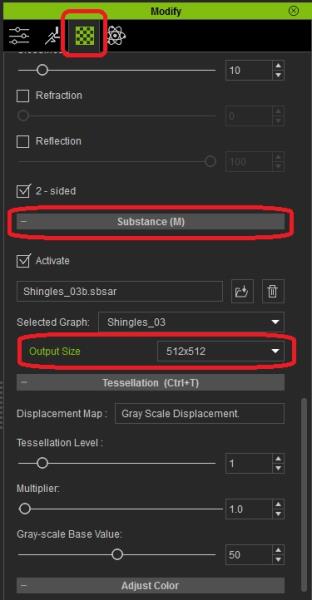
|
|
By justaviking - 10 Years Ago
|
Figured it out.
Now to try and explain it.
Short story is... I increased the "resolution" in Substance Designer *after* creating the substance graph. If I put it back to a multiplication factor of "1" (the 512x512 default) then it worked correctly.
Now I need to figure out how to increase my base resolution of the "parent" in SD. I've been curious about that anyway, and now I have a reason to figure it out.
But iClone shouldn't lock up. It ought to handle it more gracefully than that, even if it spits back an error message.
|