|
By Durl - 11 Years Ago
|
Greetings,
Might there be a way to reduce Heidi's fixed upper endowment into the realm of the plausible?
Any assistance you can provide will be much appreciated.
Thank you, Darrell
|
|
By Cricky - 11 Years Ago
|
Large as in HUGE and Enormous, or Mildly non-existent as in "Plausibly Deniable" that they exist at all?
Either way can be done using ZBrush, Mudbox, 3DSMax, Maya, Blender, etc. It's just a matter of pushing or pulling the mesh to what you want and then replacing the mesh in 3dXchange. Both, Body and the Dress have to be modified to match, before that question arises.
Here's an Image Titled "Breastless in Seattle"
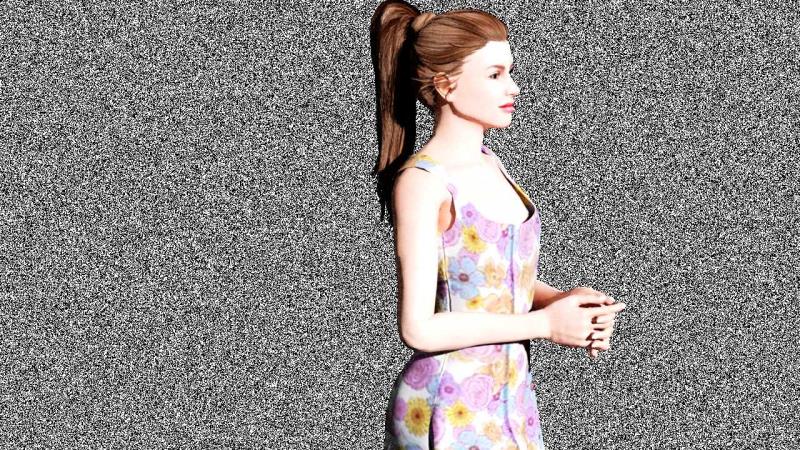
Durl (6/30/2015)
Greetings,
Might there be a way to reduce Heidi's fixed upper endowment into the realm of the plausible?
Any assistance you can provide will be much appreciated.
Thank you, Darrell
|
|
By Durl - 11 Years Ago
|
Hi Cricky,
Thank you for your answer and example of a Heidi modification.
Would you know how Heidi-clothing would also be made to conform to a more-typical upper Heidi geometry?
Best regards, Darrell
|
|
By Cricky - 11 Years Ago
|
The dress in the example was modified just like the Model (Heidi).
There are morphing tools that allow a mesh to "Conform" to other meshes, but they are not exactly available to the average user, so explanation on their use will not be forthcoming. All the tools listed in the first response can be used for this modification, and each one would take days to prepare a tutorial on. Pick up the Hammer you like using, and start pounding away. Sooner or later the form will take shape if you hammer long enough.
The easiest way is to adjust the clothing to the character using the same tool the Avatar was adjusted with. Replace the clothing until you have it sitting properly over the skin layer, then send them both back to iClone. The cloth will use the same weight maps that worked before, and will react in accordance with the Avatars preset Collision settings.
|
|
By Grimhilda - 11 Years Ago
|
Hi Cricky,
That's a good modification you've made there.
I'm still getting to grips with Iclone6 but can't see any way to export the avatar.
I only have 3DXchange5 and remember that, in iclone5 there was an option to send avatar parts there.
Do you know whether 3DXchange6 is needed for this option to exist in Iclone6?
|
|
By animagic - 11 Years Ago
|
|
Grimhilda (7/2/2015)
Do you know whether 3DXchange6 is needed for this option to exist in Iclone6?
Yes. Also, you need 3DXchange 6 specifically for iClone 6 avatars.
|
|
By Grimhilda - 11 Years Ago
|
Thanks, Animagic, your reply clears it up for me.
I know I'm six months behind but I'm liking iclone6.
But I really need a bigger monitor, some new car parts, a new washing machine - and a zillion other things competing for my cash. Now I have a reason to need 3DXchange6!
Hoping the new character builder meets my needs. But if self-made clothes meshes can be imported for the new characters via 3DXchange6, I'll be tempted to forget the washing machine! Hand-washing clothes is a lot of fun, I tell myself.
|
|
By Lawsuit Pending Records - 11 Years Ago
|
|
Durl (6/30/2015)
Greetings,
Might there be a way to reduce Heidi's fixed upper endowment into the realm of the plausible?
Any assistance you can provide will be much appreciated.
Thank you, Darrell I never noticed this until you mentioned it. With a 40 inch monitor it's all I see now. I have to use the 20mm lens so all the other props in the scene are visible and I duck every time Heidi turns around.
|