|
By jgrant - 11 Years Ago
|
I joined IClone last week and introduced myself in the Newbie corner. My goal was to immerse myself in the software and start learning my way around the interface and understand how to import elements, texture them and come to terms with the idiosyncrasies of the program. Overall, I have been very impressed with the caliber and quality of the program and as I delve deeper into the assets and manual controls available, I believe this can be a wonderful tool set for Toon based cinema and other material as I become more confident and proficient with the world. What has impressed me to date is the camaraderie and generous online assistance from the member and the continued graciousness on the Forum. It is a joy to be able to share my WIP and do what I can to be a good IClone citizen.
Here is a first pass as I explore the Toon engine and the Nevermore model I brought in and textured with the stock elements available in IClone 6. I wanted to generate a ten second clip learning how to stage multiple cameras interacting with particle elements. The balance seems to be between a robust environment using render light textures to increase the number of moving pieces on screen. I'm rocking a new PC with a decent NVidia card and I saw no lag or jitter working with multiple elements, multiple particle tools and worked consistently for about 90 minutes generating this sample of rooftops reminding me of an old English village.
I shall continue to #showmywork as I continue my adventures. Thank you in advance for reviewing or responding.
|
|
By Colonel_Klink - 11 Years Ago
|
|
jgrant. Welcome to Iclone, Impressive clip. Yes Iclone has some pretty cool stuff to play with, that is for sure. Will be following you with interest. Cheers, Bob
|
|
By Tarampa Studios - 11 Years Ago
|
|
... and you've already graduated from Newbie to Junior, LOL
|
|
By jgrant - 11 Years Ago
|
Well, I'm honored for the fast upgrade. As promised, I shall continue to show my work. Now in the same scene I have introduced an avatar in a clumsy walk cycle I hobbled together. I will learn how to transpose the slip and slide feet as I progress and appreciate any links to tutorials accordingly. Using the Switcher, I added rain in the foreground and fleshed out the buildings to the left of camera for greater depth.
|
|
By mark - 11 Years Ago
|
...the force is strong with this one!!!!!:P:P:P:P
|
|
By jgrant - 11 Years Ago
|
|
Indeed, I could be consumed by bitterness and pride and find myself on a journey of assured destruction. Wait, I already did that. I worked in the mainstream movie business. LOL. :laugh:
|
|
By justaviking - 11 Years Ago
|
Great work.
This is you learning? You're a very fast learner (and a funny guy). I can't wait to see what comes next.
|
|
By Christy0 - 11 Years Ago
|
JG Your earlier work and these tests look great.
Can't wait to see your first full iClone production. :)
|
|
By jgrant - 11 Years Ago
|
Thanks, Christy0 for your kind words. Today it is all about exploring the lip sync options available. I see there is NO TIMELINE SCRUBBING on Audio (that really should be a MUST HAVE fix) and the KEYFRAME ON/OFF option would be nice. Here's a first test of a standard Pinky character with an imported WAV file applied with masked body animation and no keyframing on lip sync.
Who are the gurus of lip sync here, please? What insights can you share on best uses, hacks and fixes?
Many thanks in advance for any insights
.
|
|
By Rampa - 11 Years Ago
|
I don't think there is a good iC6 tutorial yet, but this iC5 one covers what you need to know. The UI is basically the same for these tools. You should be able to figure out the corresponding bits. It's based around DAZ avatars, but the timeline functionality is the same for any avatar.
Audio scrubbing would be very helpful, but at least, you can get a visual.
|
|
By jgrant - 11 Years Ago
|
|
That's very helpful. Thank you very much.
|
|
By jgrant - 11 Years Ago
|
I spent some time hitting some high notes on the hand keys - missing the scrub element very much so -.( BTW the tutorial actually has them scrubbing the dialogue at one point to check sync - how did they do that?) and then jumped into the Puppet Controller to play around with the eyes/brows and peripheral options. VERY NICE!!!. Having RT interactive options like this is fabulous and is one of the reasons why I became so enamored of IClone. Now, if they just look at Key Frame ON/OFF and Scrubbing as Animation Enhancements - this will make for a much more cohesive system IMHO.
|
|
By justaviking - 11 Years Ago
|
|
jgrant (6/15/2015)
BTW the tutorial actually has them scrubbing the dialogue at one point to check sync - how did they do that?
- They slide the visemes on the timeline, but with no sound.
- They did the "puppeteer" animation at 1/2 speed, so it sounded like they were scrubbing the audio, but it is really a slow playback to allow you to move the puppet controls more accurately.
Sorry to be the bearer of bad news. As you can see in the second post of this thread, I fully support this request.
|
|
By jgrant - 11 Years Ago
|
Hell, I would take 1/2 speed playback if that's an easier option for the powers that be? Or 1/4 speed? That would allow us to 'ear all' the sync and be a lot cleaner. As anything, you take the good with the bad and figure out work arounds.
I see that for the 3dX upgrade they are promising better lip sync. Can you shed any light on that?
|
|
By justaviking - 11 Years Ago
|
|
jgrant (6/15/2015)
I see that for the 3dX upgrade they are promising better lip sync. Can you shed any light on that?
I'm far from an expert on it. I mostly use it to import props from Sketchup and Blender, though I dream of doing more.
With the disclaimer out of the way, I *suspect* it mostly refers to better tools to help you do the "mouth shape-to-viseme" mapping.
Hopefully someone can answer this with greater authority.
|
|
By Tarampa Studios - 11 Years Ago
|
Re Lipsyncs... haha, they beat me to posting that link. I've watched it a few times since I started with iClone and I understand something related to it a little more each time.
Some of the most helpful "tricks" I found elsewhere or stumbled upon myself, including how to create accurate visemes for any skin/boned avatars via 3DX, so I've been blogging about them as part of my entries for the RGCA competition.... notes to myself really, since all the other entrants are way ahead of me with experience... but you're welcome to pop in to see if you've missed anything, as I did at first... the timeline and lipsync topics are here at the start of page 1. (Page 2 also shows a pic of that little critter from my logo that google+ wouldn't let you see directly the other day... )
Weird but true: My only previous experience with animation was a few months in Cinema 4D (which I love for modelling, rendering, large projects and any really complex animations), but that spoiled me with features too, so I asked many of my initial iClone questions in various forums while clutching maniacally to clumps of my hair in my fists - and often without any responses because I'm striving for a style more like yours and pixars than most other members here, it seems, where the computer game style reigns as king, understandably, since that's the primary market for iClone - so it took me a while to learn that iC is a little like the Linux of the mac/pc universe... completely different from the ground up, but still handles nearly everything, albeit differently...
so now when I hit a wall that could have been solved easily at home in my other software, I stop and try to see how reallusion might have solved the problem during their reconstruction of animation software, which has a goal of making the whole thing *easier* for people with limited experience... and yes, sometimes this is at the expense of more advanced features... I personally miss morphing tools like my favourite shoe... but until last week, I thought I missed hypernurbs that much too - until I found the 1-click solution in 3DX via the smoothing tool... ironically, I first thought Maxon were crazy to name their smoothing tool something so bizarrely hard to find, like hypernurbs... I mean, sheesh... hypernurbs... might as well be hyper-stupid-name-for-nerds... LOL
And sometimes CrazyTalk Animator2 (Pipeline version) has solved some tooning issues for me with iC5... and still does with iC6, especially for backgrounds and toonish animations, like sweating, fuming etc... by saving those animations as alpha avis and control-dragging them into iClone, which converts them to iprops without needing to go via 3DX at all...
food for thought, at least.
:)
|
|
By jgrant - 11 Years Ago
|
|
Thanks for the timeline links and the info, Bleetz. Much appreciated. Yes, we are more 'toon' focused than game - and this I think is a good thing. I'm enjoying dealing with the 'restrictions' of IClone as all software has some kind of headache. That being said, I wouldn't complain if they added keyframing on/off and scrubbing. I shall post this to the content requirements forum. Thanks for the encouragement and insights.
|
|
By jgrant - 11 Years Ago
|
Rendering and tests continue as I look to the Toon Toolset and the Puppet Controller. I started out with Stout and looked at both the regular and toon render engines. There are always going to be limits with low poly characters but I think I can push in to a close up with no major objections. All of this material has not been color corrected or finished and is just raw out of the render engine so I have a few tricks up my sleeve. I also looked to a monochrome render as well and shall explore a limited color palette as a creative choice as well.
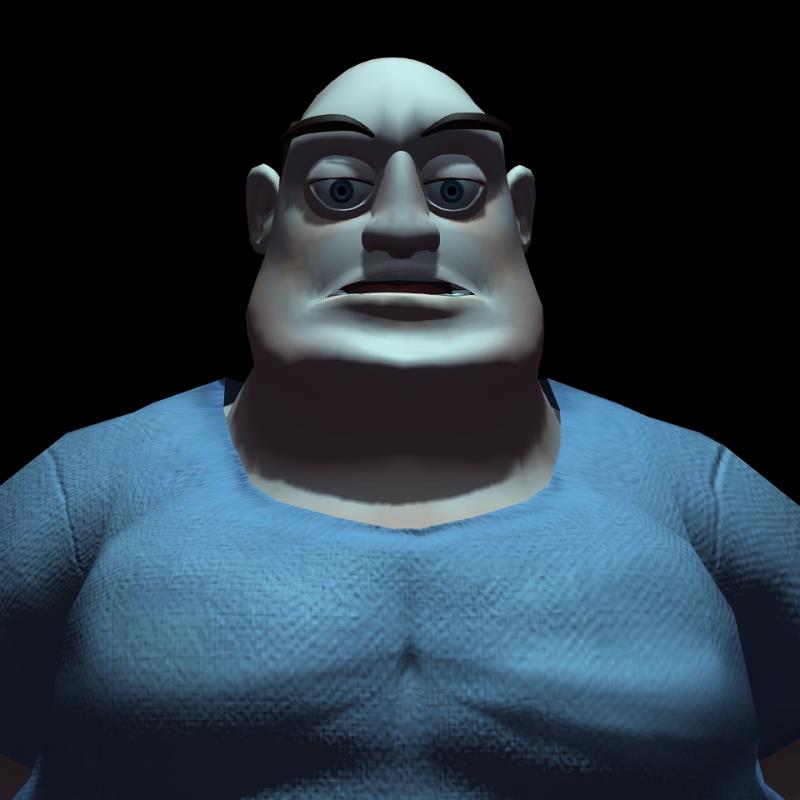
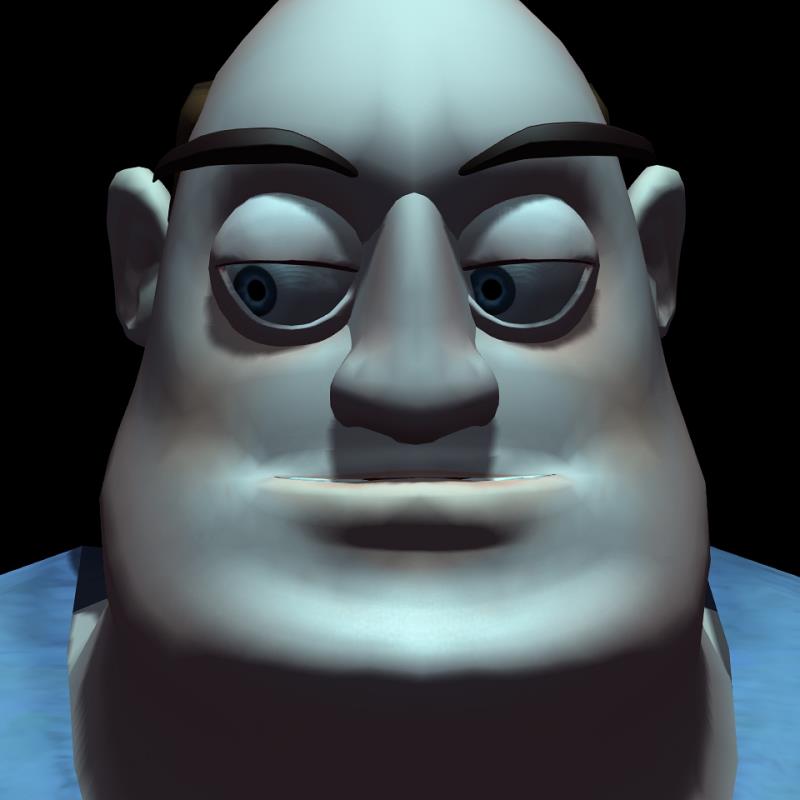
The monochrome look can be very effective, I believe, once I figure out the program. BTW - I am assuming the the depth of field aspect does not work with the Toon Render?
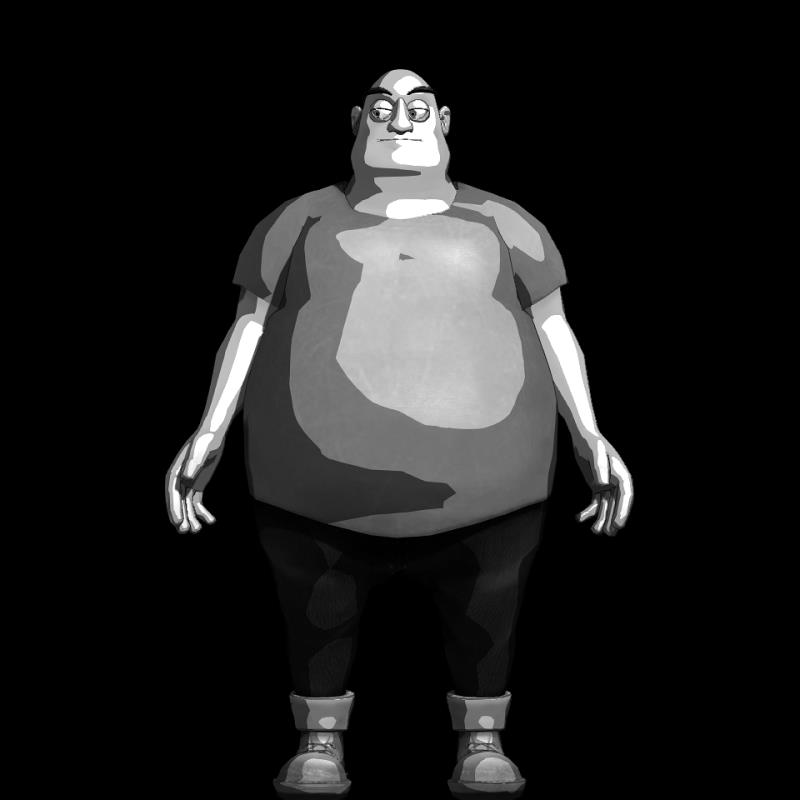
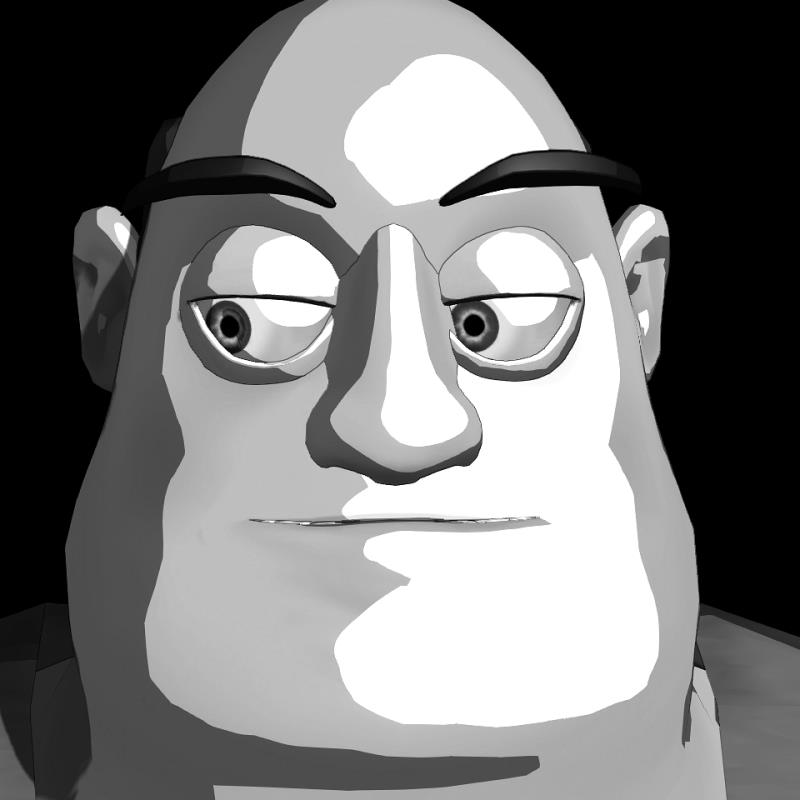
Overall, I was much pleased with the Stout character and put together a simple animation just to test his moving hold/idle position. He's a big lug that shall translate fine for the work I want to do.
I think he will be the first character I animate in a short film. I finished my day reviewing the progress I made and noted my new familiarity with keyboard shortcuts and coming to terms with the program.
|
|
By jgrant - 11 Years Ago
|
Today I worked on continued Toon character evaluations and Curvy was my victim for the day. Using the Avatar Controller, I quickly loaded her and tried various moving holds and idles and then jumped into lip sync. I find I am using a 100 frame pattern - play and watch timeline than play and watch lip sync (repeat as required with adjustments.). I was happy with my progress as I hit a few more of the vowels but will still need to use body animation and secondary exaggeration to 'sell' the performance.
I also had an opportunity to try out the Light Tool China Ball as a lighting prop (as opposed to the florescent I loaded up for the first Curvy clip here. I can see myself lighting scenes using this type of approach or assigning lights to primitives to light a larger swath of the set. The soft shadows here are quite nice without the breakup associated with the floro.
|
|
By prabhatM - 11 Years Ago
|
I have interest in doing regular TV episodes in the Toon Shader with a kind of Retro look ( More like animations done in Eighties ). I know you would bring some extra touch to the regular Toon Shader.
I would be eagerly watching you working with the Toon Shader.
|
|
By Tarampa Studios - 11 Years Ago
|
There's a few cool tips for achieving depth in toon style for iC5 here, using shadow blurs, fog etc...
I haven't tried them in iC6 yet, so if they help, I'd love to know..?
|
|
By jgrant - 11 Years Ago
|
|
Many thx Bleetz. Much appreciated. You are a fountain of great advice.
|
|
By Tarampa Studios - 11 Years Ago
|
Haha,,, noooooooooo...
but I've trudged around the trenches recently enough that some of the mud is still stuck onto me. LOL
and by mud I mean by the farmer's definition of the best dirt... and sometimes, being a farmer myself, I forget that normal people have a whole other meaning for it
:P
|
|
By jgrant - 11 Years Ago
|
I've been busy working away and trying my hand at import SketchUp props (love it!) and adding lights, tone and texture to my work. I'm documenting my progress on my personal blog as well so I have a record of what I am doing. You will also find a variety of other posts there related to my cinema work and topics of interest. You can find it here if interested.
Today was all about Mason and having a look at him in relationship to the imported Sketch Up props. I'm happy with my progress so far and can start to see the edges of a story already. I'm coming to terms with the various options available and developing work around and other tactics as I find out more about this unique eco-system. It will be interesting as more G6 characters become available and the opportunity to face change or adjust is added to the workflow. I have a wealth of characters in the toon avatars (and that shall probably be my primary work) - but the subtly available from the Mason character is quite nice.
Here I wanted to look at non-verbal communication and look at what may be conveyed with simple head shifts and eyeline changes. The character is certainly robust enough to display a wide variety of emotions - and I look forward to exploring those options.
|
|
By Tarampa Studios - 11 Years Ago
|
Re wheels: Mark has some great video tutorials that show several approaches.
I love the nifty tricks in this one if you have the icar kit.
His tutorial on "Pimp my Vespa" walks through the whole process of downloading from 3Dwarehouse thru sketchup and then animating using the physics toolbox.
And there's another one with Cleetus driving his truck, which shows how to keyframe the props directly, and make your own dummy for springs... but I won't give you the link... this one is a carrot, because everybody needs to be lured to see his whole channel, sooner or later hahaha
and re...
jgrant (6/17/2015)
... ... my personal blog... here
Crikey!
I also followed it to your webpage, and...
crikey!
Do the guys at Reallusion know you're here?
Also... congrats on rocketing up to senior member already... a new record perhaps?
:)
|
|
By jgrant - 11 Years Ago
|
I'm a little low key about who I am and my accomplishments. We are all learning together - and your assistance Bleetz (and everyone) has been marvelous. Yes, wheel physics are next on my list and I shall try my hand at that. Just built some faux God Rays and am happy with the results. It's all about the membership - and the helping of one another and I am honored to have been awarded such high stature already. I'm just plodding along and looking forward to up-rezzing my skills with everyone. Thanks again for the tutorials from Mark. Much appreciated.

And then I adjusted the softboxes I built from a light tool (love those things - I built my own movie style Softies and saved them as a prop - and created the faux God Lights here (as below). So. it's coming together. Nest up is Super Sampling vs. Highest Rez Video Rendering.

|
|
By Tarampa Studios - 11 Years Ago
|
|
Niiiice... also, if you haven't found it already, there's a smoothing tool in 3DX which may interest you to help soften those quad polys on the speaker rims. Mark mentions it and shows how to use it during the first part of his tutorial with the vespa, in that link above :)
|
|
By jgrant - 11 Years Ago
|
Thanks for the headsup on smoothing. I actually smoothed the radio once already and I wanted to see how close I could get before it all turned ugly. It's a very small low poly prop. I shall also look at smoothing in 3Dx as well.
I'm an experimenter and test based guy who tends to work in multi step passes and then documents my work as I can. I'm also looking constantly at resource size, scene bloat and other factors as I work to see how far I can push my PC.
Appreciate the tips Bleetz. Am always learning. :)
|
|
By Tarampa Studios - 11 Years Ago
|
|
jgrant (6/18/2015)
... Am always learning. :)
When we stop, we're dead, and even then I plan to decompose creatively. :)
In the meantime, here's an irony worthy of a giggle; my rank just progressed to tutor... which just goes to show, they don't really know me very well at all. hahaha
|
|
By Rampa - 11 Years Ago
|
The smoothing adds no overhead. It just adjusts the normals so that your material will look smooth.
|
|
By jgrant - 11 Years Ago
|
Great. Thank you. Appreciate the insight.
|
|
By jgrant - 11 Years Ago
|
So today, it's been a light day as I only had a chance to look at basic texture manipulations and seeing how to create a very rough Santo style mask on Athletic as I framed up a close up imagining my masked hero dishing out some pain at the end of a climactic sequence. Just meat and potatoes work here as I look to anger/frustration and the power of music and sound to enhance the emotion.
What continues to thrill me are the possibilities I have. The real joy of exploration and play as I find my way with IC6 (that's going to be my lazy man acronym). Anyway, back to playing. :D
|
|
By jgrant - 11 Years Ago
|
A full day of motion tests, lighting, camera and other related skill development. I've drafted a working story that I shall begin in a couple of weeks. Nothing too taxing - a minute or so of limited animation using a consistent palette. The goal is to build those muscles carefully (and marvel at the solid work done by the experts here). It's a slow process but one that bares fruit everyday. Each exercise finds my fingers finding the key or the associated prop a little faster. As I work, rework and experiment, I do not know what is the accepted protocol - and that's a good thing. As a constant student, I am always striving to learn new and unique ways to make the software tell the stories for me. A bug becomes an opportunity. A problem becomes a usable quirk. I have to always remind myself to be patient - to recognize that I will have a long learning curve - and that is okay. No one is an instant expert. I've posted my WIP updates on my blog right now as I don't need to bog down the membership board with my daily doodles (as this is what I am doing right now). Anyone interested can certainly visit it here.
|
|
By jgrant - 11 Years Ago
|
Learning continues as I combine 3dx with Daz 4.8 in defining my workflow. It's a wonderful way to build up knowledge and practice my skills as I work through various options available with IC6.
Recently I upgraded my computer and started stocking my Daz shelves in preparation for my Summer exercises. I am slowly coming to terms with 3dx and am thrilled to now be able to import Genesis 2 characters into IC6 and even work with lip sync. My goal was to start working with the Physics option this week and look at combining the best of Daz and IC6 in a hybrid model with realistic G6 hair. Here is a link to a recent Run Cycle I created.
http://youtu.be/dgazGrqSgWU
My greater goal this Summer is to create a standard dialogue scene between two characters in a IC6 environment rendered out and finished using Adobe Premiere or Hit Film for finishing. As a real-life filmmaker, I am adapting all of my preparation skills to the IC6 world so my real-time animations can benefit from the advance strategizing that defines my cinema world.
|
|
By justaviking - 11 Years Ago
|
Nice work, again. :)
Because it was so good, I challenged myself to see if I could find any room for improvement. It was a difficult challenge. If I were to change anything, I'd maybe try a *little* bit more shoulder twist (upper torso rotation), but of course it is entirely possible that would ruin what is already a supreme bit of work.
Very smooth, very nice. :)
|