|
By Peter (RL) - 11 Years Ago
|
Hi Everyone,
As you may be aware the Daz Genesis DUF files required for automated facial animation in 3DXchange were previously only available as a Bonus with the "Facial Pipeline Character Pack". However as many users have long requested just the DUF files, we have decided to make the Daz Genesis 1, 2 & 3 DUF files available FREE to 3DXchange 6 Pro/Pipeline users. Please download them from your Member Account by clicking the Patch/Bonus link for 3DXchange 6.
And for a tutorial on how to use them, please see HERE:
Have fun. :)
|
|
By pfontaine2 - 11 Years Ago
|
Thank you Reallusion for finally providing these files for free.
I was in desperate need of just the DUF files and recently purchased the Facial Animation Pack just to get them. I don't regret the purchase because of the other content that came with the pack but these DUF files really should have been made available as a free download much earlier, or at least be part of the purchase of 3DXchange Pro.
|
|
By thebiz.movies - 11 Years Ago
|
|
Yay!
|
|
By xalidfetah - 11 Years Ago
|
|
But if you Change the Genesis face, then is Problem in 3DXchange
|
|
By Keith_MPS - 11 Years Ago
|
|
Thank you. I was in the position of wanting the DUF files, but not the content in the character pack.
|
|
By JC Weatherby - 11 Years Ago
|
|
Thanks, Peter :)
|
|
By Dreamcube017 - 11 Years Ago
|
|
NIICE! Thanks.
|
|
By Lord Ashes - 11 Years Ago
|
While RL is being so generous, any plans on releasing the DummyBone file that many tutorials refer to when creating non-character Morphs?
I believe it is in a similar situation: It is being some as part of some much bigger Character Creation pack but some users only need the DummyBone.
|
|
By Peter (RL) - 11 Years Ago
|
|
Lord Ashes (6/8/2015)
While RL is being so generous, any plans on releasing the DummyBone file that many tutorials refer to when creating non-character Morphs?
I believe it is in a similar situation: It is being some as part of some much bigger Character Creation pack but some users only need the DummyBone.
Actually if you have upgraded to 3DXchange 6, then you should have this already. Just login to your Member Account and click Patch/Bonus for your copy of 3DXchange 6. There you should see a link for the Daz Genesis Extension Designer Source pack. If you download this you will find the DummyBone.
|
|
By Lord Ashes - 11 Years Ago
|
|
Peter (RL) (6/8/2015)
Actually if you have upgraded to 3DXchange 6, then you should have this already. Just login to your Member Account and click Patch/Bonus for your copy of 3DXchange 6. There you should see a link for the Daz Genesis Extension Designer Source pack. If you download this you will find the DummyBone.
I was not aware of that and I am guessing others might not know that too. I will give it a try. Thanks for the info.
EDIT: Yup. Worked like a charm. Thanks.
|
|
By Lord Ashes - 11 Years Ago
|
Is the DUF file for DAZ Genesis 3 coming soon?
|
|
By Peter (RL) - 11 Years Ago
|
|
Lord Ashes (6/25/2015)
Is the DUF file for DAZ Genesis 3 coming soon?
Genesis 3 only came out a few days ago so we will have to take a look at the changes. Hopefully the wait for a Genesis 3 DUF file won't be as long as for the Genesis 2, but sadly I don't have any date at this stage. :Whistling:
|
|
By JC Weatherby - 11 Years Ago
|
I've posted about this elsewhere, but it's worth noting here, the FaceKey.duf files no longer work because of a bug introduced by DAZ 4.8. If you are still working with DAZ 4.7, you likely will not have this problem. This issue has been brought to Support's attention - well over a month ago. The issue was escalated to the developer team, but so far there is no fix. I've spoken to Reallusion representatives by phone and they confirm the issue, and hope to expedite a fix, but there is no timeline yet for doing so.
Specifically, during the export process, you have to apply the FaceKey.duf files onto your character in DAZ before export. Once inside 3DX5 or 3DX6 - after you've completed the conversion process - you should be able to open the Expression Editor and see all your visemes and facial morphs active. But because of this issue, you won't see anything.
Alternately, according to an iClone Training Expert I spoke with, you should be able to adjust the sliders in the Expression Editor and create your own facial morphs, and save this as a profile you can apply to other characters. But I have not been able to get this to work with DAZ G2 in 3DX5 Pipeline.
|
|
By JC Weatherby - 11 Years Ago
|
sw00000p, There is no way to create the face morphs inside DAZ with G2. Yes, you can "Define" a brow, or set the size of eyes, the angle of the jaw, and so on... These sliders allow you to customize the look of the character, but they do not allow you to adjust the facial expression, smile, frown, angry, sad... or allow you to create all of the morphs and visemes iClone requires to animate a face. And there are no individual bones in the rig which you can grab to accomplish this. DAZ G2 only has bones for eyes, upper/lower jaw, and tongue.
I have tried exporting a blank G2, and creating the profile by using the sliders inside the 3DX5 Expression Editor - but this doesn't work either. Try it and see. I've had no luck with it.
And yes, I've checked to ensure I'm exporting animations and morphs from DAZ, and importing animation into 3DX5 - even though there's no animation to import. I've tried importing with and without these selections checked. Same results.
|
|
By Dragonskunk - 11 Years Ago
|
Can't find any definition of what a .duf file is.
is that the iMotion equivalent for Daz characters?
|
|
By Peter (RL) - 11 Years Ago
|
|
Dragonskunk (8/11/2015)
Can't find any definition of what a .duf file is.
is that the iMotion equivalent for Daz characters?
DUF files are a fairly recent new Daz file type that replaces a lot of different older file formats. Take a look at the page below for more information. :)
http://docs.daz3d.com/doku.php/public/dson_spec/format_description/file_types/start
|
|
By 0oseven - 11 Years Ago
|
Peter (RL) (6/8/2015)
Lord Ases (6/8/2015)
While RL is being so generous, any plans on releasing the DummyBone file that many tutorials refer to when creating non-character Morphs?
I believe it is in a similar situation: It is being some as part of some much bigger Character Creation pack but some users only need the DummyBone.
Actually if you have upgraded to 3DXchange 6, then you should have this already. Just login to your Member Account and click Patch/Bonus for your copy of 3DXchange 6. There you should see a link for the Daz Genesis Extension Designer Source pack. If you download this you will find the DummyBone.
Perhaps you can help as I've posted elsewhere and with support to no avail so far.
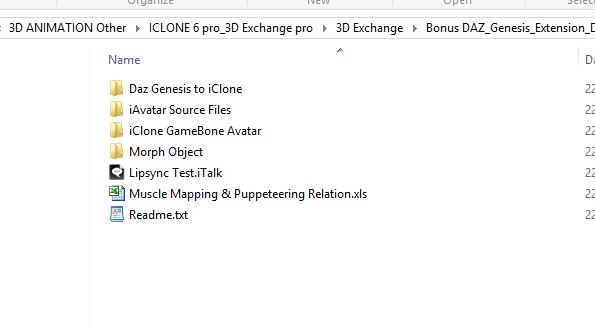
The genesis extension Pack you refer to doesn't have an installer. I would like to know what I should do with these files to have them work?
|
|
By wendyluvscatz - 11 Years Ago
|
I use DAZ studio 4.9 public beta and the facekeys work,
I drag and drop onto the figure from Windows explorer with rate set to 1fps to reduce keyframes for the fbx to 57
Only issue is I need to now reduce the viseme strength to half as the morphs are all duplicated as ctrl and pbm, DS4.7 I also use does not do that.
|
|
By gcshep - 11 Years Ago
|
|
Hi Wendy Like yourself I am working from DAZ 4.9 public beta versionbut for the life of me I cannot get any of the facekeys old or new sets to work. I have set the timeline like yourself but still will notwork. Any help would be much appreciated my project is on hold atthe moment because of this. Best Regards George
|
|
By wendyluvscatz - 11 Years Ago
|
How are you loading the duf?
Dragging into DAZ studio preview window onto the figure works for me using Genesis, G2M & F
G3M & F I have to manually do, I put a preset up in the freebie section here but it is iffy at best and in fact I use a different version now but still tweak it every time for different characters.
|
|
By wendyluvscatz - 11 Years Ago
|
How are you loading the duf?
Dragging into DAZ studio preview window onto the figure works for me using Genesis, G2M & F
G3M & F I have to manually do, I put a preset up in the freebie section here but it is iffy at best and in fact I use a different version now but still tweak it every time for different characters.
|
|
By gcshep - 11 Years Ago
|
|
I am loading the duf the same way as you dragging anddropping. What I have noticed is that when try G1 with its FaceKey itshows all the key frames but no movements at all, G2 M&F doe’s show any keyframes. How old are the FaceKey.duf files are you using, the one’s Iam using are the present one’s you can download via the bonus section in youraccount.
|
|
By wendyluvscatz - 11 Years Ago
|
That seems very odd, I shall check those later on my PC but mine not old, were updated with iC6 at some point.
How do you go loading facial poses from duf in general, it may be a bug in your data too, have you tried redownloading the starter essintials for the figures, I know I screw mine up sometimes saving support assets wrongly using the figure.
|
|
By gcshep - 11 Years Ago
|
|
I have un-installed and re-installed all of my DAZ assetsplus the program itself about 3 times but still getting the same results. It looks like I shall have to put this project on the backboiler until either Reallusion or DAZ come up with a fix. Thank you Wendy for reply’s. Best Regards George A Happy New Year
|
|
By wendyluvscatz - 11 Years Ago
|
is odd I just tried the ones in the link in the first post in this thread by Peter and they all work on their respective figures
in DS 4,9 public beta
you maybe changed the export rules for fbx?
|
|
By gcshep - 11 Years Ago
|
|
I haven’t got that far of exporting because still havingproblems with duf files. I have had no problems in the past with exporting I alwaysuse the very knowledgeable way by Warlord. I have tried all three G1 + G2 M&F but to no avail. Ihave had them working in the past even on one of models (Minotaur) that I was previouslyworking on it worked just fine.
|
|
By maxkroven - 10 Years Ago
|
Still no official Genesis 3 DUF? It's pretty much the only thing that has prevented me from getting iClone 6... Genesis 2 is great and all, but Genesis 3 is SUCH an improvement, that using the previous generation really feels like a huge setback. Hope RL can give some statement on this soon.
|
|
By sboyd2kus - 10 Years Ago
|
|
I'm in the same position - delaying the possible acquisition of the Pipeline until I get some firm feedback from RL on when they are going to release the T-Pose, Duf, and facial files for G3.
|
|
By wendyluvscatz - 10 Years Ago
|
I can get it to work using the bone based preset I manually made but it is a bit of a moving target as I load items with different additional bones in clothing and hair, and different vertex counts keep having to use variations of the one I did.
The original is on the forum in the freebie section and will work for G3F base in her base outfit but to use it on other characters in different clothes you may need to resave it under another name a few times after removing any morph based expressions and then manually redo them which is what I do for G3M too.
The morphs I manually add are mouth open wide and side left and right to use in the jaw setting as using the bone stuffs up the lower jaw expression assignment.
I am still not happy with the one I made though it does the job if you need one.
|
|
By maxkroven - 10 Years Ago
|
Thanks, wendy! I know you've done very hard work on porting G3F to iClone, but I still think a proprietary RL DUF file should be in order before I decide to take the plunge on a whole new software for me. I read somewhere they were planning on releasing one only in 2017... any truth to that?
|
|
By sboyd2kus - 10 Years Ago
|
Yes, Wendy - Thanks so much for the work you have done :)
It would be nice to have some official RL response on this!
Any updates, Peter? :)
|
|
By james4high - 10 Years Ago
|
Thank You
|
|
By Peter (RL) - 10 Years Ago
|
|
sboyd2kus (3/16/2016)
Yes, Wendy - Thanks so much for the work you have done :)
It would be nice to have some official RL response on this!
Any updates, Peter? :)
It's on the to do list but sadly other things have been taking priority recently including new content packs and support for custom content in Character Creator.
We do hope to have something ready soon though (probably just in time for the release of Genesis 4 sadly) :w00t:
I'll try and find out what's happening and let you all know. :)
|
|
By sboyd2kus - 10 Years Ago
|
|
Thanks, Peter - I went ahead and bought the pipeline and started using the Genesis 2 figures for now, with no discernible loss of quality. Thanks for the answer, and I will stay tuned!
|
|
By RagingKylo - 10 Years Ago
|
|
I have a question: When I drag the Genesis2_Female_iCloneFaceKey to the face of Genesis 2 Base Female, it shows "Preset Exceed Limits" message. I turn the limits off and export that to 3dXchange, adjust the T-pose, then apply it to iClone 6, the facial expression is really weird. How does this "Preset Exceed Limits" come? Nobody else ever encounter that error. Any suggestion will be appreciated!! By the way, I use Daz Studio 4.9 and followed the video link you posted step by step.
|
|
By sboyd2kus - 10 Years Ago
|
I had the same problem with the Genesis2 Male custom figure I was using. Dropped the duf in (wit the limit warning - ok), exported, got it to 3dxchange and into iclone.
The lower jaw was all funky when testing the speaking animations.
Did the same exact thing with the stock Genesis2 male. got the limit warning and OK, but when I got to iclone and tested the speaking animations it was perfect.
(IOW, the limit warning didn't cause any problems with a stock figure).
I am wondering if on the custom figure, having some of the morphs locked (in order to preserve the custom face) caused the problems.
Does the weird facial anim happen with the stock Genesis2 female, not some custom you may have created with locked morphs?
|
|
By wendyluvscatz - 10 Years Ago
|
it is because all the morphs are duplicated in ctrl morphs
the easy solution is to halve the viseme and expression strength in iClone.
|
|
By lokeshboyka - 10 Years Ago
|
|
link not working
|
|
By JimmyB7 - 10 Years Ago
|
Confirmed.
Error (404)
We can't find the page you're looking for.
|