|
By hattori kun - 11 Years Ago
|
Two critical improvements.
1. Iclone exporter should not create temp files for textures per frame. I understand the mesh per frame but the textures in a scene should be collected into a single folder. They're just duplicates.
The exporter/parser could just point to a single folder. I suspect this is one cause why Iclone crashes trying to export.
In other indigo plugin exporter it was mentioned that creating temp files was not necessary at all but I've yet to test it.
Also when I used Indigo's packaging command the textures and mesh collected was 1/3 of the original size from Iclone and neatly packed in a PIGS file. 3 gigs of a simple 100 frame animation became 1 gig.
2. Camera matching - the conversion is off by a few decimals.
|
|
By hattori kun - 11 Years Ago
|
We also need access to F-stop and Exposure from within Iclone. And the white point.
Adjusting this in Indigo renderer one by one per frame for an animation sequence is not ideal.
Its not possible to adjust these setting on Indigo renderer for an animation sequences en masse afaik.
|
|
By planetstardragon - 11 Years Ago
|
|
that makes sense, with the ability to animate the settings....but how would you monitor the results in iclone to animate it appropriately ?..... - I would imagine taking test shots through out your scene where the lighting changes ?
|
|
By hattori kun - 11 Years Ago
|
Yep single test renders at different frames would be enough. :D
The problem right now is Iclone exports a default f=stop, exposure and white balance setting afaik.
They're not practical in all situations so we need them accessible in Iclone so that when we export a sequence, the settings we want are carried over to each iqs file.
The iqq file is just a batch file so there's no ability to adjust all iqs files en masse from indigo.
|
|
By hattori kun - 11 Years Ago
|
Not two requests anymore :D
When using indigo sun sky with Iclone to get that look, the settings in Iclone are not really helpful since they don't give feedback on the Iclone viewport anway.
I rather tweak the sun sky setting in Indigo to work with the camera pov I have. Problem is when you get that look in indigo its not fast nor intuitive to transfer those settings from Indigo to Iclone. The direction and angle settings in Iclone took me a while to test and get the numbers I wanted. A lot of guess work which in the end I just created a chart to sort of match the Indigo settings to the Iclone settings.
I don't really see how useful the Iclone indigo direction and angle settings are if you need to export all the time to test lighting. That's slow. Its better to test within indigo with its sun sky settings adn get instant feedback while rendering, and transfer those azimuth and zenith settings over to iclone if it were there.

|
|
By planetstardragon - 11 Years Ago
|
hrmm, maybe even a "get settings from indigo" would be nice.
I usually don't bother with any settings in iclone, in fact I turn everything I can off to avoid interference. With the points you mentioned Re: animation and changing settings over time, it might be good to have a get settings from wherever you are in the timeline so Iclone automates it ? not sure if it will be possible though because you'd have to save a file to be read, unless they can copy it right from mem.
|
|
By hattori kun - 11 Years Ago
|
Get settings function would mean you would have to point Iclone to where to get the settings from everytime.
Iclone has no idea which one to get from if you have multiple indigo test frames going on.
The entry is there.

Probably easier to copy the azimuth and zenith settings from Indigo that you like then paste them to Iclone(if it had azimuth,zenith) and then export all the frames for the igq batch file.
The indigo video tuts from RL shows doing test renders and needing to export everytime. Slow workflow.
Not a problem for simple scenes. But for big scenes one frame export could take minutes just to do test render. Better to tweak in indigo.
|
|
By planetstardragon - 11 Years Ago
|
I was going by the discussion we had on how to adjust lighting over time in the animation...
was thinking ..at frame 1 ...you set the scene in indigo, press a get settings button in the plug in, and it plots that setting on the timeline....then you forward to the part of the scene where you want it to change, export that image to indigo - adjust settings accordingly, go back to iclone get settings again, then places the new settings on the current spot of the timeline.
But i think you might be right that copy and paste might be easiest as I can't imagine how those lighting settings would tween over time, and even if they did, it would be pure guesswork.
every time I try to figure out solutions for stuff like this, i remember why I really don't want to go very deep into animation, it seems like an endless adventures of work arounds lol
My ultimate work around, make a hit song and hire someone to watch me go "pew pew" while they take notes for how to animate it, i already did my time of getting tapped on the shoulder ruthlessly by producers who thought I was a human start stop button -shows finger scars on shoulder- :pinch:
|
|
By hattori kun - 11 Years Ago
|
I think its possible to do the "animation over time" with the align to light in Iclone indigo or the sky tool in Iclone. Haven't tested:D. Camera position and orientation in iclone would have to be at default to match the sun sky from both I think. Moving the camera anywhere else would be guesswork to match iclone and indigo sun sky.
I just exported 100 frames with that house and speedtree. 11 gigs :w00t:
8 gigs was duplicated textures :D
Hope RL can improve the export to indigo.
|
|
By hattori kun - 11 Years Ago
|
Egad :D
I just exported 500 frames from Iclone and its 27 gig and took 1 hour to finish exporting. :D
All of this I assume is because Iclone exports duplicated textures frame by frame.
There's also a bug when you've been editing a scene for a while and changing speedtrees in a scene and try to render a frame in indigo some trees are missing in the render even though they are on the Iclone scene and is visible in the viewport and scene editor list.
Don't think its memory issue since I barely reach 2gig in indigo.
Hope RL is reading this.
|
|
By animagic - 11 Years Ago
|
|
I think the export process should be rethought. Even if textures are shared, which is good, there is still the problem of duplicated geometry, which can add up as well with large scenes. I also wonder how animated (video) textures would be dealt with. I'm not sure if they actually work right now. I really would like to know how this is organized in other plugins. I guess it could be tested with a Blender scene.
|
|
By hattori kun - 11 Years Ago
|
It could be improved a lot. I had 320,000 jpgs duplicated. Static mesh should also not be duplicated. Animated mesh exported per frame is ok since indigo doesn't support any kind of cache afaik. For animated textures and video inserts that could either be referenced directly on the harddrive or exported per frame. I'd rather have it referenced directly on the harddrive. The sketchup indigo works this way. It doesn't export any textures at all and only points directly to the texture files on hdd.
|
|
By Bellatrix - 11 Years Ago
|
It could be improved A LOT, indeed. For now I'm not bothering with ICindigo until it evolves into a local IPR viewport, all 3rd-party plugin compatible. The export scene workflow as is, so tedious, it's faster to pack the scene up into FBX, import export via 3DX and shader-render elsewhere. IF 3DX packs the scene up properly for one's chosen ext renderer, that is.
For the long run, ideally IClone models its external renderer workflow design on its modestly-priced peers, and allow external renderer to make far better use of the iClone "mini viewport".
The IPR viewport should be un/dockable and has classic viewport options. For fast machines, it can become the main/ the only viewport to work in.
The Final viewport should be a floating window like typical plugins. Better still, dockable.
For the lower end machine, IPR render frames should be good enough for final. For high end machine, IPR acts as a typical preview render, when satisfied then use the final renderer.
Daz Studio, the best IPR Viewport of its class (near-real-time, ZERO shader transfer hassle; pause-able, render 3rd party instance hair and instances, via 3Delight a Renderman compliant engine; Viewport is full-featured so can act as a 2nd or the DEFAULT viewport; a FREE update)


OR4C Carrara Octane (near-real-time, more stable than Daz/Poser Octane, minimal shader rework, render native instances but not (WIP) procedural trees or strand hair)

Daz Studio Octane viewport design is also interesting

LuxCore Carrara IPR & Biased Renderer (near real-time, usable across all Carrara "rooms"; surprisingly fast OpenCL for AMD or Nvidia at 25-30sec per usable frame. Some shader rework needed, comes with solid LuxCore shader sets from trans to ref to SSS) Bridge to LuxusCore. Cheap alternative to Octane, current status beta test and free)
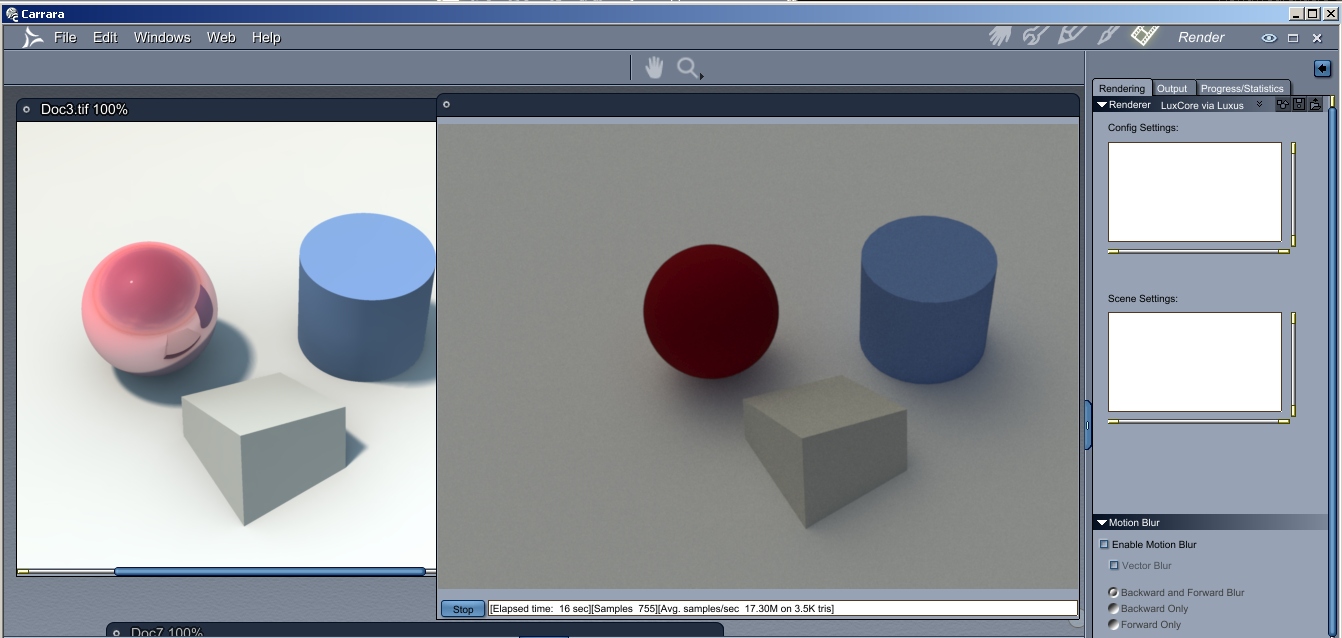

Hope that's enough ideas and inspiration for tighter, faster, more user-friendly iClone Indigo integration.
Cheers
|
|
By hattori kun - 11 Years Ago
|
I haven' tried daz ipr. I do have octane for lw. Needs a highend card, 980 or titans. Lightwave ipr is faster than octane in my experience. If Iclone indigo would improve the export process, I'm definitely going to use indigo than octane since Iclone scenes are time consuming to export one by one by fbx to another app.
Here's the bug in Iclone indigo for speedtree. The only workaround that works sometimes is to turn on/off the layer of the trees in a preview not the camview. Hope this gets fixed.
|
|
By Peter (RL) - 11 Years Ago
|
|
hattori kun (2/18/2015)
Hope RL is reading this.Yes we are. ;) I have passed your findings to the iClone team. Once I have more information I will update again. Thanks for the great feedback. :)
|
|
By hattori kun - 11 Years Ago
|
Peter (RL) (2/21/2015)
hattori kun (2/18/2015)
Hope RL is reading this.Yes we are. ;) I have passed your findings to the iClone team. Once I have more information I will update again. Thanks for the great feedback. :)
Thanks Peter. I know RL would love to improve this. Iclone+Indigo has a lot of potential to attract archiviz market.
This scene had 27 gigs exported from Iclone :w00t:

It only really needed 76mb of textures out of the 20gig duplicated textures :D
I edited the xml files to point to the 76mb textures. :)
It rendered fine with a lot less gigs. 7 gigs of mesh data and 76mb textures total. I'm sure it can still be reduced by eliminating static mesh but the names of the static mesh are random per frame so I couldn't do anything anymore.
|
|
By Soya_RL - 11 Years Ago
|
|
hattori kun (2/20/2015)
I haven' tried daz ipr. I do have octane for lw. Needs a highend card, 980 or titans. Lightwave ipr is faster than octane in my experience. If Iclone indigo would improve the export process, I'm definitely going to use indigo than octane since Iclone scenes are time consuming to export one by one by fbx to another app.
Here's the bug in Iclone indigo for speedtree. The only workaround that works sometimes is to turn on/off the layer of the trees in a preview not the camview. Hope this gets fixed.
Dear hattori kun,
Please uncheck Level of Detail in Preference, and render again to Indigo. See if Speed Trees still disappear. If they do, please give me your project so we can check. Thank you. :)
Soya
|
|
By hattori kun - 11 Years Ago
|
|
Thanks soyasu. I deleted the file already :w00t: but if it comes up again I will try unchecking lod.
|
|
By hattori kun - 11 Years Ago
|
Soyasu I was able to find the file on a backup. Where do I send it?
Turning off LOD doesn't do the trick.
|
|
By planetstardragon - 11 Years Ago
|
Hattori,
One way to do it is to upload the file to a service like https://www.wetransfer.com/
email the file to yourself, it will give you a download link - PM that link to Soyasu
|
|
By Soya_RL - 11 Years Ago
|
|
hattori kun (3/1/2015)
Soyasu I was able to find the file on a backup. Where do I send it?
Turning off LOD doesn't do the trick.
Dear hattori,
When you turned LOD off, you still can't see the trees? Please give me your project so I can try to replicate the problem. Thank you. ;)
You can put the files in Dropbox for free, and then give me the link. Please download and install Dropbox from the link below.
https://db.tt/u2d4S2pL
Soya
|
|
By Soya_RL - 11 Years Ago
|
|
test
|
|
By Soya_RL - 11 Years Ago
|
|
test
|
|
By hattori kun - 11 Years Ago
|
|
Pm sent soyasu.
|
|
By Soya_RL - 11 Years Ago
|
|
hattori kun (3/2/2015)
Pm sent soyasu.
Dear hattori,
Please turn off Mini Viewport, and render again to Indigo to see if the trees are normal. ;)
Soya
|
|
By hattori kun - 11 Years Ago
|
That fixed it with the missing trees. :D
So on to duplicated textures and mesh? :D
|
|
By planetstardragon - 11 Years Ago
|
|
Hattori, I can't thank you enough for being so helpful and supportive...it means a lot to me personally ;)
|
|
By hattori kun - 11 Years Ago
|
|
Its cool! Iclone improves with users reporting bugs and logical feature request then we all benefit from that :D
|
|
By Soya_RL - 11 Years Ago
|
|
hattori kun (3/3/2015)
That fixed it with the missing trees. :D
So on to duplicated textures and mesh? :D
Hi, hattori:
This is a bug, we will fix it next version. Tks so much. ;)
Soya
|
|
By hattori kun - 11 Years Ago
|
soyasu (3/5/2015)
hattori kun (3/3/2015)
That fixed it with the missing trees. :D
So on to duplicated textures and mesh? :DHi, hattori: This is a bug, we will fix it next version. Tks so much. ;) Soya
Looking forward to it. My latest export Iclone to indigo was 80 gig. 4 hrs to export.
I'm sure it can be less than 10 gig without the duplicates. ;)
|
|
By hattori kun - 11 Years Ago
|
soyasu (3/5/2015)
hattori kun (3/3/2015)
That fixed it with the missing trees. :D
So on to duplicated textures and mesh? :DHi, hattori: This is a bug, we will fix it next version. Tks so much. ;) Soya
Any update on the issue with Iclone exporting duplicate gigs of textures and meshes?
Its really huge for animations.
|
|
By MnerosNaRa - 11 Years Ago
|
|
Any update on the issue with Iclone exporting duplicate gigs of textures and meshes?
Its really huge for animations.
THIS ^
|
|
By hattori kun - 11 Years Ago
|
Hopefully this is addressed soon.
|
|
By animagic - 11 Years Ago
|
|
It's indeed been very quiet regarding the status.
|
|
By DELETED2 - 11 Years Ago
|
|
The ability to handle large sets would be beneficial. I love the stills aspect to iClone but Indigo cant handle man sized sets. :(
|