Range limits on avatar joint rotation


https://forum.reallusion.com/Topic187663.aspx
Print Topic | Close Window

By justaviking - 11 Years Ago
Greetings,

Real elbows do not bend 360 degrees.

  • I would like to have some "reality-based" limits put on the rotation of an avatar's joints.

  • The limits should be "generous" to allow a large range of motion

  • You should be able to turn off the constraints (useful if you want to simulate an automobile accident).

Since the physics engine includes range constraints, it seems like a reasonable request to me.

Human IK is great.  But sometimes when moving a hand, for example, the arm and shoulder get all twisted and mangled in ways that are not physically possible (without sending Chuck or Gwynn to the hospital).

By Cricky - 11 Years Ago
justaviking (5/27/2014)
Greetings,

Real elbows do not bend 360 degrees.


  • I would like to have some "reality-based" limits put on the rotation of an avatar's joints.


  • The limits should be "generous" to allow a large range of motion
  • You should be able to turn off the constraints (useful if you want to simulate an automobile accident).


Since the physics engine includes range constraints, it seems like a reasonable request to me.

Human IK is great. But sometimes when moving a hand, for example, the arm and shoulder get all twisted and mangled in ways that are not physically possible (without sending Chuck or Gwynn to the hospital).


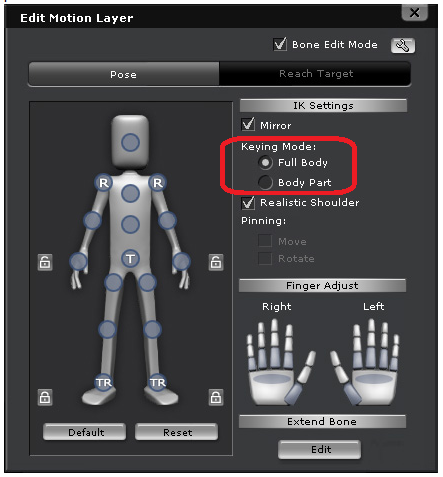
You have Full Body and Body Part options, which a lot of people overlook.

You should choose the Body Part only option, if moving the hand is twisting the other linked body parts. It makes a difference also on what angle you are viewing the character in when making adjustments.
By justaviking - 11 Years Ago
@Cricky,


1) It's not a huge problem, but it's been on my mind from time-to-time, so I figured I might as well put in on the list.


2) I mostly use the "Edit Motion Layer" panel.  I've used the "Body Part" setting, but yeah, I think I tend to forget about that setting.


I am much more likely to have a problem with "broken bodies" when moving the actor via an attached prop.  If you do the "sword fighting" action where you attach dummy props to the sword handle, and have your avatar "reach" for the dummies, you can move the sword and the avatar follows.  The avatar also has a tendency to end up with elbows bend backward and dislocated shoulders.


Also, depending on where you are moving... let’s say you a reach from a shoulder to a pants pocket, the arm may rotate strangely.  My solution is to manually find a mid-point to the motion and rotate the arm into a reasonable position, and then move the hand to the pocket.


Thanks for the tip.  I'll have to remember to try that more often.


By Peter (RL) - 11 Years Ago
Thanks for the feedback. This will be reviewed by the iClone team. :)
By Sifr - 11 Years Ago
It's about time, I've been screaming joint rotation constraints for years now. & don't forget to add a degree counter to the gizmo as well as a shaded pie graph.;)
By davood.kharmanzar - 7 Years Ago
does a chance to see "joint rotation limitations" of character feature on iclone 7 ??
its very useful for recording motion capture movements on realtime ... to getting cleaner results ...

or possibility to implement these: http://wiki.secondlife.com/wiki/Suggested_BVH_Joint_Rotation_Limits