Animated cloning, duplicating, and object particles


https://forum.reallusion.com/Topic186377.aspx
Print Topic | Close Window

By Dreamcube017 - 11 Years Ago
Hey guys. Lately I've been doing a lot of motion graphics and visual effects with iCLone (title sequences and other 3D logo type things)

I was messing around with the iClone duplication tool one day and realized something.

It is REALLY HARD to create a simple ring of objects. You want a spirle, sure. You want a nice row? Go for it... oh what you wanna circle?... um... good luck.

Yes I know it can be done, but it's tricky to et everything to line up just right, especially when you have lots of items. That's just the first thing though.

... OK here, long story short, it would be BEYOND wonderful to have some of the featuures Element 3D has.

http://www.videocopilot.net/help/element/help_files/#v16update

--Animated duplication and cloning effects
--the ability for objects to form around another and then form around something else.

Those are just two things, but those two thigns alone would be really great.

They would be REALLY useful when making speciel effects and motion graphics. Ifwe could at least animate the duplication and stuff, that in itself would be pretty cool. Yes, I can just open AE and use Element 3D to do some of the really crazy stuff, but it just feels weird using it in After Effects.

Your thoughts users? RL, thanks fr your consideration.
By justaviking - 11 Years Ago
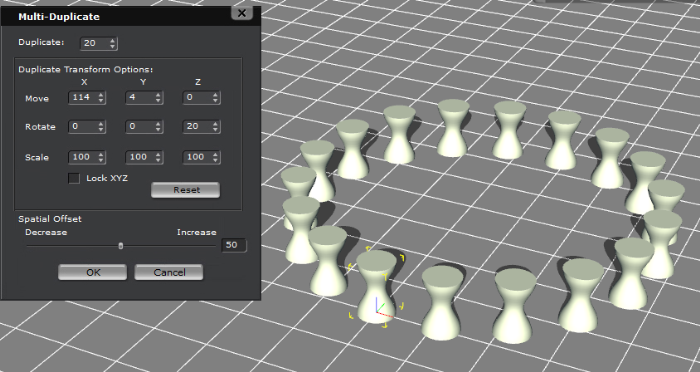
Maybe I'm misunderstanding you, but you CAN duplicate one item into a circle of, say, 48 items.

I'd give you a screen shot, but my iClone's busy rendering right now.

By Dreamcube017 - 11 Years Ago
I know you can do it, but it's still somewhat complicated to do. Most times I try to duplicate things, it comesout as slightly uneven or a spiral or something.

Plus, you can't animate the duplication (e.g. have a row of blocks curl and uncurl).

If you know of a tutorial on how to use the tool though, that'd be great.
By RobertoColombo - 11 Years Ago
Just a quick thinking: creating a circular path and assigning the dups to the various points of the path....
By Rampa - 11 Years Ago
+1 to these ideas!

Combining the duplicate with an animated path would be super cool!

You can merge the whole lot of them, but having some procedural animation for things like spirals would really help.
By Peter (RL) - 11 Years Ago
Dreamcube017 (5/8/2014)
Hey guys. Lately I've been doing a lot of motion graphics and visual effects with iCLone (title sequences and other 3D logo type things)

I was messing around with the iClone duplication tool one day and realized something.

It is REALLY HARD to create a simple ring of objects. You want a spirle, sure. You want a nice row? Go for it... oh what you wanna circle?... um... good luck.

Yes I know it can be done, but it's tricky to et everything to line up just right, especially when you have lots of items. That's just the first thing though.

... OK here, long story short, it would be BEYOND wonderful to have some of the featuures Element 3D has.

http://www.videocopilot.net/help/element/help_files/#v16update

--Animated duplication and cloning effects
--the ability for objects to form around another and then form around something else.

Those are just two things, but those two thigns alone would be really great.

They would be REALLY useful when making speciel effects and motion graphics. Ifwe could at least animate the duplication and stuff, that in itself would be pretty cool. Yes, I can just open AE and use Element 3D to do some of the really crazy stuff, but it just feels weird using it in After Effects.

Your thoughts users? RL, thanks fr your consideration.

Hi Dreamcube,

Thanks for the feedback and suggestions.

Can you explain a little more about the problem creating a circle with multi-duplicate.

Creating a circle should be very easy. You set the number of duplicates you want, set the spacing with "Move X" and then increase "Rotate Z" until you form the circle.