|
By yo bing - 13 Years Ago
|
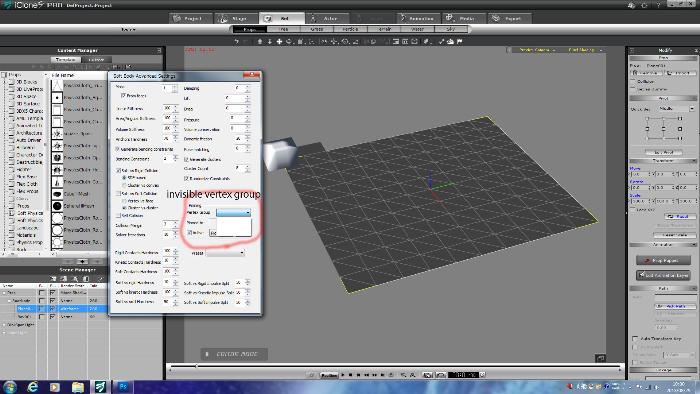 Hi. Hi.
I create plane prop and changed Soft Body of
physics settings. It works. Then
I tried creating vertex group to do pinning in
Soft Body Advanced setting(Alt+Shit+S)
Maybe It is not able to do vertex group in iclone.
So I use 3ds Max mcloth modifier.
It works in 3ds max and export FBX to iclone.
But it did not work iclone
Will you tell me How?
I have spend for this 1day
|
|
By planetstardragon - 13 Years Ago
|
if you click "Recent Posts" at the top of the forum and see all the recent posts made to the forum, you will see how this is a double post :D lol
Most of the vets on the forum use that link to keep up with the latest posts, so your messages wont be missed wherever you post.
Cheers :)
|
|
By yo bing - 13 Years Ago
|
|
Hi. I tried 1.I created plane in 3ds max. 2.goto "Mesh select" modifier and vertex of mesh select. 3.select vertexs want to pin in the plane. 4.change stack name(Mesh select) to pin001. and export fbx to 3dxchange5 5.load fbx file into 3dxchange and export iprop to iclone. 6.load iprop into iclone and set Physic setting(shift+F9) then check "activate physics" and select "Soft Body". close tab. 7.Soft Body Advanced Settings(shift+alt+S) goto "pinning" check "Active" click popup "vertex group" and invisible pins. Is this right? what is wrong?
|
|
By yo bing - 13 Years Ago
|
>"Create a Named Selection Set!"
>It's located... just to the LEFT of the MIRROR Tab!
Yes I create name pin001 as you written.But it did not work. After named pin001 in Max. I always export FBX file to 3dxchange. Is this support this modifier(physics vertex group) exporting with FBX file? Or any Max plugins for iprop?
|
|
By Rampa - 13 Years Ago
|
It's more likely that the FBX does not include the information. Check in your export FBX dialog options to see if it has any extra vertex data possibilities.
Someone was able to transfer pinning data by FBX from Maya using the selection set.
|
|
By yo bing - 13 Years Ago
|
sw00000p (9/1/2013)
Check in your export FBX dialog options to see if it has any extra vertex data possibilities.
Perhaps it's just and oversight and on a new "Patch"... it will be available! :)
I exported FBX file with option selection set. So. It work! thanks.Rampa.:w00t:
|
|
By yo bing - 13 Years Ago
|
|
>Check in your export FBX dialog options to see if it has any extra vertex data possibilities. I exported FBX optional selection set. So It works iclone pro5! I try little more. Thank you Rampa. Thnk you sw00000p.
|
|
By Rampa - 13 Years Ago
|
That's great news! Now, if only Blender could export its geometry cache data in its FBX exporter.
It seems only Autodesk (and iClone) exporters can do that.
|
|
By Rampa - 13 Years Ago
|
This "pin" issue has been eating up a lot of my time for the last few days.
It's been slow going figuring out what is what without having Max to work with. So, it's been a lot of figuring out terminology.
Glad it works! I wonder if you even need FBX? Can OBJ or 3DS include this extended vertex data as well?
Someone much wiser than me may have, or come up with, the answer. Sw00000p, any ideas?
|
|
By wendyluvscatz - 13 Years Ago
|
I cannot even get an unaltered iClone pinned cloth exported as FBX from 3DXchange pipeline to re-import with this pinning information.
So have no hope of finding if any other applications such as Carrara can do it.
So I assume this can only be done via the 3dsMax plugin?
|
|
By Rampa - 13 Years Ago
|
|
Being that we don't need any bones, morphs, or skins for a physics cloth, I pose my query again.:D
|
|
By Rampa - 13 Years Ago
|
|
Thinking weather or not the needed info is only stored in FBX. I see a lot about converting between vertex groups and poly groups for various programs, so was just curious if vertex groups were stored in any other 3d file format.
|
|
By Rampa - 13 Years Ago
|
The only options in the 'Clonverse, of course. :P I know they very limited.
I am using Blender right now, and it can save vertex groups just fine, for itself! There is just no way to get those vertex groups out of Blender and into iClone, that I have figured out. Blender's FBX is (understandably) not so fully featured.
|
|
By JC Weatherby - 12 Years Ago
|
I've come a year late to this discussion, but I am dealing with this now, as I'm trying to create a soft body backpack I can open and close...
Blender 2.71 DOES export VERTEX GROUPS info via OBJ by default. I tested this by importing my previously exported obj file, made in blender, and the Vertex Groups show up in the Scene Outline Panel.
So this is a case of 3D Exchange not reading-writing the information from the Blender OBJ.
It's a bummer because I'm getting nice physics on the backpack with the soft_BeachBall setting, I just need to be able to keyframe-deform the bag.
|
|
By Rampa - 12 Years Ago
|
Pinning in iC6 is as simple as drawing black dots, apparently. There is a section in the iC6 video that shows it in action.
Being that we will have a brand new PhysX based physics system next month, it's probably not worth bothering with the iC5 Bullet physics.
PhysX uses a grayscale map to specify which parts of a mesh respond to physics. The mesh can also be weighted to bones at the same time.
|
|
By Sen - 12 Years Ago
|
Hello ,
fbx format can embed vertex selection set , not sure for obj ;) .
|
|
By JC Weatherby - 12 Years Ago
|
|
Yes! More direct control over physics objects opens up a lot of possibilities. But from the demo video it appears the pinning feature only works on soft cloth, and what we really need is to be able to pin any physics object we create. So we'll see!
|