|
By FreddyKrueger - 13 Years Ago
|
Hi, did 5.5 release work out 100% cpu usage issue?
My 7970 is really chugging with the new update, it skips and is slow. 5.4 runs smooth.
Just wondering if those who still have an Nvidia card are getting the 100% usage problem or has it been solved.
64bit Iclone btw.
|
|
By planetstardragon - 13 Years Ago
|
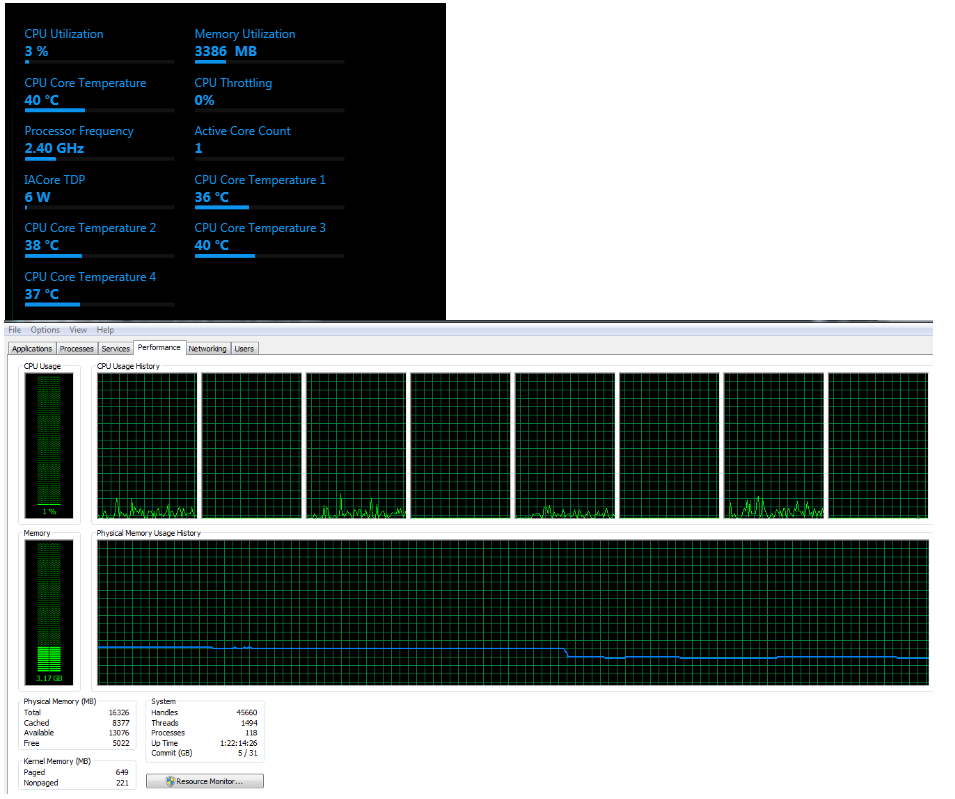
the cpu usage in my system is ridiculously low - in fact the cpu is underclocking itself and parking cores - I'm wondering if what you saw was a system idle process .. which is normal to see high cpu usage from it if Iclone is using such low resources.
http://www.computerhope.com/issues/ch000729.htm
this is what my computer looks like with iclone playing a loop in the background ...
|
|
By FreddyKrueger - 13 Years Ago
|
Actually, Iclone was shooting up to 100% any time I first started it, then if I resized it as well. After that it would cycle to 100% and sometimes lock up at 100% for few seconds. We had a thread going on about it. Switching to Radeon solved the problem.
System Idle process was not doing it, I monitored everything, it was Iclone that was shooting up to 100%, 100% certain.:) Plus, I wasn't the only one with the problem.
I was just wondering, since I just tested 5.4 with my system again and 5.5 is much slower for me as far as real time performance. Since this is happening, it made me wonder if peeps with Nvidia are having the 100% cpu usage issue still.
|
|
By animagic - 13 Years Ago
|
For me 5.5 didn't resolve anything in the CPU usage area. To be sure I did a clean install of 5.5, which was a pain, because I couldn't uninstall 5.4 for some reason.
I was contemplating trying out a 7970, but now I'm not so sure...:ermm:
|
|
By FreddyKrueger - 13 Years Ago
|
Well,
Tried it on gtx780. The same happened. However, this time around after the first opening there were no more spikes going to 100% while I was working.
Some things were changed in the 5.5 version. Not sure what. All I know is that my projects take twice as long to open (even with ssd's), and working with 4096 textures has slowed down the system some. Projects that were using 4gb of ram now routinely use 7+. I've been tracking this with the task manager. Other than the 100% spike on the cpu when first opened the nvidia seems to be stable. Well, at least better than it used to be.
I like AMD and use them, but when it comes to adobe stuff (premier, AE especially) cudas just speed up the work so much more.
Oh and other than the 100% spike at start up or window resize, there is no difference between 780 and 7970 (as far as stability goes). 780 has about 20-30 frames on 7970, the rendering seems a bit faster too, not by much though.
|
|
By animagic - 13 Years Ago
|
Freddy, I'm looking at a Futuremark benchmark page right now, and the GTX 780 should be faster than the 7970; it's also twice the price. The 7990 is about the same price as the GTX 780 and a bit faster.
I wish I knew how relevant these benchmarks are for iClone. What seems most relevant for the real-time aspect of iClone is the view port performance, which should have something with its DirectX 9 performance, so similar to how you would look at games. High-end 3D programs mostly use OpenGL and require cards with a different feature set, so you get into the world of Quadro and FireGL. For iClone with its history as a game engine (or so we are told), DirectX performance seems the most important. I hope this makes sense... :unsure:
|
|
By planetstardragon - 13 Years Ago
|
If it matters any, I did learn a little bit with the new monitoring software I'm using - not so much on what the video card does but what the cpu does - anything to do with compression and decompression of files is all cpu - so you can have a great video card ...if your cpu is choking - render to disk times and load times will be slow - also ...in 3DX5 - it's all cpu - the graphics card is all about the real time rendering to your screen...not to disk.... and it doesn't require much to run fine in real time - in my last pc - the same video card was running at like 1/4th of the performance it was running at now...... from this I can tell you the cpu matters a ton - the graphics card can't be it's best if the cpu is choking.
Iclone doesn't use the cpu all the time, but when it does, my system overclocked itself from .9ghz to 4.0ghz like ..instantly. Don't bother upgrading your cards, they are great - your cards are 3x more powerful than my card - and I'm pushing like 60fps in all options on with pixelshading... it's your cpu thats killing any performance and preventing your gpu from being it's best.
|
|
By planetstardragon - 13 Years Ago
|
also, anything that requires calculating - such as physics and particles, light reflections is based on your cpu - just ran a few tests, if i press play on an empty or simple project that is not moving, iclone required little of my cpu 1.8ghz - 2.2ghz....if I loaded up a project with a lot of props that cast shadows / physics / reflections / springs / particles with camera movement - my cpu would spike avg 3.8 - 4.0ghz depending on how complex the scene i had up. A lot of props casting shadows with real time physics - like the Rube Goldberg Project that came with iclone 5 being the most demanding on the cpu.
getting a better video card would be like upgrading a car engine because your tires have poor traction :P
|
|
By animagic - 13 Years Ago
|
Thanks, Planet...:w00t:
Well, I decided to study a bit more, and what people found is that if they enabled XMP on their ASUS board (which optimizes RAM settings), it improved the performance of their GTX 680 card. No-one understands why, the "experts" were baffled, but that was people's experience.
I never tweaked or OC-ed anything, but I think I will try things out a bit before running to the hardware store. My system has been performing adequately until around the beginning of this year, so tuning the car may be called for...:unsure:
|
|
By planetstardragon - 13 Years Ago
|
my pleasure, it's one of the cool features of the haswell 4770k chip since it can underclock itself for energy savings. I'd never be able to see this with a fixed cpu setting.
update - I also have xmp enabled, but no clue how to see if it helps. I mean, I can disable it, but I doubt I will see any measurable change due to the cpu performance.
|
|
By animagic - 13 Years Ago
|
|
BTW, I have an i7 2600K, which is a few generations old, but should still be adequate I would think...:crazy:
|
|
By planetstardragon - 13 Years Ago
|
also, contemplating on the xmp settings, you have to consider that the new systems *2013, are now working with energy savings ...this is a 2 way street since now the system optimizes itself on the fly - on a fixed setting, you get the most consistent stable setting for your system.....on an energy savings setting, there's room to overclock some without staying up there so your system can run at peak performance for a few minutes - using the xmp setting really opens up your ram / gpu and cpu all at the same time...so it's not so farfetched to 'me' - from watching these stats go from pc jr to omg in nano-seconds lol. It really depends on your motherboard's ability to tweak all these units quickly I'm guessing....it's why I made such a big deal about my mobo / cpu / and power supply - this system is off the charts - the cpu is only supposed to hit 3.9 but my mobo does such a great job at management it hits 4.0 - I'm pretty sure I could get her to 4.5 but no need on stressing it. I caught her yesterday running at 60c temp when I had a modeling software up along with iclone ....which is pretty hot - so even though I'm not overclocking, I have to keep a watch because she' is pushing herself!!
ps - based on what I've seen in gaming forums, you can get your cpu to about 4-4.2 - you just need a good cooling system.
I should also mention that even though I have a very nice cooling set up on case and cpu, I still put my fan facing the case and it makes a big difference ....I drop about 5c consistently from doing this. Bigger fans don't mean better cooling, they do this for silence so the fans can spin slower - would be nice if they could spin faster but they dont
|
|
By FreddyKrueger - 13 Years Ago
|
I agree CPU has a lot to do with Iclone performance, but when different graphic cards affect CPU performance and Iclone perfromance, then there are more things to think about.
Plus, Iclone is just one tool. Having a graphics card that works with all of your pipeline is the key.
|
|
By animagic - 13 Years Ago
|
When I checked my BIOS it turned out that the setting for memory was "Manual" (not the default "Auto"), so I probably changed the settings a while ago, as if I knew what I was doing... :crazy:
So I changed the setting to "XPM" to have a recommended baseline. This has improved the behavior of iClone.
Before, I had a high CPU usage (although not 100%) even with an empty project; now the CPU usage depends on the kind of project. High poly/texture projects still give a high CPU reading (around 25 to 30%, whereas before I had 50% or more), but for simpler projects CPU usage is low, as expected.
I'm also using the latest nVidia driver, although that didn't seem to do much before I changed my BIOS memory setting. As the GPU uses some system memory as "overflow" I can see why an optimal setting is helpful.
I looked at some benchmarks with my CPU (the 2600K is still quite popular) and various cards, and moving to a 780 would make quite a difference. One reason may also be that these cards come with 3GB of memory instead of the 1.5GB of my card. For the moment, though, I will try to optimize what I have.
|
|
By planetstardragon - 13 Years Ago
|
:w00t:

http://www.tomshardware.com/reviews/sandy-bridge-overclocking-efficiency,2850-6.html
not seeing what they used for cooling though, if they used liquid hydrogen, then it's not practical / real world.
from what I've read, 61c should be your cap - after that you are wearing down the life of your system - 75c absolute max before you start to see smoke come out of your pc.
so whatever you can get at 61c should be your limit for practical real world usage, and that depends on your heatsink/cpu cooler.
|
|
By FreddyKrueger - 13 Years Ago
|
|
Good nuggets of information there, I will be checking my bios.
|
|
By lynn3d - 13 Years Ago
|
With iClone 5.5 I am having serious problems with Nvidia CPU usage.
Specs :
Nvidia GeForce 8500 GT/PCIe/SSE2
MS XP professional SP3 - Intel Core2 Duo CPU - E4600 @ 2.40GHz - 2.41 GHz, 2.00 GB of RAM
Just booting up my PC I have the following

The file I'm currently working on does not load the terrain anymore and I have set everything to wireframe in the hope of speeding things up
file size :

just launching this file and doing nothing with it yet

Another file of similar size - which I finished without any problems in v5.4 - now has a CPU usage which would not enable me anymore to work on it in v5.5. Also the terrain does not load anymore


(click images for full size)
Unless the team at RL can make a patch to fix this CPU problem rather soon, I will reinstall v5.4.
|
|
By planetstardragon - 13 Years Ago
|
you are on a double choke point with both cpu and gpu - I can't see a patch being written for that because the shadows in iclone got better more accurate, the physics is calculating real time, along with all the compression going on for loading and rendering - those would have to be degraded to meet your specs.
you may consider a different workflow technique as a work around to finish your scenes.
What you can do is empty your scene and render it in layers, then overlay them in a video editor. This will help ease the stress on your computer with less of a load...
like render one scene on green screen with terrain, then render your next scene with just trees, then another with just avatars ...etc ...then chroma key them in your video editor.
Not the fastest route, but better than no choice. Ironically enough, that's the proper way to do it ...with even more layers than that for pro hollywood productions. heh! thats why it takes them so long to make a movie ...their details are excruciating! But it gives you more power to create more depth with video effects too...like making characters more rich in color and giving your background a more foggy look - basically compositing.
You could also try turning off some shadows so your cpu doesn't have to work as hard and see if that helps. try turning off the shadows in the distance on trees and houses which you wont see, iclone doesn't have culling so even though you don't see a shadow doesn't mean it's not being calculated and adding stress to your cpu / gpu.
|
|
By Peter (RL) - 13 Years Ago
|
|
lynn3d (8/29/2013)
With iClone 5.5 I am having serious problems with Nvidia CPU usage.
Specs :
Nvidia GeForce 8500 GT/PCIe/SSE2
MS XP professional SP3 - Intel Core2 Duo CPU - E4600 @ 2.40GHz - 2.41 GHz, 2.00 GB of RAMUnfortunately to get the best out of iClone 5.5 you may need to consider a computer upgrade. An Nvidia 8500 GT and only 2GB of ram is really not enough for iClone 5.5 and why you are experiencing problems. If you have a Desktop then you should be able to update the graphics card and add more memory for not much of an outlay.
|
|
By prabhatM - 13 Years Ago
|
|
Unfortunately to get the best out of iClone 5.5 you may need to consider a computer upgrade.
An Nvidia 8500 GT and only 2GB of ram is really not enough for iClone 5.5 and why you are experiencing problems. If you have a Desktop then you should be able to update the graphics card and add more memory for not much of an outlay.
Does ICLONE take advantage of GPU ?
|
|
By planetstardragon - 13 Years Ago
|
@prabhat - i can answer this one. to a degree, prior to my current card - I had a gt 9400 and was having the same issues as Lynn....then I upgraded to my 460 and my cpu was slowing my card down - now I upgraded my cpu ..and my drive is slowing the process down - so I found for best performance you really need a balanced computer build because each part plays it's role. if the cpu is choking, it will choke everything else with it. - iclone will perform as fast as your slowest part. The gpu matters for being able to hit play and watch whats happening on screen - the cpu matters for all the reasons I've mentioned earlier in this thread - and the memory matters for reasons that Animagic pointed out by enabling xmp and having iclone run faster ...and finally the drive matters for load and save to disk times. So having anyone of these more powerful than the other is moot, if the slowest part is slowing everything else down.
@ lynn - the gtx 650 is a nice card, it's faster than my current card and I'm blazing through iclone. it ranges from us $119 - 180'ish - depending on what manufacturer and options you get on it - ie a regular 650 or a 650 ti boost. an even better card that is great for the price is the gtx 760 which runs about 250 ( which is a great price for a 700 series video card - ie compared to the 780 which runs about $660 )
|
|
By prabhatM - 13 Years Ago
|
|
planetstardragon (8/29/2013)
@prabhat - i can answer this one. to a degree, prior to my current card - I had a gt 9400 and was having the same issues as Lynn....then I upgraded to my 460 and my cpu was slowing my card down - now I upgraded my cpu ..and my drive is slowing the process down - so I found for best performance you really need a balanced computer build because each part plays it's role. if the cpu is choking, it will choke everything else with it. - iclone will perform as fast as your slowest part. The gpu matters for being able to hit play and watch whats happening on screen - the cpu matters for all the reasons I've mentioned earlier in this thread - and the memory matters for reasons that Animagic pointed out by enabling xmp and having iclone run faster ...and finally the drive matters for load and save to disk times. So having anyone of these more powerful than the other is moot, if the slowest part is slowing everything else down.
One part is general fast screen refresh, the other is actually transferring the load of processing and rendering to GPU. As far as I know DAZ does not have the support for GPU as yet. So I want to know in unambiguous/clear terms if ICLONE supports GPU in real sense.
|
|
By Sifr - 13 Years Ago
|
YES!!!! :D
iClone most certainly does use GPU, it doesn't take full advantage of single or multi-threaded SLI GPU(Dual 2x 2GB GTX 680m), meaning iClone isn't optimized to do so, but basically your gpu is responsible for displaying the point space in real-time with shaders so that's the points lines and faces = polygons, moving onscreen so ideally the faster the GPU+memory size = how many frames per second you will get with all the bells and whistle on i.e. motion, atmospheric, physics, particles, post processing , large scene elements(poly-count), lens effect.
The CPU on the other hand is responsible for calling the commands that you tell it into GPU memory or system memory, when you change a field, or open a prop, or pressing play, but once it is displayed, it's on the GPU (hopefully Dedicated and not Integrated or Embedded graphics), so if your CPU is fast & your GPU is slow, or vise-verse, iClone will be inherently slow.
There is a limit on what even the most powerful computers can do, unless you stack a CPU/GPU render farm into infinity-X-infinity.
|
|
By lynn3d - 13 Years Ago
|
planetstardragon thank you for this comprehensive explanation and for the specs and prices of the cards, much appreciated :)
Unfortunately, I'm not aiming for the Oscars and I would like to get this project finished before Xmas and so compositing is pretty much out of the question.
The problem scene already has everything deleted which is not in the view port so there is nothing to gain there either.
Peter (RL)
Thank you as well, I'm looking into upgrading my graphics card and adding more memory
In the meantime, I did a restore point to bring back v5.4 but now - on loading iClone - I'm having a problem with the script debug telling me :
Fail to call OnUpdateGUI [string "--[[ TextLine..."]:69: attempt to call method 'CalculateTextDrawHeight' (a nil value)
and I can only close iClone again.
Please, how can I fix this ??? :crying:
|
|
By colour - 13 Years Ago
|
lynn3d (8/29/2013)
planetstardragon thank you for this comprehensive explanation and for the specs and prices of the cards, much appreciated :) Unfortunately, I'm not aiming for the Oscars and I would like to get this project finished before Xmas and so compositing is pretty much out of the question. The problem scene already has everything deleted which is not in the view port so there is nothing to gain there either. Peter (RL) Thank you as well, I'm looking into upgrading my graphics card and adding more memory In the meantime, I did a restore point to bring back v5.4 but now - on loading iClone - I'm having a problem with the script debug telling me : Fail to call OnUpdateGUI [string "--[[ TextLine..."]:69: attempt to call method 'CalculateTextDrawHeight' (a nil value) and I can only close iClone again. Please, how can I fix this ??? :crying: Lynn Windows System Restore is a Diagnostic Tool for identifying if a particular Hardware / Software change is the cause of eg; a Windows OS Stop Error Message (BSOD). It doesn't have any effect on reverting back-to an earlier version of a Program, to debug any faults in a later Version. Putting it simply.;) More often than not, it can make matters worse, as you've found-out. Go back into System Restore & undo that Restore Point. BTW- Your Project was created in iC5.4 & IMO, has now been converted to iC5.5 Project File Format. IMO, you can't now Open your Project in iC5.4 I hope you have backed-up your Project? If you can't Open your Project in iC5.5, IMO you should start a new Thread dedicated to your problem, Copying what you've Posted here into that Thread for background information & take it from there.. Anyone-else?
|
|
By planetstardragon - 13 Years Ago
|
btw, I'm using virtu MVP - a nifty little software that uses a combination of any cpus that have built in gpu / video - no conflicts with iclone so far and seems to be helping a lot - almost like having sli - 2 video cards - I can only speak for my system though as the motherboard came with the software - i really don't feel any need to upgrade my gtx 460 at the moment, not sure if part of that credit belongs to virtu.
http://www.lucidlogix.com/product-virtu-mvp.shtml
|
|
By animagic - 13 Years Ago
|
lynn, if you still have the 5.4 patch file you could try to reapply that.
But, I've experienced the same problem that you are having after a system restore: a non-functional iClone (I thought I could revert, which, in theory, is possible according to MS).
If you still have your older install files, you could try to uninstall and reinstall up to 5.4.
|
|
By colour - 13 Years Ago
|
|
animagic (8/29/2013)
lynn, if you still have the 5.4 patch file you could try to reapply that.
But, I've experienced the same problem that you are having after a system restore: a non-functional iClone (I thought I could revert, which, in theory, is possible according to MS).
If you still have your older install files, you could try to uninstall and reinstall up to 5.4.Lynn Read my Post above first.
|
|
By lynn3d - 13 Years Ago
|
Thank you all :)
I have just completely uninstalled iClone and reinstalled up to v.5.41 and everything works fine again. Only the one file that I had started in v.5.5 is not backward compatible but that's no problem for it's easy enough to set it up again.
At least now I can continue to use the software until I can upgrade my PC but not looking forward to it :(
|
|
By FreddyKrueger - 13 Years Ago
|
|
Good stuff, glad this thread is helping. :D
|
|
By lynn3d - 13 Years Ago
|
With the invaluable support of planetstardragon, I decide to buy a new PC with the following specs :
Case
COOLERMASTER 120 ADVANCED CASE + 450W PSU
Processor (CPU)
Intel® Core™i7 Quad Core Processor i7-3770S (3.1GHz) 8MB Cache
Motherboard
ASUS® P8H61-I R2.0: Mini-ITX, LG1155, USB 3.0, SATA 3GBs
Memory (RAM)
16GB KINGSTON DUAL-DDR3 1600MHz (2 x 8GB)
Graphics Card
2GB NVIDIA GEFORCE GTX 660 - 2 x DVI, HDMI, - 3D Vision Ready
Memory - 1st Hard Disk
1TB 3.5" SATA-III 6GB/s HDD 7200RPM 32MB CACHE
Operating System
Genuine Windows 7 Professional 64 Bit w/SP1
Delivery : tomorrow !
After 30 yrs of buying PCs I hope this will be the last one :ermm:
|
|
By justaviking - 13 Years Ago
|
|
lynn3d (9/5/2013)
After 30 yrs of buying PCs I hope this will be the last one :ermm:You have a great sense of humor!!! :w00t: I hope you enjoy your new toy. :)
|
|
By Pollux - 13 Years Ago
|
|
Nice rig, you will enjoy it. The last one...! :D may be because desktops will gradually disappear :w00t:
|
|
By prabhatM - 13 Years Ago
|
|
lynn3d (9/5/2013)
With the invaluable support of planetstardragon, I decide to buy a new PC with the following specs :
Case
COOLERMASTER 120 ADVANCED CASE + 450W PSU
Processor (CPU)
Intel® Core™i7 Quad Core Processor i7-3770S (3.1GHz) 8MB Cache
Motherboard
ASUS® P8H61-I R2.0: Mini-ITX, LG1155, USB 3.0, SATA 3GBs
Memory (RAM)
16GB KINGSTON DUAL-DDR3 1600MHz (2 x 8GB)
Graphics Card
2GB NVIDIA GEFORCE GTX 660 - 2 x DVI, HDMI, - 3D Vision Ready
Memory - 1st Hard Disk
1TB 3.5" SATA-III 6GB/s HDD 7200RPM 32MB CACHE
Operating System
Genuine Windows 7 Professional 64 Bit w/SP1
Delivery : tomorrow !
After 30 yrs of buying PCs I hope this will be the last one :ermm:
I would have preferred a 650W Power Supply.
|
|
By planetstardragon - 13 Years Ago
|
the 450 still makes it though - just not much room for heavy upgrading - but then the whole set up is pretty tight and should work amazing with iclone.
This is a chart I use for power supply reference - this computer is right 'on' spec
http://www.realhardtechx.com/index_archivos/Page362.htm
|
|
By animatom - 13 Years Ago
|
Well, Lynn3D, after 30 years of buying PCs, you should know that this new one is just first of all future buying. :)
Seriously, if you can, double that Terabyte hard disk. Never, ever enough disk space.
|
|
By FreddyKrueger - 13 Years Ago
|
Just remember, build a computer for more than just Iclone. You will need to edit the video somehow, edit textures... Then questions comes to what kind of effects are you doing and what you are going to use. I have found 16gb limiting, but for most part it should suffice.
|
|
By planetstardragon - 13 Years Ago
|
|
especially if you get into modeling, i watched the modeling software laugh at my 16 gigs and overclocking lol - but then i did get a little click happy on the subdivide heh!! "why is my computer locking up ? the model is only 1 billion polys!"
|
|
By colour - 13 Years Ago
|
|
FWIW - One of several Projects to be combined into one here, is; 286,963 Polys & counting. 1.5GB for approx. 30 seconds, with the System in my Signature ;)
|
|
By lynn3d - 13 Years Ago
|
Thank you all, I didn't expect there to be so many replies :)
This new PC may likely be the last one that I'll buy because I may be one of, if not the oldest member here and I'm having some serious heart problems.
My win XP pc is 5 yrs old and still going strong if it wasn't for iClone v. 5.5 so if the new PC lasts another 5 yrs it may outlive me :D
In fact I'm not even going to bother to reinstall everything onto the new PC but will run the two in parallel with a KVM switch with file transfer.
Modeling and texturing has a limit on import into iClone but regardless of that I've always modeled with a compromise between low-poly and still looking good.
@animatom
Seriously, if you can, double that Terabyte hard disk. Never, ever enough disk space.
Only the software is stored on my hard disk, all files are on external hard drives. My win XP has a 250 Gb hard drive of which 202 GB is still free, I'm a stickler for keeping my machine clean, a remnant of the old days where space was at a premium ;)
|
|
By planetstardragon - 13 Years Ago
|
|
@Lynn, plan on upgrading to at least 3 new computers - you have a new family here with us now and the adventure has just begun!! :w00t: Thank you for allowing us to help! :D
|
|
By lynn3d - 13 Years Ago
|
|
planetstardragon, your post is so sweet that it brought tears to my eyes, thank you :)
|
|
By colour - 13 Years Ago
|
"This new PC may likely be the last one that I'll buy because I may be one of, if not the oldest member here and I'm having some serious heart problems.
My win XP pc is 5 yrs old and still going strong if it wasn't for iClone v. 5.5 so if the new PC lasts another 5 yrs it may outlive me "Many a good tune played on an old fiddle, Lynn ;) And - There are more "old fiddles" on this forum than you'd think. Some of us are so old, we've forgotten how old we are :D
|
|
By lynn3d - 13 Years Ago
|
|
Thank you colour, glad I'll be able to play in the "old fiddle" section of the band :D though with one broken string the tune has become less sweet ;)
|
|
By planetstardragon - 13 Years Ago
|
age is irrelevant on the internet and 3D, you all look young and perfect to me! chop chop, we have movies to make!! onward and upward!!
-tosses around a beach ball- ;)
|
|
By lynn3d - 13 Years Ago
|
|
planetstardragon (9/7/2013)
-tosses around a beach ball- ;)
Is that how you do your creative thinking when making movies :hehe:
(my computer is coming tomorrow instead of last Friday. Time enough to make a little movie clip)
|
|
By planetstardragon - 13 Years Ago
|
|
hahah!! Nice!! You do music too?! woot!! My kind of animator!! :w00t:
|
|
By Pollux - 13 Years Ago
|
|
You're a talented person Lynn. I like the music :)
|
|
By colour - 13 Years Ago
|
|
Nice one, Lynn :) If you're a "Golden Oldie", you should remember this one ;) http://www.youtube.com/watch?v=JkM1dFaihC8
|
|
By lynn3d - 13 Years Ago
|
Thank you all :D
I always make my own music, no copyright issues :P
@colour
Oh yes, ...... I remember it well (Gigi)
I'm even a slightly older "golden oldie"
With MotionPlus now available, it would be a nice project to recreate these old dance steps.
Unfortunately, I don't remember what the one in your video clip was called.
My new pc has arrived so I'm off to play with it, might be a while before I'm back :hehe:
|