|
By justaviking - 13 Years Ago
|
|
Recently I've noticed VERY PIXELATED SHADOWS. What causes that, and how do I fix that? Here are some settings: - Preference: Max Real-time Map Size: 2048x2048
- Light01: Directional... Shadow... Self-Cast Shadow... Resolution 1024x1024... Bias -10
Why does the shadow look like it's from a 1980 8-bit Atari game? Is it because of the prop that receives the shadow, the light, the avatar, or some other setting? 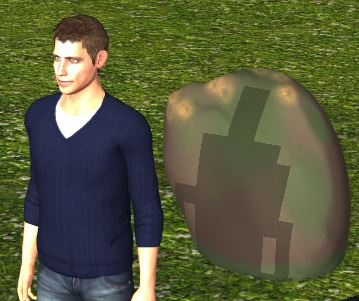
|
|
By colour - 13 Years Ago
|
|
Not happening here, Dennis Forgot to check bias though - will re-check. 
|
|
By justaviking - 13 Years Ago
|
|
Okay, thanks for trying. I don't remember this being a problem before, but then again, I didn't use shadows much.
|
|
By Rampa - 13 Years Ago
|
Currently the shadows are implemented with what is called a "shadow mask". Think of it a big black patch that has to stretch over the entire scene. The bigger the patch, the better it will be.
I suggest maxing it out at 4096. You can also make a HUGE difference by reducing the range to 50%. This is usually still plenty enough range for a scene. Set the blur level to 1 for most situations. The bias adjusts how close to the model the shadow starts. It will make no difference in the quality of the shadow edges, but can reduce unwanted shadow artifacts on surfaces that sometimes occur.
|
|
By nlprod1 - 13 Years Ago
|
Hi,
I've looked at your settings and am able to duplicate it whenever Stabilized Shadow Map option is checked. Without this being checked i can achieve a normal shadow . Hope this helps :cool:
|
|
By colour - 13 Years Ago
|
|
nlprod1 (7/28/2013)
Hi,
I've looked at your settings and am able to duplicate it whenever Stabilized Shadow Map option is checked. Without this being checked i can achieve a normal shadow . Hope this helps :cool:Good catch :) I've just tested again here, with that option selected & get the same result as Dennis.
|
|
By planetstardragon - 13 Years Ago
|
looks like chuck has been playing minecraft :w00t:

|
|
By justaviking - 13 Years Ago
|
colour (7/28/2013)
nlprod1 (7/28/2013)
Hi,
I've looked at your settings and am able to duplicate it whenever Stabilized Shadow Map option is checked. Without this being checked i can achieve a normal shadow . Hope this helps :cool:Good catch :) I've just tested again here, with that option selected & get the same result as Dennis. I had it UN-checked. When I checked it, I pretty much got a rectangle for a shadow! Playing with "Quality Partition" is making a difference too. ONE DISCOVERY is that I get hugely DIFFERENT results between the DROP SHADOW and the SELF-CAST shadow. Beyond the intended change in behavior, of course. I was expecting the self-case shadow to be capable of making nice, crisp shadows (if that's what I want), just like the drop shadow setting does. Also, as I rotate my viewing angle, I'm seeing all sorts of disturbing "shimmering" artifacts in how the shadows are rendered. I'm not moving the props, avatars, or the light... only my viewing perspective, so I'd expect the shadows to look the same whether I'm viewing from a little to the left or a little to the right. I'll play around a bit more, and perhaps I'll try some rendering, and will post a video depending on what I continue to see here. Thanks again for the ideas.
|
|
By justaviking - 13 Years Ago
|
|
New news... SPOT LIGHT = Great! :) DIRECTIONAL LIGHT = Bad :( The spot light behaves wonderfully. No complaints. Not today, anyway. ;) Additional information about bad directional light behavior... When I rotate my view, when the light is to my back (I'm facing the same direction as the light), all my props darken slightly, as if I was literally standing between the light bulb and the scene. Also, Chuck's shadow fades to nearly nothing in approximately a +/- 10 degree range of me facing the same direction as the light. Not sure if that makes sense. I might start with a brand new scene, and will post a video. P.S. How to I embed a video in my post? I forgot how to put in right in my post, like a picture. It'll be on Vimeo, though I don't think that will matter.
|
|
By Rampa - 13 Years Ago
|
|
Vimeo should provide you with the "embed" code you need. All you need to do is copy that few lines of code and paste it into your message.
|
|
By justaviking - 13 Years Ago
|
|
UPDATE: I created a brand-new project, and it is behaving correctly. Sorry for the (partially) false alarm. If I figure out what is different between the two projects, I'll let you know. If I cannot find any differences, perhaps there's some sort of corruption that the iClone team would like to investigate, but I'll do my homework first. rampa (7/28/2013)
Vimeo should provide you with the "embed" code you need. All you need to do is copy that few lines of code and paste it into your message.Oh, well that sounds easy. Thanks. :)
|
|
By justaviking - 13 Years Ago
|
|
EUREKA!!! I found the culprit. If I add any "Height Map_Large" terrain, I get the pixilation. - Butte, Canyon, Hill, Show Mountain, Volcanic Rock
But all the Mesh_Medium terrains work fine. - Combat Stage, Community Stage, Desert... (I only test those 3)
Remember, I only saw the problem with the DIRCTIONAL light. Now... new questions... - Can anyone duplicate this?
- Directional Light with Self-cast Shadow with Height Map_Large terrain = Badly pixelated shadows on the receiving props
- Does anyone have a solution?
|
|
By Rampa - 13 Years Ago
|
See my earlier post.:)
Basically, you are covering a larger area with the same amount of pixels. The higher resolution the shadow map, the bigger it can be before showing individual pixels. The range feature lets you tell it to stretch over less of your scene. It's like enlarging a photo in an image editor. It shows the individual pixels that make up the shadow mask.
The reason they have the lower resolution shadow maps is because it takes a lot more computing resources for the high resolution ones.
|
|
By justaviking - 13 Years Ago
|
|
rampa (7/28/2013)
See my earlier post.:)
Basically, you are covering a larger area with the same amount of pixels. The higher resolution the shadow map, the bigger it can be before showing individual pixels. The range feature lets you tell it to stretch over less of your scene. It's like enlarging a photo in an image editor. It shows the individual pixels that make up the shadow mask.
The reason they have the lower resolution shadow maps is because it takes a lot more computing resources for the high resolution ones.That makes sense, but it seems odd to me that the Drop Shadow works fine. And a Spot Light (with self-cast shadow) also works fine. Why not the Directional Light? It seems like "an opportunity for improvement" in the product to me.
|
|
By Rampa - 13 Years Ago
|
Peter said they are going to a new lighting model for the next version. Those other shadow types are using a different technique, I believe.
Have you tried using the spotlight like a directional light? A really big range, and a really wide angle?
|
|
By justaviking - 13 Years Ago
|
|
rampa (7/29/2013)
Have you tried using the spotlight like a directional light? A really big range, and a really wide angle?No, I have not. This was one of those discoveries made while simply playing around and exploring the application. I was actually working on something else, messed around with some lights, and started noticing the bad shadows. I'll probably drop this topic for now, having learned what I needed to know. I don't have any "large terrain" project plans on the calendar. But now I know what to look out for. Thanks to all for the support and input. Peter said they are going to a new lighting model for the next version. Those other shadow types are using a different technique, I believe. That's great news.
|
|
By mark - 13 Years Ago
|
|
I may have missed it's mention but I usually turn off "cast shadow" for any terrain or "floor" object. That is a big memory resource hog and usually not needed...
|