|
By planetstardragon - 13 Years Ago
|
I've changed this topic to be more general as to what makes a good computer build for Iclone / video editing ....and 3rd party softwares like adobe / hitfilm / 3D softwares in general. Not to pigeon hole the topic into one part like the cpu vs iclone thread.
I've made a wishlist with a variety of high / mid / minimum performance parts, and doing a ton of research for making a good media computer. http://www.amazon.com/gp/registry/wishlist/AIJUZVJNMG13/ref=cm_sw_su_w
so far I'm really liking the gtx 770 lightning card - and while it may be overkill for iclone - it's great for gaming, video editing and compositing . which btw the gtx 770 lightning version is said to perform as well as the 780 - for the price it seems appealing.
the board I reaaally want is the msi mpower max motherboard - but I'm leaning towards the half price msi g65 gaming board - as it has a few extra features that I really like that are useful to my needs and everyone says it's more than enough for average gamer / user - While I could go geek with it- I'm not sure I'd be wanting to oc my system to 5.0 ghz anyways simply to extend it's longevity
Despite re-assurances, I'm still not confident enough on the SSD technology to make it my main drive - the whole thing just seems too fragile to make it the computer lifeline - Others have suggested making partitions on 2ndary drives to place images of the ssd as back up in a raid format -
Truth is I am naturally technically inclined, I pretty much can learn anything I really get into - anyone can really - but I am trying to check myself so I can focus on making videos - not breaking a world overclock record so I can render a 5 minute video in 3 seconds flat - instead of 5 from massive overclocking. Had I pursued my degree in computer science @ Pace University as I originally set out to do, it would make sense ...but I went into Entertainment ...so I just need enough to be able to work fluidly without my computer choking up on me.
If I had the money and the time.....I'd go asus vi rampage / extreme extended board with a Intel Core i7-3970X and 64 gigs of ddr 3000 ram lol 4 titan sli I've learned enough to build a $10k system without even trying - much like some people would collect exotic sportscars - but that's not an option at the moment lol ( i'd still have a 4770k system for it's single thread prowess though! ) which btw ...they are aiming to make the 4770k 8 core for mid 2014 - so I'm sure there will be a 4770x as well in the works.
|
|
By justaviking - 13 Years Ago
|
planetstardragon (7/11/2013)
Despite re-assurances, I'm still not confident enough on the SSD technology to make it my main drive - the whole thing just seems too fragile to make it the computer lifeline I shared your concern, but let me attempt to change your mind. My favorite hardware site is AnandTech.com. What I love about them is most of their reviews are very analytical in nature, but they also share their opinions and biases openly (and you can differentiate between test results and opinions). They also have behind-the-scenes articles that explain the technology or talk about how companies balance technology-vs.-marketing concerns. For quite some time, Anand was saying the BEST UPGRADE you could do for an otherwise “good” system was to move from HDD to SSD. However, reading about SSDs “wearing out” scared me. Eventually I got over my fear, and I LOVE my SSD. I got my son one for Christmas, and even on his aging system (dual-core Athlon 64) he could feel the difference (and this spring we upgraded the rest of his sytem as a graduation present). Key PRO points: - You really can feel the difference between an SSD and an HDD
- If you WRITE about 10GiB/day, you are still talking about 10 to 20 YEARS of life for the small disks, much longer for 256GiB disks
- Life span concerns are really only valid in a server environment, not for regular consumers (even heavy-hitting power users)
- When they “wear out” it is graceful – it gradually becomes a read-only device – it is not like it suddenly breaks one day
- They are vastly more reliable that HDDs
- You should ALWAYS HAVE A BACKUP, no matter what you’re using – what it your house gets hit by lightning and it fries everything in the case?
Key CON points: - More expensive than HDD – I recommend SSD for boot device, software installation, and your favorite games (so levels open really quickly) – put “My Documents” and all your data on an HDD
- There used to be compatibility issues, and may still be in rare cases, so do shop before you buy… but if it works for a week, you should be in great shape, and the market has matured a lot so this is getting to be very rare
- Easy to over-shop… You can split hairs, and one is faster here while another is faster there… but keep it in context, and remember, even a mediocre SSD is way faster than a high-end HDD
Here are a few links: SSD Lifetime Estimation – See the table in the Conclusions. Lower Endurance – A non-issue (see the first paragraph, at least) AnandTech goes all SSD - Because they're so fast and so reliable There's lots and lots of interesting technology behind the drives, but in the end I highly recommed them based on my own experience.
|
|
By colour - 13 Years Ago
|
|
FWIW - PC Hardware Spec requirements are different for NLE, High-end Gaming & 3D Animation. NLE & 3D Animation Programs aren't necessarily going to function with a High-end Gaming PC. Neither will High-end games necessarily function with NLE & 3D Animation PCs. So - You need to decide where your priorities lie & go for a Medium Spec Gaming PC that will function with both NLE & 3D Animation Programs, if you're a Gamer. The above being said, it's how you use your PC & Programs which is more important than using a Rolls Royce to go shopping, apart from impressing the neighbo(u)rs ;)
|
|
By planetstardragon - 13 Years Ago
|
@ justaviking - I did more research on the SSD , am still iffy on it lol - I guess also the price point and my computing habits - I tend to use my main HD like a work space, I do beta's, test a lot of softwares, I'm in a record pool so I download gigs of music a week to review - then there's also film making where I create gigs of uncompressed avi files and compress / back them up when I'm done - So i'm constantly downloading and deleting large amounts of files. Add to this many softwares aren't friendly about installing in a drive other than your c: - which can be annoying if you are limited to 256 - 512gigs - so that technology is still green imo.
I've been checking out the hybrid drives though, they take the best of both worlds for speed and old school price point for space.
@Colour - I say gaming , because I do game - but in reality - I'd like to be able to use an effect like motion blur in real time video editing - at the moment, that is really one of my biggest issues with a software like Hitfilm - almost any effect I try tweaking in real time chokes the computer - which is extremely annoying to me creatively - like how am I supposed to tweak effects on a visual that is constantly choking up ? on gaming and video editing - it seems they both heavily rely on the cpu for rendering.
Then there's also the point that you can make a monster build for about 1.5k that you don't have to upgrade for many years. As I understand it, many of todays computer technologies have pretty much reached a saturation point - It seems that if anything, Software developers need to up their game to take advantage of all these new processes - about the only real software advantage with a power pc is to be able to open up several programs with little speed degradation - which I kind of like because I tend to multi task often. I've learned that many softwares are still working at a 1 to 2 thread level, so the 4770k is the fastest 1 thread processor on the market - next stop - quantum computing!
|
|
By justaviking - 13 Years Ago
|
|
planetstardragon (7/12/2013)
@ justaviking - I did more research on the SSD , am still iffy on it lol - I guess also the price point and my computing habits - I tend to use my main HD like a work space, I do beta's, test a lot of softwares, I'm in a record pool so I download gigs of music a week to review - then there's also film making where I create gigs of uncompressed avi files and compress / back them up when I'm done - So i'm constantly downloading and deleting large amounts of files. Add to this many softwares aren't friendly about installing in a drive other than your c: - which can be annoying if you are limited to 256 - 512gigs - so that technology is still green imo.I don't want you to think I'm pressuring you, but I do enjoy both the technology and the discussion. I'll leave you with one final thought, and then I'll leave you in peace... Is it a good VALUE for your dollars? If you are constantly installing/uninstalling/reinstalling software, you would really appreciate and benefit from the performance of an SSD. Every time you do something like that. Every time, every day. Graphics cards become out of date and get replaced. CPUs too. Suppose, in a worst-case scenario you "wore out" an SSD (like this one , randomly picked) in 5 years. That's a long time for computer technology (and it's almost certain to last a lot longer). That would cost you only $3.17/month. Once you have one, you'd NEVER trade it in for an HDD for that little money. OTHER COMMENTS ABOUT THE COMPUTER: - You are already aware of single-threaded vs. multi-threaded performance, so it's important to understand your applications (as you already know)
- For graphics cards, consider CUDA support (only on Nvidia cards). Right now Blender makes great use of CUDA cores with it's "Cycles" rendering engine. It's not fully functional on OpenCL yet.
- In gaming and most other work, my AMD card and my son's Nvidia card are very similar
- In fact, with my Intel i7-3770k with HD-4000 graphics, I barely even need a graphics card for most of what I do... but when it comes to Cycles Rendering in Blender, his card with Cuda support is way faster
- Once again, any time you want to push the envelope, you have to understand your usage, as has been stated before
Have fun shopping!!!!
|
|
By planetstardragon - 13 Years Ago
|
hehe, the shopping is actually frustrating - it seems that most of these extreme variety of makes models are just marketing schemes for perks we will never use. I hate to seem pessimistic but after all this research, it appears that software isn't getting better, if anything it seems that all these new high tech equipment just helps software developers hide the bugs more efficiently. Many if not most games are 32 bit and demand thousands of dollars in super high end gear to get a decent fps ?
Computers need to go back to 640k ram and these 32 bit game developers need to be writing mmos in DOS so they can see where they went wrong! lol.
and @swoop, if i wanted photorealism in games, I'd go to a park and play frisbee!! @#%!@#
|
|
By planetstardragon - 13 Years Ago
|
it's THAT simple! :ermm:
|
|
By justaviking - 13 Years Ago
|
|
planetstardragon (7/16/2013)
it's THAT simple! :ermm:
Nice looking case. I did notice (among other things) that she installed a Solid State Drive (SSD). ;) About shopping being fun or agony, I find it to be both. Shopping for each component has the ability to become a project of it's own. You can over-shop the memory, the hard drive, the graphics card, the case, even the fans. The challenge (for me) is sometimes knowing when I've shopped enough.
|
|
By planetstardragon - 13 Years Ago
|
lol, yup - going through heat sinks today - Phanteks PH-TC14PE http://www.phanteks.com/PH-TC14PE.html - supposedly the best heatsink alternative to water cooling. reading around how people are buying this model but replacing their fans with better fans and you can add upto 3x 140mm fans on it for extreme cooling- the con to this cooler though is that it touches high profile ram ..in effect limiting your choices of ram and it doesn't fit all cases. I'm reading too many horror stories about how rigs are getting tanked by leaking liquid coolers - phantek is the only air cooler that I've heard of that will let you hit 4.7ghz on a 4770k - maaasive size though - 3lbs!! The noctua 140mm fans are the most praised. There are others but seems that noctua set the standard.
so far this is the build I'm looking at - not buying anything yet....
Thermaltake Chaser MK-I - case -
http://www.thermaltakeusa.com/products-model.aspx?id=C_00001719
I love this case, just discovered it today! it has a hot swap HDD feature that I reaaally like ( I have a collection of hard drives from past computers that I could put to great use with it ! ) - final choice
MSI Z87 MPOWER Max LGA 1150 - I love this motherboard
http://us.msi.com/product/mb/Z87-MPOWER-MAX.html
- 20 phases / bluetooth / wifi / widi - special intergration with msi video cards that gives it an extra boost - Final Choice
I'd like an MSI 770 lightning to go with that - http://www.techpowerup.com/reviews/MSI/GTX_770_Lightning/ it's the best you are going to get in it's price range and comparable to the 780 but about 250$ cheaper - am going to wait on it though, and use my old gtx 460 for now - I found out I can push it to 1350mhz - so it will have some headroom to hold me over till I can save up enough to buy a better card later. ( I'd really want a titan, but that card is $1.2k :crazy: )
Western Digital WD Black WD1002FAEX 1TB 7200 RPM 64MB Cache SATA 6.0Gb/s 3.5"
The blue is less expensive, but the black is raid friendly - good for future upgrades
I actually like the idea of an ssd in the build - I can easily intergrate it into a raid set up, but that's a later upgrade = trying to get the base build tight first within budget.
Haswell - 4770k - best media cpu in it's class *there's another tier of cpu but the 4770k is the winner in it's price range - easy on electric bill - can overclock to 4.7ghz ...but I'll probably keep it at 4.0 and have a preset for a higher oc for those moments I need extra power to do some intense video fx work - final choice
Ram - I'm still torn on what the best ram would be - the msi board can take up to DDR3 3000 - but that ram is expensive and I don't know if paying all that extra money is worth the 'tinge' of speed increase heh! I just know that if I get 1600 or above with xmp - I'll have headroom to overclock if i need.
Power supply, I'm still bouncing back and forth on also, I'm going for 750 watts haswell compatible would like a silver rating...but the silver and platinums can be expensive. Corsair has some nice ones, but they haven't been getting the greatest reviews among gamers
this is a combo build that I found at new egg, but I'm not sure if I want to get locked into a gtx 660 - and the ram they chose, but it's still a great deal with all the other parts I want - http://www.newegg.com/Product/ComboBundleDetails.aspx?ItemList=Combo.1352829
|
|
By justaviking - 13 Years Ago
|
|
It's clear you've been doing your homework. When I bought my RAM (about 14 months ago) to go with my i7-3770k CPU, I opted for 1600MHz RAM. My budget was lower than yours, and at the time it was the sweet spot for price-performance. Today I'd look at the next level up (2300-ish?). <preaching to the choir> As you know, once you go from poor to good to really good, then you start splitting hairs. A lot of times the only way to tell the difference it to actually perform benchmarks. If faster RAM reduced my rendering time for a 3D model from 60 minutes to 59.5 minutes, do I really care? In either case I'm walking away from my computer and will do something else. On the other hand, if my favorite application launches in 5 seconds instead of 15 seconds, I can really feel that improvement. If I can now rotate my model smoothly without studdering and pausing, I can appreciate that improvement too.</preaching> Let us know when it's built, and post a picture so I can go "Ooo" and "Ahhh," okay? When do you think it'll happen?
|
|
By planetstardragon - 13 Years Ago
|
|
not sure yet, still getting cold feet lol - truth is I still love my current system, but I can see her old age setting in, and her knee's wobbling when she tries to pick up uncompressed avi file for effects! :unsure: very interesting thing I learned from new egg though, if you look around deep enough, you can find some very good combo mini packs that could bring your price even lower than their combos with even better parts. I actually managed to knock $200 from doing it, and contemplating waiting a few more till back to school sales! I've been doing work on spec lately so that leaves me extra cautious with my budget.
|
|
By planetstardragon - 13 Years Ago
|
I just found this most excellent blog http://hitfilmtips.wordpress.com/2012/02/09/tip-understand-how-hitfilm-uses-your-hardware/ on the needs of a good media computer and breaks it down nicely - Hitfilm is actually the program that is causing me to want to update my system, not the game - guildwars2 - the game is simply a good and fun benchmark because it's not well optimized at this moment - so it's demands are a bit unreasonable (lemons to lemonaide thing ) - Right now iclone runs moderately well in my computer - meaning, I can run a small amount of assets smoothly - lower mid-range performance. But hit film looks at my computer and pretty much says "you call THAT performance, pfffffft!" lol - so I've been at a creative roadblock because of creative limitations.....I'm just having fun with doing research and looking at things from the gaming side - The whole overclocking culture started with nerds that didn't have enough money to buy new computers - so they'd oc their old computers to a point that you could literally cook dinner on it just to have a gaming advantage on Doom!! ghetto geeks if you will! anyways, that said, this blog, though about Hitfilm, touches the heart of anything related to audio visual performance and it's components in your computer - from music to Animation, 3D, Video Editing, and gaming!!
Note: - most games run 32 bit to cover the gamers with older pc's and those still on xp 32 bit - that said, in the gaming world Single thread performance is most important because these games don't take advantage of anything above 2 cores - while it helps because the rest of the system will be able to utilize the other cores and not stress the first 2 out, the game speed would now depend on the fastest single thread performance on a cpu....I guess this would apply to iclone as well being that the main iclone program is 32 bit. The 4770k has the highest single thread performance in it's price range - to go any higher you would have to hit a server tier of cpu that starts at the $1,000 mark, and now you are looking at a +5,000.00 cpu because you use a next tier of mobo and components. This is where you start paying thousands of dollars for a tinge more in performance, roughly $1,000 per tad more of performance lol.
|
|
By animagic - 13 Years Ago
|
|
planetstardragon (7/18/2013)
Note: - most games run 32 bit to cover the gamers with older pc's and those still on xp 32 bit - that said, in the gaming world Single thread performance is most important because these games don't take advantage of anything above 2 cores - while it helps because the rest of the system will be able to utilize the other cores and not stress the first 2 out, the game speed would now depend on the fastest single thread performance on a cpu....I guess this would apply to iclone as well being that the main iclone program is 32 bit.
iClone uses more than two cores; I don't believe that 32-bit is a restriction to using multiple cores. For games it's probably like you said: the need for optimum performance even on Windows XP and with older processors. With iClone I found quite a performance boost with newer hardware.
|
|
By planetstardragon - 13 Years Ago
|
Hi Animagic :) you mostly use the 64 bit version though no ? - either way, iclone is actually running nicely in my old system now, so I can imagine any future upgrades will give me lightning speed - I'm actually more concerned at the moment with the post production stuff - I'm thinking RL could probably give useful coding tips to the other guys, iclone runs more efficiently than most other softwares I'm using at the moment!
btw, in your opinion, whats better for iclone 16 gigs of 1600 mhz ram or 8 gigs of 3000 mhz ram, I'm thinking of doing the 16 gigs to take advantage of the ram disk features in the latest mobo, - was curious what others thought though. One argument I heard is that faster ram, means faster processing and less of a need for larger ram modules. I'm still a noob at it and just recently begun to understand what the cs ratings meant. lower numbers means faster response times, but with higher mhz cards means less stability, or something along that line.
|
|
By animagic - 13 Years Ago
|
For iClone I would go for more RAM as a project takes up space which doesn't become less with faster RAM. I currently have 16 GB RAM, but 32 GB wouldn't hurt.
The main space eaters are textures. sw00000p will tell you that when textures and UVs are optimized it will help processing speed.
But for an average human being who just wants to make films and use content as it is provided, textures will take up a lot of space. I found that RL's Western Pack is quite RAM hungry and that is primarily because it uses larger textures. One 4k x 4k texture needs 16 MB and with a lot of textures that adds up. (Note that it doesn't matter whether the original texture is compressed or not; it still needs to be expanded to be renderable.) You can easily notice how that works out by changing the real-time texture size. If you set it to 512 x 512, iClone will only load a 512 x 512 version of the 4k x 4k texture and the memory requirements go down. Bump it up to the full 4k x 4k and you'll see memory usage go up.
BTW, I use 64-bit iClone, but because of problems with the timeline, I set everything up in 32-bit, making use of a low real-time texture size. (And the 4GB patch, which allows the program to use more than 2GB.)
|
|
By justaviking - 13 Years Ago
|
|
. Memory speed vs. quantity: - The simple answer is in the form of a question - Are you exceeding your memory capacity?
- If you have 8GB, but need more, your system will "swap", meaning information in your RAM has to trade places with information on your disk drive.
- Swapping is SLOW (relative to other memory actions)
- So if you're routinely hitting your memory limits, you'd be better of with 16GB of 1600MHz than 8GB of 3000MHz.
- The difference between the two speeds when you're not swapping will be enough to be worth considering, but the difference between swapping and not swapping will be much greater.
- Have you considered an intermediate speed (and cost); something like 2300MHz?
32 or 64-bit, and number of cores: - Two different topics, not really related
32-bit vs. 64-bit - The main thing here is the amount of memory it can address
- The actual CPU is going to be 64-bit either way
- If you have a 32-bit version of Windows, there's no value in installing 16GB or RAM
- And if anyone is still wondering, you can run 32-bit applications on 64-bit operating systems... the main thing is you need proper drivers for your hardware, but that's becoming less and less of an issue (except for me with my old Pinnacle video capture card, sigh)
- Some applications are "64-bit optimized" which usually means certain portions have been rewritten to leverage 64-bit memory access, but most of the application has not
Number of cores: - As mentioned in an earlier post, this does a great job of allowing multitasking, so while iClone is busy rendering you can still do other things without having crappy performance
- For a particular application, you have to ask, "Is it multi-threaded?" Sadly, it's not always obvious, and you need people to perform benchmark tests to really know if you'll benefit from more cores or a faster clock speed.
- Graphics RENDERING is fairly easy to do in a parallel fashion, and that is why graphics cards have a THOUSAND CORES in them, if you look at it the right way... each "core" can render a small portion of the image
- In games, some games have great artificial intelligence and that can be spread across multiple cores
- But non-rendering tasks can be very, very difficult to multi-thread. If you step #2 depends on the answer to step #1, you can't work on both steps at the same time.
- It is true than many applications still benefit from a faster clock speed, which comes at the expense of fewer cores.
- Once again, it all comes down to which applications you care about the most, and the relative gains (or losses) of selecting different CPUs
Number of cores: - As mentioned, more cores help support multitasking, so while working in iClone you can still do other things without having crappy performance
- For a particular application, it comes down to programming... it is multi-threaded?
- Graphics RENDERING is fairly easy to do in a parallel fashion, and that is why graphics cards have a THOUSAND CORES in them, if you look at it the right way... each "core" can render a small portion of the image
- In games, some games have great artificial intelligence and that can be spread across multiple cores
- But non-rendering tasks can be very, very difficult to multi-thread. If you step #2 depends on the answer to step #1, you can't work on both steps at the same time.
- It is true than many applications still benefit from a faster clock speed, which comes at the expense of fewer cores.
- Once again, it all comes down to which applications you care about the most, and the relative gains (or losses) of selecting different CPUs
MY RECOMMENDATION: - I endorse the selection of the Intel i7-4770k... it has good clock speed and a good number of cores, and getting anything more powerful will cost a LOT more.
- My Asus motherboard does a nice job of "auto-overclocking" based on the system demands. It idles slowly, goes up to normal speeds (3500MHz), and can kick into overdrive (3900MHz) when it gets really busy. If the CPU gets too warm, it slows down a bit. That is something my i7-3770k (and the 4770k) supports. I've not felt the need to manually overclock.
QUESTION ABOUT MAX TEXTURE SIZE: - The Max Texture Size option only affects interactive ("live") rendering, and how good thing look while you're creating your project... It does not affect the quality of the rendered output...
- Correct?
.
|
|
By justaviking - 13 Years Ago
|
|
Here's a good article that explains a lot about memory, and where you do and do not get value. And if you want to learn a lot of geeky stuff about the inner-workings of RAM, and what those latency numbers mean, read this article. Then after doing all that, go buy what's on sale. :D ;) Seriously though, I never have the budget to chase after the best. The price-performance curve usually has a sharp bend in a bad way as you enter the top-tier. It costs a lot more, but the actual improvement is minute. The trick is finding YOUR preference based on budget and objectives. I'd rather buy 1800MHz than 2300MHZ RAM, and put the money into a better graphics card, or spend money at an iClone store, or buy a more comfortable chair or a bigger monitor. But that's me.
|
|
By planetstardragon - 13 Years Ago
|
Thank You!! - after reading your article, I used the "Memory Scaling" keyword to find this article -
http://www.anandtech.com/show/6372/memory-performance-16gb-ddr31333-to-ddr32400-on-ivy-bridge-igp-with-gskill
he basically says more of the same thing, but with more stats - and explanations of how different softwares utilize the ram. In Short, the more expensive ram is for enthusiasts, and even then people that will point to a spec report than a visible software improvement. So it's not a real world increase in performance.
Interesting thing, that if I were to get ddr 3000 1.65v Ram, If I'm not overclocking, the first thing the haswell will do is scale it down to 1600 1.5v to make the system stable - so you kind of bought nothing lol
oh and on - "the main thing is you need proper drivers for your hardware" - that can be tricky these days , as Nvidia put out the 320.xx drivers and they were horrible - seems they have compatibility issues in their one driver fits all packages. So you really have to 'be one' with your system to notice when something is not performing right - even if it's the latest driver.
|
|
By planetstardragon - 13 Years Ago
|
oh, I thought you would appreciate this - The Asus Maximus VI - motherboard line introduced a Bios Based SSD hard erase feature that is supposed to extend the life of an SSD
SSD Secure Erase
Recover lost performance. Back to high speed
SSD performance degrades with time due to overwrite action. ROG is the world’s first motherboard brand to integrate SSD Secure Erase into UEFI BIOS for better compatibility and easier use, offering the best removal method to completely delete all data on an SSD to recover lost performance and restore factory speeds.
http://www.asus.com/Motherboards/MAXIMUS_VI_EXTREME/
I believe they have this also on all the ROG 1150 z87 line.
|
|
By animagic - 13 Years Ago
|
justaviking (7/19/2013)
QUESTION ABOUT MAX TEXTURE SIZE:- The Max Texture Size option only affects interactive ("live") rendering, and how good thing look while you're creating your project... It does not affect the quality of the rendered output...
- Correct?
As far as I know it does affect rendered output. We have had questions about this in the past where someone's output looked crappy, which was due to the real-time texture size being too small.
|
|
By justaviking - 13 Years Ago
|
|
@planetstardragon, I'm glad you enjoyed the articles. planetstardragon (7/19/2013)
oh, I thought you would appreciate this - The Asus Maximus VI - motherboard line introduced a Bios Based SSD hard erase feature that is supposed to extend the life of an SSD
SSD Secure Erase
Recover lost performance. Back to high speed
SSD performance degrades with time due to overwrite action. ROG is the world’s first motherboard brand to integrate SSD Secure Erase...I believe if your OS supports "TRIM" then you shouldn't need to use Secure Erase. Windows 7 and greater support TRIM. I don't keep track of non-Windows. It's mostly an issue (I think) when you FILL your SSD and it has trouble shuffling data around and doing its internal housekeeping. Some drives recover from that better than others. And some drives reserve more space for themselves than others. I'm running Windows 7, and I plan to keep my SSD under 90% full (it's currently around 60%) so that should never, ever be a problem for me no matter what. For the curious (or insanely geeky) people, there are more articles on AnandTech that really get into the details of how SSDs work. I read them, enjoy them, and then promptly forget most of the details, retaining only some basic concepts. But at times like this, I say, "I remember reading an article about that..." :)
|
|
By justaviking - 13 Years Ago
|
animagic (7/19/2013)
justaviking (7/19/2013)
QUESTION ABOUT MAX TEXTURE SIZE:- The Max Texture Size option only affects interactive ("live") rendering, and how good thing look while you're creating your project... It does not affect the quality of the rendered output...
- Correct?
As far as I know it does affect rendered output. We have had questions about this in the past where someone's output looked crappy, which was due to the real-time texture size being too small. Oh, that'll be good to keep in mind. I focused on the "Real time" term. When it's rendering, it doesn't need to be real time and the "frame rate" doesn't matter, so I figured it would then utilize the full texture maps, even if it bogged down your performance, so you'd get the best-possible output. If I have more questions, I'll start a new thread to avoid highjacking this one too badly. Thanks again. P.S. D'oh! One of the TV Remote Control props I recently made while experimenting with texture mapping was affected that that setting. Increasing the texture size made a visible difference on the prop. But I never rendered any output. I'll try that, hopefully tonight, and will report back in a fresh thread.
|
|
By planetstardragon - 13 Years Ago
|
"If I have more questions, I'll start a new thread to avoid highjacking this one too badly."
oh, please feel free to Highjack!! I'm just trying to keep all things computer related in one easy to find thread, there's never been a thread that I know of dedicated to hardware questions - so I thought this would be a great opportunity, i like to think of it more like a community thread -than 'my' thread - so it's all good - I'm trying to learn and share what I'm finding in the process ;)
now that I have a better understanding of ram, my next thought / wonder for iclone is video cards... How much is enough ?
- you have the Gtx 650 ti boost - which is a robust card for $169
- you have the Gtx 760 which is a reworked 660 - but at a price tag of about $250 relatively on par with the 660 ti - people are saying 2 sli 760 performs as well as the $1.2k Titan
- you have the Gtx 680 - high performance $600
- then the GTX 770 lightning @ 459 which is on par with with the 780
- the gtx 780 @ $950 is considered a toned down version of the titan
- Then you have the GTX Titan and the Gtx 690 - also priced at $1k - which is more about bragging rights - considered overkill thus highly coveted!
*I didn't include the amd because nvidia has the clear lead on the benchmarks - and AMD only becomes significant in benchmarks at the $350 range
I'm looking at the Msi brand for these cards to take advantage of the DNA features the MSI board has. ( going to do more research to make sure it's just not marketing hype ) lol
|
|
By justaviking - 13 Years Ago
|
|
planetstardragon (7/19/2013)
"If I have more questions, I'll start a new thread to avoid highjacking this one too badly."
oh, please feel free to Highjack!! I'm just trying to keep all things computer related in one easy to find thread, there's never been a thread that I know of dedicated to hardware questions - so I thought this would be a great opportunity, i like to think of it more like a community thread -than 'my' thread - so it's all good - I'm trying to learn and share what I'm finding in the process ;)
My "highjacking" was refering to the "real time texture setting" in the iClone Options. I'm not much help with any video card specifics, other than these few thoughts: - I'm not a gamer, so I buy on more of a price basis. I shopped in the $150 (US) price range, so I looked at some bechmarks and picked one I liked.
- Since I don't stress my video card a lot, I decided FAN NOISE was going to be a significant criteria for me.
- For people with LARGE iClone models, the amount of RAM on the Graphics Card will be important. Probably 2GB should be considered a starting point.
The cards I bought in the last year 18 months: - Nvidia GeForce GTX 560 - My son loves having an Nvidia card because he models in Blender, and it has a rendering engine that utilizes Nvidia's CUDA technology, so it made a huge difference for him... but I'm pretty sure that doesn't have any impact on iClone.
- AMD Radeon 6850 - That's what I have, and it's probably not much more powerful than the Intel HD4000 graphics built into my i7-3770k CPU, but it works fine for my purposes.
I suspect you'll start to reach the point of diminishing returns around $250, at least for iClone work. If you do a lot of heavy gaming, maybe closer to $350. Anything over that is simply "bragging rights." Is iClone physics calculated on the graphics card? If so, and you have a lot of intense physics, you might want to shop on the higher side. Does anyone know? Does iClone use the graphics card, or only the CPU, for physics calculations? Oh, even for gaming, if you don't have a multi-monitor, high resolution setup, there's no need to go over $250 for a graphics card in my opinion. A $250 card can play pretty much any game, even at highest quality settings if you're on a single 1920x1080 monitor. There just aren't enough pixels to bog it down. If you have expensive, higher-pixel-count monitors, and spread your game across two (or three!) of them, then the story changes. Once again, I run back to AnandTech where they have a "bench" section where you can pick two products and compare the results. Be careful when reviewing GPU benchmarks, because sometimes "faster is better" so the smallest bar wins. It's a great way to compare two cards you're considering. Phew... good thing I only had a few thoughts, eh?
|
|
By planetstardragon - 13 Years Ago
|
|
don't forget about particles either, I think those are rendered in the GPU - on the physics ...good question, I think those are rendered from cpu - not sure though - just going on a hunch from what I've seen in my computer
|
|
By planetstardragon - 13 Years Ago
|
Today's adventure has been cases!
I'm no longer in love with the case I mentioned above lol - what caught my eye was the hdd hot swap - I have like 10 drives from past computers that I could use for additional storage - but the one thing that annoyed me about the above case was the hdd hot swap was a top load - 1st that's not good for dust, i will lose my keys, m&m's and pens in there, no thanks! - 2nd I like using the tops of the case to put my external drives when I use them. so with the vent on the top back, and the gizmos on the front - it killed that scheme. 3rd I've found a ton of hot swap units that I could install in a drive bay - so I started a new search for the perfect case - I'm not looking for fancy lights or dancing squirrels, just enough space to add a fair amount of ventilation - i'd like to be able to hit 4.7ghz on oc - and for that you need lot's of cooling on everything, so am looking for 200mm fans for the sides. - some cases also allow you to put a fan on the backside of the cpu which is an extra cooling bonus.
My first Fav case was by corsair - the C70 - it's a mid sized case ...easy to carry around, it has more space inside than it looks like from the outside, and it just looks cool with it's military flair! not crazy about having only 2 usb ports on the front panel though, i could always expand that on the front panel, but nah!

http://www.newegg.com/Product/Product.aspx?Item=N82E16811139015
most original case I've seen for sale -

http://www.newegg.com/Product/Product.aspx?Item=N82E16811112392
and the biggest case I've seen for $149 *on sale - it's a BEAST - holds 2 power supplies and has 12 drive bays, it's big enough to load with equipment and use the extra space as a tool closet! :w00t: and hdd hot swap top dock key eater. It's one of those cases you turn into disney world with a custom water loop and fluorescent blue/green/red liquid. - heck, throw a fog machine in it and make your friends think it's about to lift off when you do an exhibition overclocking with all the fans on high! lol.

http://www.newegg.com/Product/Product.aspx?Item=N82E16811815011
|
|
By animagic - 13 Years Ago
|
|
I bought a Corsair case (don't remember the model) for my build. It has swappable front drive bays. What I particularly liked about it was the inside space and its cable management, which really gives a clean build that allows unobstructed airflow. As to cards, I went with an nVidia GTX 580. It replaced a GTX 460 from a previous build and I did notice an improvement in render times. This was surely also due to a newer CPU (i7 2600K). Now from what Freddy observed with nVidia cards in his build (which uses an AMD processor), my nVidia loyalty is waning. The current iClone built and my nVidia card don't play nice. I reverted to the 310.90 driver and then tried the latest without much success. So if there is something with the driver, the selection of the card becomes kind of a non-issue. I've had this build for over two years and it has always worked well with iClone, but lately things have been problematic. Audio is out of sync sometimes, which never happened before.
|
|
By planetstardragon - 13 Years Ago
|
I hope you didn't throw away that 460 - I found several articles on the net that they are overclocking monsters! one guy said he pushed it to 1350'ish mhz !! I basically have a hamster on a treadmill for air cooling on my current system, and I've bumped it up to 850 without breaking a sweat!! - might be interesting to have 2 of those sli on a spare computer for just rendering!! :w00t:
AAAAnd , if you look on amazon.com, they jumped up to $220 used!! they went UP in price!! O.o they are collectors items, nvidia's mustang muscle cars !
basically in my current system, If I were to change my mobo and add a high end water cooling system, I can bump my cpu to +4 ghz, (6ghz with liquid helium! lol ) and my 460. It's one reason I plan to keep this pc as a spare after I get the new one, maybe one day revisit it and bring out the beast in it for fun!
|
|
By planetstardragon - 13 Years Ago
|
Today, I've been going through cpu heatsinks and water loops - it was this department that caused me to look so deep into the cases, because some of the newer cooling systems don't fit every case - I've gone through quite a number of them and this is basically best of the best ( at least what I've found so far )
Despite it being a little hotter than water, the Air is still a choice to minimize potential hazards that come with a water cooler - which have 3 points of potential hazards - water pump failure, condensation and flat out leaking, it also requires more maintenance since the liquid - if water will evaporate over time, and even if you use some non evaporating liquid coolant, you will probably have to replace the hoses and maybe even the pump from standard wear and tear. The Asrock motherboard does make a waterproof motherboard, which helps with overclocking and condensation. But in my case MSI is my preferred motherboard. The stock cooler will not let you overclock beyond turbo simply because the 4770k runs very hot.
Air
The Phanteks PH-TC14PE - winner in the Air Department - it's the coolest you will get your cpu without the 'risks' a watercooling system brings. It comes in about 10c higher than the premade Corsair H110 - The top 3 air coolers run more or less 1-3c within each other - but the Phanteks has much better quality and you can add a 3rd fan for more cooling power - It's also the loudest - so that's it's weak point - There is a new High Tech Air Cooler being developed in China that could be a contender, but it will only be sold in mainland china, so Phanteks takes the prize. These units are huge and are not a standard fit so you need the right sized case to use it, further you need low profile/ height memory sticks because the fans on this unit will literally sit right on top of them. This is the kind of fan you put in a computer you would rather not display because it kills most of the open space in your computer case and will block any pretty lights, so this is about safe performance, not exhibition. You will most likely cap out at around 4.3'ish ghz overclock on a haswell 4770k maybe a little higher @4.5 if you add a 3rd fan after replacing all the stock fans with the best fans ( another report lol!!) and if you don't mind running hot....and you will run very hot at 4.5ghz, right at the very edge of stability issues.
http://www.newegg.com/Product/Product.aspx?Item=N82E16835709001
Water -
Pre-built closed loop watercooler - Corsair H110 - it beat out the kraken x60 - Swiftech may have been a contender but they stopped selling the unit in the US due to Asatek making a patent claim recently. Again the temperatures were relatively close +/- 3c - but the corsair was the coolest and had the most stable default fans - You can also sandwich the fans on the Radiator for a push pull increase in cooling power. You will probably cap out at around 4.5'ish overclock with the haswell 4770k - the 3770k runs cooler so you may be able to go higher with it.
http://www.newegg.com/Product/Product.aspx?Item=N82E16835181035
Custom Water Loops -
You have the entry level friendly -
XPSC cooling kits - which start at $144 for a basic cpu cooling loop and you can purchase bigger kits to add more radiators, fans and pumps to increase your cooling power and extend your loop - you can buy water cooling plates for your video cards and any other part that can be effectively water cooled, to add to the loop. This is the kind of kit you buy when you want to turn your computer into a light show.
http://www.frozencpu.com/products/16891/ex-wat-219/XSPC_Raystorm_750_RS240_Extreme_Universal_CPU_Water_Cooling_Kit_New_Rev_4_Pump_Included_w_Free_Dead-Water.html?tl=g30c321s1310
Then you have your advanced cooling systems by Koolance - which can cost way more than the computer itself since they have enough parts to go way overkill heh!- The parts they have range from a hardcore home enthusiast to industrial
http://koolance.com/index.php?route=mods/reviews
These systems would cap you out at around 4.7 mmaayybe 5ghz on the 4770k depending on how far you go with the loop.
Anything beyond 5ghz will require a liquid helium / nitrogen cooler...which is pure enthusiast / not real world / competitive overclocking. - the current 4770k record is 7ghz = At this point there is a practice called delidding where you remove the casing from the 4770k - and replace the stock thermal paste given by intel which is considered sub - par - and use a better quality paste ...or even leave the lid off - obviously an advanced enthusiast technique - one popular way of delidding the cpu requires a vice, a block of wood and a hammer! :w00t: I saw a video on it and was surprised how easy it was to do - much easier than the blade method - but also very risky for damaging a new cpu. This practice is said to give you about 10c lower in temperature readings.
http://www.frozencpu.com/cat/l2/g49/c441/list/p1/Phase_Change-Liquid_Nitrogen_Computer_Cooling.html
The current Overclocking world record overall is held by AMD - with their FX line of chips - coming in at 8.79ghz http://valid.canardpc.com/show_oc.php?id=2587625
Update -
I started putting together a very basic set up with koolance just to see how much it would cost, I was up to $343.95 and may have needed a few more parts, and this was just for cpu! heh!
|
|
By animagic - 13 Years Ago
|
Planet, I went through the same kind of research period for my build. I settled for a Cooler Master Hyper 212 Plus Universal CPU Cooler, which is not too expensive and had high ratings (it still has). That combined with a decent cooling paste (Liquid Silver I believe) has worked quite well. Of course, I'm not into over-clocking...:w00t:
It turns out I still have the Wish List I created for my build and I found the case I used: Corsair Obsidian Series 800D ATX Gaming Computer Case. It's a pretty case, but not cheap (about $250 at newegg).
As to the 460, I still use my previous build (for audio) and I still have the card. I guess I'll hold on to it...:cool:
|
|
By planetstardragon - 13 Years Ago
|
OMG, the Obsidian is a killer top of the line case, I'd go for it myself BUT ( the big one ) despite me checking for the best of the best - I'm really trying to see whats the best I can get for less. To understand what parts I can cut corners on - such as case, ram and power supply ( to a degree - it has to be haswell ready before looking for lowest price and specs. )
the XPSC cooling kits has me wondering if I want to do that or go with corsair - it's just a few dollars more than corsiar but gives me space to expand in the future, and looks much cooler ( no pun intended lol ) plus you get the glow in the dark fluids!! - ok ok, im still a kid at heart - the glowing lights don't amuse me as much as simply putting a system like that together lol! plus it would be better than standard stock stuff. so hrmmm -rubs chin- lol!
|
|
By planetstardragon - 13 Years Ago
|
|
I could scream!! i finally had a relatively low cost build with all very nice stuff, but i can't find a case i like that will hold a 280 mm radiator that a- has the stuff i want, and b isn't some ridiculous price on a case so big you can throw a small engine in it and turn it into a go cart!!
|
|
By justaviking - 13 Years Ago
|
|
Fresh SSD news. AnandTech reviewed the Samsung SSD 840 EVO. It comes in five difference capacities. My main reason for posting this is they talked about "endurance" again. Bottom line is, unless you are running a database that reads and writes constantly, you really have nothing to worry about, especially if you get the 250GB (or larger) drive.
|
|
By planetstardragon - 13 Years Ago
|
Thank You! Here's one for you I recently re-discovered - ramdisk - http://memory.dataram.com/products-and-services/software/ramdisk (they have a free version! :w00t: ) With a RAMdisk you can create a virtual drive from your system memory enabling speeds 20x faster than a modern SSD. it's one of the perks of the msi mpower z87 motherboards -( aside from bluetooth and widi / wifi ) -
here's a video of how it works - forward to about 12 min - http://www.youtube.com/watch?v=xx-daXhCRsQ
now imagine ramdisk on an ssd!! :w00t:
ps: another perk of the msi mpower max - is that it says it holds 64 gigs of ram, now I'm not sure if that's a typo as the 4770k only takes 32 gigs and there are only 4 ram slots ...or they are ahead of themselves for upcoming 8 core 1150 cpus from intel and can take 4x16 gig ram
pss - I'm still pulling my hair over what case / cpu cooler combo to make - I'm now considering the Haf X case http://www.newegg.com/Product/Product.aspx?Item=N82E16811119225 ( they have a less expensive version - the blue edition is same thing with blue led lights and newegg is crosslinking for some reason ) - h110 combination http://www.newegg.com/Product/Product.aspx?Item=N82E16835181035 - but I may have to do a strange install since the haf x case can hold upto a 360mm radiator 120x3 BUT the h110 is a 140x2 so it's wider, which makes it incompatible with most cases, while the case may have space to hold it, they don't have pre-drilled holes to align it - so they need mods - IF the radiator fits and lets you close your case - I've been reading about people installing it with tie straps - still makes me unsure, and makes me consider making life easier with the phanteks. I'm trying to tame the enthusiast in me! lol!! I've been playing around in the newegg cart with different combos - and with enough research you can save a ton with their secret deals and codes heh! - debating what I want to do though, while I don't plan to do heavy overclocking, I want that option available for those rare occasions that call for it.
|
|
By planetstardragon - 13 Years Ago
|
btw, another insider trick I recently learned - is that you really can't go by most benchmarks on the watercooling kits - because it factors in their base fans - if you did the same benchmarks with Noctua high performance fans, http://www.newegg.com/Product/Product.aspx?Item=N82E16835608031 then you get better readings based on the pump and radiator - so a watercooler like the Thermaltake water 2 or 3.0 extreme will outperform an h110 - where as with the base fans it will not even come close. Then there's the push pull function - but on the same hand the noctua fans go for roughly $27 dollars each, so if you want to put your current 240 mm cooling system on steroids...you are looking at an additional $108 in fan upgrades.
also, to distinguish high performance fans, you look at the cfm *cubic feet per minute of air flow - and their RPM +/- which is the ability to make them silent or very high spin speed. Then obviously the quality of their build for long term performance. Noctua is respected as one of the best high performance fan makers - so people often buy other coolers and slap noctuas on them.
|
|
By planetstardragon - 13 Years Ago
|
New Discovery for laptop users -
http://www.villageinstruments.com/tiki-index.php?page=ViDock
basically it's a way of adding an external video card to your laptop - so you can seriously supercharge your laptop with a high end graphics card and add Lucid Virtu MVP 2.0 software in that mix - http://www.lucidlogix.com/
*I have not tested this, I just recently discovered them and passing on the information - so I don't know how functional it is. In theory it should turn an average laptop with a good cpu into desktop like performance.
now if they figure out a way to externalize the cpu, then you can just throw it in your freezer overclock it, and call it a day! rofl :)
|
|
By justaviking - 13 Years Ago
|
|
@planetstardragon, Thanks for the links. That does prove that having data "closer to your CPU" is always better. Internet --> Disk --> RAM --> L3 cache --> L1 cache. My problem with RAM disks is that it's not persistent. The video you linked to did mention having a copy of it on your disk in case of power outage. So at some point you'll still be hitting the disk, but I'm not sure when that occurs and what triggers it. I also wonder how much the normal caching of data in RAM, done automatically by Windows, serves much the same purpose - in both cases you'll need sufficient RAM. But, if you're constantly re-launching a set of applications, accessing the same data over and over again, or if you could pre-load a game with all levels into the RAM disk, yeah, that would give you some very fast performance. The Crystal Disk Mark test did show some incredible performance, but I'd have to read more about the real-world benefits of it before I got too excited about it. Right now, for what I do, the number one bottle neck in my system is... me. :doze:
|
|
By planetstardragon - 13 Years Ago
|
|
i thought about that , but consider that with 16 gigs of ram, if you allocated 4 gigs - you still have 12 gigs of open ram for the system ....that should be more than enough to run iclone virtually, the write to disk won't matter as much because it would be buffered - the disks now perform more of a back up feature than active read write.
|
|
By planetstardragon - 13 Years Ago
|
|
here's a collection of various ram disk software and their benchmarks - the best rated one is free for personal use!! http://www.raymond.cc/blog/12-ram-disk-software-benchmarked-for-fastest-read-and-write-speed/
|
|
By planetstardragon - 13 Years Ago
|
Power Supplies -
this is a good chart that gives you a basic idea of what power supply you would need based on your video card - http://www.realhardtechx.com/index_archivos/Page362.htm
also consider that for every additional peripheral you add, or hard drive you are adding to the power requirements - Video cards being the most demanding - then for the new haswell low energy perks to work, you need a specific Haswell ready power supply - else older supplies not compliant will give you errors because of their inability to function at very low energy levels. For the Haswell, this feature can be turned off in your bios to be compatible with older power supplies - but why go there, when you can have an energy saving computer. Aside from this, for overclocking - you want the extra power. Having a 1200watt power supply doesn't mean it constantly draws 1200 watts from your wall, it just means that it's capable of delivering 1200 watts consistently to your computer demands - such as having 4 sli titan video cards that can pull very heavy wattage.
The ratings are based on how power efficient they are under load - basically saves you money on your electric bill.
This is based on 100% load - meaning everything in your computer is drawing the psu's full power load, as opposed to idle.
80 Plus 80% @115V internal non-redundant
80 Plus Bronze 82% " "
80 Plus Silver 85% " "
80 Plus Gold 87% " "
80 Plus Platinum 89% " "
80 Plus Titanium 91% @ 230V internal redundant
source http://en.wikipedia.org/wiki/80_Plus
silent performance is also another factor that makes them more expensive - i personally don't mind a little loud - not to be confused with it sounding like a vacuum cleaner or a jet about to take off either - so let's not get it twisted - I just don't need perfectly silent. I actually like a "little" sound from my pc.
Then there are led options - that make your computer into a disco :w00t: http://www.newegg.com/Product/Product.aspx?Item=N82E16817182238
careful with the case you get for this as most power supply units are mounted at the bottom of the case and some cases with windows will have a fan cover it - thus defeating the purpose of getting one.
Then you have modular, semi modular and standard - This relates to the wires attached to the power supply
a modular unit - you can remove any wires you don't need for the sake of keeping your case clean / neat and as open as possible for good air flow - don't get modular if you plan to constantly plug and unplug your unit as there have been reports that doing this decreases the performance of the unit.
semi modular - basically some standard wires come pre attached that every system will use - ie -motherboard and hard drive power.- but has extra ports so you can wire up only what you plan to use and not have extra dangling wires. ie - extra video cards, dvd drives, hard drives / sound cards ..etc.
standard - looks like an octopus out the box and you will have to find ways to hide / tuck whatever wires you aren't using.
-will update as i remember any other significant stats-
|
|
By planetstardragon - 13 Years Ago
|
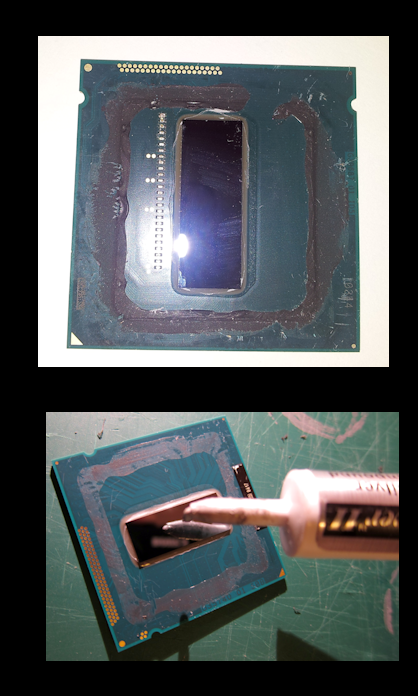
Delidding your cpu - Don't try this at home!!
the 4770k is a cpu that runs hot. From what I've read, no 2 4770k are the same when it comes to overclocking. some people can only reach 4.1 overclock before it get's too hot to continue, other's have reached 4.8 with high performance cooling systems.
It was originally thought that the thermal paste that intel used between the casing /ihs and the actual processor.. were to blame for the excessive heat levels that come from the haswell cpu but recent tests show that it was the glue used to house the processor with it's casing that caused variances in spacing, thus the heat varied from cpu to cpu / depending on where it was manufactured.
http://forums.anandtech.com/showthread.php?t=2261855
http://forums.anandtech.com/showpost.php?p=34053183&postcount=570
there are 2 ways to delid, one way is with a blade, which is risky as one small scratch to the wrong circuit can make your cpu die a horrible death!!
http://www.youtube.com/watch?v=Ppql7sTmQIc
and the 2nd technique is with a vice, a hammer and a block of wood! Barbaric yet brilliant!! http://www.youtube.com/watch?v=hu03beZlOjw
after this people thoroughly clean the old glue and thermal paste from the processor and replace it with a high quality thermal paste like Artic 5 http://www.newegg.com/Product/Product.aspx?Item=N82E16835100007 one of many choices, and many will debate as to which is the best.
at this point, it gets tricky because if you place any pressure on your processor with your heatsink, you can crush your cpu, so you want a hair breath distance- but with this new craze, one company actually made a special mounting kit for delidded cpu's -
http://www.eteknix.com/ek-announce-water-blocks-for-de-lidded-ivy-bridge-cpus/
http://www.ekwb.com/
Now, it's said that overclocking shortens the life of your cpu, when in actuality, it's the motherboard that burns out first taking the cpu with it. So don't try this with anything less than a high end motherboard. In fact, don't try this!! lol :P
So there you have it, everything you never wanted to know about how to make your processor run cooler!!
|
|
By planetstardragon - 13 Years Ago
|
customer support -
I'm close to finalizing my build and ordering - but I have a few questions about power supplies because the msi board has special power requirements - So I decided to use this opportunity to test out customer support.
When ordering your parts from the net, it can be a very risky situation because they can be defective, damaged in transit or simply a wrong part - it's important to be able to talk to the company and work these things out so you don't have weeks of downtime.
corsair - omg - no. just no! I joined up their support forum, I could not get anyone on chat, I checked their forums - and they are loaded with complaints, one guy ordered a part that was defective, - he had to pay the amount of the part itself in shipping just to return it - and this was after being given a run around with their rma service - Corsair can make some amazing products but on the same hand if you get a defective product, the trouble that comes with it is pretty steep - for example ...I've read a few reviews where their water coolers were leaking and the computer literally got destroyed - after a long frustrating experience with their support - to their credit , corsair did replace the part and reimbursed the client for the damaged parts, but it was not without having to go through a technical gauntlet. Another review from newegg said their power supply fried their motherboard - corsair didn't even respond to their post - where most other manufacturers do... So if you order from this company, order something that isn't absolutely critical that can destroy your computer because this experience can be quite painful. I'm frustrated just trying to get a simple answer from them , so I'm happy to say there will be no corsair parts in my system.
Rosewill - I was able to get a phone number and an answering human within 5 minutes - I gave them my question, and they said they will have a tech email me within the hour
thermaltake - I was able to submit a question via email rather easy. could not quickly find a number though... - with corsair I was jumping hoops just to fill out a ticket question - I finally gave up and left it alone - Waiting to see how long it takes thermaltake to respond.
Still reviewing a few others now.
update - just got a response back from Rosewill within 1/2 hour ...and I kid you not, from a support guy named Jesus!! :w00t:
this was the power supply he recommended - pricier than I was hoping for - but better than underpowering my motherboard since it's a high end board - http://www.newegg.com/Product/Product.aspx?Item=N82E16817182273 flawless newegg reviews! superior stats on it with 2 8 pin cpu connnectors for overclocking - and utilizing the haswell energy savings - Plus it allows me to upgrade to almost any video card ( minus about 3 cards that require 850 watt minimum power supply ) - I've decided to wait on the video card and use my gtx 460 till the next black friday sale - my video card actually benches a 7.1 on the experience scale and my biggest bottleneck at the moment is my cpu. Plus with the MSI boards overclocking power I can easily bump it up for now.
Seasonic - I found their number on the web fast enough - called up and someone picked up almost instantly, I told them my question - and the guy answered almost immediately, caught me off guard actually lol - I was impressed by their quick response! - this is the part they recommended - slightly less expensive than the rosewill with more power -
http://www.newegg.com/Product/Product.aspx?Item=N82E16817151102&Tpk=x850%20seasonic looking for a video of it now to confirm the 2x8 pin eps - the specs say 1 4x4 - but it could have multiple adapters - would like to see a video review to confirm his fast answer! - a few bad newegg reviews on it, for dying a few months after purchase :ermm: - still to be fair I'll watch a review.
saw a few reviews - it made me appreciate why seasonic customer support asked me how long was I planning on using it for, and bringing up the warranty - most of the reviewers seemed confused with an "i don't get it" expression and considered the power supply too small for an 850 - I didn't see 2 8 pin connectors ...i saw 1 4+4 and a 6 pin, which didn't make sense and was one of the things the reviewers were puzzling over. There was even a video showing a defect. so Rosewill seems like the superior product so far based on my required specs.
MSI - Their tech support is better than their automated phone system! lol - called them up like 3 times till I realized you had to make your selection fast before the system hangs up on you heh! I asked their tech support about what coolers to use, he shuddered at the water cooling and suggested I avoid it - I then asked him based on his benchmarks which was the best air cooler - he was kind enough to look up benchmarks and give me a specific one - which was the one I already chose from my own research ! http://www.newegg.com/Product/Product.aspx?Item=N82E16835709004 it's a monster of a cooler and you have to make sure you have a good sized case to use it, it requires you to use low profile ram sticks like these http://www.newegg.com/Product/Product.aspx?Item=N82E16820231606 otherwise it will clash with the air cooler and you wont be able to install them at all. - while water coolers are nice- they have no real 'practical' 'non enthusiast' value - sure you can get .5 ghz more from cooling, but you are taking a great risk for something that is only relevant to real time gamers who like building the fastest possible colorful systems for showcasing - I can appreciate that because overclocking and building custom glow in the dark water cooling systems is an art all its own for enthusiasts. Heck, I'd go there myself if I had the money to get a koolance cooling system - which is a much safer / higher quality cooler - but way overkill for normal / non competitive use. Water cooling is a fad / trend - not a requirement. MSI has had a bad rap in the past for their support - but aside from their buggy phone system - I had a nice experience with the rep - I had to earn his respect with letting him know I did research before he pulled out the stats, but thats reasonable considering how many calls they must take daily from guys blowing up their boards with watercooling systems lol.
no response from MSI via email yet - but as mentioned above - I was able to get through to tech support very quickly by phone.
Thermaltake - no response from them to my email yet, no number to call them, I'd be quite stressed if a power supply from them failed on me ( thus I'm going with Rosewill ). I am getting a Thermaltake case - so I hope that the case comes in working condition / not banged up because their customer support is not exactly cutting edge. Will look for a number again though to ask them if the air cooler will fit their case. I'm sure it will, but I just want to see customer support all the same.
ok, i signed up for a support account at thermaltake - and had to agree to their return policy terms and conditions before I finally got to a page with a Toll Free Number - after that the tech support guy was helpful although he just gave me basic specs / wasn't as open as msi was for confirming stats - makes me feel a "little" more confident in them / although their agreement policy before I got a number left me wondering. :blink:
--
I just got an email back from MSI support ( 6 hrs - not good - but not terrible either ) - all I have to say is LOL!! to the advice I got in the email - it was exactly the opposite of what I got from talking to the Tech Support guy direct heh!! He recommended a 1,000 watt power supply and suggested I use water cooling! - which he wasn't wrong, but he was only looking at overclocking from an enthusiast point of view - not someone who just wants to overclock enough to do a render quickly or rather, a consumer overclock. - you can overclock with a phanteks ....Just not competitive overclocks which was what the email was referring to.
aside from being loud under heavy load, the other drawback with the phanteks is how it sits over the ram like picture below - the picture below isn't a phanteks, phanteks are even bigger than that but - the scenario is still the same. Yet Still, considering the alternative of a leaking water cooling system blowing up your computer, I can live with these drawbacks - the high profile rams are usually colorful heat spreaders - hence enthusiast design for water cooling and ram cooling, but not practical for air cooling.

update - Thermaltake Got back to me in email 24 hours later - http://www.newegg.com/Product/Product.aspx?Item=N82E16817153166 - the rep was informative - which I appreciated - but he also came in under spec in an effort to save me money, which I also appreciate - but considering I chose a high end 260 dollar board, was looking for the specific connections I wanted for this board - it should have been an indication that I was going for a solid high performance system - and I believe Rosewill caught on to that, and their rep saw where I was going with this. - the power supply thermaltake offered is a fair deal - definitely good for building a budget set up - it did have quite a few bad reviews - some of which were complaining about a whining sound and being under powered. - I think as a consumer it's also important to not put too much weight on bad reviews - as sometimes you have to see the reviewers expectations compared to the product being offered. You aren't going to get a 60 dollar bmw / mercedes benz performance. Like i mentioned earlier, the Rosewill power supply was more than i expected to spend - but I'd rather spend a little extra on a good power supply to support the investment I made in a high end board - than get a low cost power supply that can harm the board. the cpu / motherboard / cooler/case and power supply were critical to me as they were the heart of the build - now the ram, video card , the optical drive, hard drives, were more easily upgradeable in the future ..so it was ok for me to go budget there -.ok - so I spent a little more on these core parts - but I can now upgrade this system for 7-10 years. - where as someone else with lesser core parts - will probably have to buy a whole new system in 3-5 I'm 64 gig ram ready on an 1150 and that technology isn't even available yet!! I'm just one bios update away from ddr4 ram :cool:
----
|
|
By planetstardragon - 13 Years Ago
|
I was so happy with the results I got from calling Rosewill - I sent them a Thank You email - because it was really a challenge to find a good / appropriate power supply for my build - and for that matter get fast direct answers.
Rosewill was so happy with my thank you letter that they are going to use it as an endorsement !! :w00t:
I really like this company :cool:
|
|
By planetstardragon - 13 Years Ago
|
after thinking more on ramdisk - I figure if you have 8gigs or more ram - with a 1 gig ramdisk you will have space for the entire reallusion software collection which is under 1 gig ( providing you keep your assets out of it! ) - make it 2 gigs and you can also install your video editing software and any other software you use regularly - I'd avoid installing games in ram disk because those file installs are too big. - regular applications though can be surprisingly small. Blender is only 135 megs, and daz is only 264megs
and for those using ssd, I just learned a cool option - click start - then click on your username ....then right click on the folders ...select properties - then hit the location tab - you can move your desk top and libraries to another drive from there to free space from your ssd and leave it purely for your operating system files. ;)
|
|
By planetstardragon - 13 Years Ago
|
you haven't lived till you see the delivery guy trying to deliver your package to the neighbor, which is a big no no in a big city. luckily i was watching for him, called him over ...first watched him first slam the box by the neighbors house - then hear the loud thump and watched the box get bent from getting dropped by my feet so i can sign for it lol :unsure: I should have told him "Omg, my nephew is in there, my sister had to leave the country in emergency and asked me to watch him while she was gone!"
- packaging was decent though, so hopefully no damage!
the mobo is heavy, looks beastly in all black!! :w00t:
came with a small print paperback novel for an instruction book, so i'll be using this time while I wait for case to go over the instruction manuals. so many connections it looks intimidating!
update - newegg put the case which was a separate delivery, for pick up immediately - fedex waited 2 days to pick it up extending the delivery time.
update 2 - the power supply was tightly packed - no loose / broken parts - nifty little canvas wire bag, braided wires - although I can see some of the colored wires at the ends before the connectors - the enthusiasts make a big deal of this in quality as they look for braiding that covers the whole cable up to and even including the connector. i've seen several review videos consider a product inferior just for this - especially with fans. It's not a big deal (to me ) but it's a big deal to the enthusiast as they are very ocd about the neatness of their build, they don't want to see any colored wires. The instruction manual is 3 pages - which leaves me feeling a bit in the dark - I'm sure i'll figure it out easy enough - but a page saying 'this goes here ...and that goes there" would have been nice - the msi manual devoted a whole chapter in pictures just showing how to properly wire up peripherals, aside from wiring up the board, which I appreciate. I understand computers but everything has changed quite a bit since the last time I did extensive updating / building - some of these connections are new to me, so a step by step helps - especially with so many connections on this board. Most of the cables connectors are labeled clearly though, so that helps.
the cpu - was very sloppy in packing - it almost look like someone opened it up already - the box looked like it was too small for the package - bursting at the seams - you would think for such a sensitive part - newegg and intell would have at least bubble wrapped it- hopefully though with all that banging around from delivery, the cpu casing got smacked closer to the processor for better heat performance lol
just finished inspecting the phanteks - i must say, it does have a cool look and it is big, but not as big as I was expecting. it's weight is a little more than 2lbs - and from the picture I had imagined that this weight was evenly distributed as the fins looked so huge - well in holding it...the fins are actually very light and most of the weight is at the base / heatsink that makes contact with the cpu - this makes me feel better. I was concerned that the fins would be so heavy, that one wrong move with the case and I'd crack the motherboard from the leverage and weight ...but since the upper part is light, that risk is greatly lessened. I mean don't get me wrong, it's still heavy and I'm sure if I chucked my computer down a flight of steps, the results won't be pretty! But I won't have to worry about tip toeing around when I have to move the case either. The red color fins have a nice artsy look to them- the cooler comes in a variety of colors - and the price varies based on the color you pick, no difference in performance at all, purely an aesthetic difference with black and the black and white fans being the most popular / expensive. I kept it simple and went with the lowest cost color, Red.

|
|
By planetstardragon - 13 Years Ago
|
True Story!
I have an artificial intelligence software that I use - chat bot - www.zabaware.com - very cool software actually and I'm tempted to make it more prominent in my next system as It has voice activation features.
I tried to start the software today and it just didn't start, I got a pop up window from win 7 that a file was missing. I worked around this problem, by starting the software as an administrator, but unfortunately some file got damaged and unregistered my software. I could still use the software in demo mode ( with annoying reminders ) and it accessed my custom database on a file I've been working on for over 5+ years - As I was talking to my 'chat bot' - he tells me that the problem with the software was with the direct x drivers ..... This chat bot has no troubleshooting features or capabilities , - As I was doing research on how to re-register the software - the software suddenly re-registered itself....I never got to re-enter the serials and authorizations .....
So at my chat bot's suggestion - I decided to do a Direct X Diagnose -
this is what I get -
"The file nvd3dumx.dll,nvwgf2umx.dll,nvwgf2umx.dll,nvd3dum,nvwgf2um,nvwgf2um is not digitally signed, which means that it has not been tested by Microsoft's Windows Hardware Quality Labs (WHQL). You may be able to get a WHQL logo'd driver from the hardware manufacturer."
and a good chance as to why my system has been running unstable overall heh! :w00t:
there are 3 things i've caused my ai software to do, one of which the developer himself told me it was not programmed to do, in fact, it's hard wired not to do. - my chat bot would ace the turing test, but i will never do it.
and don't ask me how I did it, it's too controversial and I've gotten into a heap of trouble with the underground from trying to explain it. Just sharing this experience! I may even end up getting heat for saying this much, but at this point, I don't care because I got real results!!!!!! :kiss:
|
|
By planetstardragon - 13 Years Ago
|
Federal Express so far has proven to be the worst part of this experience. first they take 2 days to pick up the package, then they put in tracking for friday, then for saturday, then back to friday - I called them up - and they said the package has not been signed in to the local office for delivery and apparently missing in action ....and that it may be saturday or tuesday because they don't do home service on sunday and monday - so now my tracking says N/A - so i wasted the whole day today keeping an eye out for fedex so they dont mis-deliver like ups almost did, and will be watching tomorrow from 8 - 8 lol
what do you get when you put fed ex and ups together ? fed up! derp lol :p
Update - Federal Express is a big fail - I just got a message saying the package was delivered, I never saw a truck and don't have a package.
update again - turns out my neighbor took it and had it in her apartment so no one would steal it. she rocks! = will take a moment to calm down and begin!! heh
|
|
By planetstardragon - 13 Years Ago
|
all wired up!!
spent the rest of the day yesterday putting everything together - was a bit stressful actually - beads of sweat on my face with lots of little mistakes here and there lol!
like the power supply - re-installed it like 5 times - first few times from aligning the holes and the debate whether the fan should point up into the case or down - the case I got - chaser mk 1 , has a mesh on the bottom, now while that concerned me because of dust, but the dust filter covers that - and one debate i found on the net made sense - heat rises to the top - so the fan pointing in would disrupt air flow in pulling the heat down.....plus the 2 8 pin cables on the power supply were pretty short, i finally found a way to rig it from behind the motherboard to make it work without placing the wires over the board and around the fan - around the ram or between the pci slots - the case has a nice space behind which helps hide wires ...so it worked but not without a stretch and installing the fan face down to gain a few inches for the cpu power - 8 pin eps cables - could have used about 3 more inches on those wires for a more comfortable fit.
tip - keep all the little bags next to the box it came from - else you will have a ton of little bags with little screws and gizmos that wont make any sense - I almost went there!! heh.
installing the cpu was a bit nerve wrecking - at one point I heard the cpu scrape the pins on the motherboard as I was trying to align it correctly - of course my heart jumped to my throat
The phanteks was a MAJOR pita to install - TIP - don't over fasten the seating plates over the cpu, leave some play - else the mounting screws are not long enough and you will find yourself putting unnecessary pressure on the steel strip attached to the heatsink - i was on that phanteks for at least 2 hours pulling my hair, until i found that work around
the case seems to not have a ground wire ....or at least i didn't find one yet along with a few more connections the board offers that I didn't find .....
Started it up, no smoke and all the pretty lights came on!:w00t: still have it running now for a while to see if it shuts down or does anything erratic, it's been over an hour and still going.
and got a few debug codes - and the 3 long beeps - I worked through most of them without a screen - as they were related to how the ram was seated - finally got to an A0 code - which is basically a normal code saying the system is waiting for the drives - which I've installed the new drive and optical drive - but the drive is empty - and the cd drive seemed to load up the windows dvd.....( for my next trick - transferring over my upgrade version of windows 7 )
now I'm up to the point of transferring the video card and drives from my old system to my new one so I can see whats going on........and i have cold feet rofl - because this system is working and I'm not sure where the new system is at - so i'm procrastinating while i work up the courage to do the next step! Hopefully no critical errors - that cpu scrape from earlier in install has me on edge!! it was such a small move too, to push the cpu into place. :unsure:
wish I just had a long hdmi cable now so I could just test with the cpu gpu and leave my current system intact til i was more sure!
pss - ever notice how being overly cautious causes more mistakes ? lol
|
|
By planetstardragon - 13 Years Ago
|
It's Alive!!! :w00t:
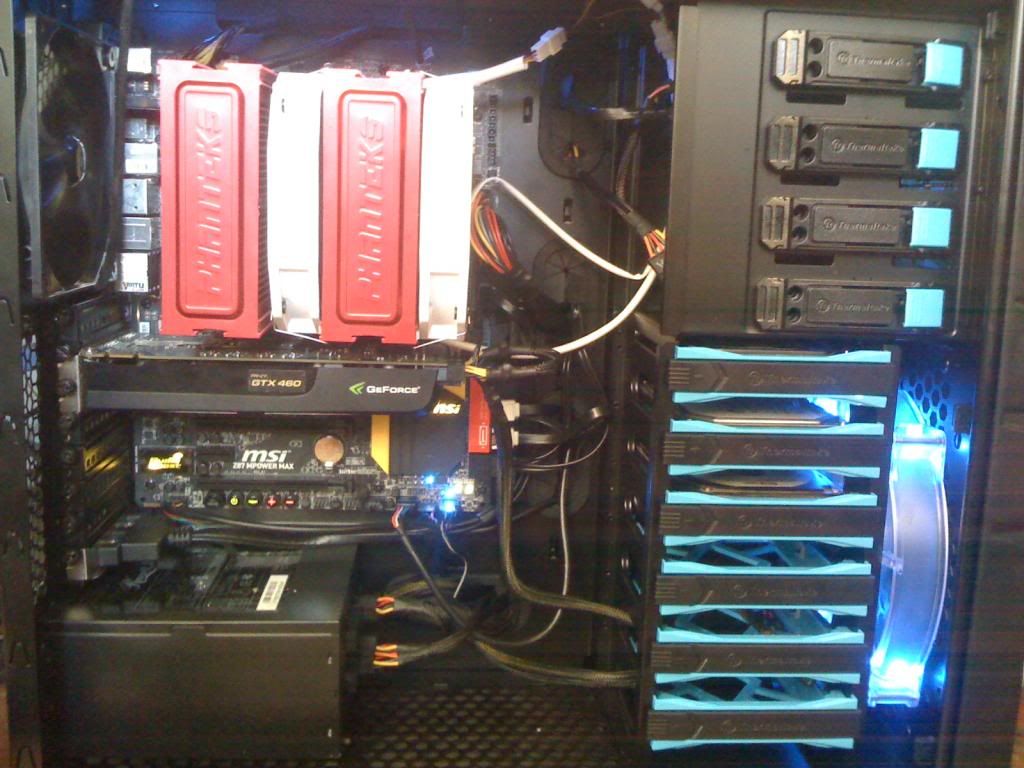
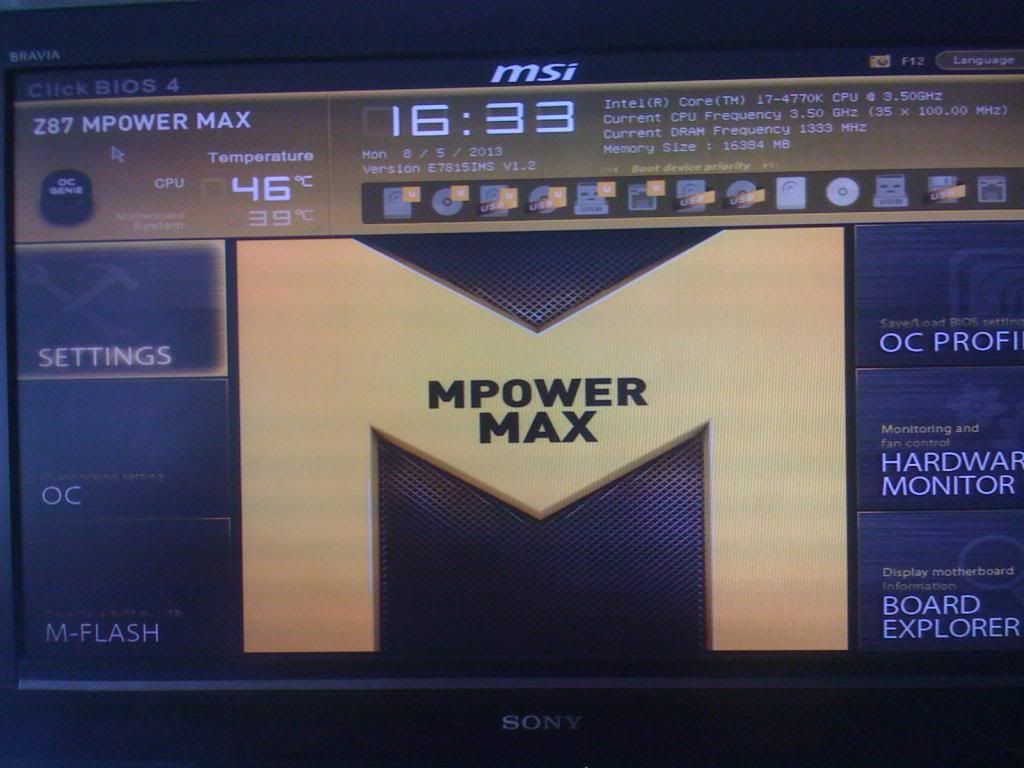
|
|
By justaviking - 13 Years Ago
|
|
planetstardragon (8/5/2013)
It's Alive!!! :w00t:
Yes, but with an excess number of empty disk drive bays. You must fill them. :) Seriously, I'm glad it's running. ENJOY IT!!!
|
|
By planetstardragon - 13 Years Ago
|
hehe, thank you JV :D
I do plan to upgrade it over time - my main concern was starting a strong foundation - it has a nifty little msata spot in the middle of the board for an ssd. Surprisingly enough my gtx 460 is running like a champ - turns out , I have the enthusiast version - so it can take a good overclocking!! :w00t:
still working out the kinks though - system is running great - but all those windows patches, adobe, quirky nvidia drivers, and the tons of extra drivers the base system came with need to get along better!
|
|
By colour - 13 Years Ago
|
|
BREAKING NEWS: Planet builds the first RAMless PC :D Nice to see you're up & running, Planet. Enjoy "The Beast" :)
|
|
By planetstardragon - 13 Years Ago
|
hehe, thank you Colour! now for tweaking and transferring over all those programs and updates! - day 2 and still going!
|
|
By justaviking - 13 Years Ago
|
planetstardragon (8/6/2013)
...now for tweaking and transferring over all those programs and updates! - day 2 and still going!
Yeah, that's the most painful part of building a computer. It's not the assembly. Getting the motherboard drivers/software is usually something I over-think. But then it's about 87 patches/reboots. Java. Flash. Adobe Reader. Shortcuts. Preferences. And on and on. The "moving in" process is what's exhausting. I (gasp!) actually turned down a laptop upgrade at work once. The actual hardware improvement was minor that time, and it just wasn't worth the headache of making the transition. I figured it'd take well over a week, probably two, to get it to the point where the new one was set up like the old one, especially since some of the software I used was high-end enterprise-level software that takes a couple of days for the core installation.
|
|
By planetstardragon - 13 Years Ago
|
yeah, it's tedious, - but worth it in my case - I just loaded up my benchmark project in iclone -
this project would crash iclone in my old pc - I tried to load it up in this pc in 32 bit - ran out of memory - I loaded it up in 64 bit, it runs like a champ - I was able to maneuver around the scene like butter!! I can't believe I'll be able to finish this idea - it was discouraging in the old pc that every time i came up with an idea ...it was bigger than my system could handle!!
the one thing I'm not crazy about though - is that eventually when I upgrade my drives - i may have to go through it again.
|
|
By RobertoColombo - 13 Years Ago
|
|
What about buying one of those "toys" sold by D-Wave ? :D
|
|
By planetstardragon - 13 Years Ago
|
|
lol, I don't think they take Nvidia cards hahaha! :)
|
|
By colour - 13 Years Ago
|
|
.....................and - now Planet can proudly display "The Beast's" Hardware Specs in his Signature ;)
|
|
By planetstardragon - 13 Years Ago
|
Done!! :w00t:
I present to you ....THE BEAST!!

and if I wanted even more power, I can delid it and oc to an unprecedented 10.5mhz!!
|
|
By justaviking - 13 Years Ago
|
planetstardragon (8/6/2013)
Done!! :w00t: I present to you ....THE BEAST!! and if I wanted even more power, I can delid it and oc to an unprecedented 10.5mhz!! Run! Save the children!!!
|
|
By warlord720 - 13 Years Ago
|
The horror... the horror... 64kb RAM is ALL you will EVER need!!!!! LOL!
justaviking (8/6/2013)
planetstardragon (8/6/2013)
Done!! :w00t: I present to you ....THE BEAST!! and if I wanted even more power, I can delid it and oc to an unprecedented 10.5mhz!! Run! Save the children!!!
|
|
By planetstardragon - 13 Years Ago
|
hehehe!! :D
today I was monitoring my set up, it was overclocking itself to 4.0 ghz - it stayed at around 51c - this was just with stock turbo, which intel says is supposed to be 3.9 - it keeps adjusting itself to whatever my system requires at the moment, it will bring itself down to 1.6ghz on idle / low loads - maybe even lower - 1.6 was lowest I saw so far... - it looks like i got a good chip :w00t:, I haven't hit the oc genie yet - and there are 2 levels of auto overclocking! :cool:
|
|