|
By marcelj29 - 13 Years Ago
|
Good afternoon everyone,
I have a question about the Physics Toolbox. I have watched all of the Tutorials on the Physics Toolbox and I must be missing something, because I have been unsuccessful at getting it to work correctly. Using motor A, and the Covered wagon from City elements-Old Western Town. I was able to get the wheel to rotate in the correction direction. I attached the wheels and motor A, back onto the Covered Wagon. When I hit the play button the Covered Wagon Moves, but motor A and the Wagon wheel doesn’t move with the wagon. I am not sure what I doing wrong, does anyone have any suggestion on how I fix this problem?
|
|
By colour - 13 Years Ago
|
|
IMO, since the covered wagon has 4 wheels you would need the relevant Physics tool for those & not Motor A, which is for a single Prop rotation eg; a fan or Propeller. I'm just going to fire-up iClone & check my Physics Toolbox, to see which tool you need. ADDED - Go to; Physics Toolbox / Structure / 07 Wheels. See Screenshot; 
|
|
By marcelj29 - 13 Years Ago
|
|
Thank you very much. I will try that one.
|
|
By Dushka - 11 Years Ago
|
I have the same problem trying to move a bicycle with spinning wheels. The bicycle's body moves forward, but the wheels stay spinning on the spot. The Physics Toolbox doesn't have a two-wheel motor for wheels aligned longitudinally.
|
|
By colour - 11 Years Ago
|
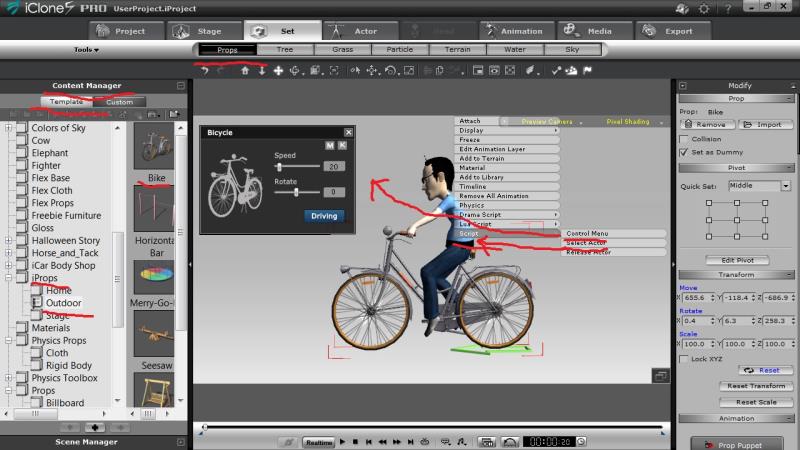 Welcome to the Forum. Welcome to the Forum.
1) Try Reallusion iPtop Bike. See Screenshot.
2) Physics Toolbox Motor A will Drive both wheels. You need to Select both.
Screenshot
|
|
By animagic - 11 Years Ago
|
|
I didn't even know we had such a cool bike...:blush: Learning something every day...:ermm:
|
|
By Dushka - 11 Years Ago
|
Thanks, Tutor. Unfortunately, I am still completely stumped, and totally frustrated with Physics Toolbox. I can get the wheels of the bike iProp to rotate successfully but still cannot get the bike to move forward. If I move the bicycle along a path, the bicycle frame breaks away from the wheels and moves along the path leaving the wheels locked to the spot spinning merrily. (I can get the bicycle moving forward with rotating wheels using the Control Menu script, but that's not what I'm trying to master right now.)
But what is bothering me even more right now is that I cannot figure out how to play back any animation produced using the Physics Toolbox. The locked spinning wheels don't spin when I play back. For example, when I play back the bicycle moving along a path, the bike frame without its wheels moves forward but the wheels stop spinning. I see a clip in the animation track on the timeline, but if one hits the Play button, nothing happens. I can get primitive blocks to rock back and forth using the 04 Motor D prop, but once again, no success playing the animation back. I have the Rigid Body Simulation turned on. When I tinker with the Project files that come with the Physics Toolbox, I can get playback to work O.K. when I fiddle with the controls there. I reckon I have forgotten to do something very basic.
|
|
By Dushka - 11 Years Ago
|
Ah. I have just discovered the reason for failure to play back. For anybody else struggling with the same problem, the answer is here at https://www.reallusion.com/iclone/help/iclone5/PRO/20_Physics/The_Basics_of_Rigid_Body_Simulation.htm. But it's not well-written and you will need to read every sentence carefully. Unless I am mistaken, you have to hold down the Rigid Body Simulation icon while the simulation is taking place. Also, once the simulation is complete, do not click on that icon again or you will lose what you recorded! Very strange indeed.
I am still at a complete loss as to "the bicycle problem".
|
|
By mark - 11 Years Ago
|
I believe what you would do is click to activate the simulation then once you're happy with the result click again to turn off the simulation. I don't think you need to "hold-down" the simulation button.
|
|
By Dushka - 11 Years Ago
|
Thank you, Mark. I tried that, and you are quite right.
|
|
By Dushka - 11 Years Ago
|
I have cracked the problem of moving the bicycle with its wheels spinning. The process is as follows (the first two steps can be done in either order):
1/ Load the bicycle iProp.
2/ Load the Physics Toolbox 01 Motor A
3/ Using the Advanced Options of the Toolbox Control, select BOTH bicycle wheels. (The basics of how to do this for one wheel are covered in the video https://www.youtube.com/watch?v=P6mBerW5Jrk)
4/ Make sure Rigid Body Simulation is activated (icon at top right next to Physics Settings icon)
5/ Click the Play button on the toolbox control and let the wheels spin for as long as you want them to, hitting the space bar to stop the simulation at any time you want. (The bicycle will not move while this is happening.)
6/ TURN OFF RIGID BODY SIMULATION, and do not turn it on again. If you do turn it on, you will lose the wheel rotation simulation you have just recorded.
7/ Now you can move the bicycle around on the timeline to your heart's content and the spinning wheels will move with the bike. You can run it along a path if you desire, flip it upside down, or whatever other transforms you want.
|
|
By colour - 11 Years Ago
|
Reallusion's Bike iProp has it's own Control Panel, as per my previous Post's Screenshot. Physics Tool Box Motors are for animating Google 3DWarehouse SKP Models
IMO, you're making life un-necessarily difficult for yourself.
|
|
By animagic - 11 Years Ago
|
|
The bike prop is actually quite elegant. Like Colour says, it has its own control panel, which allows you to ride the bike forward and backward and also change the direction with another control. Nothing else is needed. It's actually more stable than Physics, which can be finicky.
|
|
By Dushka - 11 Years Ago
|
Thank you, Colour and Animagic. I will have to investigate the bike iProp further. I did learn a lot about the fundamentals of physics and the simple Toolbox motor by playing with the bicycle. At least I now have a much better understanding of physics, and I can apply what I learned to other wheeled props, such as Medieval Village carts.
|