|
By cimjd - 13 Years Ago
|
|
Does anyone know how to fix the foot pose of the genesis character in 3dxchange? I will include an attachment to show the problem I'm experiencing.
|
|
By Peter (RL) - 13 Years Ago
|
|
Obviously try to make sure you have applied the correct foot pose in Daz Studio 4.5 first. Then if you still have this issue in 3DXchange5, select "Convert To Non-Standard Character" and then select "lFoot" from the Scene Tree. Now use the Rotate Object (E) to reposition the foot as required. Then do the same with "lToe". Finally repeat for the right foot. That should do it. :)
|
|
By cimjd - 13 Years Ago
|
|
Will try and let you know the results.
|
|
By majorlance - 13 Years Ago
|
|
I've followed the suggestion in this thread, but the only problem is that with pumps the heel of the shoe moves down thus the heel of the foot is sticking out. It looks very awkward. It does, however, seem to work for sandals and boots. Still looking for a solution for the pumps. Any ideas?
|
|
By Cricky - 13 Years Ago
|
|
majorlance (9/26/2013)
I've followed the suggestion in this thread, but the only problem is that with pumps the heel of the shoe moves down thus the heel of the foot is sticking out. It looks very awkward. It does, however, seem to work for sandals and boots. Still looking for a solution for the pumps. Any ideas?
---------------This is a (Quoted Reply) < ------------- For those that don't know how to reply to another persons posting, so you know who said what.
In the attached image, the characters floor height was raised and the contact lowered, but it is a simple process in 3DXchange5 once the heels are flattened and the Toe is turned up. Just look for a great set of calves in real life, walking around in heels. The profile can be reused on all Genesis characters after it's created.
Personal Observation: I've yet to see a great pair of legs on a woman who wears "practical shoes" all the time. You will see that a woman wearing heels is literally suffering for her beauty, to make those legs look good.
|
|
By cimjd - 13 Years Ago
|
|
Is there any way that you can show the numbers that you used to raise and lower contact? I cannot recreate what you have done.
|
|
By Chief Whiteowl - 12 Years Ago
|
|
A way I found easy to do is to import into 3dxchange and when prompt "Do you want to convert it to a non-standard (talking) Character" select No. Align Character to ground then scroll down to convert to non-standard character. after you select that, save the T-pose. Change the bone structure preset to Daz4 Genesis and straighten out the fingers, save the new T-pose over the previous one and keep it somewhere you will remember. Then every time you import a character with heels just load that T-pose.
|
|
By majorlance - 12 Years Ago
|
|
Just in case anyone still has problems with this and would like to take care of it all on the DAZ side before 3dx5 I hope the following images will help. Before exporting your character from DAZ as an .fbx file select the right or left foot, in parameters lock the bend, side-side, and twist sliders. Do the same for the toes and big toe. Repeat for opposite foot. Next select the right or left high heel shoe, in parameters lock the X rotate, Y rotate, and Z rotate sliders. Repeat for opposite shoe. Nothing is necessary in 3dXchange. When the character is applied to iclone it works fine. The third photo shows the heels during the Gwynn walk motion. Hope this helps!
|
|
By cimjd - 12 Years Ago
|
|
Thank you Majorlance I have been experimenting for a long time with this, but it never occurred to me to fix things on the Daz end. You guys in this forum are a wealth of information for a guy like me. I am going to post the results that I got by following your advice just in case anyone has any doubts about this. Guys this works great, once again thank you very much.
|
|
By majorlance - 12 Years Ago
|
|
You're welcome, cimjd. I found the turn the toe in 3dx5 worked well for sandals, but it made high heels slide down in the back. I remember wendyluvscatz had mentioned something about making sure the shoe was fit well in DAZ before exporting. I had assumed that just applying the foot pose and the shoes took care of that, but her comment prompted me to investigate further. Trial and error.
|
|
By griyar - 12 Years Ago
|
|
cimjd (3/9/2014)
Thank you Majorlance I have been experimenting for a long time with this, but it never occurred to me to fix things on the Daz end. You guys in this forum are a wealth of information for a guy like me. I am going to post the results that I got by following your advice just in case anyone has any doubts about this. Guys this works great, once again thank you very much.
majorlance,
Thank you very much about your advice with importing high heels from DAZ to iClone.
I am new in this prog and now you make me happy with advice of heels. I can transfer now V6 from DAZ to iClone in original state of her.
Thanks,again
|
|
By APRND - 10 Years Ago
|
There is news about the heels?
Thanks.
|
|
By pruiz - 9 Years Ago
|
majorlance (3/8/2014)
Just in case anyone still has problems with this and would like to take care of it all on the DAZ side before 3dx5 I hope the following images will help. Before exporting your character from DAZ as an .fbx file select the right or left foot, in parameters lock the bend, side-side, and twist sliders. Do the same for the toes and big toe. Repeat for opposite foot. Next select the right or left high heel shoe, in parameters lock the X rotate, Y rotate, and Z rotate sliders. Repeat for opposite shoe. Nothing is necessary in 3dXchange. When the character is applied to iclone it works fine. The third photo shows the heels during the Gwynn walk motion. Hope this helps!
have been using this successfully with G3. G8 is supposed to work using the G3face key.duf - but it puts G8 into the new 'zero' pose Tpose with arms at 45 degrees and feet at 25 degrees in the timeline conversion. Any ideas on how to fix this please?
|
|
By toystorylab - 9 Years Ago
|
|
G8 is supposed to work using the G3face key.duf - but it puts G8 into the new 'zero' pose Tpose with arms at 45 degrees and feet at 25 degrees in the timeline conversion. Any ideas on how to fix this please?
From Member Charleshoover885:
Here is a quick-and-dirty (note that it is only necessary on the Genesis 8 Female because of the modified T-Pose)
1. Export the G8F from DS in FBX format.
2. Open in 3DXchange and click on "Convert to Non-Standard"
3. Uncheck the "Active" box.
4. Select "lShldrBend" in Scene Tree.
5. Use rotate tool (keyboard E).
6. Rotate to standard T-Pose position.
7. Repeat for "rShldrBend, lThighBend, and rThighBend".
8. Check "Active" box.
9. Click "Convert".
10. Click "iC" Export (Top Left).
Open character in iClone. It should assume the standard standing pose.
Charles
See also this G8 to iClone Post:
https://forum.reallusion.com/329261/yes-genesis-8-works-just-need-a-new-Tpose?PageIndex=1
|
|
By pruiz - 9 Years Ago
|
toystorylab (7/15/2017)
G8 is supposed to work using the G3face key.duf - but it puts G8 into the new 'zero' pose Tpose with arms at 45 degrees and feet at 25 degrees in the timeline conversion. Any ideas on how to fix this please? From Member Charleshoover885: Here is a quick-and-dirty (note that it is only necessary on the Genesis 8 Female because of the modified T-Pose) 1. Export the G8F from DS in FBX format. 2. Open in 3DXchange and click on "Convert to Non-Standard" 3. Uncheck the "Active" box. 4. Select "lShldrBend" in Scene Tree. 5. Use rotate tool (keyboard E). 6. Rotate to standard T-Pose position. 7. Repeat for "rShldrBend, lThighBend, and rThighBend". 8. Check "Active" box. 9. Click "Convert". 10. Click "iC" Export (Top Left). Open character in iClone. It should assume the standard standing pose. Charles See also this G8 to iClone Post: https://forum.reallusion.com/329261/yes-genesis-8-works-just-need-a-new-Tpose?PageIndex=1Thank you for your quick and concise reply. I am trying to import G3 shoes fitted to G8 into iclone. I followed your instructions in rotating the body parts but when I hit active I get the following -see screenshot 'bones must be under hip' etc. Any idea what is going on here and what I'm doing wrong? The activate throws off the adjustments I made to hip and foot as in the screenshot. 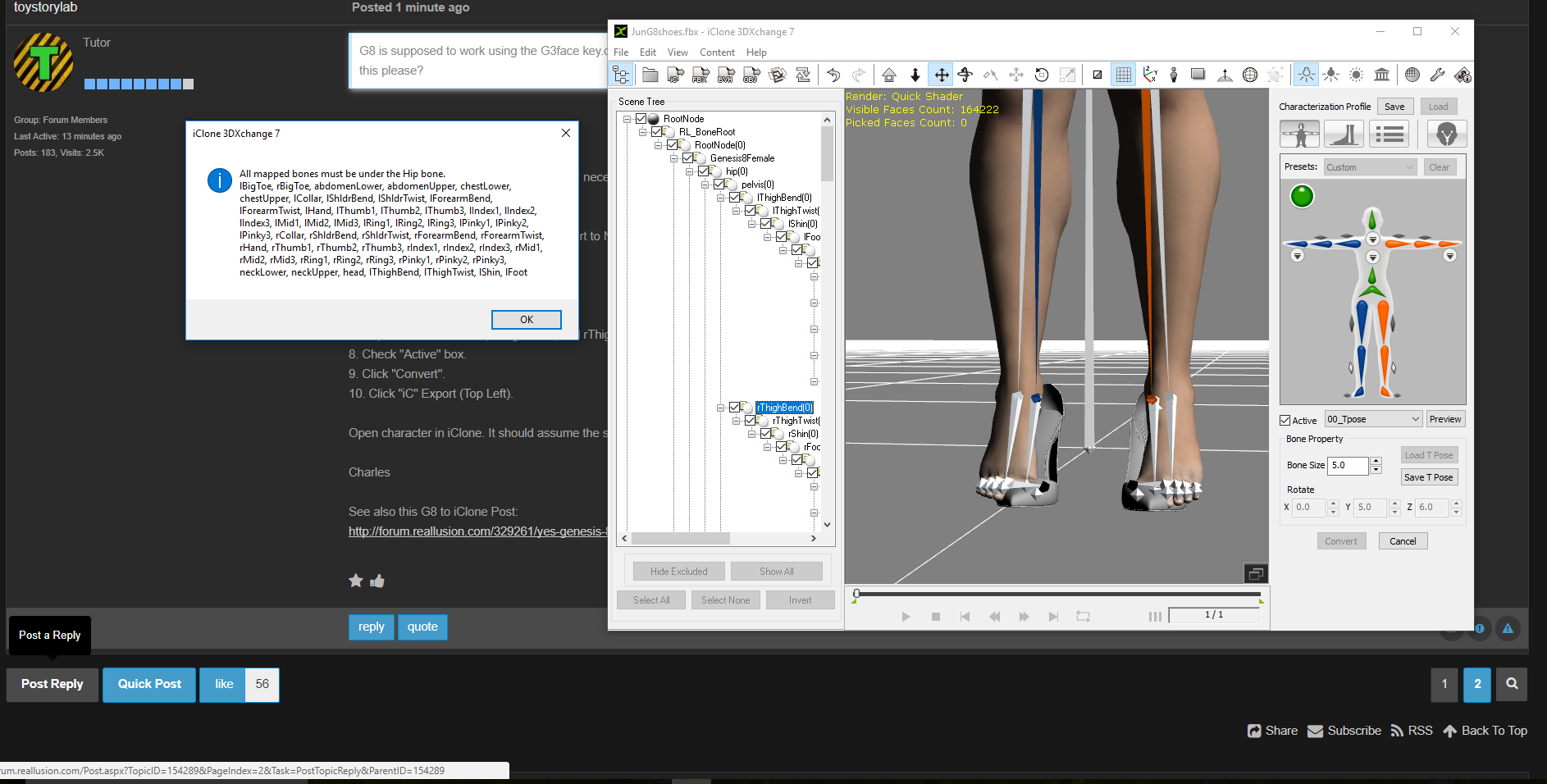
|
|
By vidi - 9 Years Ago
|
In the export menu in DAZ, you must always mark merge clothing in figure skeleton
|
|
By pruiz - 9 Years Ago
|
|
vidi (7/15/2017)
In the export menu in DAZ, you must always mark merge clothing in figure skeleton
Thanks - I checked and did have 'merge clothing in figure skeleton' checked?
|
|
By pruiz - 9 Years Ago
|
|
I have encountered another issue with G8 exported into iclone 7. The finger bones seem to get stuck during an animation and the whole arm becomes distorted - this just for a brief few frames? Did I see something in a post about fixing fingers in 3dxchange somewhere? Any helpful thoughts appreciated.
|
|
By pruiz - 9 Years Ago
|
|
davidcaputokeene (7/15/2017)
I have encountered another issue with G8 exported into iclone 7. The finger bones seem to get stuck during an animation and the whole arm becomes distorted - this just for a brief few frames? Did I see something in a post about fixing fingers in 3dxchange somewhere? Any helpful thoughts appreciated.
Here is screen capture of distortion frame.
|
|
By vidi - 9 Years Ago
|
|
I checked and did have 'merge clothing in figure skeleton' checked?
if so why have your Character in the screen, more as one Armature
That happend if is not set this option in the export menue in DAZ
Here is screen capture of distortion frame
Seems to me the Bone are not fit to the mesh
in this case, in DAZ is Option called fit Bone to the Shape
|
|
By helielfilmz - 5 Years Ago
|
|
vidi (7/15/2017)
In the export menu in DAZ, you must always mark merge clothing in figure skeleton
None of this work now. I have tried the locking the feet and toes (both feet) and 3DXchange still messes up the heels. I don't know what to do to fix is there anything i need help
|
|
By Kelleytoons - 5 Years Ago
|
It's kind of ironic that your tag is "What you know today will be obsolete tomorrow" because this thread is four years old and, yes, things have changed.
Nowadays we wouldn't EVER recommend using 3DXChange for a Genesis figure. That's up to CC3 and Transformer. And that's what I would recommend now.
|