|
By KaiD - 14 Years Ago
|
Hi all,
We’ve recently noticed that a few of you have been inquiring about the possibility of gaining access to the iClone LUA script API for the purpose of creating your own custom scripted content for iClone.
While we’ve certainly made new strides by brining LUA scripting into iClone, the API in its present state is still being developed, and is still constantly improving due to our efforts to make it a more useful and stable tool.
Due to the fact that it is frequently changing and evolving, releasing it to the developer community at this time may cause content that you’ve worked long and hard on to become incompatible with future iterations. In addition, there is currently no debugging environment which would allow developers to troubleshoot issues with their content.
Therefore, we’ve decided to continue our work on improving the LUA script API until we’re satisfied in order to avoid future headaches. We’d like you to know that we’re constantly working on developing and refining the LUA script API so that our developers can have the opportunity to create their own unique and comprehensive content, complete with their own LUA scripting.
Thank you for your patience with this, and keep up the great work with your current content submissions!
|
|
By Sen - 14 Years Ago
|
|
Thank KaiD :)
|
|
By warlord720 - 14 Years Ago
|
|
Thanks for the info Kai.:cool:
|
|
By Sen - 14 Years Ago
|
|
Any news ?????
|
|
By Such Stuff - 13 Years Ago
|
|
Did anything ever come of this?
|
|
By Colonel_Klink - 13 Years Ago
|
|
I'm wondering this too. Is scripting going to return soon?
|
|
By Peter (RL) - 13 Years Ago
|
|
Unfortunately nothing to report as yet. The team have been hard at work bringing facial animation to your Daz and other non-standard characters in the latest 5.4 and the upcoming 5.5 update. LUA scripting is still on the table though. As soon as more news is available I will post it here.
|
|
By CRANK - 13 Years Ago
|
|
I'm really looking forward to it. Mind you I've over 500 props that will need modifying!
|
|
By theschemer - 12 Years Ago
|
Any news on this yet?? :D
Thanks,
TS
|
|
By Lord Ashes - 11 Years Ago
|
iClone 6 has LUA scripting for Personas and also a second "generic" scripting.
With Persona scripting there is an export, so you can export a characters Persona and the resulting LUA script can be opened in a text editor and is fairly self explanatory.
The more general scripting is more of a mystery since there is no export.
I can't seem to find any description about it.
|
|
By Rampa - 11 Years Ago
|
You might be interested in using the AML editor, sense AML still works in iC6. Grab it here.
http://developer.reallusion.com/amleditor.aspx
Or check out some documentation here.
http://www.reallusion.com/iclone/help/amleditor/
You'll need to open the resultant AML's you generate, and take the "$" signs out of the motion file path names. The "$" sign was a wild card. When you add your own files, they will be absolute paths, so you won't need the wild card.
The existing personas are in AML, and can be opened directly in this program. They only get saved as Lua when exported from iClone.
|
|
By R2 Studio - 10 Years Ago
|
|
It has been four years since you said you were working on it... any updates yet?
|
|
By com556 - 10 Years Ago
|
Hi, All
Where can I find a guide to programming Lua script iClone?
|
|
By CRANK - 10 Years Ago
|
Hi what are you looking to add a Lua to? Prop or Character?
|
|
By R2 Studio - 10 Years Ago
|
|
I'd like to use it for both, if possible.
|
|
By R2 Studio - 10 Years Ago
|
|
I mean, is it possible to use them on characters and props... are there scene controls, too?
|
|
By CRANK - 10 Years Ago
|
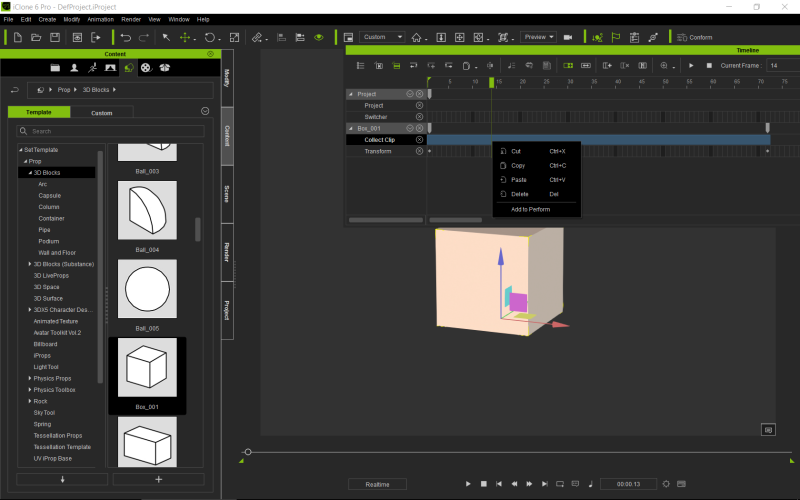
Certainly on props.The perform commands are Lua's
They are easy to create using the time line.
Very simple lua
load a box move the time on say ten squares then move the box.
If you now press play the box will move.
To repeat this action-Enter the time line select your box-transform.
On the line that says collect clip-
You will see two white dots.
Drag the cursor back from the second one to the beginning whilst holding the left mouse button.
Right click on the highlighted rectangle you've created and select add to perform name it whatever 'move box,
You have created a lua.
Now remove animation from box-Right click and select perform The Option 'Move box will appear.
Hope this was useful.
Cheers the Crank
PS you can create motion / Performs for characters in a similar way.
|
|
By CRANK - 10 Years Ago
|
|
|
By CRANK - 10 Years Ago
|
|
|
|
By Pankratz - 10 Years Ago
|
You can vote for access on RL's Feedback Tracker here.
I'd definitely find it useful to create custom controls such as iclone's light tool.
|