|
By Vit3D - 14 Years Ago
|
Hi All.
March has come and, as promised, I'm ready to show preview of first (but not last) cloths collection for PR5 female Sasha. ;)
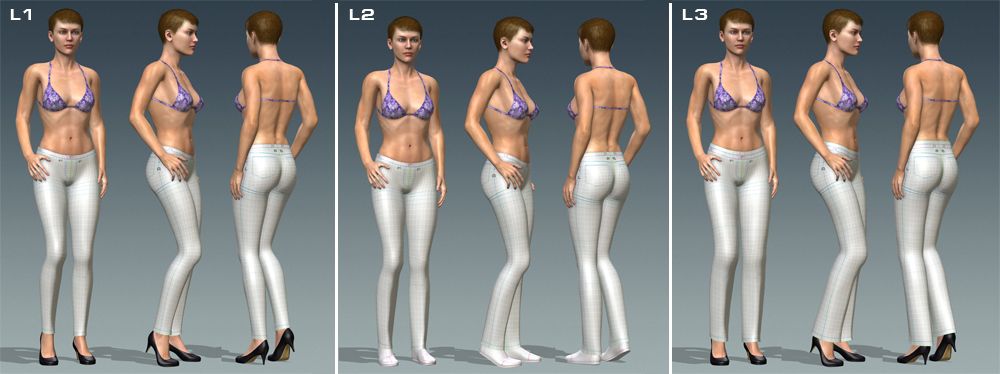
This collection based on 3 Lower basic shapes
and 5 Upper basic shapes
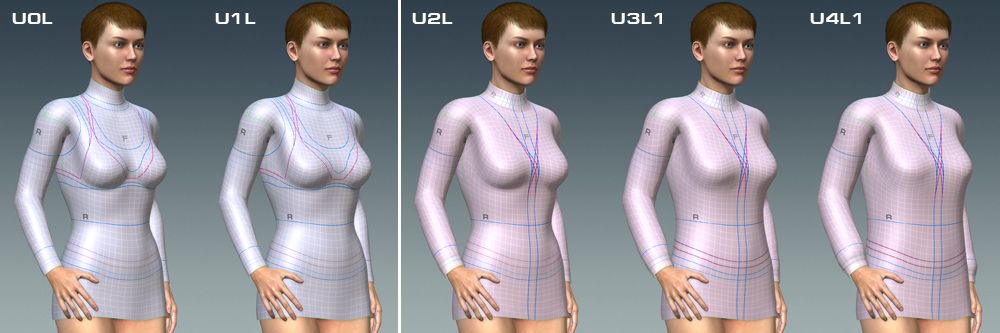
Each lower model has additional element (sub-layer) for belt creating. L3 is official (business) female trousers; it has higher waist cut and wider belt element.
Upper models U0-U1 and U3-U4 also have tucked (UxT) versions; U4 has additional loosed (UxL) version.
Shapes U0 and U1 (both tucked and loosed versions) represent first upper cloths layer (UpperA).
Upper shape U0 is different from others -- it has no cloths relaxation between breast (all other have natural relaxed look in this zone). U0 useful for top underwear creation (if it will be visible through second upper cloths layer UpperB).
Shapes U0T, U1T and U1L used in LowerPlus (LP) models construction. This way collection includes 9 unequal LowerPlus shapes.
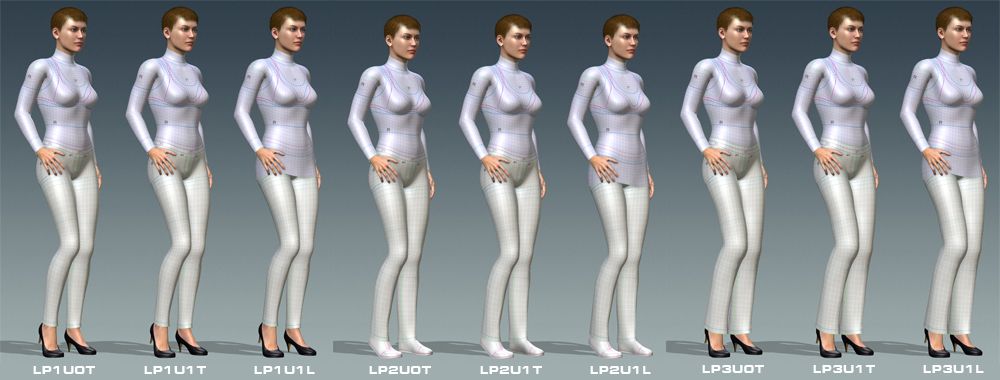
Think I should remind that LowerPlus is expanded modification of Lower cloths part specially created for multi-layers Upper cloths constructing.
LowerPlus consists of 3 elements -- Lower body, Lower Cloths and Close-to-Skin Upper cloths (first layer of upper cloths).
When You put LowerPlus on your character and then put some Upper cloths, You do NOT REPLACE first layer of upper cloths (which is the part of LowerPlus), but ADD new (second) layer of upper cloths.
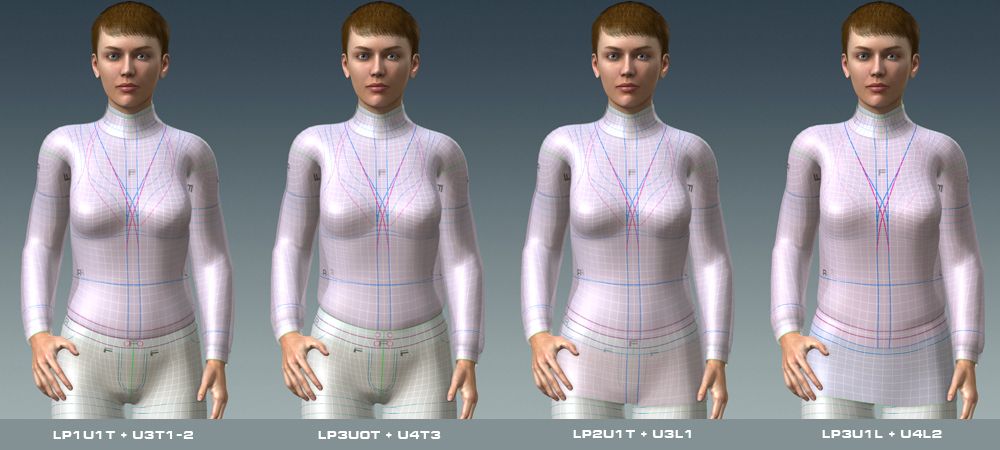
(This picture shows only few of valid combinations)
Shapes U2, U3 and U4 (both tucked and loosed versions) represent second upper cloths layer (UpperB).
All models on these shapes have additional elements (sub-layer) for collar and wristbands creating. Unlike the male cloths pack this sub-layer used the same material (UpperB) as main cloths object. I decided "preserve" separate material (UpperD) for assigning to big upper elements (like hood for example) in future packs.
Texture layout.
Although collection includes a lot of models they used only 3 basic texture layouts (UV):
- All Lower models (and lower parts of LowerPlus) have the same texture layout;
- Models U0-U2 (and modifications) have the same texture layout;
- Models U3 and U4 (and modifications) have the same texture layout;
This way if material have been created for one model it can fit all models in the same group.
Shoes fitting.
Unfortunately High Heels creating procedure recommended for G5 (Flat Shoes and High Heels shoes must have the same foot bone rotation) cause some problems with skinning bottom of pants -- it's not possible to make universal skinning for long and/or wide pants which will has natural bottom deformation for both Flat and High Heels shoes when character bend foot.
L1 model of pants rather tight and short and this issue practically does not affect on this model. Initially L1 model have been skinned for High Heels shoes but You will have no visual issues in wide range of foot bending for flat shoes too. Although if You wish completely avoid this issue You should make this pants a bit shorter (apply opacity mask up-to first bottom guide line in template) for using with flat shoes.
L3 trousers in most of cases used with High Heels shoes, so it was skinned for High Heels. Using L3 with flat shoes can cause issue (pants-to-shoes intersection) on foot bend (or they must be shorter).
L2 (classic jeans) commonly used with both flat and High Heels shoes, but this model does not allows universal rigging. So I have to include separate models for fitting to different types of shoes -- L2f and L2h. Both modifications have absolutely identical shape, but L2f rigging to fit Flat Shoes and L2h - High Heels.
Cloths Packs.
Working at this project I tried to give as many combinations as possible and as result this collection includes 22 unequal models (26 if take in count L2f-L2h modifications).
It's rather big number of models, so this collection will be published as 2 packs.
PR5FC_CL0 pack will include:
4 Lower models -- L1, L2(f/h), L3
3 Upper models -- U0L, U1L, U2L
Using this pack You will be able to create 9 unequal combinations of single layer cloths.
Also upper models from this pack can be combined with Lower SkinSuit model.
PR5FC_CL1 pack will include:
12 LowerPlus models - LP1U0T, LP1U1T, LP1U1L, LP2fU0T, LP2fU1T, LP2Uf1L, (the same for PL2h), LP3U0T, LP3U1T, LP3U1L
7 Upper models (for second layer) - U3L1, U3T1-2, U3T3, U4L1, U4L2, U4T1-2, U4T3
Using this pack You will be able to create 39 valid unequal combinations.
Also upper models from this pack can be combined with Lower and LowerPlus SkinSuit models.
Total number of valid unequal combinations for complete collection (CL0 + CL1) equal 61 ;)
Also both packs will include Gwynn shoes fitted for PR5 female as bonus.
Currently all models practically ready for sell, I just need prepare them for publishing (promos, descriptions etc.)
After this I'm going to make some fashions (materials) for these models, which will be published separately.
If some of fashion artist (materials developers) interested in creating materials for sell on the base of this collection, please contact me by PM.
Hope these products will be useful :)
|
|
By Bigboss - 14 Years Ago
|
|
These look amazing Vit,... As always, you have surpassed yourself once again with these fantastic Packs ... CONGRATULATIONS! :)
|
|
By Vit3D - 14 Years Ago
|
A lot of thanks Bigboss! :)
And You are right -- It was most complex cloths collection I ever made before.
P.S. Creating cloths for male was much easy :)
|
|
By W.VEEKE - 14 Years Ago
|
|
Profesional Work with class, Welldone my friend
|
|
By Sen - 14 Years Ago
|
Very good work Vitaly .
|
|
By shygirl - 14 Years Ago
|
|
Excellent work as always Vit. Beautiful! Shy :)
|
|
By Vit3D - 14 Years Ago
|
Wil, Sen, Shy. Thank very much for nice comments! Glad that You like it :)
|
|
By MrStockboto - 14 Years Ago
|
|
I'm in line to buy soon as it hits the market.
|
|
By duchess110 - 14 Years Ago
|
|
Fantastic work as always
|
|
By Vit3D - 14 Years Ago
|
Hi BristolDuncan!
Think You will have such possibility this weekend ;)
A lot of thanks Duchess! :)
|
|
By Capemedia - 14 Years Ago
|
|
Wow :D
|
|
By Apparition - 14 Years Ago
|
Excellent indeed!
Very detailed, careful an extremely well crafted!
I am just curious to know how heavy in poly count is Sasha with full coth on her!
Vit brings iClone charcters to a very high level!
Congratulations!
|
|
By Vit3D - 14 Years Ago
|
Capemedia and Mike, a lot of thanks for comments! :)
Mike, I classify all models in PR5 series as middle poly.
As I told before, PR5 male and female used unified topology (body meshes for these characters exactly the same). According to iClone "Project Info" poly count for nude PR5 character with head equal 25994 polygons.
Cloths basic mesh has practically the same poly counter as body, but topology of cloths is different - more "natural" for cloths. In some zones it has a bit more polygons, in other a bit less.
Poly count of character with cloths from this pack depends on used cloths combinations.
Maximal poly count will be if use LowerPlus LP3U1L for lower (trousers with higher waist cut and long loosed first layer upper shirt) with some long loosed upper (U2L, U3L1 or U4L1). In this case total poly counter (nude character with head + all these cloths) will be 45938 .
Also I should remark that this combination gives 4 cloths layers in waist zone --
Pants + Belt element + UpperA + UpperB
|
|
By Apparition - 14 Years Ago
|
It looks like very good engineering.
I still have the doubt: are this counts taken within icLone or at the modeller level?
I also take the opportunity to express admiration for such well done work!
Would it be too much to ask to see how is the UVW structure?
I suppose it is also a master's work!
Mike
|
|
By sjonesdc - 14 Years Ago
|
|
These look great!!! Is it too late to add a skirt to the pack?
|
|
By Vit3D - 14 Years Ago
|
Mike, I understand your question. As I told this counter from "Project Info" inside iClone and if I'm not mistaken iClone calculate triangular polygons.
And of course I do not make any secrets from my UV (it visible in cloths templates as white hair lines) -- see attach to this post.
So these UV pictures also shows topology of cloths models in this collection.
|
|
By Vit3D - 14 Years Ago
|
Thanks sjonesdc ! :)
Skirts, dress, coats, overcoats and shoes already in my plans, but they will be published as separate packs or addons. Of course models in this packs will be cross-compatible with models from this collection.
As I told it's first but not last cloths pack for PR5 female and I did not forgot PR5 male too ;)
|
|
By Vit3D - 14 Years Ago
|
To Power.
About thumbs...
I know about this issues (legs distortion on thumb) and have the same thumbs for both PR5 male and female. I can expect that it's some iClone 5 issue with thumbs generation for G5 body parts for characters with custom bone scales. Complete PR5 characters look normally on thumbs.
Sorry, I have no idea how to fix this issue :(
About ready-to-use materials..
I already started to make fashions (materials) for this collection and they will be published separately as soon as will finish them.
Cloth designing...
There is no difference in designing cloths (creating materials) between this collection and any standard models for texturing -- methods absolutely the same. So I did not planned to make some special tutorial.
Only difference -- this collection allows more upper-to lower combinations and if You will create material for one cloths part it can fit to other cloths part with the same texture layout (see info in first post). But it's more important for creating materials for sell. If You going to make materials for "internal use" just create them as You usually do for standard models for texturing (CloneCloths).
|
|
By sjonesdc - 14 Years Ago
|
|
Vit3D (3/2/2012)
Thanks sjonesdc ! :)
Skirts, dress, coats, overcoats and shoes already in my plans, but they will be published as separate packs or addons. Of course models in this packs will be cross-compatible with models from this collection.
As I told it's first but not last cloths pack for PR5 female and I did not forgot PR5 male too ;)
Looking forward to the new clothes!!!
|
|
By power - 14 Years Ago
|
Hi:
Vit3D, if you can include garment for Sasha as News Presenter I will appreciate! or business related I mean.
:)
|
|
By peteradam6 - 14 Years Ago
|
|
This system looks great, but I find it ususable. It's so complex that it takes an hour or more just to work out how to apply a simple set of clothes. You need to supply project files with ready-dressed characters, not expect people to study for a Ph.D in your character system. :angry:
|
|
By duchess110 - 14 Years Ago
|
|
Not having done much texturing for Vit3D lately due to beta testing etc, but just a quick reply with some possible solutions. 1 - Check the Upper Layer and see if it has a drop down to select another layer. As I know some have collar etc on a different upper layer. 2- In your other post on iClone thread https://forum.reallusion.com/Topic125829-281-1.aspx you mention shirt and jacket. Now it could be a lower combo. This is where Vit combines a lower and upper cloth all on the lower. So you could have jeans and tshirt on lower and on the upper a jacket. Hope this might help.
|
|
By Alley - 14 Years Ago
|
|
If you are having trouble with a particular purchased outfit, you could post which one or send a note to the developer and perhaps the creator could help you. It is a bit confusing at first, but it's because Vit is very organized and has created groupings for you to create just about every sort of combination. This is useful to save polys when you don't need all the layers or vice versa when you do. It also lets you apply the same texture, i.e. shirt to two different bases. But it does take some getting used to compared to other systems. I know that I include the name of the upper or lower used in Full in the name. For example PR5MC_CL2_L4_UPPER(RL_UpperB)GreenCamoHoodie So add the PR5MC_CL2_L4 Upper to the character. Name stands for..... PR5MC (photo realistic 5 Male Cloth) CL2 (Cloth Pack 2) L4 (name of upper used) UPPER (meaning it is an upper layer) RL Upper B (select this from the drop down in the Upper Tab) and load this material on the RL Upper B. Follow same logic for lowers.
|
|
By Vit3D - 14 Years Ago
|
peteradam6, sorry for some delay with the answer and I'd like to thank duchess110 and Alley for assistance!
I just published PR5 Cloth System guide in my portal on marked place. Hope it will be helpful.
If You still will have questions feel free to contact me by PM on forum.
|