|
By igorpoker63 - 14 Years Ago
|
Iclone5. (Standart)
When prop is under the grid -no shadows on it. Shadow shows only on grid place.
( Option "Receive shadows" is on)
Shadow on grid:

No shadow on prop:

Anybody know about this issue and solution?
|
|
By colour - 14 Years Ago
|
|
Not all Floor Props automatically Allign To Grid. You need to move them Up & Down, to fit. If you Rotate the the 2nd Image, you'll see that the Road Floor Prop is higher than the Terrain?. Adding the Road Floor Prop to the Terrain? might automatically fix it. IMO, your 1st Image is the correct Allignment. The 2nd isn't. If you have a Floor Prop. Turn it's Shadow off. Anyone-else?
|
|
By igorpoker63 - 14 Years Ago
|
|
thank you, colour!
|
|
By CIANO - 14 Years Ago
|
Dear Colour
Sorry to disturb you but you help me already in the past on other issue and hope you can help me also this time regarding "SHADOWS"
(Iclone 5 Pro -Nvidia Geforce Graphic card supporting Pixel shading)
==> Having to built a scene with some vegetation , to my surprise I find that while all the objects and Avatars cast shadow , the TREES ONLY they don't (no shadow) : I've tried to switch from "drop shadow" to "self cast shadow" but all the shadows disappear . Do you have any suggestion ?
(otherwise I'll have to waive because it makes no sense a scene with missed shadows)
PS : I'm afraid to have seen somewhere that it is an iClone bug without remedy (?!)
Thanks in advance
CIANO (Italy)
|
|
By DroneMaster - 14 Years Ago
|
|
Hi CIANO, For me, the trees have shadows where you would expect them under "self-cast". Check that your AO/IBL settings under Atmosphere are not cranked up too high, particularly the distance settings. If not, check your Ambient lighting too. All these light settings have a huge impact on the shadows.
|
|
By CIANO - 14 Years Ago
|
Dear PixelPiper
It is not a matter of Atmosphere settings because I find the problem with AO and IBL switched off . Simply opening iClone , putting an Avatar and it has shadow , then I add a tree and it has no shadow. If I use "self cast shadow" also the Avatar shadow disappears . Please note that Pixel Shading is "on".
|
|
By animagic - 14 Years Ago
|
|
@CIANO: Self-cast shadows have many options. One is Opacity. When set to 0 or low, you may not see the shadows. There are other settings too, such as Threshold, that determine whether you see a shadow or not, so you may have to experiment.
|
|
By Samulis - 14 Years Ago
|
There are some basic rules about shadows in iClone you need to understand first...
1. Regular (drop) shadow ONLY casts shadow on the ground plane. If a prop is above the ground plane, it will cast a shadow on the ground plane. Note that the ground plane is an infinite plane that extends horizontally in all directions at z = 0. Not all things display drop shadow!
2. Self cast shadows ONLY cast shadow on props, terrains, and avatars (essentially, anywhere there is a mesh). They do NOT cast shadow on the ground plane. Self-cast shadow will work for ALL meshes, including trees (however, if there is NOT a mesh under the tree for the shadow to fall on, it will NOT display a shadow).
3. Drop shadow is displayed in quick shading if you are using drop shadow, but self-cast shadow does NOT appear in quick shading if you are using self-cast shadow.
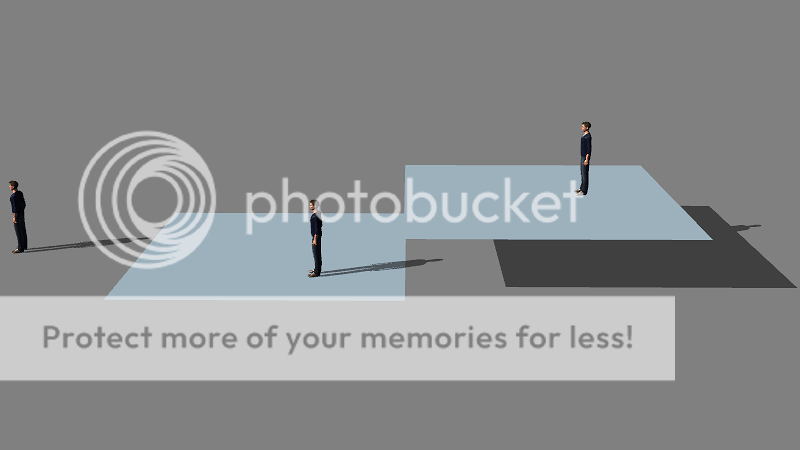
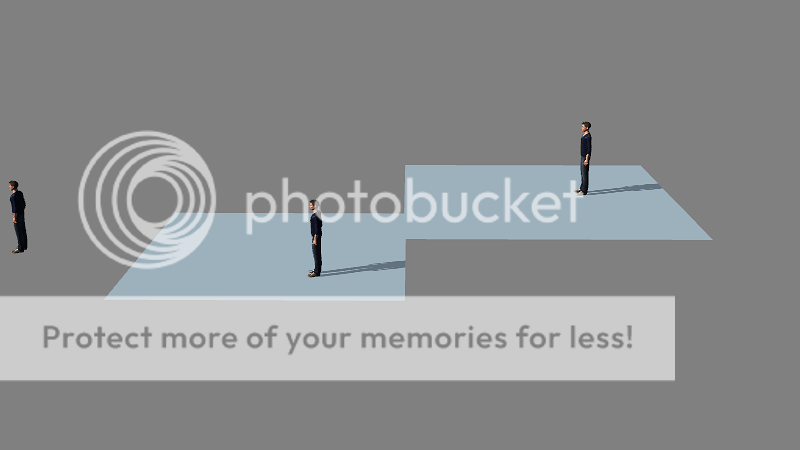
Here are two pictures to demonstrate. These pictures should make the same result if you use trees instead of Chucks. :)
The first has drop shadow. Note how chuck creates a shadow in all of them on that invisible plane at z = 0 (the middle plate is at Z = -1, so his shadow LOOKS like it is on it!), you can even see a bit of his shadow in the one to the right. In the picture below that, using self-cast shadow, the left chuck's shadow is NOT visible because there is nothing for it to be cast upon, the middle one has a partial shadow because it is being cast on the plate, and he upper chuck also has a partial shadow because that shadow is also being cast upon that plate.
|
|
By CIANO - 14 Years Ago
|
Many thanks to everybody and in particular to Samulis for the clear technical explanation.
The "misunderstanding" was that since I don't use the same program every day , in iClone I start dragging & dropping items on the grid (without putting planes or terrain or atmoshpere) ; thus putting "Chuck" on the Grid (with default "drop shadow" ) its shadow is there while adding a tree on the same grid the shadow is not visible . Then I changed from "drop shadow" to " "self cast" and all the shadows desappear (on the grid) .
It took me some trials to find that I need to put a terrain or a plane below the trees and then to switch to "self cast" and adjust the other parameters.
Thanks again for the clarification which I'll resume in my personal "Tips & Tricks" to avoid fear next time I will create a tree without shadow.
CIANO (Italy)
|
|
By Samulis - 14 Years Ago
|
|
Good luck! Hope things work well for you. :D
|