|
By wendyluvscatz - 15 Years Ago
|
|
Help, can a mod pls resize this pic so I can read replies on my Android browser! 

been trying to help someone on the Daz 3D forum who wants to bring a Genesis character into iClone
I CAN atleast get it as far as 3dx4 which is more than he can :w00t:
but
like the original Genesis default figure in clothes which I did get into iClone
it stops me accessing my drives!
Just pointing this out for those who keep insisting on trying to get highpoly Daz models into iClone.
It really does not work well
BTW I am very happy I can get lowpoly characters into iClone
Aiko3 imports fine dressed!
I like those figures anyway
prefer animals and those import fine too!
unfortunately the M3 and V3 etc figures and supporting content are rapidly disappearing from the store as is anything DS3
just a bit of a heads up and warning to save people getting frustrated as the person I was trying help was.
I DID point out continually, Genesis works fine in Daz studio 4 which it is designed for
just as iClone content works fine in iClone
when frustration at wasting money on software was expressed.
I love 3dx4
would love more features like the MAX plugin supports but my love stems from the ability to modify the iClone content for my needs (which with iC5 being incompatible annoys me) and the fact I can rig low poly models from any source in Carrara and bring them into iClone, be it something off Turbosquid, sharecg whatever, it only needs to be an object in a humanoid shape and the Maya FBX in the content developer kit can be used to rig it for iMotions.
One needs to be realistic about ones expectations.
As I have previously said, more 3dx features in v5 for things like facial motion from software other than MAX would be welcome.
|
|
By bluemidget666 - 15 Years Ago
|
What folder you exporting too .. I had a problem with poser folders for some reason ... Also you could try doing the hair separate that might make stuff go a bit easier.
The "Decimator" plug-in for Win32/64 and Mac32 is now installed with DAZ Studio 4, and is available separately, as part of the Game Developer Kit, or as part of the DS4 "Pro" bundle the new version no includes the Decimator plug in if you bought the Game developers kit ..that will all-so help a lot..
|
|
By Dreamcube017 - 15 Years Ago
|
Which version of DS4 has that plugin? Is it the advanced or pro version?
Also if you have to export for iCLone and rig with the maya FBX, you can just reduce the polies in any program such as balancer. The lack of facial animation is still disappointing though.
|
|
By wendyluvscatz - 15 Years Ago
|
I only get this issue with Genesis,
V4 &M4 dressed will simply not open in 3dx4 at all,
(just stops working!)
other Daz figures ok
there is nothing corrupt with the file, it just seems to be a size issue
this is why people decimate them in DS3
but you cannot yet do that with Genesis in DS4
was only posting this because some people get upset that it will not "work" blaming the software, the posts I have seen, (on the Daz forum) they don't even get this far then complain it is broken, it doesn't work etc.
Simply showing even if it does work, there is always another hurdle because it is a figure not designed to natively work with iClone.
Even getting Genesis into iClone animated caused huge issues with render saving ability.
Yes I can rerig her in Carrara, use the Maya iClone FBX, can also decimate the model there too!
That is another story, these are studio users trying to do the near impossible.
The only really successful Genesis imports use second skin clothing (ie textured bodies)
prop hair you can import seperately but not conforming clothes and many expect to do it all.
What I would like to know though is just what limits the readability of drives?
Is it graphics
RAM (does the 32bit program restrict it)
an outright crash makes more sense than this strange inabilty to open/save to folders.
My needles barely move on my meters so I suspect it is graphics but I have just over a Gb.
Yes Bluemidget I CAN get some Genesis characters into iClone, AND dressed (you saw my videos) but rendering it animated as a character at 1920x1080 pixels appears impossible. (800x600 seems to be the limit) an animated prop copes better for some reason, that too is a puzzle.
|
|
By wendyluvscatz - 15 Years Ago
|
The good news
http://forum.daz3d.com/viewtopic.php?t=177700
they have the decimator!
I am not getting it though but for those who do wish to successfully use Genesis
I would say it is vital.
I myself am content with DS4A as getting Genesis out is not so important and not interested in making clothes etc. Can use all my V4 & M4 stuff!
I am more interested in using the textures on iClone cloth etc which involves a lot of Gimping!
I suck at Gimping!
|
|
By wendyluvscatz - 15 Years Ago
|
|
Sw00000p this was from Daz studio,, not Carrara using Daz rigging I did not rig anything was trying to help people who insist on using the highpoly dressed figures from DS understand that even if you do manage to conquer one step, it does not get any easier. I am still a new 3dx4 user myself but am very quickly learning the limitations and wishing to share this with others considering doing this that there is no magic bullet. don't blame the software if you cannot fit a roadtrain in a gararge for a Mini Minor.
|
|
By bluemidget666 - 15 Years Ago
|
|
After playing with the Daz = Iclone pipeline I can say I do not think the main problem is the Polly count of the characters, I have brought much larger files into Iclone than the Daz characters but the texture sizes I think are the bigger problem. Try using texture atlas but do not be tempted to go as low as 512X512 thay do not look good, try 1024x1024 or 2048X2048 and see how you get on ..
|
|
By Borrowind - 15 Years Ago
|
|
Also look at reducing your texture size to 1024px or 2048px in the Runtime, before FBX export. 3DXchange hates 4000px textures.
|
|
By Dreamcube017 - 15 Years Ago
|
|
bluemidget666 (11/29/2011)
After playing with the Daz = Iclone pipeline I can say I do not think the main problem is the Polly count of the characters, I have brought much larger files into Iclone than the Daz characters but the texture sizes I think are the bigger problem.
Try using texture atlas but do not be tempted to go as low as 512X512 thay do not look good, try 1024x1024 or 2048X2048 and see how you get on ..
I don't have 3DX pro, but I can say for sure that the DAZ characters have a LOT of textures, especially when you add clothes. This takes up more and more video memory on the graphics card and that can slow thigns down.
So blue is correct. I've not used Texture atlas either, but from what I've seen, it will be very useful for something like this.
If you plan on rerigging, you don't need decimator or even the FBX export.
I've exported characters from DAZ studio as obj files and reduced them using Antiogo Balancer. (Balancer is about 30 dollars and does a REALLY great job at reducing and keeping UV space)
You can then rerig with either the Maya rig or an improved version of that rig.
Oh, one other thing, if you do export as obj and have clothing, make sure to hide pars of the mesh that will not be seen and are under the clothing. You can also erase the faces in another app such as Carrara or Max.
if you're in max, you can even give the clothes and hair pinning groups so you can use physics cloth in iClone. I still haven't gotten around to messing with this yet though.
|
|
By action_2009 - 15 Years Ago
|
Hi
Try it once with the program. Is very price value.
https://forum.reallusion.com/Topic65513-85-1.aspx
With cordial greetings
action_2009
|
|
By animagic - 15 Years Ago
|
|
Dreamcube017 (11/30/2011)
You can then rerig with either the Maya rig or an improved version of that rig.Don't you need Maya for that? (Which is as expensive as Max.)
|
|
By wendyluvscatz - 15 Years Ago
|
No the Maya rig of the iClone/Reallusion bones is in FBX format which can be imported into Carrara, my software of choice.
It is what I have been using to rig models to use in iClone with iMotion thx to a video posted by Vidi.
I have not been successful with highpoly stuff like V4, could well be the textures but admittedly I haven't persisted as getting her and other Daz people into iClone does not really interest me.
My post was a result of a disgruntled user on the Daz 3D forum who basically got shitty that they'd spent all this money on software and it didn't work.
I was trying to make the point that stuff designed for another program is going to cause issues and workarounds raise other issues, in this case a need to decimate and/or use lower res textures.
I was just puzzled by the drive access issue as it was an odd sympton I'd only encountered with Genesis, other stuff just crashes 3dx4 or iClone (hi res bump maps the biggest culprit for that!).
|
|
By wendyluvscatz - 15 Years Ago
|
I did get her into iClone BTW after reducing textures to 1000x1000 pixels
I also rigged her in Carrara with the character resource Maya fbx and she works quite well
thx for the texture tip, it was the cause of the drive reading issues
just an odd sort of symptom.
|
|
By Dreamcube017 - 15 Years Ago
|
MAN! I need to get 3DX pro so badly now!
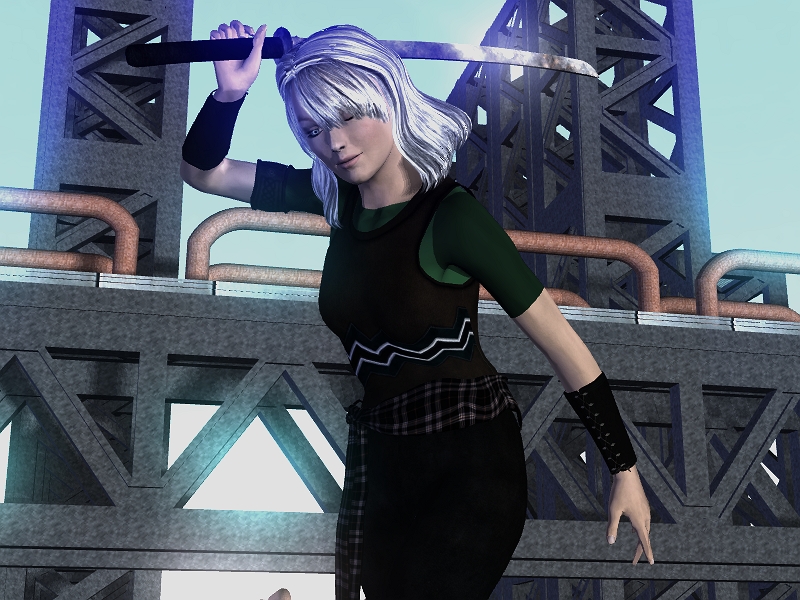
I was able to get a character out of Daz Studio 4, but as I A). don't have FBX exporter there and B) don't have 3DX Pro, I can only do still renders... here's my try.
Thing is though that I didn't reduce the textures at all. iClone didn't choke TOO badly... 3DX did at first... although my graphics card has 2 gigs of ram so that might have something to do with it.
|
|
By hutchartwork - 15 Years Ago
|
Hi Wendy! Jasmin's hilarious! Love her perky looks and that neat Sixties hair-do! :) Too bad there's no way to facially animate her in iClone. :/
Dreamcube, the hair on the still you posted looks far more realistic than anything Reallusion has to offer! Why not import it separately as an object and sell it at the Marketplace? (iClone hair, both for males and females, is a real downer as yet.)
|
|
By wendyluvscatz - 15 Years Ago
|
Nice Render Dreamcube!
(prob get lynched if I added esp for iClone!):D
here is a iClone Maya FBX rig quickie using Carrara
unfortunately no facial animation possible, I did it very hurridly before work so a bit of limb bending weirdness!
Pity there are not iAvatar heads without bodies or one could just copy the head image from a render and import a rigged headless body for attachment, have tried doing it with another avatar but you cannot parent the necks unless I am missing something!
|
|
By Dreamcube017 - 15 Years Ago
|
|
hutchartwork (12/1/2011)
Hi Wendy! Jasmin's hilarious! Love her perky looks and that neat Sixties hair-do! :) Too bad there's no way to facially animate her in iClone. :/
Dreamcube, the hair on the still you posted looks far more realistic than anything Reallusion has to offer! Why not import it separately as an object and sell it at the Marketplace? (iClone hair, both for males and females, is a real downer as yet.)
Why not?... uh... because that's illegal. xD
HOWEVER I might do what you said as far as using the object on another iClone mesh and then just using it on some other charactes. I think what makes the hair realistic here is the texture.
Wow Wendy, there's something about your videos that is so weird, yet so great.
Some info on my Genisis model.
After exporting from DAZ, it was 200 thousand plus polygons. I used Balancer and brought it all the way down to 34,000.
If the next 3DX can take morphs, you may get away with exporting morphs for the characters from DAZ if you have the FBX exporter... but there are A LOT of morphs and they have them organized in such a way that if you just looko at the raw data, it can be very confusing.
I'd really love to see more costumes like this in the iClone store or market place. Most of the ones I see are either too casual or too... well... TOOOO casual, if you get my drift... More fantasy costumes that don't look like they're from a hentai please RL. Thanks.
Also, you should be able to use the faces by way of using the normal face creation tool in iClone. Just take a nice flat render of the face in DAZ Studio or something and then map that to a normal iClone face.
Hopefully you'll be able to define pingroups for cloth or something in 3DX5 or they'll have the hair and character cloth ready so then we can do even more cool things.
(I tried using Max, but I guess the plugin doesn't work on 64 bit and I really don't feel like going through the hastle of installing the 32 bit version.)
FINAL ANSWER
YES you can get DAZ characters into iClone... just not facial animations.
|
|
By hutchartwork - 15 Years Ago
|
Dreamcube said: "Why not?... uh... because that's illegal. xD"
ONLY if YOU didn't make it from scratch! :D (I was under the impression the lady was YOUR creation, from head to toe.) :D
|
|
By Dreamcube017 - 15 Years Ago
|
|
hutchartwork (12/1/2011)
Dreamcube said: "Why not?... uh... because that's illegal. xD"
ONLY if YOU didn't make it from scratch! :D (I was under the impression the lady was YOUR creation, from head to toe.) :D
Oh my GOSH I WISH!!!
Man if I had skills like THAT I'd be... well... having SKILLS!
I just started in character modeling, but I don't know how good I really am... and I'm not a very good drawer. I think I can model stuff off of reference images though.
I may try my hand at customizing some clone cloth though.
Oh one thing I forgot to mention that I LOVE about 3DXchange.
In many programs, I'll import a character from DAZ Studio and either none or just MOST of the materials will import. In 3DX, ALL of them import correctly! Alpha maps and bump and EVERYTHING!
That right THERE saved me about a half an hour's worth of work.
Oh I did make the environment though. I am pretty good at those. I also lot and set up the scene.
|